
1. Inleiding
This manual provides detailed instructions for the installation, operation, and maintenance of your VIKVIZ 5MP PoE IP Bullet Camera (Model: PG2T56IRC-ZS). Please read this manual thoroughly before using the product to ensure proper setup and functionality. Keep this manual for future reference.
2. Produk verbyview
2.1 Sleutelkenmerke
- 5MP Ultra HD Resolution: Neem video op teen 'n resolusie van 2592 x 1944 teen 30 rame per sekonde.
- 5X Optiese Zoom: Features a 2.7-13.5mm varifocal lens with a 105° ultra-wide viewing hoek.
- Volkleur Nagvisie: Dual illuminated system with 4 warm LEDs and 4 IR LEDs for clear color night vision up to 98 feet.
- Slim bewegingsopsporing: Advanced human and vehicle detection to reduce false alarms.
- Tweerigting-klank: Ingeboude mikrofoon en luidspreker vir kommunikasie intyds.
- H.265+ Videokompressie: Efficiently saves storage space and provides smoother video.
- Power Over Ethernet (PoE): Single Ethernet cable for both power and data transmission.
- Weerbestande ontwerp: IP66 rated metal casing for outdoor use in various weather conditions.
- Buigsame berging: Supports NFS, NVR, APP Cloud Storage, or SD cards (up to 256GB, purchased separately).
2.2 Pakketinhoud
Verifieer dat alle items in jou pakket teenwoordig is:
- VIKVIZ 5MP PoE IP Bullet Camera
- Instruksie Handleiding
- Monteer skroewe

Image: Contents of the VIKVIZ 5MP PoE IP Bullet Camera package, including the camera, instruction manual, and mounting screws.
3. Opstelling
3.1 Installasieligging
Kies 'n buitelugligging wat die verlangde viewing angle and is within reach of an Ethernet cable. The camera is IP66 weatherproof, suitable for various environmental conditions.

Image: A VIKVIZ bullet camera mounted on an exterior wall, shown operating in rainy conditions, highlighting its IP66 weatherproof rating.
3.2 Montering van die kamera
- Mark the drilling points on the wall or ceiling using the camera's mounting base as a template.
- Boor vlieëniergate op die gemerkte posisies.
- Insert the provided wall anchors (if necessary for your surface).
- Secure the camera's mounting base to the surface using the mounting screws.
- Pas die kamerahoek aan soos nodig.
3.3 Power and Network Connection (PoE)
The camera supports Power over Ethernet (PoE), simplifying installation by using a single Ethernet cable for both power and data.
- Connect one end of an Ethernet cable to the camera's PoE port.
- Connect the other end of the Ethernet cable to a PoE-enabled NVR, PoE switch, or PoE injector.
- Ensure the NVR/switch/injector is powered on. The camera will power up automatically.
Let wel: A PoE NVR/switch/injector and DC power adapter are not included. If PoE is not available, a 12V DC power adapter (not included) can be used with a standard Ethernet connection.

Image: A VIKVIZ PoE camera connected to a Network Video Recorder (NVR) using a single Ethernet cable, illustrating the Power over Ethernet setup for data, sound, and power.
3.4 Aanvanklike konfigurasie
For initial setup and configuration, use the recommended software:
- For Windows and MAC: Use AjDevTools software.
- For professional playback and recording: Blue Iris software is recommended.
- Mobiele toegang: Download the "videolink" app for smartphone access.
The camera works with most major web browsers including Google Chrome, Microsoft Edge, and Safari.
4. Operasie
4.1 Remote Access via Mobile App
The "videolink" app allows you to view leef footage, receive motion alerts, and manage camera settings from your smartphone.
- Download and install the "videolink" app from your device's app store.
- Follow the in-app instructions to add your camera. This typically involves scanning a QR code on the camera or manually entering its details.
- Once added, you can access live view, playback recordings, and configure settings.
4.2 Smart Motion Detection (Human/Vehicle)
The camera features advanced recognition technology to accurately identify human and vehicle movement, minimizing false alarms.
- Configure detection zones and sensitivity settings within the camera's software or mobile app.
- When a person or vehicle is detected, the camera can trigger an event, sending notifications via email, FTP, or push alerts to your smartphone.
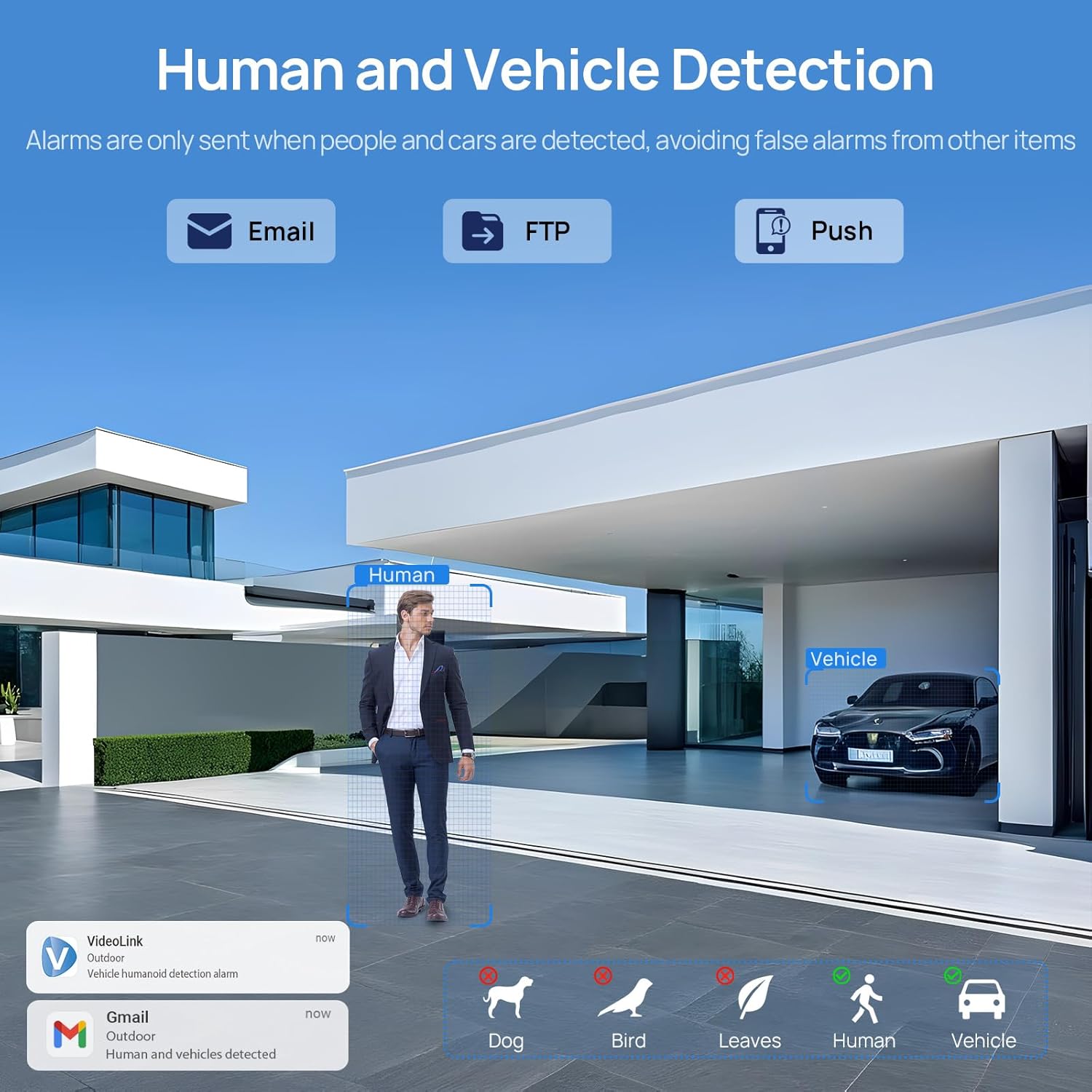
Image: A scene demonstrating the camera's human and vehicle detection capabilities, showing alerts for detected individuals and cars while ignoring animals or environmental factors.
4.3 Nagsigmodusse
Die kamera bied veelsydige nagsigvermoëns:
- IR Nagvisie: By default, the IR illuminator is active at night for black and white surveillance.
- Volkleur Nagvisie: When a target is detected, the spotlight activates to record in full color. The spotlight will warn the target in the area.
- Smart Dual Illumination: The camera intelligently switches between IR light and warm light (spotlight) depending on the situation, providing color details when needed.

Image: A split image showing a scene at night with the spotlight off (black and white IR vision) and with the spotlight on (full-color night vision), demonstrating the camera's dual illumination feature.
4.4 5X Optical Zoom
The 2.7-13.5mm varifocal lens allows for 5X optical zoom, enabling you to adjust the viewing angle from 32° to 100° and focus on specific details without losing image quality.
- Adjust the zoom level through the camera's software or mobile application.
- The optical zoom maintains clarity even at maximum magnification.

Image: A series of images demonstrating the 5X optical zoom capability of the camera, showing a wide view and then progressively zoomed-in views of a specific area, highlighting the detail retention.
4.5 Tweerigting-klank
The integrated microphone and speaker enable two-way communication, allowing you to listen to the environment and speak through the camera.
- Access the two-way audio function via the mobile app.
- Use it to greet visitors or deter unwanted individuals.

Image: A scenario depicting a delivery person at a door, with a VIKVIZ camera facilitating a two-way audio conversation between the homeowner (via smartphone app) and the delivery person.
5. Onderhoud
- Gereelde skoonmaak: Maak die kameralens gereeld skoon met 'n sagte, damp lap om duidelike beeldkwaliteit te verseker. Vermy skuurmiddels.
- Firmware -opdaterings: Gaan die vervaardiger na website or app for available firmware updates to ensure optimal performance and security.
- Kabel inspeksie: Regularly inspect the Ethernet cable for any signs of wear or damage, especially in outdoor installations.
- Omgewingsbeskerming: While the camera is weatherproof (IP66), ensure it is not submerged in water or exposed to extreme conditions beyond its operating temperature range (-10°C to 50°C).
6. Probleemoplossing
- Geen krag: Ensure the PoE NVR/switch/injector is powered on and the Ethernet cable is securely connected. If using a DC adapter, verify the power source and connection.
- Geen videostroom nie: Check network connectivity. Ensure the camera is properly configured in your NVR or app. Verify the IP address and network settings.
- Swak beeldkwaliteit: Clean the camera lens. Check for obstructions in the field of view. Ensure sufficient lighting for night vision modes. Adjust focus if applicable.
- Vals bewegingwaarskuwings: Adjust the sensitivity settings for human/vehicle detection in the camera's software or app. Refine detection zones to exclude irrelevant areas.
- Tweerigting-oudio-kwessies: Check microphone and speaker settings in the app. Ensure network bandwidth is sufficient for real-time audio.
- Kan nie op afstand toegang tot kamera kry nie: Verify your internet connection. Ensure port forwarding (if required by your network setup) is correctly configured on your router. Check firewall settings.
7. Spesifikasies
| Kenmerk | Spesifikasie |
|---|---|
| Model Naam | PG2T56IRC-ZS |
| Resolusie | 5MP (2592 x 1944) @ 30fps |
| Optiese zoom | 5X (2.7-13.5mm varifocal lens) |
| Viewing Hoek | 105° (wide) to 32° (telephoto) |
| Nagsigreeks | Tot 98 voet (30 meter) |
| Tipe Nagvisie | Full Color, IR, Smart Hybrid Light |
| Oudio | Tweerigting-klank (ingeboude mikrofoon en luidspreker) |
| Video kompressie | H.265+, H.265, H.264 |
| Konnektiwiteit | Ethernet (PoE), ONVIF |
| Bergingsopsies | NFS, NVR, APP Cloud Storage, Micro SD Card (up to 256GB) |
| Weerbestande gradering | IP66 |
| Bedryfstemperatuur | -10°C tot 50°C (14°F tot 122°F) |
| Kragbron | PoE (Power over Ethernet) of 12V DC (adapter nie ingesluit nie) |
| Materiaal | Metaal |
| Afmetings | 12.7 x 5.11 x 4.72 duim |
| Gewig | 2.2 pond |
8. Waarborg en Ondersteuning
8.1 Retourbeleid
This product is eligible for a return within 30 days of purchase for a refund or replacement, subject to the retailer's terms and conditions.
8.2 Tegniese Ondersteuning
For technical assistance, troubleshooting, or warranty inquiries, please contact VIKVIZ customer support through their official website or the retailer where the product was purchased. Refer to your purchase documentation for specific contact details.