
1. Inleiding
This manual provides instructions for the safe and efficient operation of your vretti Bluetooth Thermal Label Printer, model B0FNW9FCS5. Please read this manual thoroughly before using the device and retain it for future reference.
2. Veiligheidsinligting
- Ensure the printer is connected to a power source with the correct voltage.
- Moenie die drukker aan water of oormatige humiditeit blootstel nie.
- Vermy die plasing van die drukker in direkte sonlig of naby hittebronne.
- Moenie probeer om die drukker self uitmekaar te haal of te herstel nie. Kontak gekwalifiseerde dienspersoneel.
- Hou buite bereik van kinders.
- Use only vretti approved accessories and power adapters.
3. Pakketinhoud
Verifieer dat alle items in die pakket teenwoordig is:
- vretti Bluetooth Thermal Label Printer (Model B0FNW9FCS5)
- Kragadapter
- USB kabel
- Vinnige Begingids
- Sample Labels (50 premium labels)
4. Opstelling
4.1 Fisiese verbinding
- Koppel die kragadapter aan die drukker en dan aan 'n kragaansluiting.
- Connect the USB cable from the printer to your computer (if using USB connection).
- Skakel die drukker aan met die kragskakelaar.
4.2 Laai van etikette
The printer features an integrated paper bin designed for easy label loading.
- Maak die boonste deksel van die drukker oop.
- Place the roll of thermal labels into the integrated paper bin. Ensure the labels feed from the bottom of the roll and the printable side faces upwards.
- Adjust the guide rails to fit the width of your labels snugly, without creasing them. The printer supports label widths from 0.78 inches (19mm) to 4.6 inches (116mm).
- Feed the first label through the print mechanism until it is positioned correctly.
- Maak die boonste deksel toe.

Figuur 4.2.1: Label loading into the integrated paper bin. The visualization window allows monitoring label supply. Adjustable guide rails ensure proper label alignment for various sizes like 2"x3", 3"x3", and 4"x6".
4.3 Drywer- en sagteware-installasie
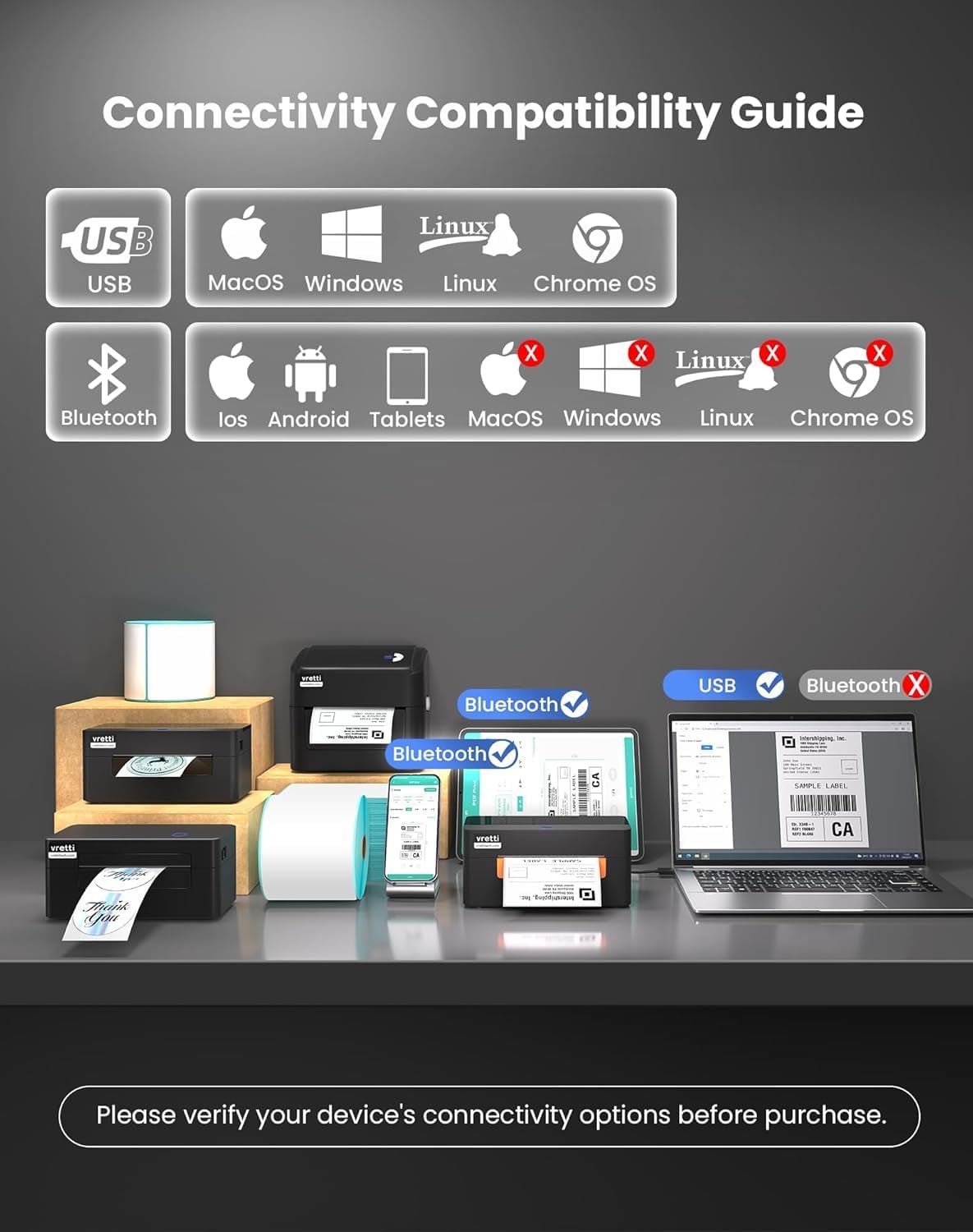
The vretti printer offers dual connectivity options: USB and Bluetooth.

Figuur 4.3.1: Connectivity Compatibility Guide. USB connection is compatible with MacOS, Windows, Linux, and Chrome OS. Bluetooth connection is compatible with iOS, Android, and Tablets. Bluetooth is not supported for MacOS, Windows, Linux, or Chrome OS.
4.3.1 USB Connection (Windows/Mac/Linux/ChromeOS)
For most operating systems, the printer is designed for "Plug & Play" functionality. Connect the USB cable, and your system should automatically detect and install the necessary drivers within approximately 60 seconds. If drivers do not install automatically, refer to the included Quick Start Guide or the manufacturer's website for manual driver installation instructions.
Figuur 4.3.2: The vretti label printer is designed for quick deployment, allowing users to master its operation rapidly, often within 2 minutes for basic setup.
4.3.2 Bluetooth Connection (iOS/Android/Tablets)
- Ensure Bluetooth is enabled on your mobile device or tablet.
- Turn on the vretti printer.
- On your device, search for available Bluetooth devices and select the vretti printer (e.g., "vretti Printer" or similar).
- Volg enige instruksies op die skerm om die saambindproses te voltooi.
- Install the vretti printing application from your device's app store (e.g., Apple App Store, Google Play Store) to manage print jobs.
5. Bedryfsinstruksies
5.1 Druk van etikette
The vretti thermal label printer uses direct thermal printing technology, eliminating the need for toner or ink. It is optimized for 4x6 inch shipping labels and barcodes.
- Ensure labels are properly loaded (refer to Section 4.2).
- Maak die dokument of toepassing oop waaruit jy wil druk.
- Kies "Druk" vanaf die toepassing se spyskaart.
- Choose the vretti printer from the list of available printers.
- Adjust print settings as needed, such as label size (e.g., 4x6 inches) and orientation.
- Begin die druktaak.

Figuur 5.1.1: The printer delivers 203 dpi resolution, ensuring clear and scannable barcodes with a 99.99% recognition rate for labels such as DHL 4x6 shipping labels and QR codes.

Figuur 5.1.2: The vretti printer offers a print speed of 152 mm/s, capable of producing 72 labels per minute. Its direct thermal technology eliminates ink/toner, leading to significant cost savings and a print head lifespan three times longer than standard printers.
6. Onderhoud
6.1 Skoonmaak van die drukkop
The printer features automatic cleaning functionality. However, if print quality degrades, manual cleaning may be necessary.
- Skakel die drukker af en koppel dit uit die kragbron.
- Maak die boonste deksel oop.
- Vee die drukkop liggies af met 'n pluisvrye lap.ampgeëindig met isopropylalkohol.
- Laat die drukkop heeltemal droog word voordat u die deksel toemaak en die drukker aanskakel.
6.2 Algemene Skoonmaak
Vee die buitekant van die drukker af met 'n sagte, droë lap. Moenie skuurmiddels of oplosmiddels gebruik nie.
7. Probleemoplossing
| Probleem | Moontlike oorsaak | Oplossing |
|---|---|---|
| Drukker skakel nie aan nie | No power, faulty power adapter | Kontroleer kragverbindings, probeer 'n ander aansluiting. |
| Swak drukkwaliteit | Dirty print head, incorrect label type, low-quality labels | Clean the print head (Section 6.1). Ensure you are using thermal labels. Try new labels. |
| Etikette word nie korrek ingevoer nie | Labels improperly loaded, guide rails not adjusted | Reload labels, adjust guide rails (Section 4.2). |
| Kan nie via Bluetooth koppel nie | Bluetooth not enabled, incorrect pairing, device incompatibility | Ensure Bluetooth is on. Re-pair the device. Confirm your device is compatible (iOS/Android/Tablets only). |
| Drukker word nie deur rekenaar herken nie (USB) | Driver issue, faulty USB cable, incorrect port | Try a different USB port or cable. Reinstall drivers if necessary. |
8. Spesifikasies
| Kenmerk | Detail |
|---|---|
| Handelsmerk | vretti |
| Modelnommer | B0FNW9FCS5 |
| Druk tegnologie | Direkte termiese |
| Druk resolusie | 203 dpi |
| Druk spoed | Up to 152 mm/s (72 labels/min) |
| Etiket breedte | 0.78" - 4.6" (19mm - 116mm) |
| Konnektiwiteit | USB (Windows/Mac/Linux/ChromeOS), Bluetooth 5.0 (iOS/Android/Tablets) |
| Maksimum velkapasiteit | 500 labels (integrated bin) |
| Afmetings (L x B x H) | 29.5 x 20.5 x 18.8 cm (ongeveer) |
| Kragbron | Eksterne kragadapter |
9. Waarborg en Ondersteuning
vretti products are manufactured to high-quality standards. For warranty information and technical support, please refer to the warranty card included with your product or visit the official vretti website. Please have your model number (B0FNW9FCS5) and purchase date available when contacting support.