
1. Inleiding
This manual provides detailed instructions for the safe and efficient operation of your Blukar Mini Rechargeable LED Flashlight, Model K9183. Please read this manual thoroughly before using the product and retain it for future reference.
The Blukar K9183 is a compact, durable, and versatile LED flashlight designed for everyday carry (EDC). Its small size, multiple lighting modes, and USB-C rechargeable battery make it ideal for various situations, from outdoor activities to emergency lighting.
2. Pakketinhoud
Kontroleer asseblief die pakket vir die volgende items:
- 1 x Blukar Mini Rechargeable LED Flashlight (Model K9183)
- 1 x USB-C laaikabel
- 1 x Gebruikershandleiding
3. Produkkenmerke
- Ultra-Compact EDC Design: Super compact and lightweight, equipped with a keychain for easy attachment to keys, backpacks, or pockets.
- Drie beligtingsmodusse: Offers High, Medium, and Low brightness levels to suit different illumination needs.
- USB-C herlaaibaar: Features a built-in battery that recharges conveniently via the included USB-C cable.
- Geheue funksie: Automatically remembers the last used lighting mode when turned off and on again.
- IPX6 Waterdigte Gradering: Ensures safe operation in wet conditions and rain, making it suitable for outdoor use.
- Duursame konstruksie: Made from high-quality aluminum alloy, providing a lightweight, durable, and corrosion-resistant housing.
- Battery aanwyser: The power switch illuminates red during charging or when the battery is low, and green when fully charged or in use.
4. Opstelling
Before initial use, it is recommended to fully charge the flashlight. Refer to the "Charging Instructions" section for details.

Image: The Blukar Mini Rechargeable LED Flashlight K9183, showcasing its compact design and illuminated power button.
Attaching to a Keychain
The flashlight comes with an integrated keychain ring. You can easily attach it to your existing key ring, backpack, or other personal items for convenient access.

Image: Demonstrates various carrying options for the Blukar Mini Flashlight, including with a necklace, keychain, and in a pocket.
5. Bedryfsinstruksies
The Blukar K9183 flashlight features a single button for all operations.

Image: Illustrates the three lighting modes (High, Medium, Low) and the single-button control for switching modes and turning off.
- Turning On/Changing Modes: Press the power button briefly to turn on the flashlight. Each subsequent brief press will cycle through the brightness modes: High > Medium > Low.
- Skakel af:
- If the flashlight has been on for more than 8 seconds in any mode, a single brief press of the power button will turn it off.
- To turn off the flashlight quickly at any time (within 8 seconds of turning on or changing modes), press and hold the power button for approximately 3 seconds.
- Geheue funksie: The flashlight will remember the last used brightness mode. When you turn it on again, it will activate in that mode.
6. Laaiinstruksies
The Blukar K9183 flashlight is equipped with a built-in rechargeable battery.
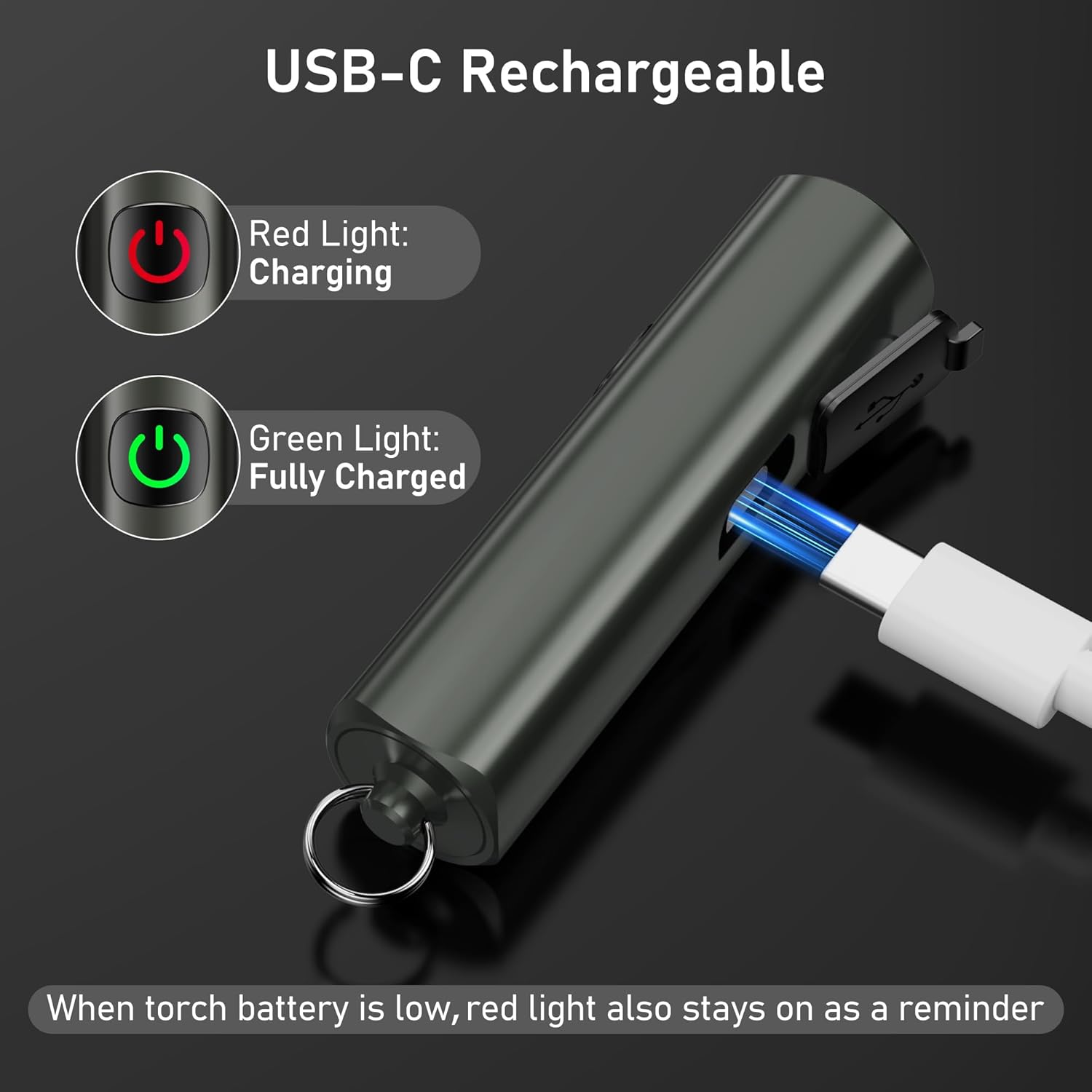
Image: Shows the USB-C charging port and the red/green indicator lights for charging status.
- Locate the USB-C charging port on the side of the flashlight, usually covered by a rubber flap.
- Gently open the rubber flap to expose the port.
- Connect the included USB-C charging cable to the flashlight's port and the other end to a standard USB power source (e.g., computer, wall adapter, power bank).
- Die kragknoppie sal verlig rooi to indicate that the flashlight is charging.
- Once fully charged, the power button will turn groen.
- 'n Volle lading neem gewoonlik ongeveer 2 uur.
- When the battery is low during operation, the power button will also illuminate rooi as a reminder to recharge.
A full charge provides up to 5.5 hours of continuous illumination on the low brightness setting.
7. Onderhoud
Skoonmaak
- Vee die flitslig af met 'n sagte, damp lap om vuil of puin te verwyder.
- Moenie skuurmiddels of oplosmiddels gebruik nie, aangesien dit die afwerking of interne komponente kan beskadig.
- Ensure the USB-C port cover is securely closed after charging to maintain its IPX6 waterproof rating.
Berging
- Berg die flitslig op 'n koel, droë plek weg van direkte sonlig en uiterste temperature.
- If storing for an extended period, recharge the battery every 3 months to prevent battery degradation and prolong its lifespan.
8. Probleemoplossing
| Probleem | Moontlike oorsaak | Oplossing |
|---|---|---|
| Flitslig skakel nie aan nie. | Battery is leeg. | Laai die flitslig met die meegeleverde USB-C-kabel. |
| Lig is dof of flikker. | Lae battery. | Herlaai die flitslig. |
| Flitslig laai nie. | Laaikabel of adapter foutief; poort nie behoorlik gekoppel nie. | Ensure the USB-C cable is securely connected. Try a different USB-C cable or power adapter. |
| Cannot change brightness modes. | Verkeerde werking. | Ensure you are pressing the button briefly to cycle modes. |
9. Spesifikasies

Image: Visual representation of key specifications including beam distance, drop test, weight, waterproof rating, and length.
| Kenmerk | Detail |
|---|---|
| Modelnommer | K9183 |
| Handelsmerk | Blukar |
| Afmetings (L x B x H) | 6.64 x 1.58 x 1.58 cm (2.61 x 0.62 x 0.62 duim) |
| Gewig | 27 gram (0.95 onse) |
| Battery Tipe | 1 Litium-ioon battery (ingesluit) |
| Kragbron | Battery aangedrewe |
| Waterdigte gradering | IPX6 (Resistant to powerful water jets) |
| Laaipoort | USB-C |
| Laai tyd | Ongeveer 2 uur |
| Max Runtime (Low Mode) | Tot 5.5 uur |
| Straal afstand | Tot 48 meter (157 voet) |
| Valweerstand | 1.5 meter (5 voet) |
| Materiaal | Hoë kwaliteit aluminiumlegering |
10. Veiligheidsinligting
- Do not shine the flashlight directly into eyes, as the bright light can cause temporary vision impairment.
- Hou buite bereik van kinders. Dit is nie 'n speelding nie.
- Do not disassemble, modify, or attempt to repair the flashlight yourself. This may void the warranty and pose safety risks.
- Avoid exposing the flashlight to extreme temperatures, open flames, or corrosive liquids.
- While the flashlight is IPX6 waterproof, it is not designed for submersion in water.
- Gebruik slegs die meegeleverde USB-C-kabel of 'n gesertifiseerde ekwivalent vir laai.
11. Waarborg en Ondersteuning
For warranty information, please refer to the documentation included with your purchase or visit the official Blukar website. If you encounter any issues or require technical assistance, please contact Blukar customer support through their official channels.


