
1. Inleiding
Thank you for choosing the Vaczon 60" Farmhouse Ceiling Fan with Lights. This manual provides essential information for the safe installation, operation, and maintenance of your new ceiling fan. Please read these instructions thoroughly before beginning installation or use, and retain them for future reference.
This ceiling fan features a durable construction, a reversible DC motor for year-round comfort, 6-speed settings, and convenient control via both a remote and the "FanLamp Pro" mobile application. The dual-finish blades allow for customization to match your interior decor.

Beeld: Oorview of the Vaczon 60" Farmhouse Ceiling Fan highlighting key features such as energy efficiency, quiet operation, and reversible motor.
2. Veiligheidsinligting
WAARSKUWING: Om die risiko van brand, elektriese skok of persoonlike besering te verminder, volg altyd hierdie basiese voorsorgmaatreëls:
- Lees alle instruksies voordat u die waaier installeer.
- Ensure the installation site is structurally sound and can support the fan's weight.
- Alle bedrading moet in ooreenstemming wees met nasionale en plaaslike elektriese kodes. Raadpleeg 'n gekwalifiseerde elektrisiën as u onseker is.
- Ontkoppel die krag by die stroombreker of sekeringboks voordat u met installasie begin of enige onderhoud uitvoer.
- Do not operate the fan with damaged wiring or if any parts are missing or damaged.
- Hou hande, klere en ander voorwerpe weg van die waaierlemme wanneer die waaier in werking is.
3. Pakketinhoud
Verify that all components listed below are included in your package. If any parts are missing or damaged, contact Vaczon customer support immediately.
- Plafonwaaier Motorbehuising
- 5 Dual-Finish Fan Blades (Matte Black / Maple Wood Grain)
- Light Kit with 2 E12 Lamp Holders (bulbs not included)
- Afstandbeheer
- Receiver for Remote Control/APP
- Afwaartse stange (6-duim en 10-duim opsies)
- Bevestigingsbeugel en hardeware
- Instruksie Handleiding
4. Opstelling en installering
Hierdie afdeling bied 'n algemene oorview of the installation process. Refer to the detailed instruction manual included in your package for step-by-step guidance and safety warnings specific to your model.
4.1 Oorwegings voor installasie
- Plafonhoogte: Choose the appropriate downrod (6-inch or 10-inch) based on your ceiling height to ensure proper blade clearance.
- Plafontipe: The fan is suitable for both flat ceilings and sloped ceilings with an angle of up to 15 degrees.
- Elektriese toevoer: Maak seker dat die elektriese boks stewig gemonteer is en die waaier se gewig kan ondersteun.
4.2 Installasiestappe (Meer asview)
- Skakel krag by die stroombreker af.
- Install the mounting bracket to the ceiling electrical box.
- Assemble the downrod and hang the fan motor assembly.
- Connect the electrical wiring, including the receiver for remote/APP control.
- Heg die waaierlemme aan die motorbehuising vas.
- Install the light kit and desired E12 bulbs (not included).
- Secure the canopy and test the fan's operation.

Image: Diagram illustrating the fan's dimensions, available downrod lengths, and suitable ceiling types (flat and sloped up to 15 degrees).
5. Bedryfsinstruksies
Your Vaczon ceiling fan offers multiple control options for convenience and comfort.
5.1 Afstandbeheer werking
The included remote control allows you to manage all fan functions from anywhere in the room. Ensure batteries are correctly inserted.

Beeld: Gedetailleerd view of the remote control with labels for each button's function, including power, light, fan speed, direction, and timer.
- Krag AAN/AF: Skakel die waaier en lig aan of af.
- Lig AAN/UIT: Beheer die lig onafhanklik.
- Waaierspoedinstelling: Verstel waaierspoed van 1 (laagste) tot 6 (hoogste).
- Vorentoe/Agtertoe (V/A): Changes the direction of blade rotation for summer or winter mode.
- Timer Settings (1H, 2H, 4H): Stel die waaier om outomaties af te skakel na 1, 2 of 4 uur.
- Klank AAN/UIT: Toggles audible feedback from the fan.
- Fan Stopped: Stops the fan blades.
5.2 "FanLamp Pro" APP Control
Download the "FanLamp Pro" application on your smartphone to control the fan. The app offers similar functionalities to the remote control, including fan speed adjustment, light control, and timer settings. The fan also features a memory function that recalls your last settings upon restart.
5.3 Reversible DC Motor (Summer/Winter Modes)
The reversible DC motor allows you to optimize air circulation for different seasons:
- Somermodus (Afwaartse trek): Blades rotate counter-clockwise, pushing cool air downwards to create a refreshing breeze.
- Wintermodus (Opwaartse lugstroom): Blades rotate clockwise, drawing cool air up towards the ceiling and circulating warm air downwards, helping to distribute heat more evenly.
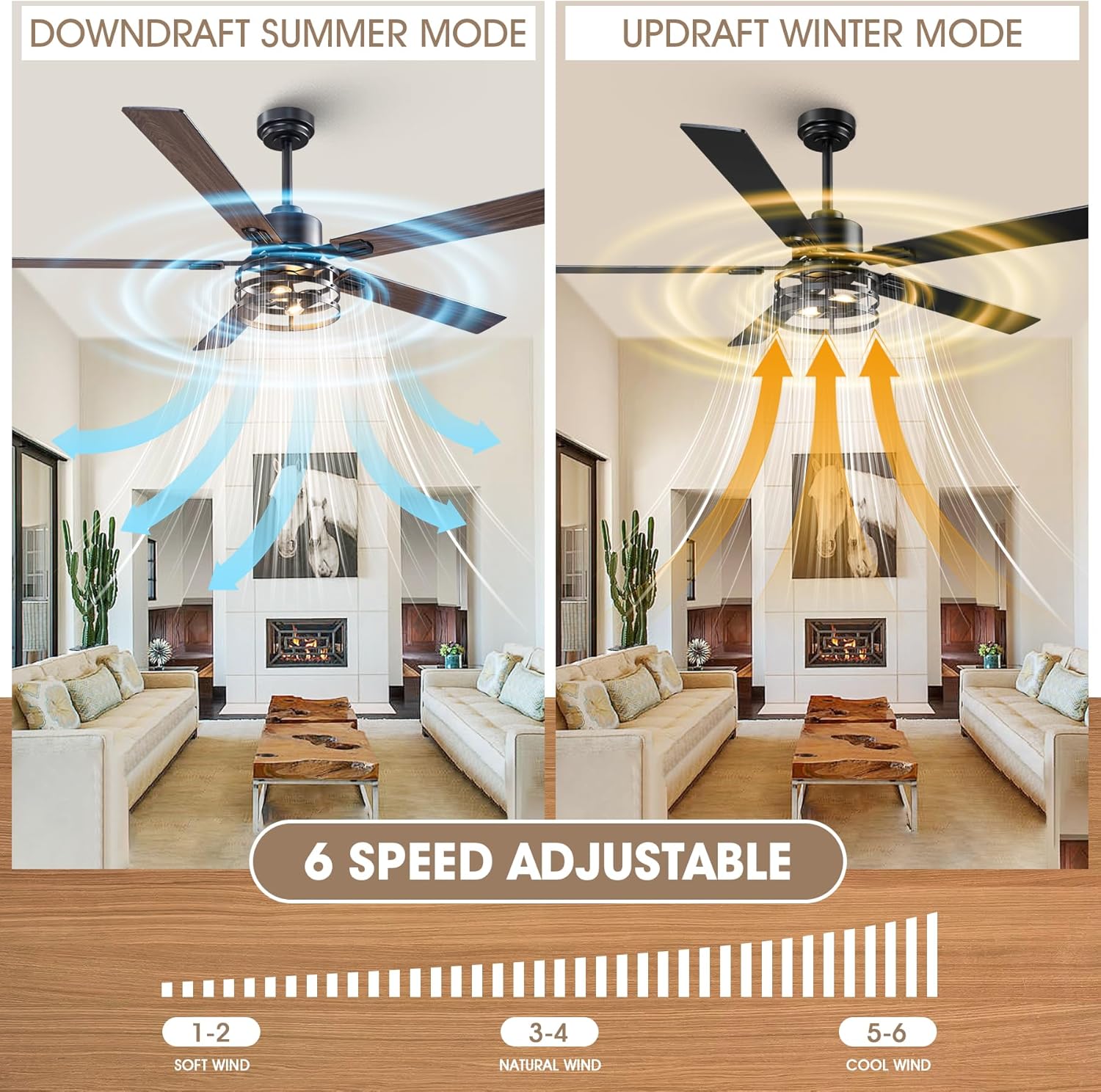
Image: Illustration of the fan's reversible motor function, demonstrating downdraft for summer cooling and updraft for winter heat circulation, along with the 6-speed adjustment scale.
5.4 Dual-Finish Blades
The fan comes with 5 dual-finish blades, featuring matte black on one side and maple wood grain on the other. You can choose the side that best complements your room's aesthetic during installation.

Beeld: Nabyskoot view of the dual-sided fan blades, showcasing the maple wood and matte black finishes.
6. Onderhoud
Regular maintenance ensures optimal performance and extends the lifespan of your ceiling fan.
- Skoonmaak: Maak die waaierblaaie en motorbehuising gereeld skoon met 'n sagte, damp lap. Moenie skuurmiddels of oplosmiddels gebruik nie. Maak seker dat die krag afgeskakel is voor skoonmaak.
- Bevestigingsmiddels: Check all screws and fasteners annually to ensure they are secure. Loose connections can cause noise and wobble.
- Gloeilampe: Replace E12 bulbs as needed. Always turn off power before changing bulbs.
7. Probleemoplossing
If you encounter issues with your fan, refer to the following common problems and solutions. For persistent issues, contact customer support.
| Probleem | Moontlike oorsaak | Oplossing |
|---|---|---|
| Waaier begin nie | No power supply; Loose wiring; Remote control battery dead; Receiver not paired. | Check circuit breaker; Verify all wire connections; Replace remote battery; Re-pair remote/receiver (refer to detailed manual). |
| Fan wiebel | Los lemme of monteerhardeware; Ongebalanseerde lemme. | Ensure all blade screws and mounting screws are tight; Use a blade balancing kit (if included or purchased separately). |
| Lig werk nie | Bulbs faulty or loose; Wiring issue; Light switch on remote/app off. | Check/replace bulbs; Verify light kit wiring; Ensure light is turned on via remote/app. |
| Afstandbeheer werk nie | Dead battery; Obstruction; Receiver issue. | Replace remote battery; Ensure clear line of sight to fan; Check receiver connections. |
8. Spesifikasies
| Handelsmerk | Vaczon |
| Modelnommer | VCZ099BK |
| Produk afmetings | 60" D x 60" B x 18.9" H |
| Kleur | Black/Maple |
| Materiaal | Iron, Aluminum, Copper, MDF (Blades: Plastic) |
| Kragbron | DC |
| Wattage | 21 watt |
| Aantal lemme | 5 |
| Aantal snelhede | 6 |
| Lugvloeikapasiteit | 3726 kubieke voet per minuut |
| Beheer metode | Remote, App ("FanLamp Pro") |
| Ligte tipe | LED (E12 lamp holders, bulbs not included) |
| Binne/buiteluggebruik | Binneshuise |
9. Waarborg en Ondersteuning
For warranty information and customer support, please refer to the documentation included with your product or visit the official Vaczon website. Typically, warranty details cover manufacturing defects for a specified period from the date of purchase.
If you require assistance with installation, operation, or troubleshooting that is not covered in this manual, please contact Vaczon customer service. Have your model number (VCZ099BK) and purchase date ready when contacting support.