Welcome to the user manual for your new XIAOMI Redmi 15C 4G LTE smartphone. This guide provides essential information on setting up, operating, maintaining, and troubleshooting your device. Please read this manual carefully to ensure optimal performance and longevity of your phone.
The Redmi 15C features a quad-curved design for comfortable handling, IP64 dust and water resistance, a 50MP AI dual camera system, and creative AI tools for effortless editing. It is powered by a massive 6000mAh (typ) battery with 33W turbo charging, designed for extended use.
Wat is in die boks
Upon unboxing your XIAOMI Redmi 15C, please verify that all the following items are included:
XIAOMI Redmi 15C Slimfoon
33W muurlaaier
Adapter
Telefoonkas
Opstelling
1. Aanvanklike Toestel Oorview
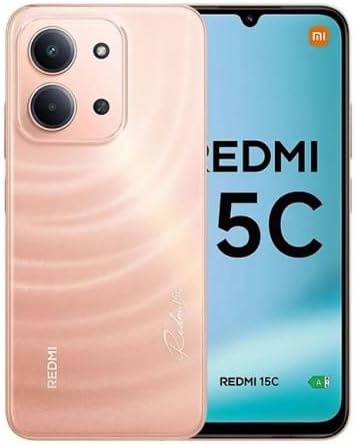
This image displays the XIAOMI Redmi 15C smartphone in Twilight Orange. The front shows the large display, while the back highlights the camera module and the phone's color. This provides a visual reference for the device's appearance.
Familiarize yourself with the physical layout of your new phone, including button placement, ports, and camera locations.
2. SIM-kaart installasie
The Redmi 15C supports Dual Nano SIM cards and one Micro SD card. Ensure your carrier is compatible with the device's network bands before installation.
This image illustrates the carrier compatibility for the XIAOMI Redmi 15C. It clearly lists compatible carriers (T-Mobile, Mint, Tello, Ultra, and outside USA networks) and incompatible carriers (Verizon, AT&T, Xfinity, Boost, Virgin, Visible, Cricket, and other CDMA carriers). This is crucial for users to verify network support.
Vind die SIM-kaartlaai aan die kant van jou foon.
Steek die SIM-uitwerpgereedskap (of 'n klein skuifspeld) in die klein gaatjie langs die laai en druk liggies totdat die laai uitspring.
Place your Nano SIM card(s) and/or Micro SD card into the designated slots on the tray, ensuring the gold contacts face downwards.
Druk die laai versigtig terug in die foon totdat dit vasklik.
3. Skakel aan/af
Om aan te skakel: Druk en hou die aan/af-knoppie in totdat die Xiaomi-logo verskyn.
Om af te skakel: Druk en hou die aan/af-knoppie in totdat die aan/af-kieslys verskyn, en kies dan "Skakel af".
Om weer te begin: Druk en hou die aan/af-knoppie in totdat die aan/af-kieslys verskyn, en kies dan "Herbegin".
Bedien jou toestel
1. Basiese navigasie
Your Redmi 15C runs on Xiaomi HyperOS based on Android 15. Navigation is primarily touch-based:
Tik: Om 'n item te kies of 'n toepassing oop te maak.
Swiep: Om deur skerms of lyste te blaai.
Knyp: Om in of uit te zoem op foto's en web bladsye.
Lang pers: Om toegang tot kontekstuele kieslyste te verkry of ikone te skuif.
2. Kameragebruik
The phone features a 50MP main camera and an 8MP front camera.
Maak die "Kamera"-toepassing oop vanaf jou tuisskerm of toepassinglaai.
Switch between photo, video, portrait, and other modes using the options at the bottom of the screen.
Tik die sluiterknoppie om 'n foto te neem of video-opname te begin/stop.
Utilize features like HDR mode, Soft-light ring (front camera), and AI tools for enhanced photography.
Rear camera video recording supports 1080p (1920x1080) HD at 30 fps and 720p (1280x720) HD at 30 fps. Front camera video recording also supports 1080p and 720p HD at 30 fps.
3. Konnektiwiteit
Wi-Fi: Gaan na Instellings > Wi-Fi to connect to available networks. Supports 2.4GHz and 5GHz.
Bluetooth: Gaan na Instellings > Bluetooth to pair with other Bluetooth devices (version 5.1).
GPS: Die toestel ondersteun GPS, AGPS, GLONASS, Beidou en Galileo vir akkurate liggingsdienste.
3.5 mm koptelefoonaansluiting: Located on the device for wired audio accessories.
4. Batterybestuur
Your Redmi 15C is equipped with a 6000mAh (typ) battery and supports 33W turbo charging.
Use the included 33W charger for optimal charging speed.
To check battery usage, go to Instellings > Battery.
Enable battery saver modes to extend battery life when needed.
Onderhoud
1. Skoonmaak van jou toestel
Om die voorkoms en funksionaliteit van jou foon te behou:
Gebruik 'n sagte, pluisvrye lap om die skerm en liggaam af te vee.
Vermy die gebruik van harde chemikalieë, skuurmiddels of aërosolspuitmiddels.
Vir hardnekkige vlekke, effens dampMaak die lap skoon met water of 'n skermreiniger wat vir elektronika ontwerp is.
2. Sagteware-opdaterings
Regular software updates provide new features, security enhancements, and bug fixes. It is recommended to keep your device's software up to date.
Connect your phone to a stable Wi-Fi network.
Gaan na Instellings > Meer oor foon > Stelselopdatering om na beskikbare opdaterings te kyk en te installeer.
3. Bergingbestuur
Your device comes with 128GB of internal storage. You can expand this using a Micro SD card.
Om stoorplekgebruik na te gaan, gaan na Instellings > Berging.
Maak gereeld kas skoon, verwyder onnodige files, and uninstall unused apps to free up space.
Probleemoplossing
1. Algemene probleme en oplossings
Kwessie
Moontlike Oplossing
Foon skakel nie aan nie
Maak seker dat die battery gelaai is. Koppel dit vir ten minste 10 minute aan die laaier en probeer dan om dit aan te skakel.
Programme wat vasval of vries
Maak die toepassing se kasgeheue skoon (Instellings > Programme > [Programnaam] > Berging > Vee kasgeheue uit). If the issue persists, reinstall the app.
Swak netwerk sein
Check SIM card installation. Ensure you are in an area with network coverage. Restart the phone. Verify carrier compatibility (refer to Setup section).
Battery raak vinnig leeg
Reduce screen brightness, close background apps, disable unnecessary features like GPS or Bluetooth when not in use. Check battery usage in settings to identify power-hungry apps.
2. Fabrieksterugstelling
A factory reset will erase all data on your phone and restore it to its original factory settings. This can resolve persistent software issues but should be used as a last resort.
Backup your data: Before proceeding, back up all important data to a cloud service or computer.
Gaan na Instellings > Oor foon > Fabrieksterugstelling.
Volg die instruksies op die skerm om die herstel te bevestig.
Spesifikasies
Below are the detailed technical specifications for the XIAOMI Redmi 15C (Model: 25078RA3EL).
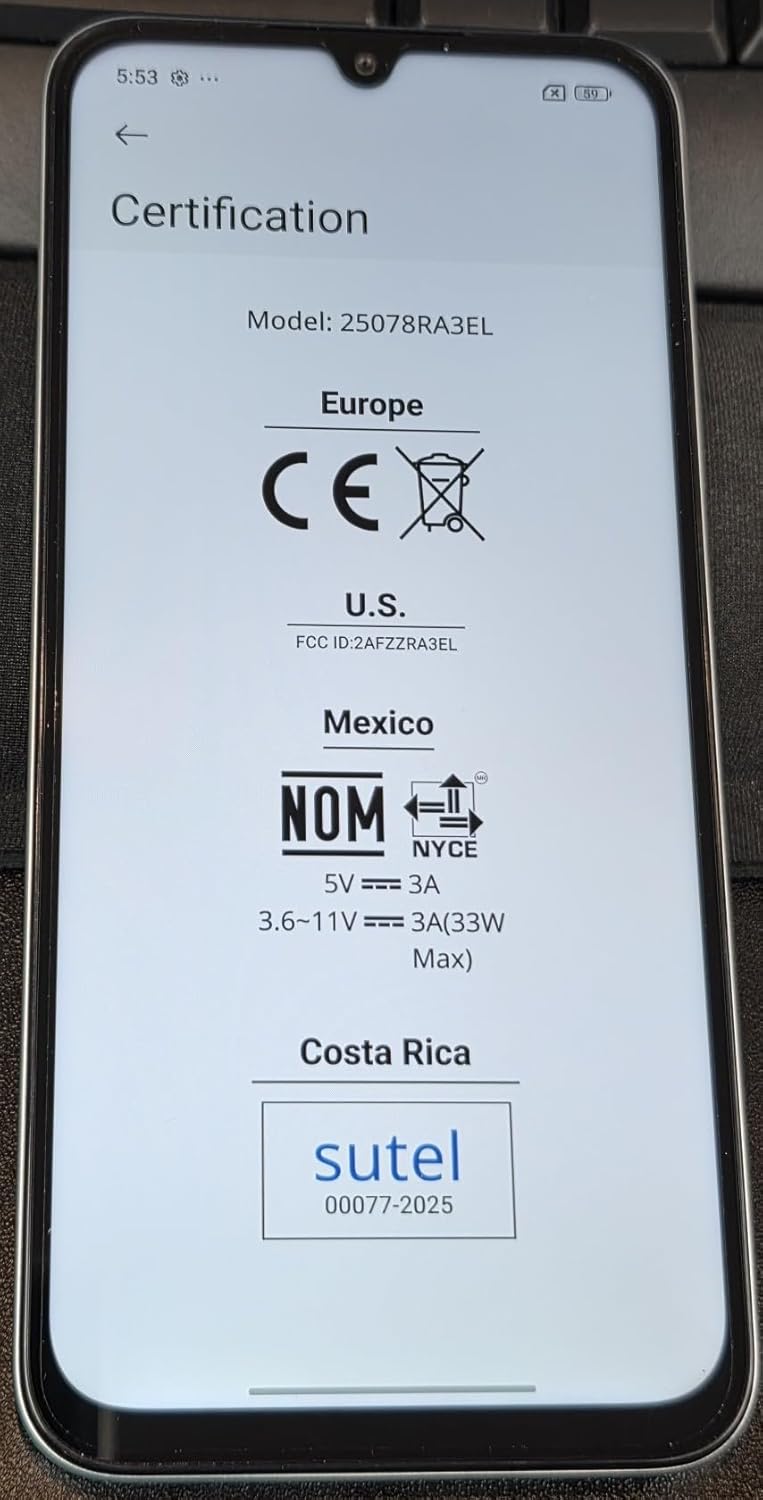
This image displays the certification information for the XIAOMI Redmi 15C, including CE for Europe, FCC ID: 2AFZZRA3EL for the US, NOM for Mexico, and Sutel for Costa Rica. This confirms the device's compliance with various regional regulatory standards.
Kenmerk
Detail
Model Naam
Redmi 15C (25078RA3EL)
Bedryfstelsel
Xiaomi HyperOS gebaseer op Android 15
Verwerker
Agtkern Helio G81 2.0GHz, GPU Mali-G52 MC2
Vertoon
6.9 Inches FHD+ DotDisplay, 720 x 1600 Resolution, 120Hz Refresh Rate (up to 144Hz for supported apps), 288Hz Touch Sampling Rate, 700nits (typ) / 850 nits HBM Brightness
RAM
4 GB
Interne berging
128 GB (uitbreidbaar via Micro SD)
Agterste kamera
50MP main camera (5P lens, f/1.8) + Auxiliary lens
Wi-Fi (2.4GHz | 5GHz), Bluetooth 5.1, GPS (AGPS, GLONASS, Beidou, Galileo), USB Type-C
Network Bands (USA)
Only Works on TMOBILE - MiNT IN THE USA Market (Previous sim card activated). Outside USA: 4G VoLTE Worldwide Unlocked Dual Nano sim. 2G: GSM:2/3/5/8; 3G: WCDMA:1/5/8; 4G: LTE FDD: 1/2/3/4/5/7/8/20/28; 4G: LTE TDD: 38/40/41.
Vir gedetailleerde waarborginligting en kliëntediens, verwys asseblief na die amptelike XIAOMI website or contact their customer service directly. Specific warranty terms may vary by region and retailer.
Ask about setup, troubleshooting, compatibility, parts, safety, or missing instructions. Manuals+ will review the question and use this page’s manual context to help answer it.