
1. Inleiding
This manual provides essential information and instructions for the safe and efficient use of your XIAOMI Redmi 15C 4G LTE smartphone. Please read this manual thoroughly before using your device to ensure optimal performance and longevity. Keep this manual for future reference.
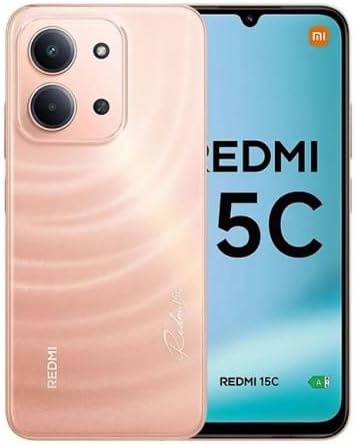
Figuur 1: XIAOMI Redmi 15C Smartphone. This image displays the front and back of the Redmi 15C in Twilight Orange, highlighting its design and camera module.
2. Wat is in die boks
Upon opening your XIAOMI Redmi 15C package, verify that all items are present:
- XIAOMI Redmi 15C Slimfoon
- 33W muurlaaier
- USB Type-C Cable (Adapter)
- Telefoonkas
- SIM-uitwerper-instrument (mag ingesluit wees)
- Vinnige Begingids (mag ingesluit wees)
3. Opstelling
3.1. SIM-kaart en MicroSD-kaart Installasie
The Redmi 15C supports Dual Nano SIM cards and one MicroSD card for expanded storage.
- Vind die SIM-kaartlaai aan die kant van jou toestel.
- Plaas die SIM-uitwerpgereedskap in die klein gaatjie langs die laai en druk stewig totdat die laai uitspring.
- Place your Nano SIM card(s) and/or MicroSD card into the designated slots on the tray, ensuring the gold contacts face downwards. Refer to the diagram on the tray for correct orientation.
- Plaas die laai versigtig terug in die foon totdat dit vasklik.
Important Carrier Compatibility Information:

Figuur 2: Carrier Compatibility. This chart indicates that the Redmi 15C is compatible with T-Mobile, Mint, Tello, Ultra, and other networks outside the USA. It is NOT compatible with Verizon, AT&T, Xfinity, Boost, Virgin, Visible, Cricket, or other CDMA carriers.
For USA users, this device is primarily compatible with T-Mobile, Mint, and Tello networks. It supports 4G VoLTE worldwide. Please verify compatibility with your specific carrier before use.
3.2. Aanvanklike aanskakeling en opstelling
- Druk en hou die aan/af-knoppie in totdat die XIAOMI-logo verskyn.
- Volg die aanwysings op die skerm om jou taal en streek te kies en aan 'n Wi-Fi-netwerk te koppel.
- Meld aan met jou Google-rekening of skep 'n nuwe een om toegang tot Google-dienste en die Play Winkel te verkry.
- Set up security features such as a PIN, pattern, password, fingerprint, or AI face unlock.
4. Bedien jou toestel
4.1. Vertoonkenmerke
The Redmi 15C features a 6.9-inch FHD+ DotDisplay with a resolution of 720x1600 pixels. Key display characteristics include:
- Herlaaitempo: Up to 120Hz (adjustable up to 144Hz for supported applications).
- Raak Sampling koers: Tot 288Hz vir responsiewe interaksie.
- Helderheid: 700 nits (typical), 850 nits (HBM).
- Ooggerief: TÜV Rheinland Low Blue Light, Circadian Friendly, and Flicker Free Certified for reduced eye strain.
4.2. Kameragebruik
The device is equipped with a 50MP AI dual camera system on the rear and an 8MP front camera.
- Agterste kamera: 50MP main lens (f/1.8) with an auxiliary lens. Supports 1080p HD video recording at 30 fps.
- Voorste kamera: 8MP lens (f/2.0). Features include filmCamera, HDR mode, Soft-light ring, Portrait mode, and Time-lapse. Supports 1080p HD video recording at 30 fps.
To access the camera, tap the Camera icon on your home screen or lock screen. Select modes like Photo, Video, Portrait, or More for additional options.
4.3. Battery en Laai
The Redmi 15C is powered by a 6000mAh (typical) battery and supports 33W turbo charging.
- Use the included 33W wall charger and USB Type-C cable for optimal charging speed.
- Avoid using non-certified chargers or cables to prevent damage to the device.
- The device is designed for worry-free use for up to 2 days on a single charge under typical usage conditions.
4.4. Konnektiwiteit
Jou toestel bied verskeie konnektiwiteitsopsies:
- Sellulêr: Dual Nano SIM support for 4G LTE (FDD and TDD bands).
- Wi-Fi: Ondersteun 2.4GHz en 5GHz Wi-Fi-netwerke.
- Bluetooth: Bluetooth 5.1 vir die koppeling van draadlose bykomstighede.
- GPS: Integrated GPS, AGPS, GLONASS, Beidou, and Galileo for precise location services.
- Oudio-aansluiting: Standaard 3.5 mm-koptelefoonaansluiting.
4.5. Sekuriteitskenmerke
Enhance your device security with:
- Agterste vingerafdruksensor: Ontsluit jou foon vinnig en veilig met jou vingerafdruk.
- KI-gesigontsluiting: Gebruik gesigsherkenning om jou toestel te ontsluit.
- PIN/Patroon/Wagwoord: Standard lock screen security options.
5. Onderhoud
5.1. Sagteware-opdaterings
Regularly update your device's operating system (Xiaomi HyperOS based on Android 15) to ensure optimal performance, security, and access to new features.
- Gaan na Instellings > Meer oor foon > Stelselopdatering om na beskikbare opdaterings te kyk en te installeer.
- Ensure your device has sufficient battery charge and a stable internet connection before starting an update.
5.2. Skoonmaak van jou toestel
To clean your Redmi 15C:
- Gebruik 'n sagte, pluisvrye lap.
- Vermy die gebruik van harde chemikalieë, skuurmiddels of saamgeperste lug.
- The device has an IP64 dust and water resistance rating, meaning it is protected from dust ingress and splashing water from any direction. However, it is not waterproof; avoid submerging it in water.
5.3. Bergingbestuur
Your device comes with 256GB of internal storage and 8GB of RAM. You can expand storage using a MicroSD card.
- Maak gereeld kasgeheue en onnodige items skoon files om prestasie te handhaaf.
- Manage applications and media files to optimize storage space.
6. Probleemoplossing
This section addresses common issues you might encounter with your Redmi 15C.
6.1. Toestel skakel nie aan nie
- Maak seker dat die battery gelaai is. Koppel die laaier aan en wag 'n paar minute voordat jy probeer om dit aan te skakel.
- Druk en hou die aan/af-knoppie vir ten minste 10-15 sekondes in om 'n herbegin te forseer.
6.2. Poor Network Signal or No Service
- Kontroleer of jou SIM-kaart korrek ingesit is.
- Verify that your carrier is compatible with the device (refer to Section 3.1).
- Herbegin die toestel.
- Gaan na Instellings > SIM-kaarte en mobiele netwerke and ensure your SIM is enabled and network settings are correct.
6.3. Battery dreineer vinnig
- Verminder die helderheid van die skerm.
- Maak ongebruikte toepassings wat in die agtergrond loop toe.
- Deaktiveer Wi-Fi, Bluetooth of GPS wanneer dit nie gebruik word nie.
- Kontroleer batteryverbruik in Instellings > Battery om kragverbruikende toepassings te identifiseer.
6.4. Programme wat vasval of vries
- Maak die kasgeheue van die problematiese toepassing skoon (Instellings > Programme > [Programnaam] > Berging > Vee kasgeheue uit).
- Dateer die toepassing op na sy nuutste weergawe vanaf die Google Play Winkel.
- Indien die probleem voortduur, deïnstalleer en herinstalleer die toepassing.
7. Spesifikasies
Detailed technical specifications for the XIAOMI Redmi 15C (Model 25078RA3EL):
| Kenmerk | Spesifikasie |
|---|---|
| Model Naam | Redmi 15C (25078RA3EL) |
| Bedryfstelsel | Xiaomi HyperOS gebaseer op Android 15 |
| Verwerker | Octa Core Helio G81 (2.0GHz) |
| GPU | Mali-G52 MC2 |
| Vertoon | 6.9-inch FHD+ DotDisplay |
| Resolusie | 720 x 1600 piksels |
| Herlaaitempo | Up to 120Hz (144Hz for supported apps) |
| RAM | 8 GB |
| Interne berging | 256 GB |
| Uitbreidbare berging | MicroSD (dedicated slot) |
| Agterste kamera | 50MP Main (f/1.8) + Auxiliary lens |
| Voorste kamera | 8MP (f/2.0) |
| Battery kapasiteit | 6000 mAh (tipies) |
| Laai | 33W Turbo-laai (USB Tipe-C) |
| Konnektiwiteit | 4G LTE, Wi-Fi (2.4GHz/5GHz), Bluetooth 5.1, GPS (AGPS, GLONASS, Beidou, Galileo) |
| SIM Tipe | Dubbele Nano SIM-kaart |
| Klankaansluiting | 3.5 mm |
| Sensors | Agterste vingerafdruksensor, KI-gesigontsluiting, nabyheidsensor, omgewingsligsensor, versnellingsmeter |
| Afmetings | 7 x 4 x 2 duim (Pakket) |
| Gewig | 6 onse |
| Stof- en Waterweerstand | IP64 |
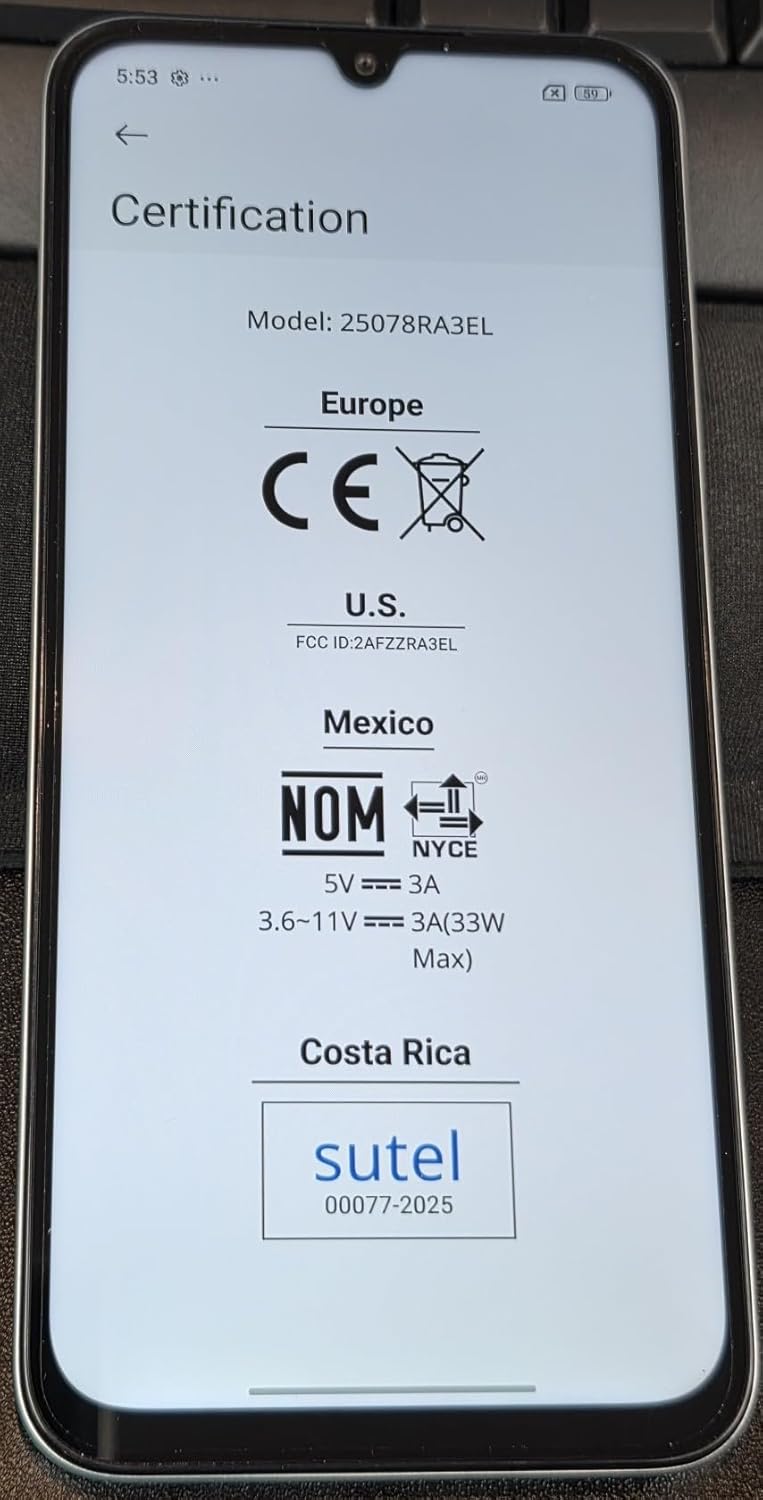
Figuur 3: Device Certifications. This image displays the regulatory compliance information for the Redmi 15C, including CE for Europe, FCC ID: 2AFZZRA3EL for the U.S., NOM for Mexico, and Sutel for Costa Rica.
8. Veiligheidsinligting
Neem asseblief die volgende veiligheidsriglyne in ag:
- Moenie probeer om die toestel uitmekaar te haal of te verander nie.
- Gebruik slegs goedgekeurde laaiers en bykomstighede.
- Vermy die blootstelling van die toestel aan uiterste temperature, direkte sonlig of vloeistowwe.
- Gooi die toestel en sy battery verantwoordelik weg volgens plaaslike regulasies.
- Maintain a safe distance from medical devices when using the phone.
9. Waarborg en Ondersteuning
For warranty information and customer support, please refer to the warranty card included in your product package or visit the official XIAOMI website. You can also contact XIAOMI customer service for assistance with your Redmi 15C.
Vervaardiger: Xiaomi
Modelnommer: Redmi 15C (25078RA3EL)
Eerste datum beskikbaar: 7 Augustus 2025
Vir verdere hulp, besoek asseblief die Amptelike XIAOMI Winkel op Amazon.