
1. Inleiding
This manual provides essential information for the proper setup, operation, and maintenance of your XIAOMI Redmi 15C 4G LTE smartphone. Please read this guide thoroughly to ensure optimal performance and longevity of your device.
2. Pakketinhoud
Verifieer dat alle items in u produkverpakking teenwoordig is:
- XIAOMI Redmi 15C 4G LTE Smartphone
- 33W muurlaaier
- Adapter
- Telefoonkas
- SIM-uitwerper-instrument (mag ingesluit wees)
- Vinnige Begingids (mag ingesluit wees)
3. Toestel oorview
Maak jouself vertroud met die fisiese komponente van jou Redmi 15C-slimfoon.

Prent 3.1: Voor en agter view of the XIAOMI Redmi 15C smartphone. The image displays the device's 6.9-inch screen, the front camera notch, and the rear camera module with two lenses and a flash.
- Voorskerm: 6.9-duim FHD+ DotDisplay.
- Voorste kamera: Geleë in die boonste middel van die skerm.
- Agterkamera-module: Contains the 50MP main camera and an auxiliary lens.
- Kragknoppie: Typically on the right side, often integrated with the fingerprint sensor.
- Volume knoppies: Located near the power button.
- USB Tipe C-poort: Vir laai en data-oordrag, geleë aan die onderkant.
- 3.5 mm koptelefoonaansluiting: Vir oudio-uitvoer.
- SIM/MikroSD-kaartgleuf: Geleë aan die kant vir die invoeging van SIM-kaarte en uitbreidbare berging.
4. Opstelinstruksies
4.1. SIM- en MicroSD-kaarte insit
- Vind die SIM-kaartlaai aan die kant van die toestel.
- Plaas die SIM-uitwerpgereedskap in die klein gaatjie langs die laai en druk liggies totdat die laai uitspring.
- Plaas jou Nano SIM-kaarte (tot twee) en/of 'n MicroSD-kaart in die aangewese gleuwe op die laai. Maak seker dat die goue kontakte na onder wys.
- Plaas die laai versigtig terug in die foon totdat dit vasklik.
4.2. Aanvanklike aanskakeling en laai
- Druk en hou die aan/af-knoppie in totdat die XIAOMI-logo verskyn.
- Volg die aanwysings op die skerm om die aanvanklike opstelling te voltooi, insluitend taalkeuse, Wi-Fi-verbinding en Google-rekeningopstelling.
- To charge the device, connect the provided 33W wall charger and USB Type-C cable to the phone's charging port. The device supports 33W turbo charging.
4.3. Netwerkversoenbaarheid (VSA-gebruikers)
For users in the USA, this device is primarily compatible with specific carriers. Please review die versoenbaarheidsinligting hieronder:

Prent 4.1: Network compatibility chart. The chart indicates that the device is compatible with T-Mobile, Mint, Tello, and Ultra in the USA, and generally compatible outside the USA. It is NOT compatible with Verizon, AT&T, Xfinity, Boost, Virgin, Visible, Cricket, or other CDMA carriers.
Versoenbare VSA-diensverskaffers: T-Mobile, Mint, Tello, Ultra (requires previous SIM card activation).
Not Compatible USA Carriers: Verizon, AT&T, Xfinity, Boost, Virgin, Visible, Cricket en ander CDMA-draers.
The device supports 4G VoLTE worldwide and operates on the following bands:
- 2G GSM: 2/3/5/8
- 3G WCDMA: 1/5/8
- 4G LTE FDD: 1/2/3/4/5/7/8/20/28
- 4G LTE TDD: 38/40/41
5. Bedryfsinstruksies
5.1. Basiese navigasie
- Krag aan/af: Press and hold the Power button. Select 'Power off' or 'Restart'.
- Skermslot/Ontsluit: Press the Power button briefly. Use fingerprint, face unlock, or PIN/pattern/password to unlock.
- Volumebeheer: Gebruik die Volume Op/Af knoppies.
- Tuisskerm: Swipe up from the bottom of the screen (if using gestures) or tap the Home button (if using navigation bar).
5.2. Vertooninstellings
Your Redmi 15C features a 6.9-inch FHD+ DotDisplay with a resolution of 720x1600 pixels. Key display features include:
- Herlaaitempo: Up to 120Hz for smoother visuals.
- Helderheid: 700 nits (typical), 850 nits (HBM).
- Ooggerief: TÜV Rheinland Low Blue Light, Circadian Friendly, and Flicker Free Certified for reduced eye strain.
5.3. Kameragebruik
The device is equipped with a 50MP AI dual camera system on the rear and an 8MP front camera.
- Agterste kamera: 50MP main lens (f/1.8) with an auxiliary lens. Supports 1080p HD video recording at 30 fps.
- Voorste kamera: 8MP (f/2.0). Features include filmCamera, HDR mode, Soft-light ring, Portrait mode, and Time-lapse. Supports 1080p HD video recording at 30 fps.
- To open the camera, tap the Camera app icon on your home screen or lock screen.
5.4. Batterybestuur
The Redmi 15C is powered by a large 6000mAh (typical) battery, designed for extended usage. To optimize battery life:
- Utilize the built-in battery saver modes.
- Verminder die skermhelderheid of aktiveer aanpasbare helderheid.
- Maak ongebruikte toepassings wat in die agtergrond loop toe.
- Deaktiveer Wi-Fi, Bluetooth of GPS wanneer dit nie gebruik word nie.
5.5. Sekuriteitskenmerke
The device offers multiple security options:
- Agterste vingerafdruksensor: Registreer jou vingerafdrukke vir vinnige en veilige ontsluiting.
- KI-gesigontsluiting: Use your face to unlock the device.
- PIN, Patroon, Wagwoord: Standaard Android-sekuriteitsopsies.
5.6. Konnektiwiteit
The Redmi 15C supports various connectivity options:
- Wi-Fi: Supports 2.4GHz and 5GHz bands.
- Bluetooth: Weergawe 5.1.
- GPS: Includes GPS, AGPS, GLONASS, Beidou, and Galileo for accurate location services.
- Let wel: Hierdie toestel doen NIE include NFC functionality.
6. Onderhoud
6.1. Skoonmaak van jou toestel
- Gebruik 'n sagte, pluisvrye lap om die skerm en liggaam van die foon saggies af te vee.
- Vermy die gebruik van harde chemikalieë, skuurmiddels of aërosolspuitmiddels.
- Ensure no moisture enters ports or openings.
6.2. Sagteware-opdaterings
Regularly check for and install system updates to ensure your device has the latest features, security patches, and performance improvements. You can usually find this option in Settings > About phone > System update.
7. Probleemoplossing
This section addresses common issues you might encounter with your Redmi 15C.
7.1. Toestel skakel nie aan nie
- Maak seker dat die battery gelaai is. Koppel die laaier aan en wag 'n paar minute voordat jy probeer om dit aan te skakel.
- Druk en hou die aan/af-knoppie vir ten minste 10-15 sekondes in om 'n herbegin te forseer.
7.2. Poor Network Signal or No Service
- Verifieer dat jou SIM-kaart korrek ingesit is.
- Check if your carrier is compatible with the device (refer to Section 4.3).
- Herbegin die toestel.
- Go to Settings > SIM cards & mobile networks and ensure your SIM is enabled and network settings are correct.
- Try moving to an area with better network coverage.
7.3. Programme wat vasval of vries
- Maak die toepassing toe en heropen.
- Maak die toepassing se kasgeheue en data skoon (Instellings > Toepassings > [Toepassingnaam] > Berging > Maak kasgeheue skoon/Maak data skoon).
- Maak seker dat die toepassing na sy nuutste weergawe opgedateer is.
- Herbegin jou foon.
7.4. Battery dreineer vinnig
- Review battery usage in Settings > Battery to identify power-hungry apps.
- Verminder die skermhelderheid en die skerm-time-out-duur.
- Disable background app refresh for non-essential applications.
- Maak seker dat jou toestel se sagteware op datum is.
8. Spesifikasies
Detailed technical specifications for the XIAOMI Redmi 15C smartphone:
| Kenmerk | Spesifikasie |
|---|---|
| Model Naam | Redmi 15C (25078RA3EL) |
| Bedryfstelsel | Xiaomi HyperOS gebaseer op Android 15 |
| Verwerker | Octa Core Helio G81 2.0GHz (GPU Mali-G52 MC2) |
| Vertoon | 6.9 Inches FHD+ DotDisplay, 720 x 1600 Resolution |
| Herlaaitempo | Tot 120 Hz |
| RAM | 4 GB |
| Interne berging | 128 GB |
| Agterste kamera | 50MP Main (f/1.8) + Auxiliary lens |
| Voorste kamera | 8MP (f/2.0) |
| Battery kapasiteit | 6000 mAh (tipies) |
| Laai | 33W Turbo Charging (33W wall charger included) |
| Konnektiwiteit | Wi-Fi (2.4GHz | 5GHz), Bluetooth 5.1, GPS, AGPS, GLONASS, Beidou, Galileo |
| Klankaansluiting | 3.5 mm |
| Sekuriteit | Agterste vingerafdruksensor, KI-gesigontsluiting |
| Afmetings (Pakket) | 7 x 4 x 2 duim |
| Item gewig | 6 onse |
| FCC ID | 2AFZZRA3EL |
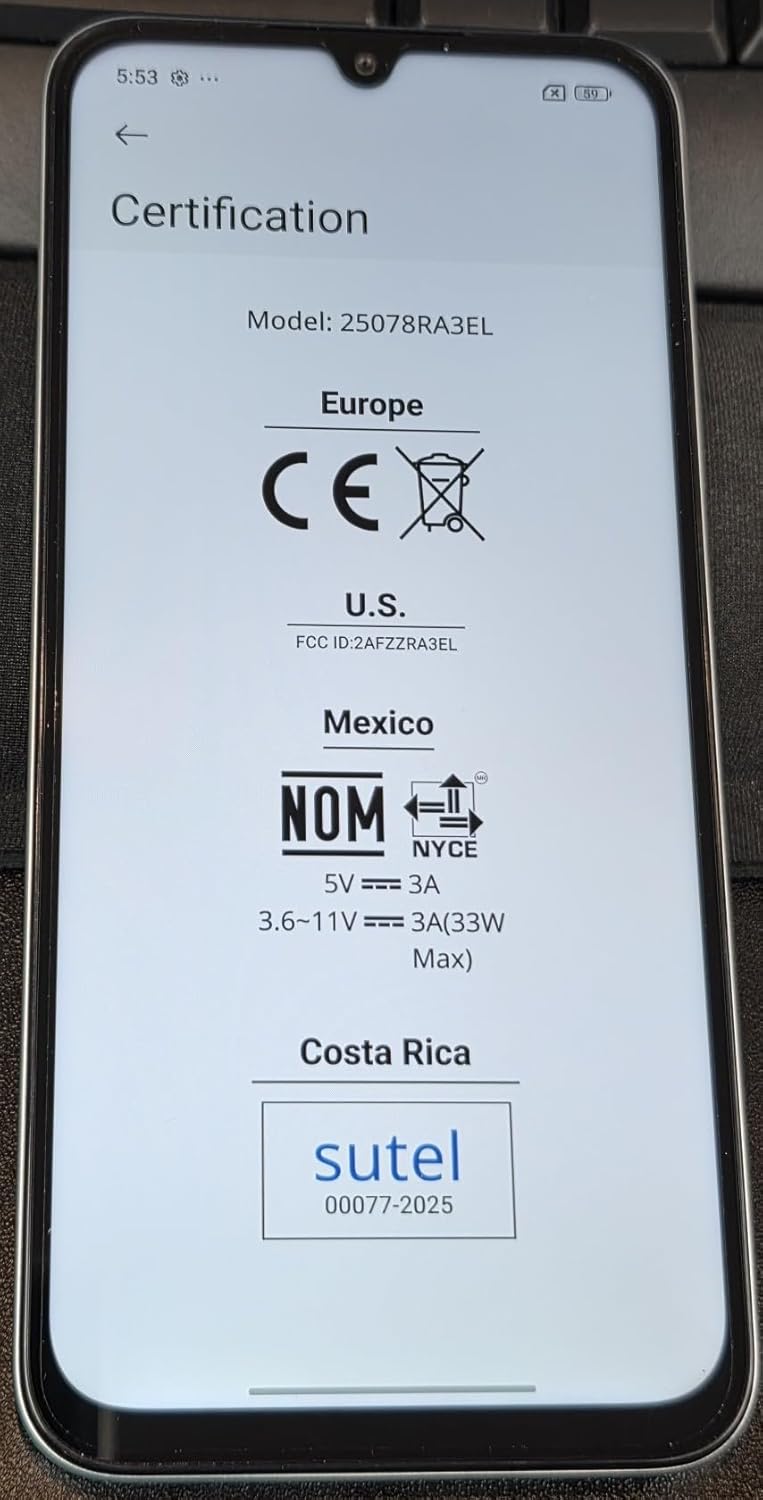
Prent 8.1: Screen displaying certification details for the XIAOMI Redmi 15C, including Model: 25078RA3EL, CE mark for Europe, FCC ID: 2AFZZRA3EL for U.S., NOM for Mexico, and SUTEL for Costa Rica.
9. Veiligheidsinligting
Volg asseblief die volgende veiligheidsriglyne om skade aan u toestel of besering aan uself te voorkom:
- Moenie die toestel blootstel aan uiterste temperature, direkte sonlig of oormatige vog nie.
- Gebruik slegs goedgekeurde laaiers en bykomstighede.
- Vermy om die toestel te laat val of aan ernstige impakte bloot te stel.
- Moenie probeer om die toestel self uitmekaar te haal of te herstel nie. Raadpleeg gemagtigde dienspersoneel.
- Gooi die toestel en sy battery verantwoordelik weg volgens plaaslike regulasies.
10. Waarborg en Ondersteuning
Vir waarborginligting, verwys asseblief na die waarborgkaart wat by u aankoop ingesluit is of besoek die amptelike XIAOMI-webwerf. website. Support resources, including FAQs and contact information, can also be found on the manufacturer's official support pages.
Always purchase from authorized retailers to ensure valid warranty coverage.