
1. Inleiding
The FNIRSI FPM-02 is a high-precision 3-in-1 environmental monitor designed for measuring illuminance (lux), temperature, and humidity. It features a 2-inch color display for clear data visualization and is suitable for various professional applications including office lighting assessment, horticulture, laboratories, and photography studios.
2. Wat is in die boks
- FNIRSI FPM-02 Environmental Monitor
- USB kabel
- Dratas
- Gebruikershandleiding
3. Sleutel kenmerke
- 3-in-1 Measurement: Monitors Lux, temperature, and humidity simultaneously.
- 2-duim kleurskerm: High-definition display with light and dark theme modes for optimal readability.
- Real-time Data & Curve Recording: Visualizes environmental changes over time.
- Adjustable Alarm Thresholds: Alerts users when measurements exceed set values.
- Vinnige Sampling koers: 20Hz (50ms) for real-time monitoring.
- Dual-language Interface: Supports English and Chinese.
- Built-in Sleep Mode & Data Logging: Enhances battery efficiency and usage tracking.
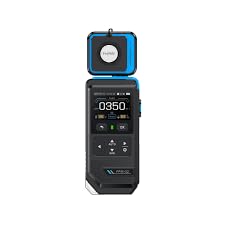
Figure 1: FNIRSI FPM-02 Environmental Monitor with key features highlighted on its color screen.
4. Opstelling
4.1 Laai die toestel
- Connect the provided USB cable to the FNIRSI FPM-02's charging port.
- Steek die ander kant van die USB-kabel in 'n standaard USB-kragadapter (nie ingesluit nie) of 'n rekenaar se USB-poort.
- The device will indicate charging status on its screen. A full charge typically takes approximately 2-3 hours.
4.2 Aan-/afskakel
- To power on: Press and hold the Power button (usually located on the side or front panel) until the screen illuminates.
- Om af te skakel: Druk en hou die aan/af-knoppie in totdat die toestel afskakel.
5. Bedryfsinstruksies
5.1 Navigasie deur die koppelvlak
The FPM-02 features a user-friendly interface with a 2-inch HD color screen. Use the navigation buttons (up, down, left, right, OK/Enter) to move through menus and select options. The device supports both English and Chinese languages, which can be selected in the settings menu.
5.2 Taking Measurements (Illuminance, Temperature, Humidity)
Upon powering on, the device typically defaults to the main measurement screen, displaying real-time values for illuminance (Lux/FC), temperature (°C/°F), and relative humidity (%).
- illuminansie: Ensure the light sensor (located at the top of the device) is unobstructed and pointed towards the light source or area to be measured. The device will display the light intensity in LUX or FC.
- Temperatuur en humiditeit: The internal sensors continuously monitor ambient temperature and humidity. Allow a few minutes for readings to stabilize after significant environmental changes.
5.3 Real-time Data and Curve Recording
The device can display real-time data and record changes over time, presenting them as a curve. Access this feature through the main menu to visualize trends and fluctuations in environmental conditions.
5.4 Alarmdrempels instel
You can set custom alarm thresholds for Lux, temperature, and humidity. If a measured value exceeds or falls below the set threshold, the device will trigger an alert. Refer to the device's settings menu to configure these thresholds.
5.5 Sleep Mode and Data Logging
To conserve battery, the device features a configurable sleep mode. It also includes data logging capabilities, allowing you to store measurement data for later review and analysis. Consult the user manual for detailed instructions on activating and managing these functions.
6. Onderhoud
- Skoonmaak: Use a soft, dry cloth to clean the device. Do not use abrasive cleaners or solvents. Ensure the light sensor and display are kept clean for accurate readings.
- Berging: Bêre die toestel op 'n koel, droë plek weg van direkte sonlig en uiterste temperature. Indien dit vir lang tydperke gebêre word, maak seker dat die battery gedeeltelik gelaai is (ongeveer 50%) om die lewensduur daarvan te verleng.
- Batterysorg: Avoid fully discharging the lithium battery frequently. Recharge the device when the battery level is low.
7. Probleemoplossing
| Probleem | Moontlike oorsaak | Oplossing |
|---|---|---|
| Toestel skakel nie aan nie. | Lae of uitgeputte battery. | Laai die toestel met die meegeleverde USB-kabel. |
| Onakkurate lesings. | Sensor obstructed or dirty; device not calibrated. | Clean sensors. Ensure proper placement. If issues persist, contact support. |
| Skerm reageer nie. | Software glitch; extreme temperature. | Restart the device. Ensure operating within specified temperature range. |
8. Tegniese spesifikasies
| Parameter | Waarde |
|---|---|
| Modelnommer | FPM-02 |
| Beligtingreeks | 0–1000 / 9999 / 99990 LUX; 10–1000 / 1000 / 10000 FC |
| Beligtingsresolusie | 0.1 LUX (0–1000); 0.1 FC (10–1000) |
| Beligting akkuraatheid | ±(3% + 5 LUX) with standard incandescent lamp (2854°K); ±(6% + 5 LUX) for other light sources |
| Sampling Tyd | 20Hz (50ms) |
| Vertoon | 2″ HD Color Screen |
| Kragbron | 3.7V / 1500mAh Lithium Battery |
| Toestelafmetings | 63 × 28 × 182 mm |
| Gewig | 205g |
| Kleur | Swart & Blou |
| Land van oorsprong | China |
9. Waarborg en Ondersteuning
This FNIRSI FPM-02 Environmental Monitor comes with a standard manufacturer's warranty. Please refer to the warranty card included in your package for specific terms and conditions.
For technical support, troubleshooting assistance, or warranty claims, please contact the retailer or manufacturer directly. Keep your purchase receipt as proof of purchase.