
GUSTARD R30
GUSTARD R30 Volledig-Diskrete R2R Netwerk Streamer DAC Gebruikershandleiding
Model: R30
Inleiding
This manual provides detailed instructions for the setup, operation, and maintenance of your GUSTARD R30 Fully-Discrete R2R Network Streamer DAC. Please read this manual thoroughly before using the device to ensure optimal performance and longevity.
Verpakking Lys
Nadat u die pakkie oopgemaak het, maak asseblief seker dat al die volgende items ingesluit is:
- GUSTARD R30 Mainframe
- Kragkoord
- USB kabel
- Afstandbeheer
- Waarborgkaart

Voorpaneel oorview
The front panel of the GUSTARD R30 features essential controls and a display for real-time status and operations.
- Kragknoppie: Toggles between standby and active states. The R30 can remain in standby mode when the rear power switch is ON.
- Vertoon area: Shows the current input channel, encoding format, and sampling rate. Displays menu items when in the setup menu.
- Volume vertoon: Indicates the current volume level, ranging from -63.5dB to 0dB. 'FIXED' indicates bypass mode. Displays menu options during configuration.
- '-' Knoppie: Normally decreases volume. Cycles through options in the menu.
- Ratknoppie: Short press switches inputs. Long press enters/exits the menu. Short press navigates items in the menu.
- '+' Knoppie: Normally increases volume. Cycles through options in the menu.

Agterpaneel oorview
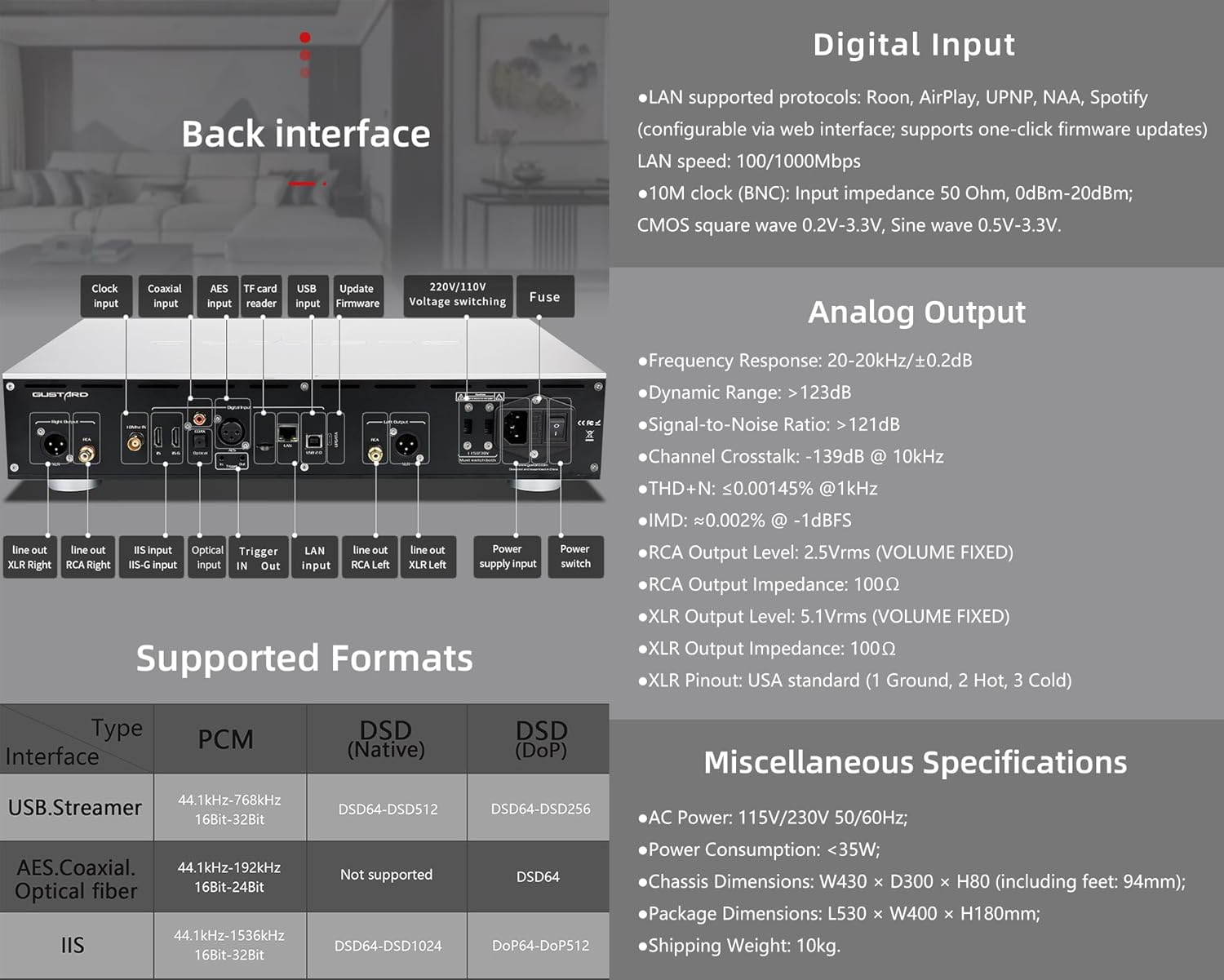
The rear panel provides various input and output connections for the GUSTARD R30.
- Horlosie-invoer: For external 10MHz clock synchronization.
- Koaksiale invoer: Digitale klankinvoer.
- AES-invoer: Digitale klankinvoer.
- USB-invoer: For connecting to a computer or other USB audio source.
- LAN-invoer: For network streaming functionality.
- TF-kaartleser: Vir firmware-opdaterings.
- Dateer firmware op: USB-poort vir firmware-opdaterings.
- 220V/110V Voltage Skakel: Selector for power voltage.
- lont: Krag lont.
- Line Out XLR Right/Left: Balanced analog audio outputs.
- Line Out RCA Right/Left: Unbalanced analog audio outputs.
- IIS Input (IIS-G): Digital audio input with Gustard pinout.
- Optiese invoer: Digitale klankinvoer.
- Sneller in/uit: For 12V trigger control.
- Kragtoevoerinvoer: WS-kragverbinding.
- Krag skakelaar: Hoofkragskakelaar.
Important: Ensure both voltage skakelaars is op dieselfde volume gesteltage wanneer die 220V/110V-volume gebruik wordtage switch, otherwise, it may damage the internal transformer upon powering on.
Skerm- en paneelkontroles
The R30 utilizes a large OLED display for real-time status monitoring and functional operations. The diagram below illustrates the main interface display states.
1. OLED -skerm
The display shows the input channel, external clock indication, encoding format, sampling rate, and volume.
2. Input Channel Selection
Die R30 beskik oor 7 invoerkanale. Op die hoofkoppelvlak blaai elke druk van die ratknoppie deur beskikbare kanale in hierdie volgorde: COAX → AES → OPT → USB → STREAMER → IIS(G) → IIS(M*).
***Note: IIS(G) is for fixed Gustard pinout configuration and cannot be adjusted. IIS(M*) supports adjustable pinout configuration.
3. Volume aanpassing
- When the main interface is displayed, pressing the "+" or "-" buttons directly adjusts the analog volume attenuation function of the passive preampverswakking. Demping wissel van 0dB tot -63.5dB (totale 63.5dB demping).
- Pressing "+" at 0dB activates Fixed Output mode (bypassing attenuation circuit), displaying 'FIXED' indicator.
- When 'FIXED' is displayed, pressing "-" first exits bypass mode before controlling the attenuation level.

Opstelkieslys
On the main screen, long press the Gear Button to enter the settings menu (hereinafter referred to as the menu button). In this state, the menu button can sequentially switch the menu items to be modified. "+" and "-" buttons are used to adjust the currently selected menu options. When the screen is in the settings menu, long press the menu button again to return to the main screen.
Menu Struktuur:
- PCM-FILTER
- DSD-FILTER
- NOS MODUS
- REF CLOCK
- IIS MODE
- FASE
- TRIGGER CH.
- TRIGGER VOL.
- VERTONING

Kieslys funksies
Kry toegang tot die kieslys deur op die Kieslys-knoppie op die hoofkoppelvlak te druk. Elke kieslysopsie word hieronder uiteengesit.
1. PCM FILTER (PCM Digital Filter Adjustment)
Die R30 gebruik 'n selfontwikkelde hoëprestasie PCM-oversampling digitale filtermodule met drie filtertipes:
- VIVID (Default): Similar to the FAST roll-off type of traditional digital filter, but with better ringing characteristics, very small pre-ringing, and fast convergence post-ringing. It aims for a broad soundstage and sound restoration. Recommended for most music styles.
- SAG: Similar to the SLOW roll-off type of traditional digital filter, offering a soft listening experience.
- SAAMGESTELDE: A hybrid digital filter, balancing characteristics between Vivid and Gentle for a good listening experience.
2. DSD FILTER (DSD Digital Filter Adjustment)
The DSD filter has 4 built-in bandwidth options: 47K (Default), 50K, 60K, 70K.
3. NOS-MODUS (Geen boulbeurte nieampling Filter Mode)
When enabled, the PCM signal bypasses the oversampling filter entirely, decoded straight through the R-2R decoder module. This preserves micro-details and timing integrity. When enabled, there may be a slight clicking sound when the playback data format switches between PCM and DSD.
- DISABLE (Default)
- AKTIVEER
4. REF CLOCK (Reference Clock Selection)
The GUSTARD-K2, low-noise clock synthesizer, achieves ultra-low jitter performance. The R30 offers two clock options:
- INTERNAL (Default): Uses the built-in OCXO internal reference.
- EXT. 10MHz: Selects an external 10MHz reference source. It is recommended to connect to GUSTARD C16 or C18 reference 10M master clocks.
If the external clock is lost, powered off, or its frequency deviation is greater than +/-150ppm, "EXT ERR" will be displayed and flash.
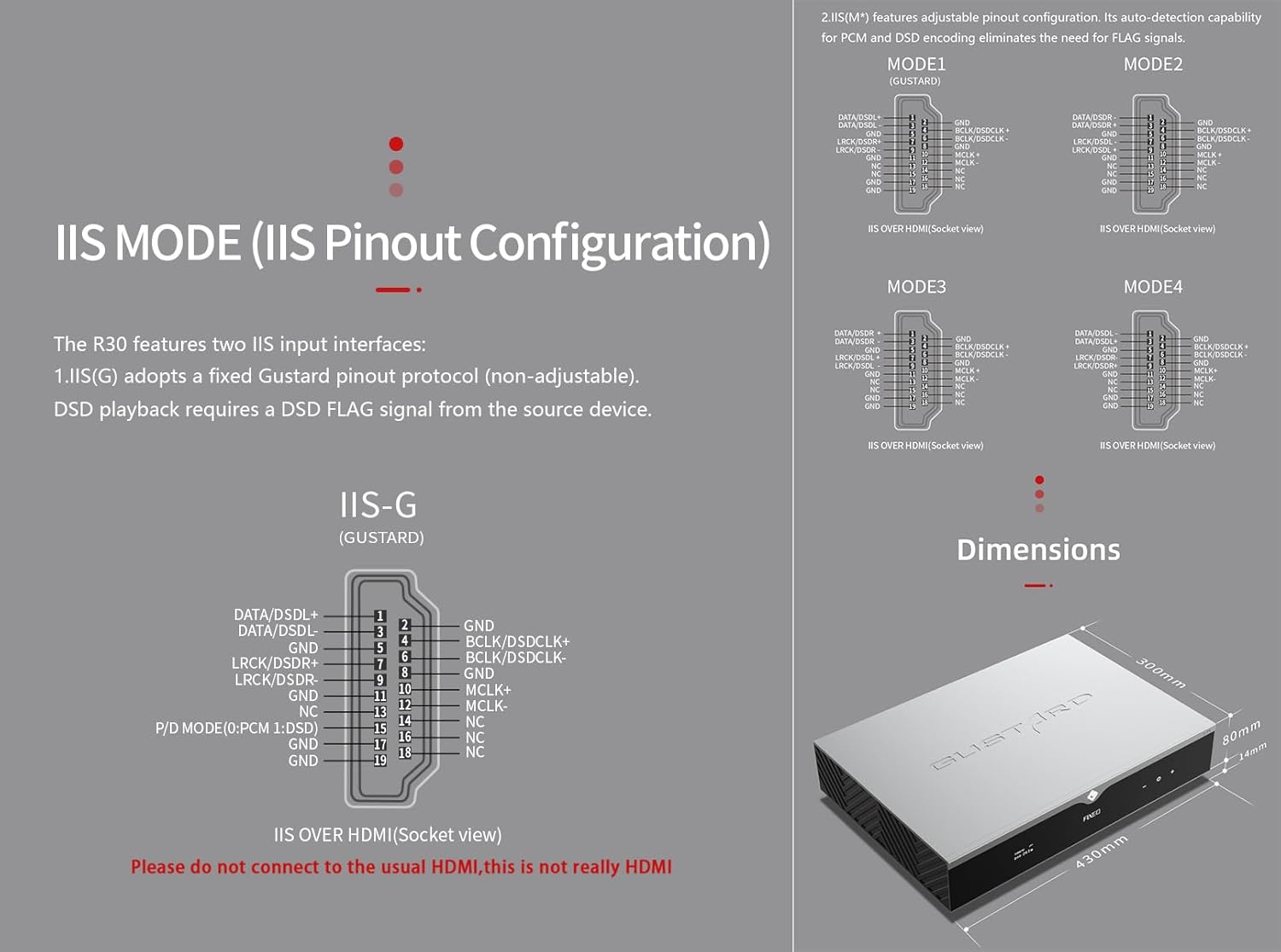
5. IIS MODE (IIS Pinout Mode Selection)
Die R30 beskik oor twee IIS-invoerkoppelvlakke:
- IIS(G): Fixed Gustard pinout protocol (non-adjustable). DSD playback requires a DSD FLAG signal from the source device.
- IIS(M*): Features adjustable pinout configuration. Its auto-detection capability for PCM and DSD encoding eliminates the need for FLAG signals.
IIS(M*) adjustable Pinout mode IIS input has four Pinouts: MODE1 (Default), MODE2, MODE3, MODE4. MODE1 is compatible with the GUSTARD mode. If you are connecting to a GUSTARD front end such as U12, U16, U18, S16, S26, etc., you can match them with MODE1, which is the former works in the Gustard output mode.
Please do not connect to the usual HDMI, this is not really HDMI.
6. PHASE (Phase Setting)
Hierdie funksie bied twee opsies:
- NON-inverted (Default): When non-inverted, the RCA output of R30 is normal phase, and the XLR balanced output is American standard polarity output (1 ground, 2 hot, 3 cold).
- Omgekeerd: When inverted, only the RCA output is reverse phase, and the XLR balanced output is Japanese/European standard polarity output (1 ground, 2 cold, 3 hot).
7. TRIGGER CH. (Linkage Trigger Start Channel Selection)
The R30 can be triggered by an external 12V linkage signal and automatically turn on from standby mode. When the 12V trigger signal ceases or drops to 0V, automatic standby activation occurs. When the R30 is working, it is switched to the input channel of this setting by the 12V trigger linkage signal.
- LAST (Default): The input channel that was in use before entering standby last time.
- Other options include COAX, AES, OPT, USB, STREAMER, IIS(G), IIS. Selecting any channel activates it upon receiving a 12V trigger signal.
8. TRIGGER VOL. (Link Trigger Boot Volume Selection)
Die R30 kan vanuit bystand aangeskakel word via 'n eksterne 12V-snellersein en outomaties op die gekose volumevlak gestel word. Alternatiewelik, tydens werking, skakel 'n 12V-snellersein die uitset na die voorafbepaalde volume. Hierdie opsie konfigureer die uitsetvolume na snelleraktivering.
- LAST (Default): The volume used before entering standby.
- VASTE: Fixed full-scale output bypassing attenuation.
- -20dB: Output at a volume attenuated to -20dB.
- -30dB: Output at a volume attenuated to -30dB.
- -40dB: Output at a volume attenuated to -40dB.
9. DISPLAY (Screen Brightness Settings)
Long-term high-brightness use of OLED screens can cause screen burn-in or ghosting. Therefore, the R30 is designed to always select automatic screen off, or manually select automatic screen off, which can also reduce interference.
- AUTO (Default): Automatically reduce brightness.
- AUTO AF: Automatically turn off the screen.
Infrarooi afstandbeheer
Wanneer jy DAC-produkte gebruik, druk en hou die DAC-knoppie vir meer as 3 sekondes in om DAC-beheermodus te betree. AMP/STREAM-modusse beheer ander Gustard-produkte.
- Standby: Press once to activate R30 from standby. Press once during operation to enter standby.
- Spyskaart: Press to access R30's setup menu.
- Blok met 4 rigtingsleutels: Up/Down navigates menu items. Left/Right adjusts selected options. Center press activates/deactivates mute.
- Agter: Returns to main interface.
- Vol-: Decreases output volume on main interface.
- Vol+: Increases output volume on main interface.
Notas:
- Operational range varies with angle.
- Obstructions between remote and sensor may cause malfunction.
- Remove batteries if unused for more than 1 month.
- Thoroughly clean battery compartment if leakage occurs.
- May accidentally trigger other IR-controlled devices.

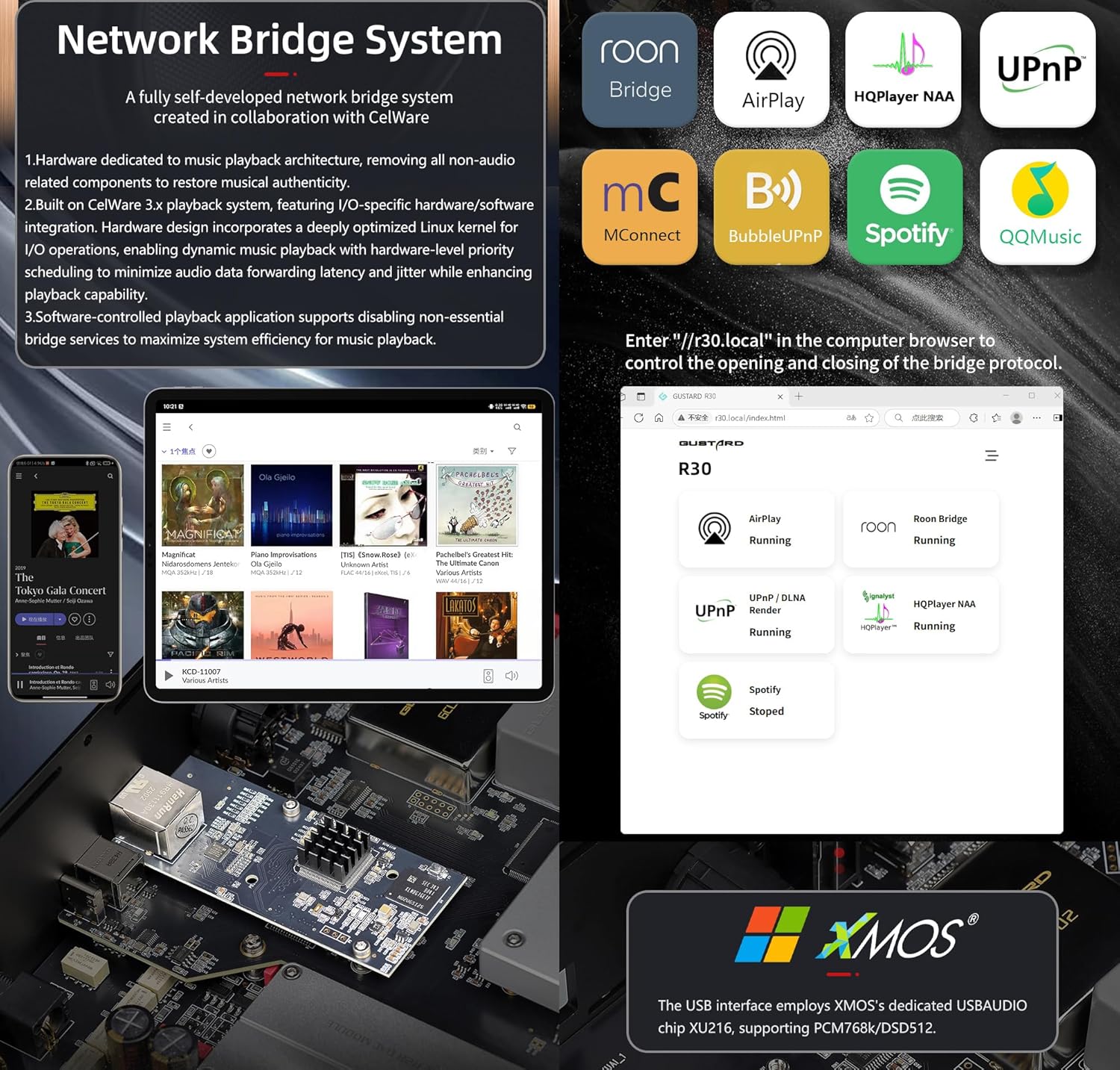
Netwerkbrug-stromer Vinnige begin
After connecting R30's RJ45 port to your local network:
- Select the STREAMER channel and await system boot (approximately 1 minute, until "DSD 24.5MHz" appears).
- Access R30's configuration page via: http://R30.local (as shown below). Disable unused streaming protocols on the web koppelvlak om stelseldoeltreffendheid te maksimeer. Firmware-opdaterings word ook hier uitgevoer.
(Mobiele/tablet-werking hangende tot toegewyde toepassingvrystelling)
You can turn off streaming protocols that are not frequently used through the web page to maximize system music playback performance. At the same time, the online upgrade of the Streamer is also operated on the web bladsy.
(Nadat die toegewyde Streamer-app bekendgestel is, kan die bogenoemde bewerkings in die app uitgevoer word)
Official Product Video: GUSTARD R30 - User Manual
Produkspesifikasies
Digital Input Support Formats:
| Tik | PCM | DSD (inheems) | DSD (DoP) |
|---|---|---|---|
| USB.Streamer | 44.1kHz-768kHz 16Bit-32Bit | DSD64-DSD512 | DSD64-DSD256 |
| AES.Coaxial.Optical fiber | 44.1kHz-192kHz 16Bit-24Bit | Nie ondersteun nie | DSD64 |
| IIS | 44.1kHz-1536kHz 16Bit-32Bit | DSD64-DSD1024 | DoP64-DoP512 |
Analoog uitset:
- Frekwensierespons: 20-20kHz/±0.2dB
- Dinamiese reikwydte:> 123dB
- Verhouding sein-tot-ruis:> 121dB
- Kanaal-oorspraak: -139dB @ 10kHz
- THD+N: ≤ 0.00145% @1kHz
- IMD: ≈0.002% @ -1dBFS
- RCA-uitsetvlak: 2.5Vrms (VOLUME VASTE)
- RCA-uitsetimpedansie: 100Ω
- XLR-uitvoervlak: 5.1Vrms (VOLUME VASTE)
- XLR-uitsetimpedansie: 100Ω
- XLR-penuitvoer: VSA-standaard (1 grond, 2 warm, 3 koud)
Ander spesifikasies:
- AC Power: 115V/230V 50/60Hz
- Kragverbruik: <35W
- Chassis Dimensions: W430 × D300 × H80 (including feet: 92mm)
- Package Dimensions: L530 × W400 × H180mm
- Shipping Weight: 10kg (with package)
- 10MHz BNC Input: Input impedance 50 Ohm, 0dBm-20dBm; CMOS square wave 0.2V-3.3V, Sine wave 0.5V-3.3V.
- Trigger: IN- 12V Typ. OUT- 12V Typ.
Waarborgbepalings
Thank you for choosing GUSTARD HIFI products. To safeguard your rights and interests, please read the following warranty terms carefully. You can promptly obtain comprehensive after-sales service provided by GUSTARD.
Produkwaarborg
You will enjoy a 2-year free warranty and lifetime maintenance after the date of purchasing GUSTARD's HIFI product.
* Die vervaardiger dra slegs die vragte vanaf die Chinese vasteland. 'n Deel van die vrag en belasting wat van oorsee gegenereer word, sal deur die gebruiker opgelos word met die handelaar-onderhandeling.
Gratis waarborgdiens
GUSTARD R30 from the purchasing-datum in die gratis waarborgtydperk, die gebruiker gebruik die produk normaalweg, en die produk faal as gevolg van komponentkwaliteit of vervaardigingsprobleme.
Behalwe die waarborgdiens
Belonging to one of the following circumstances, products are no longer provided warranty service:
- Produkte vanaf die aankoopdatum het 'n voorafbepaalde waarborgtydperk oorskry.
- Model, strepieskodes en aankoopdatum stem nie ooreen met die werklike produk en waarborgkaart nie.
- Without GUSTARD technician permission, unauthorized modifications to the circuit, components or self-repaired product.
- Skade veroorsaak deur onweerstaanbare natuurlike kragte.
- Behalwe die toegelate gebruik van omgewingskade.
- Beskadig as gevolg van verkeerde gebruik of onbehoorlike berging. Insluitend maar nie beperk nie tot: die voltage is te hoog om die stroombane of komponente te verbrand; Stamp en lei tot beskadiging van die dop of interne; skadelik as gevolg van water, olie, vloeistof en oormatige stof; produk oksidasie of korrosie, ens.
- Buiten die waarborgtydperk, soos skade aan individuele komponente, voorkoms as gevolg van menslike skade, lei firmware-wysigings daartoe dat ongemagtigde gebruikers nie kan werk nie. GUSTARD verbind hom om redelike onderhoudsfooie te neem (behalwe groot area komponente of stroombaanbord wat onherstelbaar verbrand is). Vrag- en instandhoudingskoste, materiaalkoste moet die gebruiker dra.
Kontakinligting
Vervaardiger: Shenzhen Goshide Technology Co., LTD
Adres: Room 302, Building 1, No. 28, Huimin 1st Road, Guanlan Sub-district, Longhua District, Shenzhen City, Guangdong Province
Tel: +86-18682080102
Webwebwerf: http://www.gustard.com
E-pos: diens@gustard.com