
Inleiding
Thank you for choosing the EUQQ YYK-Q10 AI Translator Earbuds. These earbuds are designed to provide seamless real-time language translation, high-quality audio, and effective noise cancellation, making them ideal for communication across language barriers, business meetings, and everyday use. This manual will guide you through the setup, operation, and maintenance of your new device to ensure optimal performance and user experience. Please read this manual thoroughly before using the product.
Pakketinhoud
Kontroleer asseblief die pakket vir die volgende items:
- EUQQ YYK-Q10 AI Translator Earbuds (L/R)
- Laaikas
- USB-laaikabel
- Verskeie groottes van oorpunte
- Gebruikershandleiding
Indien enige items ontbreek of beskadig is, kontak asseblief kliëntediens.
Produk verbyview
The EUQQ YYK-Q10 features a compact design with intuitive controls and a smart charging case. Familiarize yourself with the components below.
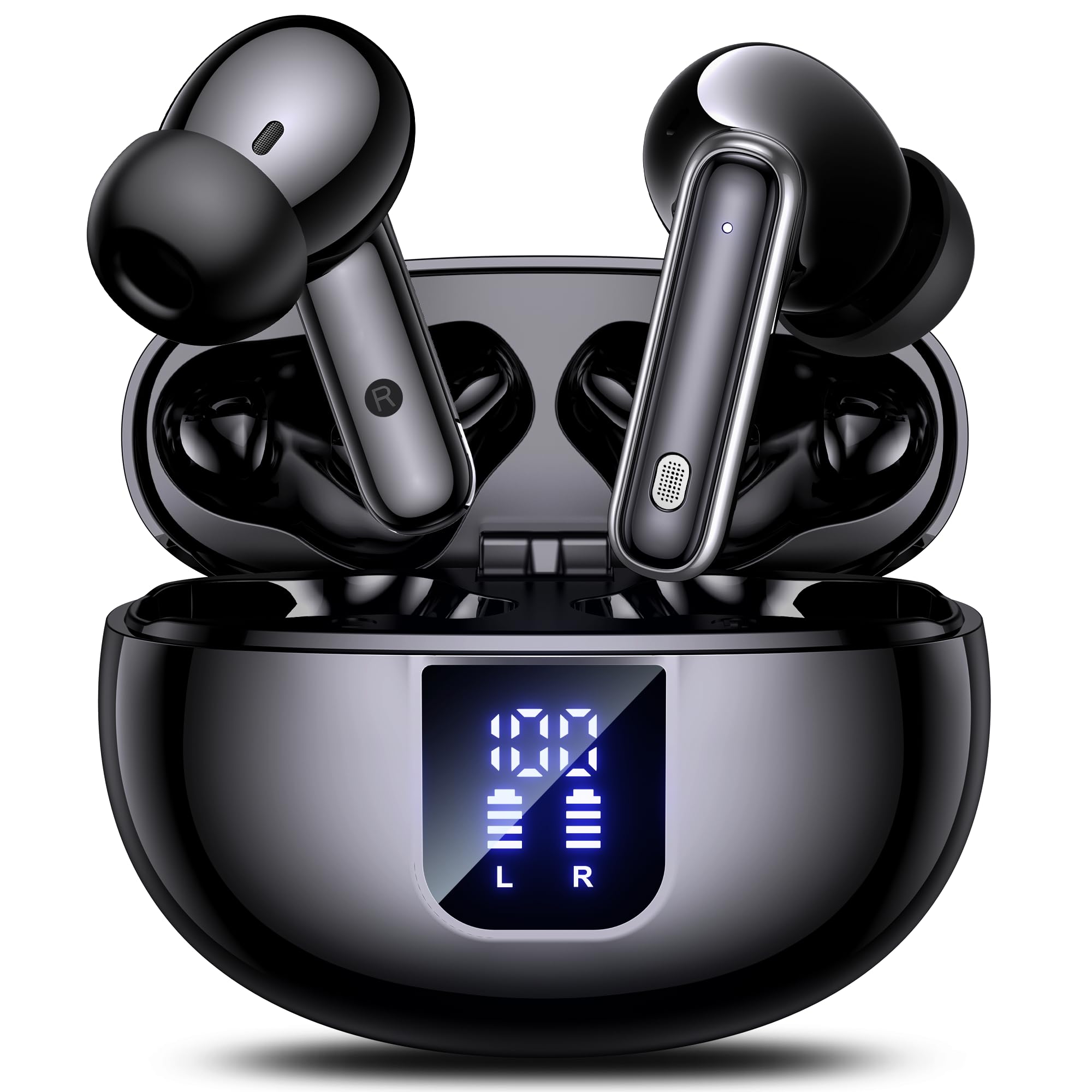
Image: The EUQQ YYK-Q10 AI Translator Earbuds are shown inside their open charging case. The case is black and features a digital display on the front, indicating battery levels for both the case and individual earbuds (L and R). The earbuds themselves are black with silver accents.
Sleutelkomponente:
- Oordopjes: Left (L) and Right (R) earbuds with touch control areas and microphones.
- Laaikas: Stores and charges the earbuds. Features a digital display for battery status.
- Laaipoort: USB-C port on the charging case for power input.
- LED-aanwysers: On earbuds and case to show charging status and connection.
Opstelling
1. Aanvanklike laai
- Plaas albei oordopjes in die laaikas.
- Koppel die USB-laaikabel aan die laaipoort op die kas en 'n kragbron.
- The digital display on the case will show the charging status. Ensure both earbuds and the case are fully charged before first use (approximately 1-2 hours).
2. Bluetooth-koppeling
- Open the charging case. The earbuds will automatically enter pairing mode, indicated by flashing LED lights.
- Aktiveer Bluetooth op jou slimfoon of toestel en soek vir beskikbare toestelle.
- Select "EUQQ YYK-Q10" from the list of devices.
- Once connected, the earbud LEDs will stop flashing, and a voice prompt will confirm the connection.
3. App-installasie (vir vertaalfunksies)
To utilize the real-time translation features, download the dedicated EUQQ translation app from your device's app store (iOS App Store or Google Play Store). Follow the in-app instructions to connect your earbuds and configure language settings.
Bedryfsinstruksies
Krag aan/af
- Krag aan: Maak die laaikas oop, of haal die oorfone uit die kas. Hulle sal outomaties aanskakel.
- Skakel af: Plaas die oorfone terug in die laaikas en maak die deksel toe. Hulle sal outomaties afskakel.
Music Playback Controls (Touch Controls)
- Speel/pouse: Enkele tik op enige van die oordopjes.
- Volgende snit: Dubbeltik op die regteroorfone.
- Vorige snit: Dubbeltik op die linker oordopje.
- Volume op: Tik drie keer op die regteroorfone.
- Volume af: Tik drie keer op die linker oordopje.
Call Management (Touch Controls)
- Beantwoord/beëindig oproep: Enkele tik op enige van die oordopjes.
- Verwerp oproep: Druk en hou enige oordopjes vir 2 sekondes.
Translation Mode
Activate translation mode through the dedicated EUQQ app. The app will guide you through selecting source and target languages. Depending on the app's features, you may use different modes:
- Gesprekmodus: Speak into your earbud's microphone, and the translation will be played through the other person's earbud or your phone's speaker.
- Tolkmodus: One person wears an earbud, the other speaks into the phone.
- Touch-to-Speak Mode: Tap an earbud to speak, release to translate.
Refer to the EUQQ app's help section for detailed instructions on specific translation modes and features.
Geraasonderdrukking
The earbuds feature dual-mic noise cancelling. This feature is typically active by default or can be toggled via the companion app. It helps reduce ambient noise during calls and translation sessions for clearer communication.
Onderhoud
- Skoonmaak: Maak die oorfone en laaikas gereeld skoon met 'n sagte, droë, pluisvrye lap. Moenie harde chemikalieë of skuurmiddels gebruik nie.
- Oorwenke: Remove and clean ear tips periodically with water and mild soap. Ensure they are completely dry before reattaching.
- Laai kontakte: Maak die laaikontakte op beide die oordopjes en die houer versigtig skoon met 'n droë wattestokkie om behoorlike laai te verseker.
- Berging: Wanneer dit nie gebruik word nie, bêre die oorfone in hul laaikassie om hulle te beskerm en gelaai te hou. Vermy uiterste temperature en humiditeit.
Probleemoplossing
| Probleem | Oplossing |
|---|---|
| Oorknoppies koppel nie |
|
| Geen klank of lae volume nie |
|
| Laai kwessies |
|
| Vertaling werk nie |
|
Spesifikasies
| Kenmerk | Detail |
|---|---|
| Handelsmerk | EUQQ |
| Model Naam | YYK-Q10 |
| Verbindingstegnologie | Draadloos |
| Koptelefoonvormfaktor | In-Oor |
| Kleur | Swart |
| Ingesluit komponente | Instruction Manual (and other standard accessories like earbuds, case, cable, ear tips) |
| Aantal items | 1 (product unit) |
| Batterye benodig | Nee (ingeboude herlaaibare) |
| Modelnommer van die vervaardiger | YYK-Q10 |
| Pakket afmetings | 0.1 x 0.1 x 0.1 cm; 45.36 g |
| ASIN | B0FN3WC8LW |
Waarborg inligting
The EUQQ YYK-Q10 AI Translator Earbuds come with a standard manufacturer's warranty. For detailed information regarding warranty coverage, terms, and conditions, please refer to the warranty card included in your package or visit the official EUQQ webwebwerf. Bewaar asseblief u bewys van aankoop vir waarborgeise.
Kliënte ondersteuning
If you encounter any issues or have questions regarding your EUQQ YYK-Q10 AI Translator Earbuds, please do not hesitate to contact our customer support team. You can find contact information on the official EUQQ website or through the support section of the EUQQ translation app.
Aanlyn hulpbronne:
- Official EUQQ Webwebwerf: Visit EUQQ Store on Amazon
- EUQQ Translation App (for in-app support)