
1. Inleiding
The WatchGuard Firebox T185 is a high-performance tabletop firewall designed to provide enterprise-grade security for branch offices and retail environments. This device handles demanding traffic loads and offers flexible connectivity options, including SFP+ fiber, 2.5Gb, and 1Gb Ethernet ports. It integrates advanced threat protection, VPN support, and SD-WAN capabilities to ensure secure and efficient network operations.
2. Veiligheidsinligting
- Lees alle instruksies voordat u die toestel gebruik.
- Verseker behoorlike aarding om elektriese skok te voorkom.
- Moenie die toestel aan vog of uiterste temperature blootstel nie.
- Gebruik slegs die kragtoevoer wat saam met die toestel voorsien word.
- Moenie die toestel oopmaak nie casing; verwys onderhoud na gekwalifiseerde personeel.
- Secure the device physically using the Kensington Lock slot to prevent theft.
3. Pakketinhoud
Verifieer dat alle items in die pakket teenwoordig is:
- WatchGuard Firebox T185 Appliance
- Kragadapter
- Ethernet kabel
- Vinnige Begingids
4. Fisiese Oorview
Familiarize yourself with the ports, indicators, and features of your Firebox T185.

This image displays the WatchGuard Firebox T185, highlighting its front and rear panels. The front panel features LED indicators for status and mode. The rear panel includes a DC power input, two USB 3.2 ports, one O/WAN 1/LAN port, four 1 Gbps LAN ports (ports 2-5), two 2.5 Gbps PoE ports (ports 6-7), one 10 Gbps SFP+ port, a reset button, and a power switch. A Kensington lock slot is also visible.

The WatchGuard Firebox T185 is shown held in a hand, illustrating its compact tabletop form factor suitable for various environments.

'n Gedetailleerde view of the rear panel of the Firebox T185, showing the power input, USB ports, 1GbE LAN ports, 2.5GbE PoE ports, and the SFP+ port.
LED-aanwysers
Die voorpaneel se LED's verskaf statusinligting:
- Status-LED: Dui die operasionele status van die toestel aan.
- Aandag LED: Alerts to system warnings or errors.
- Modus LED: Toon die huidige bedryfsmodus.
- Poort LED's: Indicate link status and activity for each network port.
5. Aanvanklike Opstelling
- Pak die toestel uit: Carefully remove the Firebox T185 and all accessories from the packaging.
- Koppel netwerkkabels:
- Connect your internet source (modem or upstream router) to the O/WAN 1/LAN hawe.
- Connect your internal network devices (switches, computers) to the LAN ports (2-5). For higher speeds, use the 2.5 Gbps PoE ports (6-7) of die SFP+ poort soos nodig.
- Koppel krag: Plug the power adapter into the device's power input and then into a power outlet. Turn on the power switch.
- Krag aan: The device will power on automatically. Observe the LED indicators for boot-up status.
- Aanvanklike konfigurasie: Toegang tot die toestel s'n web interface or use WatchGuard Cloud for initial configuration. Refer to the Quick Start Guide for default IP addresses and login credentials.
Hierdie video verskaf 'n produk oorview of the WatchGuard Firebox T185, demonstrating its features and potential deployment scenarios. It highlights the device's physical aspects and connectivity options.
6. Bedryfsinstruksies
Once configured, the Firebox T185 operates continuously to protect your network. Management is typically performed through the WatchGuard Cloud platform or a local web koppelvlak.
- Monitering: Regularly check the device status through the WatchGuard Cloud dashboard or local interface for alerts and performance metrics.
- Firmware -opdaterings: Keep the device firmware updated to ensure the latest security patches and features. Follow WatchGuard's official update procedures.
- VPN Connections: Utilize the VPN features for secure remote access or site-to-site connectivity as configured.
- SD-WAN: Leverage SD-WAN capabilities for optimized traffic routing and network resilience.
7. Onderhoud
- Gereelde skoonmaak: Keep the device free from dust. Use a soft, dry cloth to clean the exterior. Do not use liquid cleaners.
- Ventilasie: Ensure adequate airflow around the device to prevent overheating. Do not block ventilation openings.
- Firmware-bestuur: Periodically check for and apply firmware updates as recommended by WatchGuard.
- Konfigurasie-rugsteun: Regularly back up your device configuration to prevent data loss in case of an issue.
8. Probleemoplossing
- Geen krag:
- Check the power cable connection and ensure the power outlet is functional. Verify the power switch is in the 'On' position.
- Geen netwerkverbinding:
- Verify all Ethernet cables are securely connected. Check the status of the port LEDs. Ensure your internet service is active. Review network configuration settings.
- Stadige prestasie:
- Check network traffic and resource utilization through the management interface. Ensure firmware is up-to-date. Consider reviewing security policies for potential bottlenecks.
- Toestel oorverhit:
- Ensure the device is placed in a well-ventilated area. Clear any dust from the ventilation openings.
9. Tegniese spesifikasies
| Kenmerk | Waarde |
|---|---|
| IPS Throughput (full scan) | 2.40 Gbps |
| Firewall Throughput (IMIX) | 7.90 Gbps |
| VPN Throughput (IMIX) | 1.14 Gbps |
| HTTPS (IPS enabled, full scan) | 1.00 Gbps |
| Netwerk koppelvlakke | 4 x 1 GbE, 4 x 2.5 GbE, 1 x SFP/SFP+ |
| I/O koppelvlakke | 1 Serial/2 USB-A 3.2 |
| Model Naam | WatchGuard Firebox T185 |
| Spesiale kenmerk | UTM, VPN Support, Integrated SD-WAN |
| Aanbevole gebruike | Besigheid |
| Verbindingstegnologie | Ethernet, SFP+ |
| Item gewig | 6.8 pond |
| Bedryfstelsel | Vuurware |
| Data Transfer Rate (UTM) | 1830 megabits per sekonde |
| Maximum Upstream Data Transfer Rate | 1830 megabits per sekonde |
| LAN-poortbandwydte | 2500 Mbps |
| Modem Compatible | Nee |
| Dekking | Software and emergency support |
| UPC | 654522437150 |
| Vervaardiger | WatchGuard |
| Vervaardiger se deelnommer | WGT185000+WGT1850063 |

This image displays a table detailing key performance specifications for the WatchGuard Firebox T185, including IPS, Firewall, VPN, and HTTPS throughputs, as well as network and I/O interfaces.
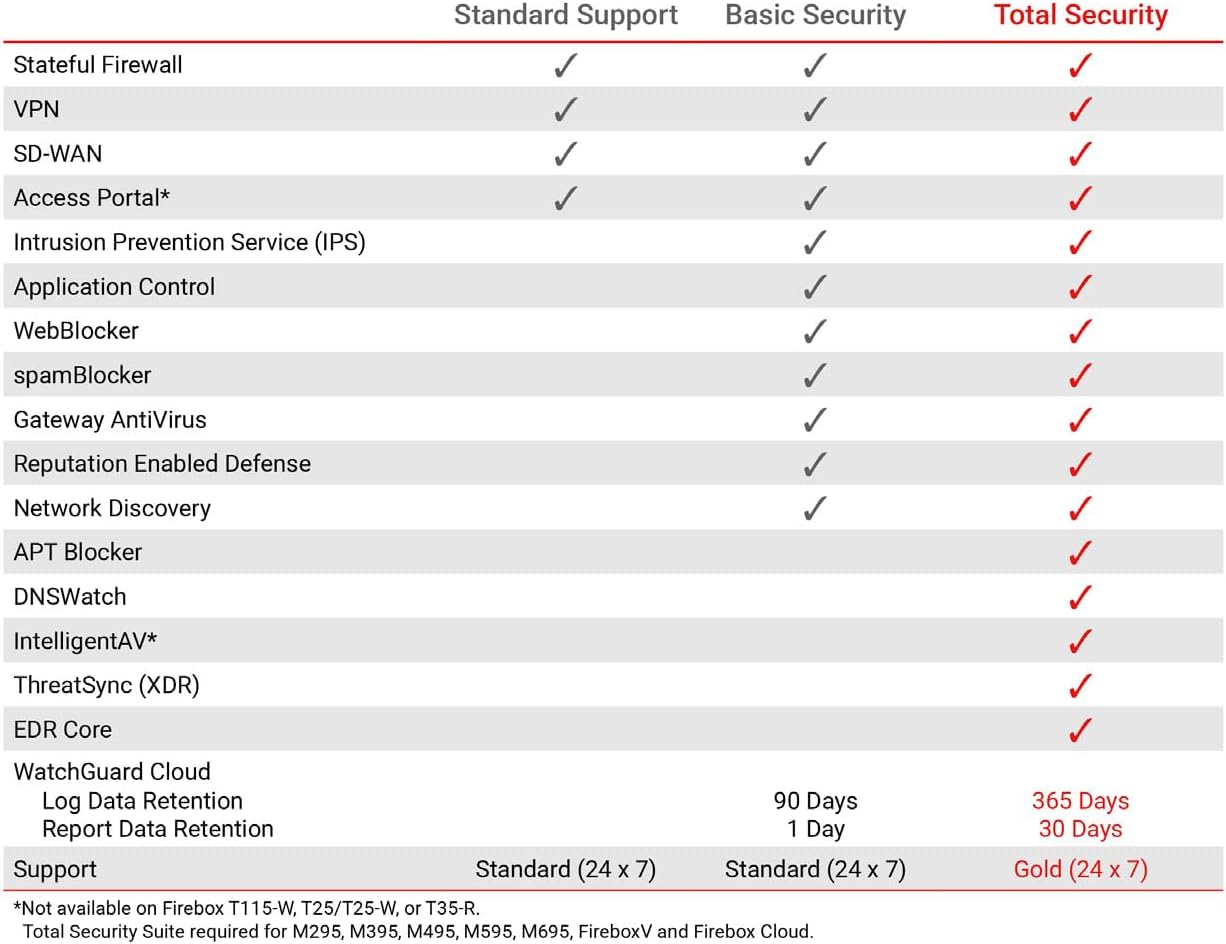
This table compares the security features included with Standard Support, Basic Security Suite, and Total Security Suite for the WatchGuard Firebox T185, showing which features are enabled for each option.
10. Waarborg en Ondersteuning
The WatchGuard Firebox T185 comes with a 3-year Standard Support license (WGT185003).
- Standaard ondersteuning: Provides software updates and 24x7 emergency technical assistance, along with business-hours support for routine inquiries.
- Beskermingsplanne: Additional protection plans may be available, such as a 4-Year Protection Plan or a Complete Protect monthly plan. Refer to your purchase documentation for details.
- Vervaardiger ondersteuning: Vir verdere hulp, besoek die amptelike WatchGuard support webwebwerf of kontak hul kliëntediens.