
Inleiding
Welcome to the world of robotics with your new Xtrem Bots Bionic Robot! This interactive robot is designed to provide an engaging and educational experience, allowing users to explore basic programming concepts and remote control operation. With its versatile movement modes, LED lights, and robotic sounds, the Bionic Robot offers hours of interactive fun.

Image: The Xtrem Bots Bionic Robot in white and green, standing next to its white remote control.
Pakketinhoud
- 1 x Xtrem Bots Bionic Robot (Model XT3803418)
- 1 x afstandbeheer
- Instructiehandleiding (hierdie dokument)
Opstelling
1. Battery Installasie
The Xtrem Bots Bionic Robot requires 2 AA batteries (included) for operation.
- Vind die batterykompartement aan die agterkant van die robot.
- Gebruik 'n klein skroewedraaier (nie ingesluit nie) om die batteryklep oop te maak.
- Plaas 2 AA-batterye in en verseker die korrekte polariteit (+/-).
- Plaas die deksel van die batterykompartement terug en maak dit met die skroef vas.
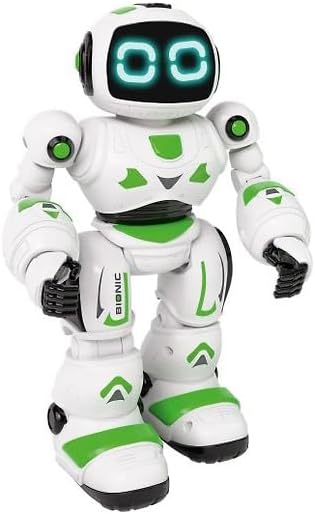
Beeld: Voorkant view of the Xtrem Bots Bionic Robot, showing its design.
2. Skakel aan/af
- To power on the robot, locate the power switch on its back and slide it to the "ON" position.
- To power off the robot, slide the power switch to the "OFF" position.
- Ensure the remote control also has batteries installed and is powered on to establish a connection.
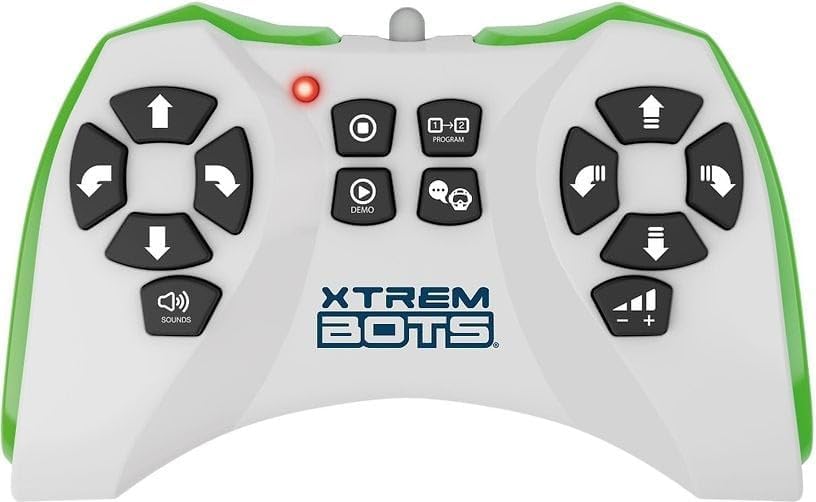
Image: The remote control for the Xtrem Bots Bionic Robot, showing various buttons for movement and functions.
Bedryfsinstruksies
Afstandbeheerfunksies
The remote control allows you to command your Bionic Robot with various actions. Familiarize yourself with the buttons and their corresponding functions:
- Bewegingskontroles: Use the directional buttons to make the robot move forward, backward, turn left, and turn right.
- Skyfiemodus: The robot can perform sliding movements.
- Loopmodus: The robot can perform walking movements.
- Programmering: Utilize the programming function to create sequences of up to 20 different actions.
- LED ligte: The robot's eyes feature LED lights that illuminate during operation.
- Robotic Sound: The robot produces various robotic sounds.
Programmeringsfunksies
To program a sequence of actions:
- Press the "Program" button on the remote control.
- Input your desired sequence of movements and actions (up to 20 steps).
- Press the "Program" button again to execute the programmed sequence.
Video: Demonstration of a remote control robot's programmable functions, including movement, sounds, and gesture sensing.
Onderhoud
- Skoonmaak: Wipe the robot and remote control with a dry, soft cloth. Do not use water or cleaning solutions.
- Berging: Store the robot and remote control in a cool, dry place away from direct sunlight when not in use. Remove batteries if storing for extended periods.
- Batterysorg: Gebruik altyd vars batterye van die aanbevole tipe. Moenie ou en nuwe batterye of verskillende soorte batterye meng nie.
Probleemoplossing
| Probleem | Moontlike oorsaak | Oplossing |
|---|---|---|
| Robot reageer nie. | Batteries are low or incorrectly installed. Remote control is off or out of range. | Check and replace batteries in both robot and remote. Ensure remote is within operating range. Power cycle both devices. |
| Robot moves erratically. | Interference from other electronic devices. Low battery power. | Move to an area with less electronic interference. Replace batteries. |
| Programming sequence is incorrect. | Incorrect button presses during programming. | Clear the current program and re-enter the sequence carefully. |
Spesifikasies
| Kenmerk | Detail |
|---|---|
| Modelnommer | XT3803418 |
| Handelsmerk | Xtrem Bots |
| Afmetings | 30 x 20 x 15 cm |
| Gewig | 500 g |
| Materiaal | Plastiek |
| Kleur | Groen |
| Battery Tipe | 2 x AA -batterye (ingesluit) |
| Vergadering benodig | Nee |
| Spesiale kenmerke | LED Lights, Robotic Sound, Programmable (up to 20 functions), Walk and Slide Movement Modes |
| Opvoedkundige doelwit | Introduce children to programming concepts and provide an educational, fun experience. |
Veiligheidsinligting
- Nie geskik vir kinders onder 3 jaar nie as gevolg van klein onderdele.
- Volwasse toesig word tydens spel aanbeveel.
- Do not operate near stairs, water, or other hazards.
- Do not attempt to modify or disassemble the robot or remote control.
- Gooi batterye verantwoordelik weg volgens plaaslike regulasies.
Waarborg en Ondersteuning
For warranty information or technical support, please refer to the contact details provided on the product packaging or visit the official Xtrem Bots webwebwerf.