
1. Produk verbyview
The Generic B30 Wireless Bluetooth Headset offers a high-fidelity stereo sound experience with a lightweight, comfortable over-ear design. It supports both wireless Bluetooth and wired connections, making it versatile for various devices and situations. Key features include:
- Bluetooth 5.2-verbinding: Ensures stable and fast audio transmission with low power consumption.
- Dubbelmodus werking: Use wirelessly via Bluetooth or wired with the included 3.5mm audio cable.
- Geïntegreerde mikrofoon: For clear hands-free calls.
- RGB LED-beligting: Colorful lights on the earcups for an enhanced visual experience.
- Veelvuldige afspeelopsies: Supports TF (SD) card playback, AUX input, and FM radio.
- Gerieflike ontwerp: Soft padded ear cushions and an adjustable silicone headband for extended wear.
- 40 mm dinamiese drywers: Delivers powerful bass and rich audio.
- Smart Noise Reduction: For clearer communication.

Figure 1: Generic B30 Wireless Bluetooth Headset in green. This image shows the headset's overall design, highlighting its over-ear structure and green color variant.
2. Opstelling
2.1 Laai die oorfone
Before first use, fully charge the headset. Use the provided Type-C charging cable and connect it to a standard USB power adapter (not included).
- Connect the Type-C end of the cable to the charging port on the headset.
- Connect the USB-A end to a power source.
- Die LED-aanwyser sal die laaistatus wys (bv. rooi vir laai, af of blou vir volledig gelaai).
2.2 Krag aan/af
- To power on, press and hold the Power button for approximately 3 seconds until the LED indicator lights up.
- To power off, press and hold the Power button for approximately 3 seconds until the LED indicator turns off.
2.3 Bluetooth -koppeling
After powering on, the headset will automatically enter pairing mode if not connected to a previously paired device. The LED indicator will flash (e.g., blue and red alternately).
- Aktiveer Bluetooth op u toestel (slimfoon, tablet, rekenaar).
- Soek vir beskikbare Bluetooth-toestelle.
- Select "B30" from the list of devices.
- Once paired, the LED indicator will typically show a solid blue light or flash slowly.
- The headset will automatically connect to the last paired device when powered on, if within range.
2.4 Bedrade verbinding (AUX-modus)
If the battery is depleted or your device does not support Bluetooth, you can use the 3.5mm audio cable.
- Connect one end of the 3.5mm audio cable to the AUX port on the headset.
- Koppel die ander kant aan die 3.5 mm-klankaansluiting op jou toestel.
- Die oorfone sal outomaties na bedrade modus oorskakel.
2.5 SD-kaartweergawe
- Plaas 'n TF (microSD) kaart met klank in files into the designated SD card slot on the headset.
- The headset will automatically detect the card and begin playing audio.
3. Bedryfsinstruksies
3.1 Kontroles
The control buttons are located on the side of the earcup. Refer to Figure 2 for button layout.
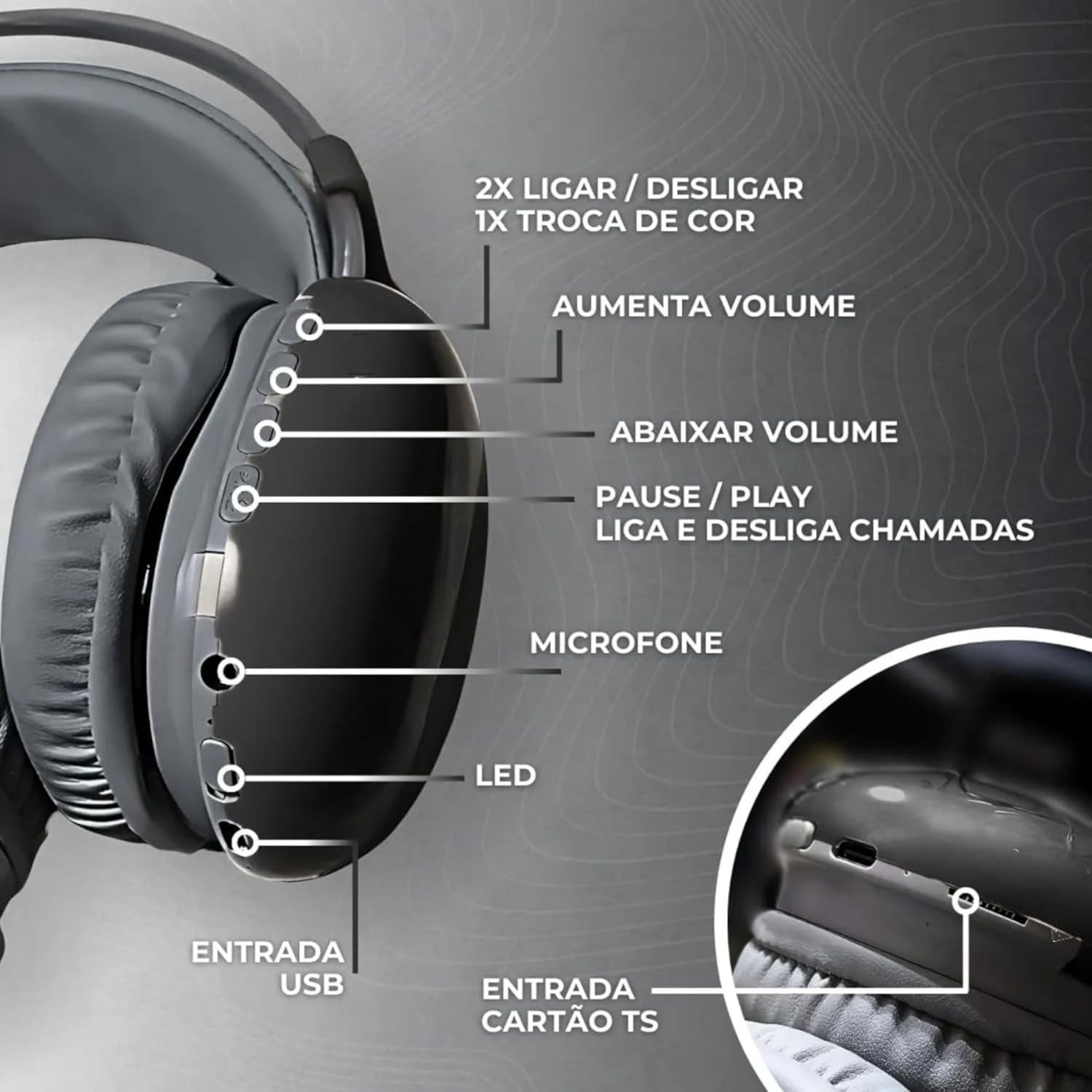
Figuur 2: Gedetailleerd view of the headset's left earcup, illustrating the control buttons for volume, track navigation, play/pause, call management, and the USB charging port, microphone, and SD card slot.
| Knoppie/poort | Funksie |
|---|---|
| Kragknoppie | Press and hold for 3 seconds to Power On/Off. Double press to change RGB light mode. |
| Volume op (+) / Volgende snit | Druk kort om die volume te verhoog. Druk lank om na die volgende snit oor te slaan. |
| Volume af (-) / Vorige snit | Druk kort om die volume te verlaag. Druk lank om na die vorige snit te gaan. |
| Play/Pause / Call Button | Short press to Play/Pause music. Short press to Answer/End calls. Long press to Reject calls. |
| Modusknoppie (M) | Short press to switch between Bluetooth, FM Radio, and SD Card modes. |
| Type-C laaipoort | For charging the headset battery. |
| 3.5 mm AUX -poort | Vir bedrade klankverbinding. |
| TF (SD) Card Slot | Vir die speel van klank files directly from a memory card. |
| Mikrofoon | Vir stemoproepe. |
3.2 RGB LED Lighting
The headset features colorful RGB LED lights on the earcups. You can control these lights:
- To change light mode: Double press the Power button.
- To turn off lights: Continue double-pressing the Power button until the lights turn off, or refer to specific instructions if a dedicated light button is present (not explicitly stated in data, assuming power button control).

Figure 3: The headset displaying its vibrant RGB LED lighting feature on the earcups.
3.3 FM-radiowerking
Om die FM-radiofunksie te gebruik:
- Druk die Modus (M) knoppie om na FM-radiomodus oor te skakel.
- Druk lank op die Speel / Pouse knoppie om outomaties beskikbare FM-stasies te skandeer en te stoor.
- Gebruik die Volgende snit (+) en Vorige snit (-) knoppies om tussen gestoorde stasies te navigeer.
4. Onderhoud
- Skoonmaak: Gebruik 'n sagte, droë lap om die headset skoon te maak. Moenie skuurmiddels of oplosmiddels gebruik nie.
- Berging: Bêre die oorfone op 'n koel, droë plek weg van direkte sonlig en uiterste temperature.
- Batterysorg: Om die batterylewe te verleng, vermy om die battery gereeld heeltemal te ontlaai. Laai die oorfone gereeld, selfs al word dit nie vir lang tye gebruik nie.
- Waterblootstelling: Hierdie oorfone is nie waterdig nie. Vermy blootstelling aan water of oormatige vog.
5. Probleemoplossing
| Probleem | Moontlike oorsaak | Oplossing |
|---|---|---|
| Die oorfone skakel nie aan nie. | Lae battery. | Laai die oorfone volledig. |
| Kan nie via Bluetooth koppel nie. | Oorfone nie in paringsmodus nie; Bluetooth af op toestel; toestel te ver. | Ensure headset is in pairing mode. Turn on Bluetooth on your device. Move device closer to headset (within 10 meters). |
| Geen geluid of lae volume nie. | Volume too low; incorrect source; headset not connected. | Increase volume on both headset and connected device. Ensure correct mode (Bluetooth, AUX, SD). Reconnect headset. |
| Sound distortion (especially with RGB lights). | Interference from RGB lighting. | Try changing the RGB light mode or turning off the RGB lights if distortion occurs. |
| Mikrofoon werk nie. | Microphone muted; incorrect audio input selected on device. | Ensure microphone is not muted. Check audio input settings on your connected device. |
6. Spesifikasies
| Kenmerk | Detail |
|---|---|
| Model Naam | B30 |
| Handelsmerk | Generies |
| Kleur | Green (variant shown) |
| Koptelefoonvormfaktor | Oor-oor |
| Verbindingstegnologie | Bluetooth, Draadloos |
| Draadlose kommunikasietegnologie | Bluetooth 5.2 |
| Impedansie | 140 ohm |
| Geraasbeheer | Passiewe ruisonderdrukking |
| Koptelefoonaansluiting | 3.5 mm-aansluiting |
| Ingesluit komponente | Cable (charging and AUX) |
| Ouderdomsreeksbeskrywing | Volwasse |
| Land van oorsprong | China |
| Aantal items | 1 |
| Beheer metode | Via App (Note: Product description implies physical buttons, 'Via App' might be a generic spec entry) |
| Tipe oudiobestuurder | Dinamiese drywer (40 mm) |
| Materiaal | Leer (oorkussings) |
| Spesifieke gebruike vir produk | School, Office Work, Sports, Travel |
| Versoenbare toestelle | Laptops, Tablets, Mobile Phones, Smart Speakers, Televisions |
| Item gewig | 3 Grams (Note: This weight seems unusually low for an over-ear headset and might be an error in the source data. Actual weight is likely higher.) |
7. Waarborg en Ondersteuning
7.1 Waarborginligting
There are no explicit warranties provided for this product as per the available information. Please refer to your retailer's return policy for details on product returns or exchanges.
7.2 Kliëntediens
For any questions or issues not covered in this manual, please contact your point of purchase or the manufacturer's customer service. Contact details are typically found on the product packaging or the retailer's webwebwerf.