
1. Inleiding
The CUBOT Kingkong 11 is a rugged 5G smartphone designed for durability and high performance. It features a powerful processor, extensive memory, a large battery, and an advanced camera system, all housed in a robust, water-resistant, and dustproof body.
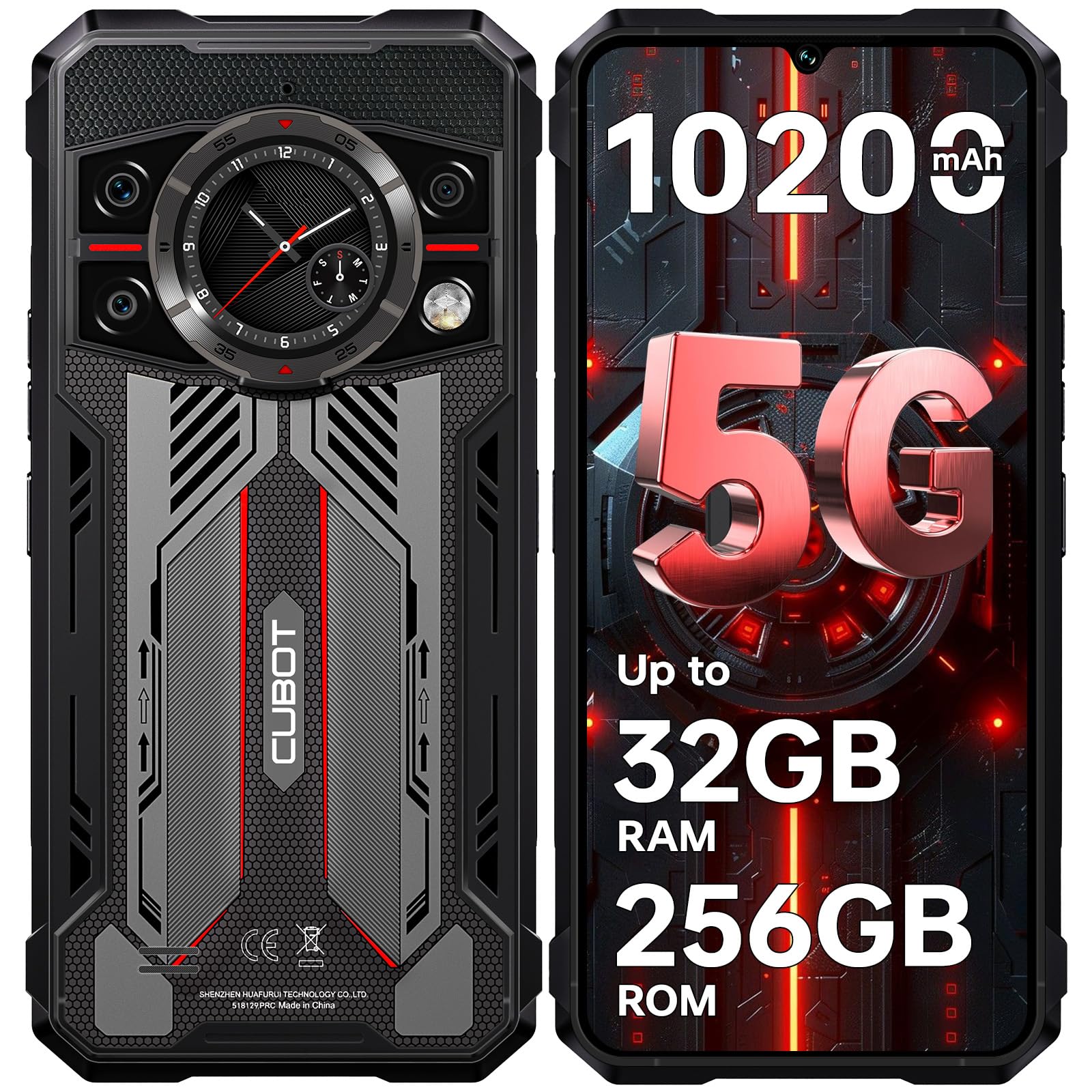
Beeld: Voor en agter view of the CUBOT Kingkong 11 5G smartphone, highlighting its rugged design.
2. Aanvanklike Opstelling
2.1. SIM-kaarte en MicroSD-kaart insit
The CUBOT Kingkong 11 supports dual SIM cards and a MicroSD card for expanded storage.
- Vind die SIM-kaartlaai aan die kant van die toestel.
- Gebruik die meegeleverde SIM-uitwerpgereedskap om die skinkbord oop te maak.
- Carefully place your Nano-SIM cards and/or MicroSD card into the designated slots. Ensure correct orientation.
- Druk die skinkbord versigtig terug in die toestel totdat dit gelyk met die kant is.

Image: Close-up of the CUBOT Kingkong 11 showing the SIM card tray with waterproof seals.
2.2. Powering On and Initial Charge
- Press and hold the power button located on the side of the device until the CUBOT logo appears.
- For first-time use, it is recommended to fully charge the device. Connect the USB-C cable to the phone and the 33W fast charger to a power outlet.
- Die battery-aanwyser op die skerm sal die laaistatus wys.

Image: Illustration of the 10200mAh battery capacity and 33W fast charging capability of the CUBOT Kingkong 11.
2.3. Sagteware-konfigurasie
Follow the on-screen prompts to complete the initial setup, including language selection, Wi-Fi connection, Google account login, and security settings (Face ID/Fingerprint).
3. Operasie
3.1. Android 15-bedryfstelsel
The CUBOT Kingkong 11 runs on Android 15, offering an intuitive user interface and enhanced features. Navigate through apps, customize settings, and utilize smart functions for an optimized experience.

Image: Screenshot of the Android 15 operating system interface on the CUBOT Kingkong 11.
3.2. Main Display (6.72" FHD+ 120Hz)
The 6.72-inch FHD+ display provides vibrant visuals with a 120Hz refresh rate for smooth scrolling and gaming. The 1080x2400 resolution ensures clear and detailed content viewing.

Image: Visual representation of the 6.72-inch FHD+ display with 120Hz refresh rate on the CUBOT Kingkong 11.
3.3. Rear Smart Display (1.46")
The 1.46-inch rear smart display provides quick access to essential information such as time, notifications, battery status, and compass without activating the main screen. This feature is useful for quick glances during activities.

Image: The 1.46-inch rear smart display of the CUBOT Kingkong 11, showing widgets for clock, camera, music, battery, calls, compass, and alarm.
3.4. Kamerastelsel
The device features a versatile quad-camera system:
- 108MP Hoofkamera: Captures high-resolution photos with impressive detail.
- 32MP Voorkamera: For high-definition selfies and video calls.
- 24MP Nagvisiekamera: Equipped with infrared LEDs for clear imaging in complete darkness.
- 8MP Makro-lens: Allows for close-up photography, capturing intricate details of small subjects.

Beeld: Oorview of the CUBOT Kingkong 11's quad-camera system, including the 108MP main, 32MP front, 24MP night vision, and 8MP macro lenses, with exampdie foto's.
3.5. Konnektiwiteit en Navigasie
The Kingkong 11 supports 5G full-band connectivity for fast data speeds. It includes NFC for contactless payments and data transfer, and a quadruple positioning system (GPS+GLONASS+BeiDou+Galileo) for accurate navigation.

Image: Graphic illustrating the CUBOT Kingkong 11's 5G ultra-fast global coverage and connectivity features.
4. Onderhoud
4.1. Duursaamheid en Beskerming
The CUBOT Kingkong 11 is certified with IP68/IP69K for dust and water resistance, and MIL-STD-810H for shock resistance. It can withstand submersion in water up to 5 meters for 30 minutes.
- Waterweerstand: Ensure all ports (USB-C, SIM tray) are properly sealed before exposing the device to water. After exposure to water, dry the device thoroughly before charging.
- Stofweerstand: The device is designed to prevent dust ingress. Clean any accumulated dust from ports and crevices using a soft, dry brush.
- Skokweerstand: While rugged, avoid intentional drops or impacts from extreme heights to preserve the device's integrity.

Image: Visual representation of the CUBOT Kingkong 11's IP68, IP69K, and MIL-STD-810H certifications for water, dust, and shock resistance.
4.2. Skoonmaak
Use a soft, lint-free cloth to clean the screen and body of the phone. For stubborn smudges, a slightly damp lap kan gebruik word, gevolg deur onmiddellike droogmaak.
5. Probleemoplossing
5.1. Toestel skakel nie aan nie
- Maak seker dat die battery gelaai is. Koppel die laaier aan en wag 'n paar minute voordat jy weer probeer aanskakel.
- Druk en hou die aan/af-knoppie vir ten minste 10-15 sekondes in om 'n geforseerde herbegin uit te voer.
5.2. Poor Performance/Lag
- Maak onnodige agtergrondtoepassings toe.
- Vee kasdata uit vir programme wat gereeld gebruik word.
- Maak seker dat voldoende stoorplek beskikbaar is. Oorweeg dit om groot hoeveelhede te skuif. files to the MicroSD card or cloud storage.
- Herbegin die toestel gereeld.
5.3. Laaiprobleme
- Verify that the charging cable and adapter are securely connected and undamaged.
- Try using a different compatible charger and cable.
- Check the USB-C port for any debris or obstruction.
5.4. Probleme met netwerkverbinding
- Ensure SIM cards are correctly inserted and activated.
- Check network settings (e.g., APN settings) with your service provider.
- Skakel vliegtuigmodus aan en af.
- Herbegin die toestel.
6. Spesifikasies
| Kenmerk | Detail |
|---|---|
| Handelsmerk | KUBOT |
| Model | CUBOT KINGKONG 11 |
| Bedryfstelsel | Android 15 |
| Verwerker | 5G Dimensity 7025 Octa-Core |
| RAM | Up to 32 GB (16 GB physical + 16 GB extended) |
| Interne berging | 256 GB |
| Uitbreidbare berging | Tot 1 TB via MicroSD-kaart |
| Hoofvertoning | 6.72 inches FHD+ (1080x2400), 120Hz refresh rate, 450 nits brightness |
| Agterste vertoning | 1.46 inches Smart Display |
| Hoofkamera | 108 MP |
| Voorste kamera | 32 MP |
| Nag Visie Camera | 24 MP with IR LED |
| Makro lens | 8 MP |
| Battery kapasiteit | 10200 mAh |
| Laai | 33W vinnige laai, OTG omgekeerde laai |
| Konnektiwiteit | 5G, NFC, Dubbele SIM |
| Navigasie | GPS+GLONASS+BeiDou+Galileo |
| Duursaamheid | IP68/IP69K, MIL-STD-810H (Water resistant up to 5m for 30 min) |
| Sekuriteit | Face ID, Fingerprint Sensor |
| Afmetings | 22.4 x 17.3 x 4.2 cm (Pakket) |
| Gewig | 700 g (Pakket) |

Image: Energy label for the CUBOT Kingkong 11, showing battery life and durability ratings. View EPREL Produk Inligtingsblad
7. Waarborg en Ondersteuning
CUBOT offers a comprehensive support package for the Kingkong 11:
- Terugsendings: Hassle-free returns within 30 days of purchase.
- Waarborg: A two-year warranty covers manufacturing defects.
- Tegniese ondersteuning: Long-term technical assistance is available.
- Kliëntediens: 24/7 online customer service is provided for any inquiries during your ownership.
For assistance, please contact CUBOT customer service through their official channels.