
WOLFANG WDV01
WOLFANG WDV01 Portable DVD Player User Manual
Model: WDV01
1. Inleiding
Thank you for choosing the WOLFANG WDV01 Portable DVD Player. This manual provides essential information for setting up, operating, and maintaining your device. Please read it carefully before use to ensure optimal performance and longevity of your product.
The WOLFANG WDV01 is designed for portable entertainment, featuring a 9.5-inch unit with a 7.5-inch HD swivel screen, stereo speakers, and a long-lasting battery. It supports various disc and file formats, making it versatile for different media content.
2. Pakketinhoud
Verifieer dat alle items in die pakket teenwoordig is:
- WOLFANG WDV01 Portable DVD Player
- Afstandbeheer
- Gebruikershandleiding
- WS-laaier
- Motorlaaier
- 3-in-1 AV-kabel

Image: Contents of the WOLFANG WDV01 package, showing the DVD player, remote control, user manual, AC charger, car charger, and AV cable.
3. Produk verbyview
3.1 Sleutelkenmerke
- Vertoon: 9.5-inch unit with 7.5-inch HD eye-protection screen.
- Skermrotasie: 270° horizontal rotation and 180° vertical flip for flexible viewhoeke.
- Oudio: Geïntegreerde stereoluidsprekers.
- Batterylewe: Tot 6 uur se afspeeltyd op 'n volle lading.
- Kragopsies: AC power adapter and car charger included.
- Geheue funksie: Breakpoint memory resumes playback from the last stopped point.
- Verenigbaarheid van media: Supports DVD, SVCD, VCD, CD-R/RW discs.
- File Formaat ondersteuning: JPEG, WMA, MPG, MP3, DIVX, VOB, AVI.
- Eksterne verbinding: USB port, SD card slot (max 32GB), AV input, AV output, 3.5mm headphone jack.
3.2 Toesteluitleg
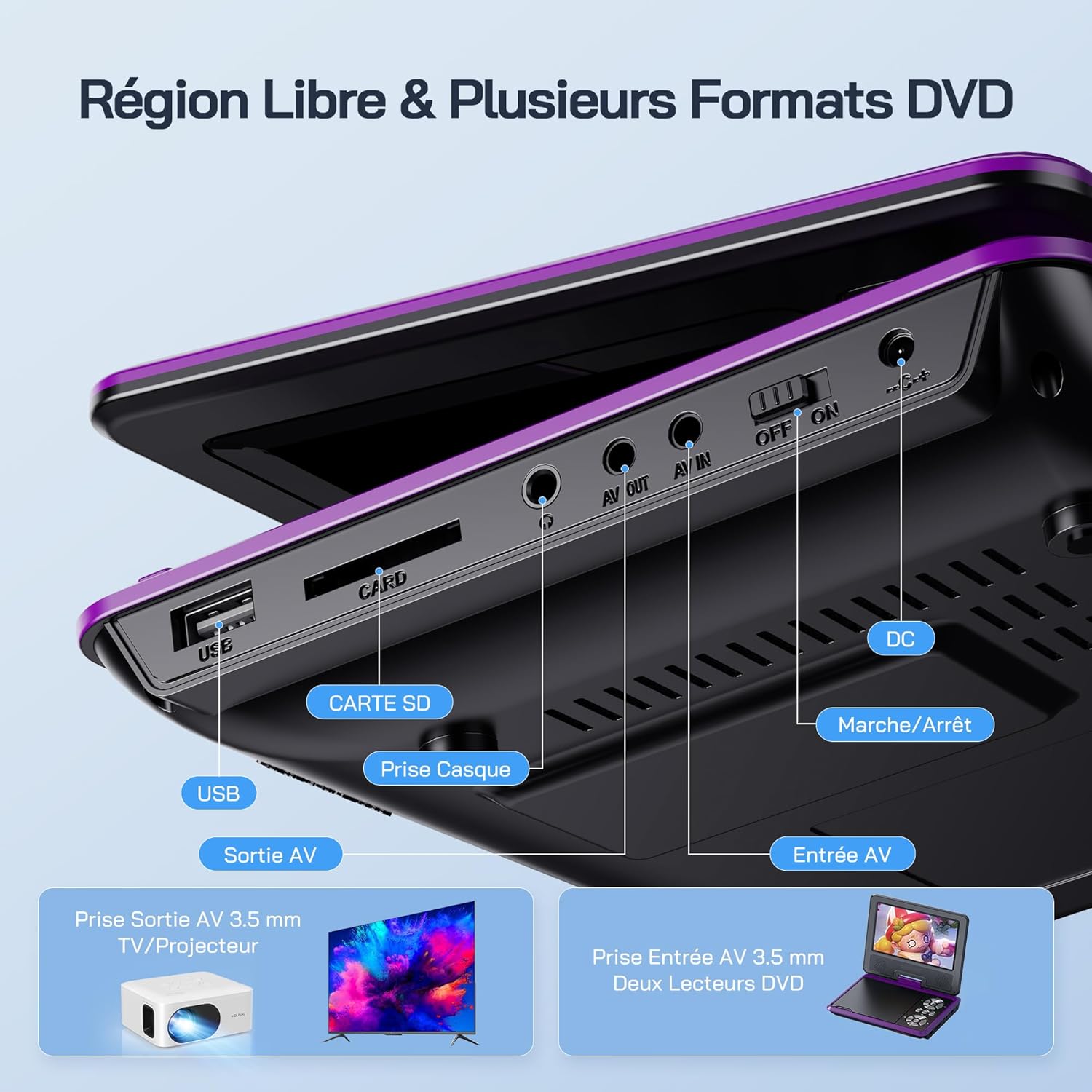
Beeld: Gedetailleerd view of the side panel of the WOLFANG WDV01, highlighting the USB port, SD card slot, headphone jack, AV OUT, AV IN, DC power input, and ON/OFF switch.
- USB-poort: Vir die koppeling van USB-flash drives.
- SD-kaartgleuf: For inserting SD/MMC cards.
- Koptelefoonaansluiting: 3.5 mm-klankuitset vir oorfone.
- AV UIT: Audio/Video output for connecting to a TV or projector.
- AV IN: Audio/Video input for connecting external devices or another DVD player.
- DC IN: Power input for AC adapter or car charger.
- AAN/UIT -skakelaar: Kragbeheer vir die toestel.
4. Opstelling
4.1 Aanvanklike laai
Before first use, fully charge the device. Connect the AC charger to the DC IN port on the player and plug it into a wall outlet. The charging indicator light will illuminate. Once fully charged, the light may change color or turn off, depending on the model.
4.2 Aan-/afskakel
To power on the device, slide the ON/OFF switch to the "ON" position. To power off, slide it to the "OFF" position.
4.3 Skermverstelling
The screen can be rotated 270 degrees horizontally and flipped 180 degrees vertically. Adjust the screen to your preferred viewing angle. This feature is particularly useful for mounting in a car or for shared viewing.

Image: Illustration demonstrating the 270-degree rotation and 180-degree flip capabilities of the WOLFANG WDV01 screen.
5. Bedryfsinstruksies
5.1 Playing a DVD/CD
- Maak die skyfdeksel versigtig oop.
- Place a compatible DVD or CD onto the spindle, label side up.
- Maak die skyfdeksel toe.
- The player will automatically detect and begin playback. If not, select "Disc" from the main menu.
Let wel: This device supports DVD, SVCD, VCD, CD-R/RW discs. It is not compatible with 1080p, 4K, or Blu-ray discs.
5.2 Playing from USB/SD Card
- Steek 'n USB-geheuestokkie in die USB-poort of 'n SD-kaart in die SD-kaartgleuf.
- From the main menu, select "USB" or "SD" depending on your media source.
- Navigeer deur die dopgehou en files using the control buttons or remote control.
- Kies die gewenste file (JPEG, WMA, MPG, MP3, DIVX, VOB, AVI) to begin playback.
Let wel: Maximum supported Micro SD card capacity is 32GB. Video files should have a resolution up to 720x480. Image files should have a resolution up to 2650x1440.
5.3 Breakpoint Memory Function
The player automatically remembers the last playback position. When you power on the device again or re-insert the same disc/media, it will prompt you to resume playback from where you left off. This function may need to be activated in the system settings.

Image: Visual representation of the breakpoint memory feature, illustrating how the player can pause and resume video playback from the exact point of interruption.
5.4 Connecting to an External Display (TV/Projector)
Use the provided 3-in-1 AV cable to connect the player to a TV or projector.
- Connect one end of the AV cable to the AV OUT port on the DVD player.
- Connect the other end of the AV cable to the corresponding AV input ports (Yellow for Video, Red for Right Audio, White for Left Audio) on your TV or projector.
- Select the correct AV input source on your TV or projector.
- The player's screen content will now be displayed on the external screen.

Image: A WOLFANG WDV01 Portable DVD Player connected to a large television screen, displaying content for a family watching together, demonstrating the TV sync feature.
5.5 Connecting to Another DVD Player (AV IN)
The AV IN port allows you to connect another compatible device, such as a second DVD player, to display its content on the WOLFANG WDV01 screen.
- Connect one end of an AV cable to the AV OUT port of the external device.
- Connect the other end of the AV cable to the AV IN port on the WOLFANG WDV01.
- Switch the WOLFANG WDV01 to AV input mode (refer to the on-screen menu or remote control for this option).
6. Onderhoud
6.1 Die skoonmaak van die toestel
- Maak seker die toestel is afgeskakel en ontkoppel voordat dit skoongemaak word.
- Gebruik 'n sagte, droë lap om die buitekant van die speler af te vee.
- Vir die skerm, gebruik 'n sagte, pluisvrye lap wat spesifiek vir elektroniese skerms ontwerp is. Moenie skuurmiddels of oplosmiddels gebruik nie.
- To clean the disc lens, use a specialized DVD lens cleaning disc. Do not attempt to clean the lens manually.
6.2 Batterysorg
- Vermy blootstelling van die toestel aan uiterste temperature (warm of koud).
- If storing the device for an extended period, charge the battery to approximately 50% to prolong its lifespan.
- Moenie probeer om die interne battery self te vervang nie. Kontak kliëntediens indien batteryprobleme ontstaan.
6.3 Berging
Store the player in a cool, dry place away from direct sunlight and moisture. Keep it in its original packaging or a protective case when not in use to prevent damage.
7. Probleemoplossing
| Probleem | Moontlike oorsaak | Oplossing |
|---|---|---|
| Geen krag nie | Battery drained, power adapter not connected, power switch off. | Charge the battery, ensure power adapter is securely connected, slide power switch to ON. |
| Skyf speel nie | Incompatible disc format, disc dirty/scratched, disc inserted incorrectly. | Check disc compatibility (no Blu-ray/4K), clean disc, insert disc label side up. |
| Geen klank nie | Volume too low, headphones connected, audio settings incorrect. | Increase volume, disconnect headphones, check audio output settings. |
| Geen beeld op TV nie | AV cable loose, incorrect TV input selected. | Ensure AV cable is securely connected, select correct AV input on TV. |
| USB/SD-kaart word nie herken nie | Incompatible format, card/drive damaged, incorrect file stelsel. | Ensure media is formatted to FAT32, check for damage, try another USB/SD card. Max 32GB SD card. |
If the problem persists after trying these solutions, please contact WOLFANG customer support.
8. Spesifikasies
| Kenmerk | Detail |
|---|---|
| Handelsmerk | WOLFANG |
| Model | WDV01 |
| Skerm grootte | 7.5 duim |
| Eenheid Grootte | 9.5 duim (skuins) |
| Skermresolusie | Tot 800 x 480 piksels |
| Skyfversoenbaarheid | DVD, SVCD, VCD, CD-R/RW |
| File Formateer ondersteuning | Video: AVI, MPG, MP3, DIVX, VOB; Audio: WMA, MP3; Image: JPEG |
| USB/SD-kaartondersteuning | Max 32GB (Micro SD) |
| Video Resolution (USB/SD) | Tot 720 x 480 piksels |
| Image Resolution (USB/SD) | Tot 2650 x 1440 piksels |
| Batterylewe | 4-6 uur |
| Item gewig | 1100 gram |
| UPC | 850067892205 |
9. Waarborg en Ondersteuning
9.1 Vervaardiger se waarborg
The WOLFANG WDV01 Portable DVD Player comes with a 24 maande vervaardiger se waarborg vanaf die aankoopdatum. Hierdie waarborg dek defekte in materiale en vakmanskap onder normale gebruik. Dit dek nie skade wat veroorsaak word deur misbruik, ongelukke, ongemagtigde wysigings of normale slytasie nie.
Behou asseblief jou aankoopbewys vir waarborgeise.
9.2 Kliëntediens
For any questions, technical assistance, or warranty claims, please contact WOLFANG customer support. Our team is available to assist you and aims to respond within 24 hours.
Contact information can typically be found on the official WOLFANG webwebwerf of deur jou aankoopplatform.
Verwante Dokumente - WDV01
 |
WOLFANG Draagbare Videospeler Gebruikershandleiding Omvattende gebruikershandleiding vir die WOLFANG Draagbare Videospeler, met besonderhede oor spesifikasies, veiligheidsinstruksies, bedieningsgids en afstandbeheerfunksies. Verskaf waarborginligting en ondersteuningskontakbesonderhede. |
 |
Sylvania SDVD1566 15.6-inch Portable DVD Player User Manual User manual for the Sylvania SDVD1566 15.6-inch Swivel Screen Portable DVD Player, covering safety, package contents, panel and remote functions, setup, playback, specifications, troubleshooting, and warranty. |
 |
How to Connect and Set Up Your DVD Player with HDMI or AV Cables Learn how to easily connect your DVD player to your TV using either standard A/V (Red-White-Yellow) cables or a modern HDMI cable. This guide provides step-by-step instructions for a seamless setup, ensuring you can enjoy your movies quickly. |
 |
Pyle PDV156BK 15.6" Draagbare CD/DVD-speler Gebruikersgids Gebruikersgids vir die Pyle PDV156BK, 'n 15.6" draagbare CD/DVD-speler met 'n hoë-resolusie HD-breedskerm en dubbele volle reeks stereoluidsprekers. Sluit veiligheidsinstruksies, kenmerke, opstelling, terugspeel, spesifikasies en probleemoplossing in. |
 |
Power Acoustik PD-348B Flip-down/Detachable 3.4" Monitor DVD/CD/MP3/MP4 Player Owner's Manual Comprehensive owner's manual for the Power Acoustik PD-348B car stereo system, covering installation, operation, features like Bluetooth, DVD/CD/MP3/MP4 playback, radio, troubleshooting, and specifications. |
 |
Pyle PDV177BK 15.6-Inch Portable CD/DVD Player User Guide Comprehensive user guide for the Pyle PDV177BK portable CD/DVD player, detailing features, setup, operation, troubleshooting, and safety instructions for its 15.6-inch Hi-Res HD widescreen display and dual stereo speakers. |
Ask a question about this manual
Ask about setup, troubleshooting, compatibility, parts, safety, or missing instructions. Manuals+ will review the question and use this page’s manual context to help answer it.