
bmani T16
bmani Wireless Earbuds User Manual
Model: T16
Handelsmerk: bmani
Inleiding
Welcome to the bmani Wireless Earbuds user manual. These Bluetooth headphones are designed for comfort and performance, featuring a secure over-ear fit, long battery life, and intuitive controls. This manual will guide you through setting up, operating, and maintaining your new earbuds.
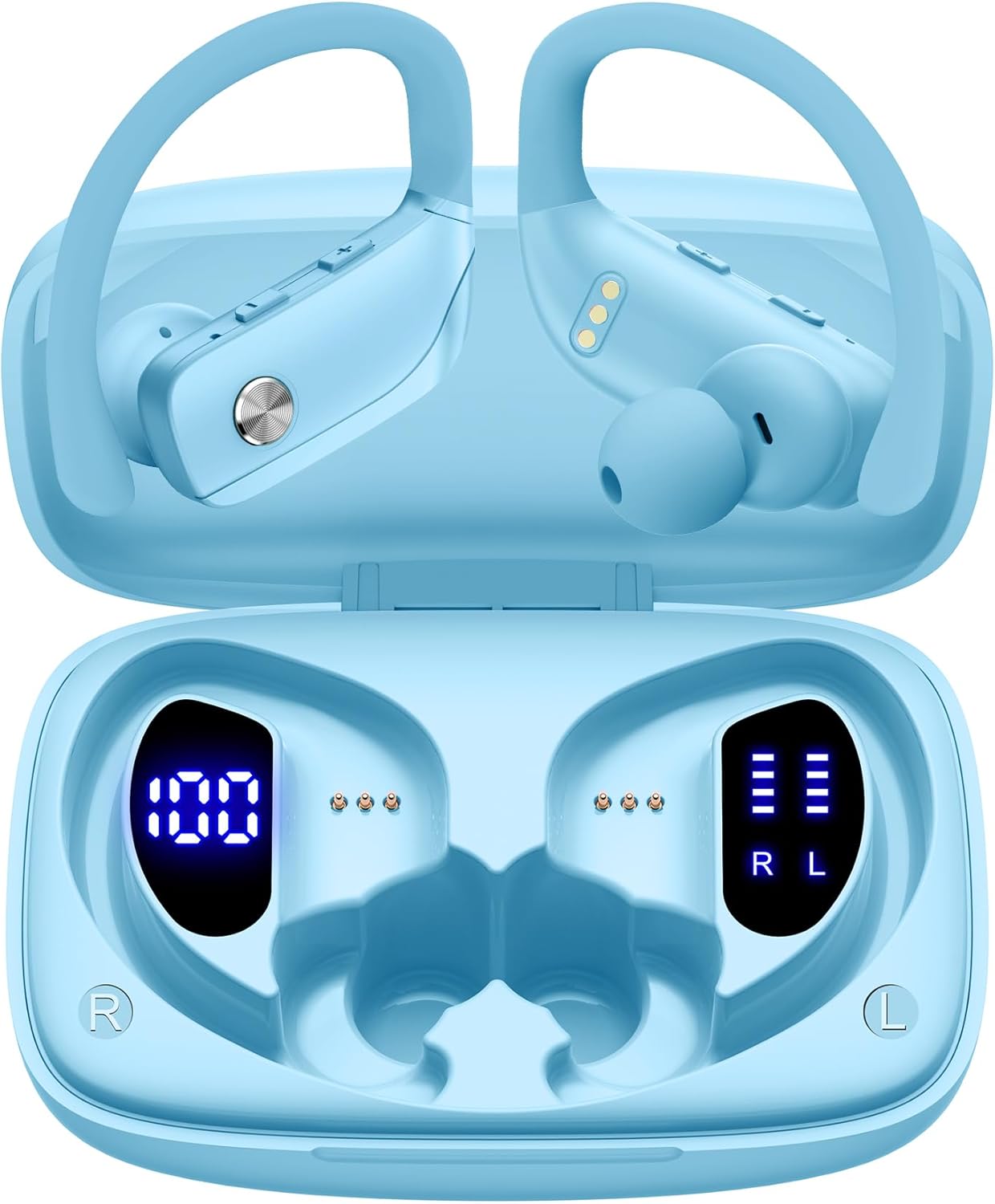
Image: The bmani Wireless Earbuds in their open sky blue charging case, showcasing the earbuds and the case's interior.
Wat is in die boks
- Draadlose oordopjes
- Laaikas
- Eartips (three size options: L, M, S)
- Tipe C-kabel
- Gebruikershandleiding (hierdie dokument)

Image: This image displays all the items included in your bmani Wireless Earbuds package: the two wireless earbuds, their charging case, a set of three different sized eartips (L, M, S), a Type-C charging cable, and the user manual.
Produk verbyview & Kenmerke
The bmani Wireless Earbuds are engineered for an exceptional audio experience with user-friendly features.
Dual LED Displays Charging Case
The charging case features dual LED displays. The left display shows the remaining battery power of the case in percentage. The right side indicates the charging process of each earbud with four grids, each representing 25% of the bud's power. The LED indicator light will flash during charging.

Image: This image highlights the dual LED digital display on the charging case. The left screen shows the charging case's battery capacity as a percentage, while the right screen displays the power status of the left (L) and right (R) earbuds using four bars each.
Lang batterylewe
Enjoy extended listening sessions with up to 8 hours of music time per earbud and an additional 40 hours provided by the 600mAh charging case, totaling 48 hours of playback.

Image: This diagram illustrates the impressive battery life: 8 hours of music time per earbud (50mAh each) and an additional 40 hours of listening time provided by the 600mAh charging case, totaling 48 hours of playback.
Bluetooth 5.0 and Hi-Fi Stereo Sound Quality
Equipped with advanced Bluetooth 5.0 technology, these earbuds provide a clear and smooth connection with extended range and fewer dropouts, ensuring crystal-clear calls and uninterrupted music listening. The 10mm speakers deliver Hi-Fi stereo sound.

Image: This image visually represents the 10mm speakers within the earbuds, emphasizing their capability to deliver Hi-Fi stereo sound.

Image: This image emphasizes the Bluetooth 5.0 technology, offering extended range and fewer dropouts, and the integration with voice assistants like Siri.
Designed for Sports (IPX5 Water Resistant)
These sport headphones are designed to stay securely in place during long hours of training, preventing shifting or falling out. They come with flexible earhooks and three pairs of ear caps (S, M, L) to ensure a comfortable and suitable fit, even during intense activities like camping, running, or working out. They are also IPX5 water-resistant, protecting them from splashes and sweat.

Image: This image shows a woman wearing the earbuds during exercise, highlighting their secure fit. An inset graphic demonstrates the flexible earhooks and the three included eartip sizes (L, M, S) for personalized comfort.

Image: This infographic summarizes key features: Dual LED Battery Display, 600mAh Charging Case, Anti-skid Earhooks, IPX5 Waterproof rating, Hi-Fi Stereo sound, and Voice Assistant compatibility.
Opstelling
Laai die oordopjes en omhulsel
Laai beide die oordopjes en die laaikas volledig voor die eerste gebruik.
- Connect the provided Type-C cable to the charging port on the back of the case.
- Steek die ander kant in 'n USB-kragbron.
- The LED display on the case will show the charging progress.
- Once fully charged, the display will show 100% for the case and full bars for both earbuds.
Pairing with Your Device (One-step Pairing)
The bmani earbuds feature automatic pairing for convenience.
- Open the charging case and take out both earbuds. They will automatically power on and attempt to pair with each other.
- Aktiveer Bluetooth op jou toestel (slimfoon, tablet, skootrekenaar, ens.).
- Soek vir "T16" in the list of available Bluetooth devices and select it to connect.
- Sodra dit gekoppel is, sal jy 'n oudio-prompt hoor, en die oorfone sal gereed wees vir gebruik.
- The earbuds will automatically reconnect to the last paired device when taken out of the case.

Image: This image demonstrates the one-step pairing process, showing the earbuds connected to a smartphone. It also highlights their wide compatibility with various Bluetooth-enabled devices, including notebooks, TVs, desktops, smartwatches, and tablets.
Bedryfsinstruksies
Dra die oordopjes
For optimal sound and comfort, ensure the earbuds are worn correctly.
- Put the ear hook over the back of your ear.
- Insert the ear cap into your ear canal.
- Adjust by twisting the earbud for a comfortable and secure fit.

Image: This visual guide provides three simple steps for wearing your earbuds: 1. Place the ear hook over your ear. 2. Insert the ear cap into your ear. 3. Adjust the earbud by twisting it for a secure and comfortable fit.
Kontroles
The bmani earbuds feature intuitive button controls.
| Aksie | Funksie |
|---|---|
| Klik een keer | Speel/Pauseer Musiek, Beantwoord/Beëindig Oproep |
| Quick Double-click (R) | Volgende Snit |
| Quick Double-click (L) | Vorige Snit |
| Press "+" Button | Volume op |
| Press "-" Button | Volume af |
| Quick Triple-click | Aktiveer stemassistent |
| Hou vas | Krag aan/af |

Image: This image illustrates the dual audio controls on the earbuds. It shows the physical volume buttons (+/-) and a diagram explaining single click for play/pause, double click for track navigation, and holding the button for power on/off.

Image: This infographic details the various controls: single click for call answer/end and play/pause, double click for next/previous track, pressing +/- for volume, and triple click for voice assistant.
Onderhoud
To ensure the longevity and optimal performance of your bmani Wireless Earbuds, follow these maintenance guidelines:
- Skoonmaak: Regularly clean the earbuds and charging case with a soft, dry, lint-free cloth. Do not use harsh chemicals or abrasive materials.
- Oordoppe: Remove and clean the eartips periodically. You can gently wash them with mild soap and water, then ensure they are completely dry before reattaching.
- Waterweerstand: The earbuds are IPX5 water-resistant, meaning they can withstand splashes and sweat. Do not submerge them in water or expose them to heavy rain. Ensure they are dry before placing them back in the charging case.
- Berging: When not in use, store the earbuds in their charging case to protect them from dust and damage.
- Laai: Use only the provided Type-C cable for charging. Avoid extreme temperatures during charging and storage.
Probleemoplossing
If you encounter any issues with your bmani Wireless Earbuds, please refer to the following common solutions:
Earbuds not pairing with each other or with device:
- Maak seker dat albei oordopjes ten volle gelaai is.
- Place both earbuds back into the charging case, close the lid, wait a few seconds, then open the lid and take them out again. This often resets the pairing.
- On your device, forget or delete "T16" from your Bluetooth device list. Then, try the pairing process again from step 1.
- Maak seker dat geen ander Bluetooth-toestelle met die verbinding inmeng nie.
Geen geluid of lae volume:
- Check the volume level on both your earbuds and your connected device.
- Maak seker dat die oorfone behoorlik in jou ore sit.
- Clean any debris from the eartips or earbud speakers.
- Koppel die oordopjes weer aan jou toestel.
Laaikas laai nie:
- Maak seker dat die Tipe-C-kabel stewig aan beide die kas en die kragbron gekoppel is.
- Probeer 'n ander USB-kragadapter of -poort.
- Kontroleer die laaikabel vir enige skade.
Oorfone val uit:
- Try different sizes of eartips provided in the box to find the best fit for your ears.
- Ensure the ear hooks are correctly positioned over your ears.
Spesifikasies
| Kenmerk | Detail |
|---|---|
| Model Naam | T16 |
| Verbindingstegnologie | Draadloos (Bluetooth 5.0) |
| Batterylewe | Up to 8 hours (earbuds), 40 hours (with charging case) |
| Laaikas kapasiteit | 600mAh |
| Oordopjes se batterykapasiteit | 50mAh (elk) |
| Waterweerstand | IPX5 |
| Tipe beheer | Knoppie beheer |
| Materiaal | Plastiek |
| Item gewig | 2 ons |
| Produk afmetings | 3.54 x 2.36 x 0.79 duim |
| Ingesluit komponente | Charging Case, Eartip, Type-C Cable, User Manual, Wireless Earbuds |
| Versoenbare toestelle | All Bluetooth-enabled mobile phones, tablets, laptops, computers, audiobooks, TV, and all devices with Bluetooth 5.0 |
Waarborg & Ondersteuning
bmani products are designed with quality and reliability in mind. For specific warranty information or technical support, please refer to the contact details provided on the product packaging or visit the official bmani webwerf. Hou jou aankoopkwitansie vir waarborgeise.
Verwante Dokumente - T16
 |
BMANI T16 Ware Draadlose Stereo (TWS) Oordopjes Gebruikershandleiding Gebruikersgids vir BMANI T16 TWS draadlose oordopjes, met besonderhede oor opstelling, paring, kontroles, laai, onderhoud, probleemoplossing, veiligheid en voldoeningsinligting. |
 |
N35 Ware Draadlose Oordopjes Gebruikershandleiding | PocBuds Omvattende gebruikershandleiding vir PocBuds N35 True Wireless-oordopjes. Leer meer oor opstelling, paring, kontroles, laai, onderhoud en probleemoplossing vir jou N35-oordopjes. |
 |
coioc T1 Draadlose Oordopjes Gebruikershandleiding Hierdie gebruikershandleiding verskaf omvattende instruksies vir die coioc T1 draadlose oordopjes, wat opstelling, verbinding, werking, probleemoplossing en veiligheidsriglyne dek. Leer hoe om jou oordopjes te koppel, te gebruik en in stand te hou vir optimale werkverrigting. |
 |
BMANI T16 Ware Draadlose Sport Oordopjes Gebruikershandleiding en Opstelgids Omvattende gebruikershandleiding vir BMANI T16 True Wireless Sports-oordopjes, wat paring, laai, onderhoud, probleemoplossing en produkspesifikasies vir optimale werkverrigting dek. |
 |
OCC T18 Ware Draadlose Sport Oordopjes Gebruikershandleiding Omvattende gebruikershandleiding vir OCC T18 True Wireless Sports-oordopjes, met besonderhede oor opstelling, Bluetooth-verbinding, funksies, laai, toestelversoenbaarheid en veiligheidsmaatreëls. |
 |
BMANI T16 Ware Draadlose Sport Oordopjes Gebruikershandleiding en Opstelgids Omvattende gebruikershandleiding vir BMANI T16 True Wireless Sports-oordopjes, insluitend instruksies vir opstelling, paring, laai, probleemoplossing en onderhoud. |
Ask a question about this manual
Ask about setup, troubleshooting, compatibility, parts, safety, or missing instructions. Manuals+ will review the question and use this page’s manual context to help answer it.