
1. Belangrike veiligheidsinstruksies
Please read all instructions carefully before using this appliance and retain them for future reference. Failure to follow these instructions may result in electric shock, fire, or serious personal injury.
- Verseker die kragtoevoer voltage stem ooreen met die graderingsetiket op die toestel.
- Moenie die waaier met 'n beskadigde koord of prop gebruik nie. Indien die koord beskadig is, moet dit deur die vervaardiger, sy diensagent of soortgelyk gekwalifiseerde persone vervang word om 'n gevaar te vermy.
- Ontkoppel altyd die waaier uit die kragtoevoer voordat u dit skoonmaak, diens of skuif.
- Moenie vingers of enige voorwerpe in die waaierrooster steek terwyl dit werk nie.
- Keep the fan away from water or other liquids. Do not use it in wet or damp omgewings.
- Hierdie toestel is slegs vir binnenshuise gebruik. Moenie buite gebruik nie.
- Do not place the fan near heat sources such as radiators, heat registers, stoves, or other appliances that produce heat.
- Hou toesig oor kinders om te verseker dat hulle nie met die toestel speel nie.
- Do not use the fan in areas where gasoline, paint, or flammable liquids are stored.
2. Produk verbyview
The Altus AL 40 TFB is a sleek and efficient tower air cooler designed for indoor use. It features a compact design, multiple speed settings, and easy-to-use push-button controls.
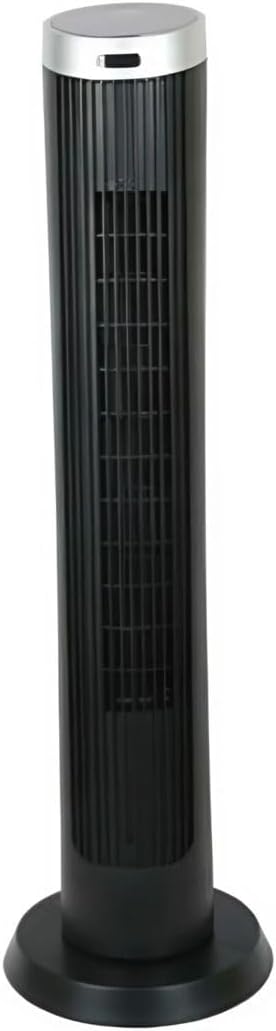
Figuur 2.1: Voorkant view of the Altus AL 40 TFB Tower Air Cooler. This image shows the tall, slender black body of the fan with its air outlet grille and a stable round base.
Komponente:
- Beheerpaneel: Located on the top of the unit for easy access to all functions.
- Luguitlaatrooster: Vertical grille on the front for air dispersion.
- Basis: Stable round base for secure placement.
- Kragkabel: Geleë aan die agterkant van die eenheid.

Figuur 2.2: Gedetailleerd view of the control panel on top of the Altus AL 40 TFB Tower Air Cooler. The panel features a digital display showing '28' and several push buttons for various functions.
3. Opstelling
Follow these steps to set up your Altus AL 40 TFB Tower Air Cooler:
- Pak uit: Carefully remove the fan from its packaging. Retain the packaging for future storage or transport.
- Basissamestelling (indien nodig): Some models may require minor base assembly. If your unit's base is detached, align the base sections and secure them according to the diagrams in the packaging. Ensure it is firmly attached.
- Plasing: Place the fan on a firm, level surface. Ensure there is adequate space around the fan for proper airflow, at least 30 cm (12 inches) from walls or furniture. This appliance is designed for indoor use only.
- Kragverbinding: Plug the power cord into a standard electrical outlet. Ensure the outlet meets the voltage vereistes gespesifiseer op die produketiket.
4. Bedryfsinstruksies
Your Altus AL 40 TFB Tower Air Cooler is equipped with user-friendly push-button controls on the top panel.
Beheerpaneel funksies:
- Kragknoppie (⏻): Press once to turn the fan ON, press again to turn it OFF.
- Spoedknoppie (💨): Press repeatedly to cycle through the 3 available fan speeds: Low, Medium, and High. The current speed setting may be indicated on the digital display.
- Modusknoppie (M): If available, press to select different operating modes (e.g., Normal, Natural, Sleep). Refer to the digital display for the active mode.
- Ossillasieknoppie (↔): Press to activate or deactivate the oscillation function, which allows the fan to rotate from side to side to distribute air over a wider area.
- Timer-knoppie (🕒): If available, press to set an automatic shut-off timer. Each press typically increases the timer duration by a set increment (e.g., 1 hour).
Algemene werking:
- Prop die waaier in 'n geskikte kragaansluiting.
- Druk die kragknoppie (⏻) to turn on the fan.
- Select your desired fan speed using the Speed Button (💨).
- Activate oscillation if desired by pressing the Oscillation Button (↔).
- To turn off the fan, press the Power Button (⏻) weer.
5. Onderhoud
Regular maintenance ensures optimal performance and extends the lifespan of your Altus AL 40 TFB Tower Air Cooler.
Skoonmaak:
- Ontkoppel altyd die waaier voordat dit skoongemaak word.
- Buitenste skoonmaak: Vee die buite-oppervlaktes van die waaier af met 'n sagte, damp cloth. Do not use abrasive cleaners, waxes, or polishes as they may damage the finish.
- Luginlaat-/uitlaatroosters: Use a vacuum cleaner with a brush attachment to gently remove dust and debris from the air inlet and outlet grilles. Do not attempt to disassemble the fan for cleaning.
- Maak seker dat die waaier heeltemal droog is voordat jy dit weer inprop en gebruik.
Berging:
Wanneer dit nie vir lang tye gebruik word nie, bêre die waaier op 'n koel, droë plek. Dit word aanbeveel om dit in sy oorspronklike verpakking te bêre om dit teen stof en skade te beskerm.
6. Probleemoplossing
If you encounter any issues with your Altus AL 40 TFB Tower Air Cooler, please refer to the following common problems and solutions:
- Fan skakel nie aan nie:
- Kontroleer of die kragkabel stewig in 'n werkende elektriese aansluiting ingeprop is.
- Ensure the power button on the control panel has been pressed.
- Verify that the household circuit breaker or fuse has not tripped.
- Swak lugvloei:
- Check if the fan speed is set to a higher setting.
- Ensure the air inlet and outlet grilles are not blocked by dust or obstructions. Clean them if necessary.
- Ongewone geraas:
- Ensure the fan is placed on a stable, level surface.
- Check for any foreign objects that might have fallen into the fan grilles.
- Indien die geraas voortduur, staak gebruik en kontak kliëntediens.
If the problem cannot be resolved using the above steps, please contact Altus customer support.
7. Spesifikasies
Detailed technical specifications for the Altus AL 40 TFB Tower Air Cooler:
| Kenmerk | Spesifikasie |
|---|---|
| Handelsmerk | Altus |
| Model Naam | AL 40 TFB |
| Kleur | Swart |
| Elektriese waaierontwerp | Floor Fan (Tower Type) |
| Kragbron | Elektries met koord |
| Produk Afmetings (D x B x H) | 29D x 29B x 101H cm |
| Montage tipe | Vloerberging |
| Voltooi Tipe | Geverf |
| Binne/buiteluggebruik | Binneshuise |
| Beheer metode | Drukknop |
| Aantal kragvlakke | 3 |
| Draadloos | Nee |
8. Waarborg en Ondersteuning
Altus provides comprehensive support for its products. For any assistance or warranty-related inquiries, please contact our customer service.

Figuur 8.1: Altus customer service and warranty information. The image displays the Altus logo, a message about service availability, and a contact number for support.
Our services are always available for your Altus products. You can benefit from our door-to-door service by calling our support line for any assistance you may need.
Arçelik Service Warranty: For products under warranty, our home product pickup service is provided free of charge.
Customer Support Line: 0850 210 0 888
Please have your product model number (AL 40 TFB) and purchase details ready when contacting support.