
1. Inleiding
Thank you for choosing the RUIZU 64GB HiFi Lossless MP3 Player. This device is engineered to deliver a pure, high-resolution audio experience, supporting a wide range of lossless formats. Its compact design and intuitive touchscreen interface make it ideal for enjoying your music without distractions. This manual provides essential information for setting up, operating, and maintaining your player.
2. Produk verbyview
The RUIZU HiFi Lossless MP3 Player features a durable CNC-milled aluminum alloy body, ensuring both elegance and resilience. Designed for a dedicated audio experience, it operates exclusively with wired headphones, eliminating latency and interference associated with wireless connections. The 2-inch HD IPS touchscreen provides clear visuals and easy navigation.
2.1. Fisiese kenmerke en afmetings
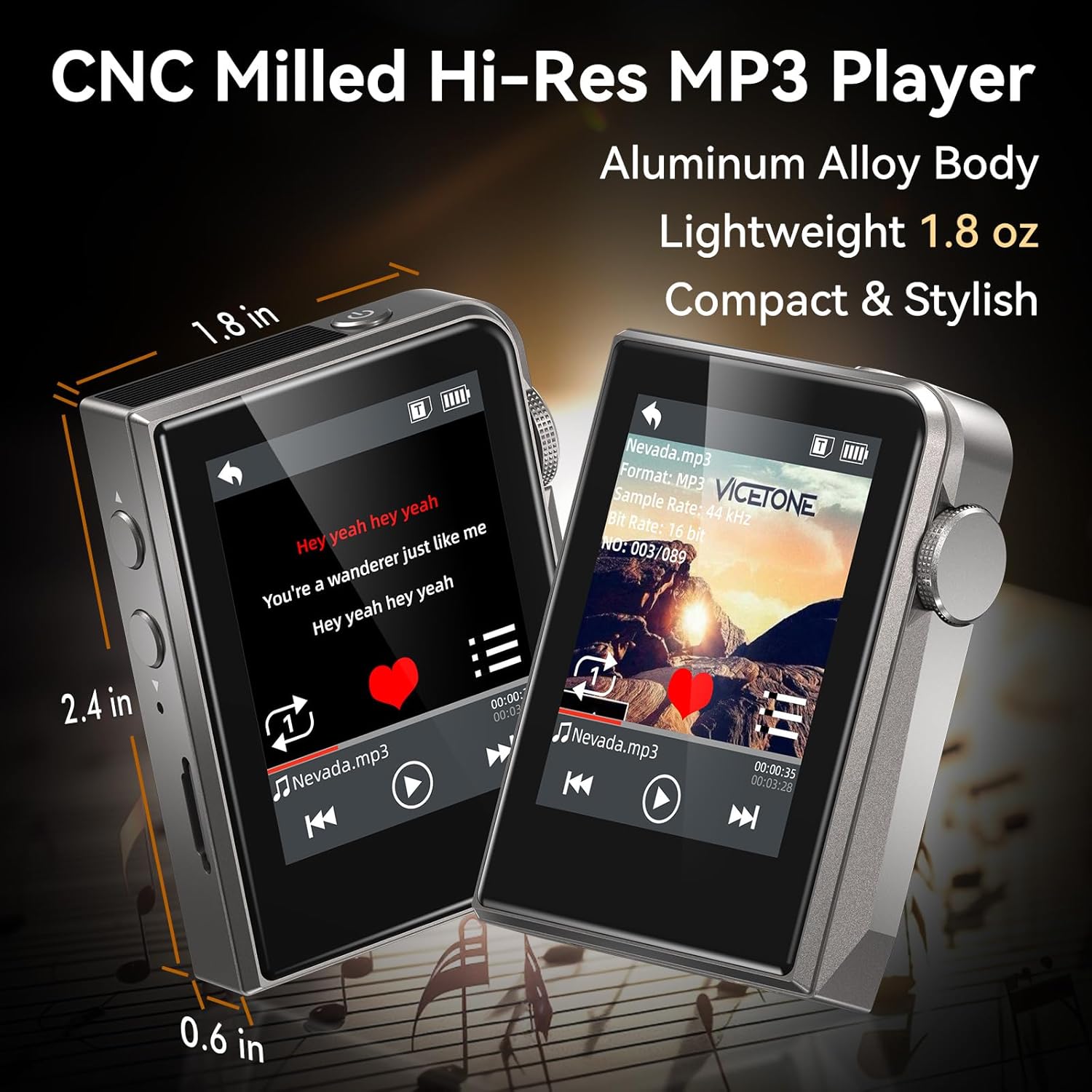
The RUIZU MP3 Player is compact and lightweight, measuring approximately 2.36 x 1.81 x 0.55 inches and weighing 1.76 ounces.
2.2. Wired Audio Design

The player supports advanced DAC decoding for high-resolution audio formats such as MP3, WMA, WAV, APE, FLAC, AAC, M4A, OGG, ALAC, DSF, and DFF, ensuring pure sound quality.
2.3. Pakketinhoud

The package includes the RUIZU 64GB Hi-res MP3 Player, 3.5mm wired headphones, a USB-C cable for charging and file transfer, a protective pouch, and this user manual.
3. Opstelling
3.1. Laai die toestel
Before first use, fully charge the MP3 player. Connect the provided USB-C cable to the player's USB-C port and the other end to a USB power adapter (not included) or a computer's USB port. The battery indicator on the screen will show charging status.
3.2. Musiek oordra Files
- Connect the MP3 player to your computer using the supplied USB-C cable.
- The player will appear as a removable disk drive on your computer.
- Sleep en los jou verlangde klank files (MP3, WAV, FLAC, APE, OGG, DSD256, etc.) into the player's internal storage or a connected microSD card folder.
- Safely eject the device from your computer before disconnecting the USB-C cable.
3.3. Invoeging van 'n MicroSD-kaart

The player supports microSD cards up to 128GB for expanded storage. Gently insert the card into the designated slot until it clicks into place.
4. Bedryfsinstruksies
4.1. Skakel aan/af
Press and hold the power button (usually on the side) to turn the player on or off.
4.2. Basiese navigasie
The player features a 2-inch HD IPS touchscreen for navigation. Swipe to browse menus and tap to select options. The dedicated Home button allows for quick return to the main menu.
4.3. Musiekweergawe

Access your music library through the 'Music' or 'Folder' options on the main screen. Select a song to begin playback. Use the on-screen controls for play/pause, skip forward/backward.
4.3.1. Terugspeelmodusse
The player offers various playback modes:
- Skommel: Speel snitte in 'n ewekansige volgorde.
- Herhaal een: Herhaal die huidige snit.
- Folder Loop: Repeats all tracks within the current folder.
- Opeenvolgend: Plays tracks in order.
- All Loop: Repeats all tracks in the current playlist/library.
4.3.2. Equalizer (EQ)
Customize your sound experience using the built-in equalizer. Navigate to the 'Equalizer' setting to adjust frequency bands or select from preset options.
4.3.3. Playlists and Favorites
Create up to 4 favorite lists or organize your music into folders for easy access.
4.3.4. Skip Tracks with Screen Off
For convenience during activities like jogging, the player allows you to skip tracks using physical buttons even when the screen is off.
4.4. Bykomende funksies
The player includes several utility functions:
- Stophorlosie: Vir tydsberekeningaktiwiteite.
- Kalender: Keep track of dates.
- Volumebeperking: Set a maximum volume level for hearing protection.
- Date & Time Display: View huidige datum en tyd.
- Slaaptimer: Automatically turn off the player after a set period.
- Power-Saving Shutdown: Configure automatic shutdown to conserve battery.
- Tale: Supports 21 languages for the user interface.
5. Onderhoud
- Hou die toestel droog. Vermy blootstelling aan vog of vloeistowwe.
- Clean the screen and body with a soft, dry cloth. Do not use abrasive cleaners.
- Vermy uiterste temperature.
- Moenie probeer om die toestel self uitmekaar te haal of te herstel nie. Dit sal die waarborg ongeldig maak.
6. Probleemoplossing
6.1. Device Does Not Turn On
- Ensure the battery is charged. Connect the player to a power source and allow it to charge for at least 30 minutes before attempting to power on again.
- If the device is unresponsive, try performing a soft reset by pressing and holding the power button for 10-15 seconds.
6.2. Geen klankuitset nie
- Check if headphones are properly connected to the 3.5mm audio jack.
- Verify the volume level is not set to zero or muted.
- Test with a different pair of wired headphones to rule out headphone malfunction.
- Verseker die klank files are not corrupted and are in a supported format.
6.3. Cannot Transfer Files
- Maak seker dat die USB-C-kabel stewig aan beide die speler en die rekenaar gekoppel is.
- Probeer 'n ander USB-poort op jou rekenaar of 'n ander USB-C-kabel.
- Herbegin jou rekenaar en die MP3-speler.
- Check if your computer's operating system recognizes the device as a removable disk.
6.4. MicroSD Card Not Detected
- Ensure the microSD card is inserted correctly and fully seated in its slot.
- Try removing and reinserting the card.
- Test with a different microSD card to determine if the card itself is faulty.
- Ensure the card is formatted to a compatible file stelsel (bv. FAT32).
7. Spesifikasies
| Kenmerk | Spesifikasie |
|---|---|
| Handelsmerk | RUIZU |
| Model | 64GB HiFi Lossless MP3 Player |
| Geheue berging kapasiteit | 64 GB (Internal), expandable up to 128GB via Micro SD card |
| Skerm grootte | 2 duim |
| Vertoon tegnologie | LCD |
| Verbindingstegnologie | Aux, USB (Wired only, No Bluetooth) |
| Spesiale kenmerke | Equalizer, Hi-Res Audio, Touch Screen |
| Versoenbare toestelle | Headphones, Personal Computer |
| Media tipe | Mikro SD |
| Item gewig | 4.9 onse |
| Batterye | 1 Nie-standaard battery (ingesluit) |
8. Waarborg en Ondersteuning
For warranty information and technical support, please refer to the official RUIZU webwebwerf of kontak u kleinhandelaar. Bewaar u aankoopbewys as bewys van aankoop vir enige waarborgeise.