
1. Inleiding
The Huepar SW-T100 is a versatile 3-in-1 measurement tool designed for various applications in construction, home improvement, and DIY projects. It integrates a laser distance meter, a green cross line laser level, and a traditional tape measure into a single compact device. This manual provides detailed instructions for safe and effective operation of your device.
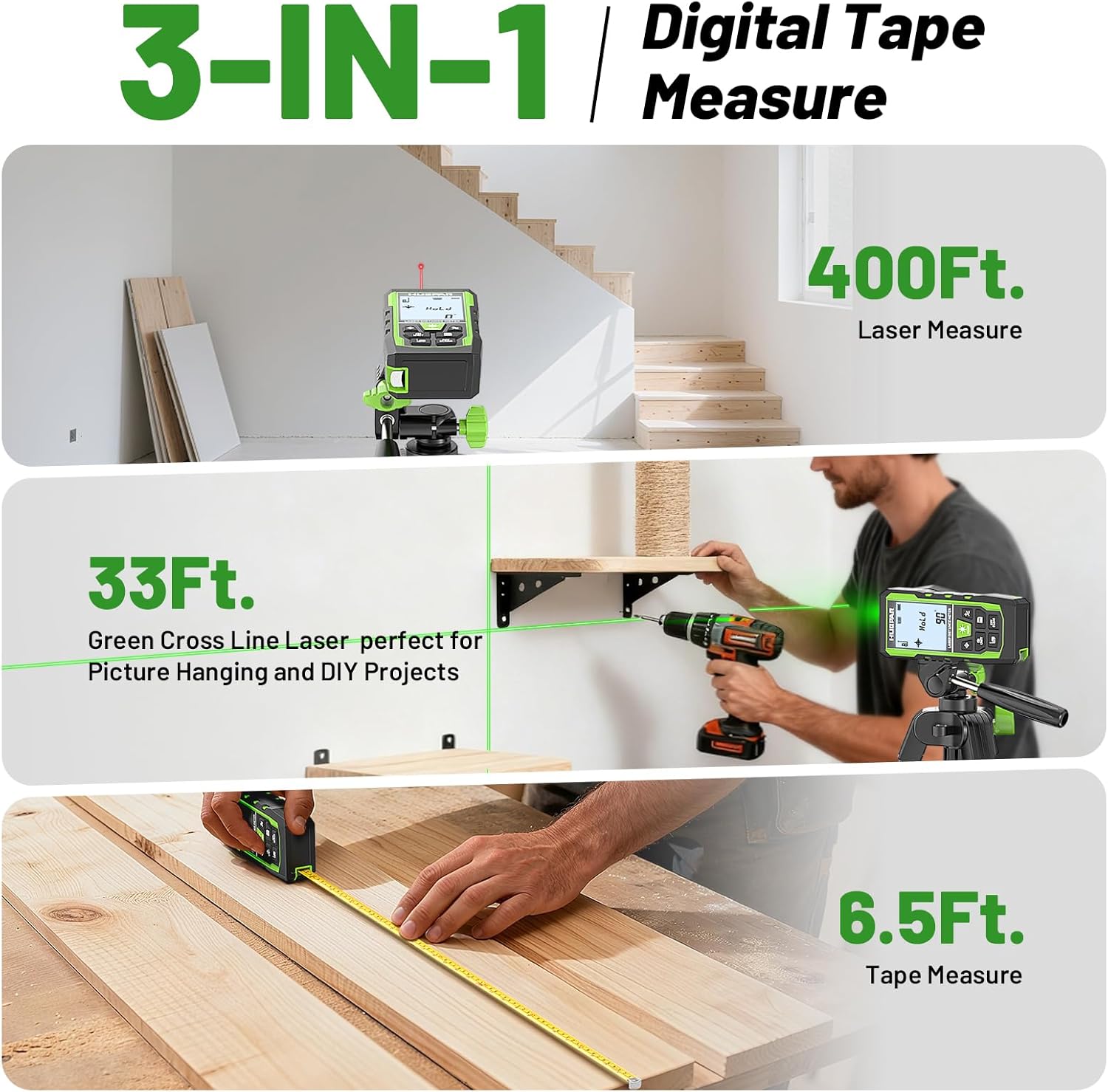
Image 1.1: The Huepar SW-T100 demonstrating its three core measurement functions.
2. Veiligheidsinligting
This device uses a Class 2 laser (490-560nm, <1mW). Observe the following safety precautions:
- Moenie direk in die laserstraal staar nie.
- Avoid directing the laser beam at other people or reflective surfaces.
- Moenie die toestel uitmekaar haal nie; blootstelling aan laserstraling kan voorkom.
- Hou die toestel buite bereik van kinders.
- Use only the specified Type-C charging cable.
3. Pakketinhoud
Verifieer dat alle items in jou pakket teenwoordig is:
- 1x Huepar SW-T100 3-in-1 Laser Measurement Tool
- 1x Tipe-C-laaikabel
- 1x Draagbare Draagtas
- 1x Handband
- 1x Auxiliary Measuring Target Plate
- 1x Gebruikershandleiding (hierdie dokument)
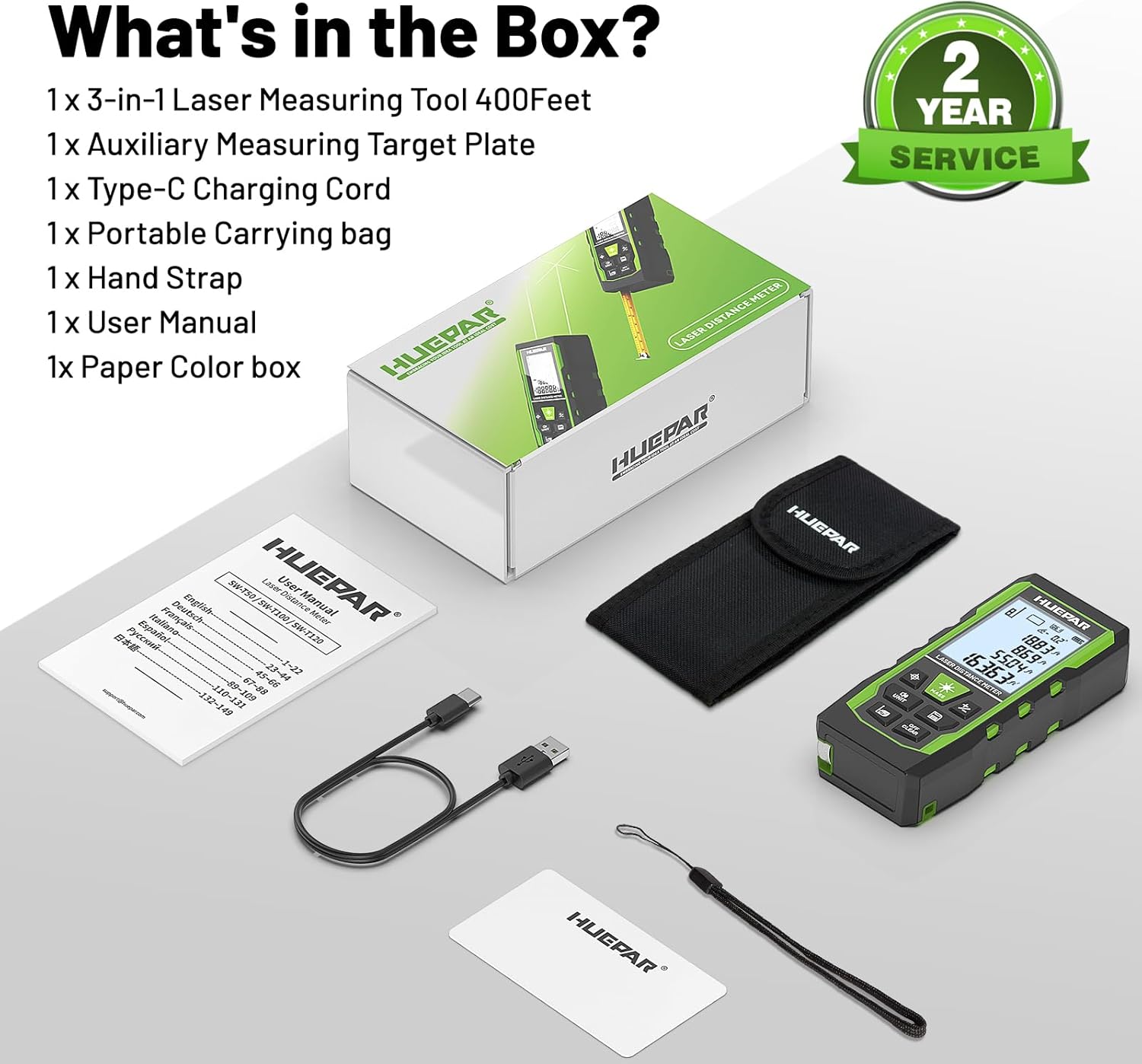
Image 3.1: All components included in the Huepar SW-T100 product box.
4. Opstelling
4.1. Laai die toestel
The device is equipped with a built-in 3.7V / 600mAh Lithium-Ion rechargeable battery. Before first use, fully charge the device.
- Koppel die meegeleverde Tipe-C-laaikabel aan die laaipoort op die toestel.
- Koppel die ander kant van die kabel aan 'n standaard USB-kragadapter (nie ingesluit nie).
- Die laai-aanwyser op die skerm sal die laaistatus wys.
- 'n Volle lading neem gewoonlik 'n paar uur.

Image 4.1: The device being charged via its Type-C port.
4.2. Aanvanklike aanskakeling
Druk die Power ON/Measure button to turn on the device. The display will illuminate, and the device will be ready for use.
5. Bedryfsinstruksies
5.1. Algemene Beheermaatreëls
The device features several buttons for various functions:
- Power ON/Measure Button: Turns the device on/off and initiates measurements.
- Laser Level Mode Button: Activates the green cross line laser.
- Unit Switch/Sound Button: Changes measurement units and controls voice broadcast.
- Benchmark/Mode Switch Button: Selects measurement reference points and different measurement modes.
- Addition/Subtraction Buttons: Tel metings op of trek dit af.
- Data Saving Button: Saves current measurement data.
- Turn off/Clear Button: Clears the last measurement or turns off the device with a long press.
5.2. Laser Distance Measurement Mode
This mode provides precise distance measurements up to 330ft/100M with an accuracy of ±1/16 inch.
- Druk die Power ON/Measure knoppie om die laser te aktiveer.
- Rig die laser op die teikenpunt.
- Druk die Power ON/Measure druk weer op die knoppie om 'n meting te neem. Die resultaat sal op die skerm vertoon word.
Metingsoorte:
Die toestel ondersteun verskeie meetfunksies:
- Afstandmeting: Single point-to-point distance.
- Oppervlaktemeting: Bereken die oppervlakte van 'n oppervlak.
- Volumemeting: Bereken die volume van 'n ruimte.
- Indirect Height (Pythagoras): Calculates height using two or three measurements.
- Muurarea: Calculates the total area of multiple walls.
- Deurlopende meting: Verskaf intydse afstandopdaterings soos jy die toestel beweeg.

Image 5.1: Visual representation of the 9 available measurement modes.
Reference Points:
You can select the measurement reference point:
- Front-based: Measures from the front edge of the device.
- Rear-based: Measures from the rear edge of the device.
- Screw-hole based: Measures from the tripod screw hole.
Stemuitsending:
The device features real-time voice feedback for measurements, enhancing readability and efficiency, especially in challenging conditions or for users with limited vision.
- Druk lank op die Unit Switch/Sound button to switch between Chinese voice, English voice, or to turn off the sound.
- Note: The device does not broadcast voice while charging.

Image 5.2: The voice broadcast feature in action, providing audible measurement readings.
Data geheue:
The device can store up to 100 readings, allowing you to recall past measurements without manual notes.
5.3. Green Cross Line Laser Level Mode
This mode projects bright green horizontal and vertical cross lines, ideal for tasks like picture hanging, shelf installation, and tile alignment. Accuracy is ±1/9 inch.
- Druk die Laser Level Mode button to activate the green cross lines.
- Place the device on a stable surface or mount it on a tripod using the 1/4"-20 threaded mount.
- The screen displays angles from -90° to +90° horizontally.
- If the angle is > ±4°, the 'Out' indicator will flash on the screen, and the laser line will flash rapidly, indicating the device is not level.

Image 5.3: Using the green cross line laser for leveling tasks.
5.4. Tape Measure Function
The integrated digital tape measure extends up to 6.5ft/2M for traditional short-distance measurements.
- Pull out the tape measure from the side of the device.
- The tape measure features both imperial and metric markings.
5.5. Eenheidskakeling
Druk die Unit Switch/Sound button to cycle through available measurement units (m, cm, mm, ft, ft+inches, ft+fractions).
5.6. Outomatiese afskakeling
To conserve battery life, the device will automatically shut off after 150 seconds of inactivity. This setting cannot be changed.
6. Onderhoud en versorging
- Skoonmaak: Vee die toestel af met 'n sagte, damp lap. Moenie harde chemikalieë of skuur skoonmaakmiddels gebruik nie.
- Berging: Store the device in its portable carry bag in a cool, dry place when not in use.
- Robuuste ontwerp: The device features a tough TPE housing, providing resistance against drops, dust, and light water spray (IP54 rated). While durable, avoid intentional exposure to harsh conditions.

Image 6.1: The device's robust construction and tripod mounting option.
7. Probleemoplossing
- Toestel skakel nie aan nie: Ensure the battery is charged. Connect to the Type-C charger and try again.
- Onakkurate lasermetings: Ensure the laser lens is clean. Verify the correct reference point is selected. Ensure the target surface is flat and reflective enough. Use the auxiliary target plate if needed.
- Laser line flashing in level mode: This indicates the device is outside its self-leveling range (> ±4°). Adjust the device's position until the flashing stops.
- Stemuitsending werk nie: Check if the voice broadcast is turned off by long-pressing the Unit Switch/Sound button. Voice broadcast is also disabled during charging.
- Auto shut-off too fast: The device is designed to shut off after 150 seconds of inactivity to save battery. This duration is fixed and cannot be adjusted.
8. Spesifikasies
| Kenmerk | Spesifikasie |
|---|---|
| Handelsmerk | Huepar |
| Model | SW-T100 |
| Meetbereik (Laser) | 330 voet / 100 miljoen |
| Lasermeting Akkuraatheid | ±1/16 duim |
| Laser Level Accuracy | ±1/9 duim |
| Laser klas | Klas 2 |
| Laser tipe | 490-560nm, <1mW |
| Meetbandlengte | 6.5 voet / 2 miljoen |
| Battery | 3.7V / 600mAh Lithium-Ion (Rechargeable) |
| Laaipoort | Tipe-C |
| Materiaal | Acrylonitrile Butadiene Styrene, TPE |
| Item gewig | 200 gram |
| IP-gradering | IP54 (Dust and light water spray resistant) |
| Outo-afskakel | 150 seconds (laser), 150 seconds (device) |
9. Waarborg en Ondersteuning
9.1. Waarborg
This Huepar laser measurement tool comes with a 2-year quality assurance. In the event of a product fault, free repair or replacement will be provided.
9.2. Tegniese Ondersteuning
Huepar is committed to providing best-in-class service to our customers. We offer:
- 24/7 Service Team (response within 24 hours & solution within 48 hours).
- Lewenslange tegniese ondersteuning.
- Worldwide Maintenance Center for faster repair or replacement.
For support, please visit the official Huepar website or contact our customer service team directly.
10. Produkvideo oorview
Kyk na hierdie video vir 'n vinnige oorsigview of the Huepar 3-in-1 Laser Measurement Tool's features and functions.
Video 10.1: An official product video demonstrating the key features and usage scenarios of the Huepar SW-T100 3-in-1 Laser Measurement Tool. This video highlights the voice broadcast, distance measurement, laser leveling, and tape measure functions.