
1. Inleiding
Thank you for choosing the Darmoshark M5PRO Mini Wireless Gaming Mouse. This manual provides detailed instructions for setting up, operating, and maintaining your new gaming mouse. The M5PRO features a tri-mode connection (2.4G wireless, Bluetooth, wired), a high-precision PAW3950 optical sensor, and a lightweight design for optimal performance.
2. Produk verbyview
The Darmoshark M5PRO is designed for competitive gaming, offering versatile connectivity and advanced sensor technology. Its ergonomic shape is ideal for finger grip players, providing responsive control and comfort during extended use.

Image: Darmoshark M5PRO Mini Wireless Gaming Mouse in various colors, highlighting its design.
Sleutel kenmerke:
- Drie-modus-konnektiwiteit: Seamlessly switch between 2.4G wireless, Bluetooth 5.0, and wired USB connections.
- PAW3950 Optiese Sensor: Provides up to 30000 DPI, 750 IPS tracking speed, and 50G acceleration for precise and responsive tracking.
- 8KHz Polling Rate: Experience ultra-low latency with an 8KHz polling rate in 2.4G wireless mode, ensuring rapid response times.
- Ultraliggewig-ontwerp: Weighing approximately 38 grams, the mouse reduces hand fatigue during long gaming sessions.
- 5 programmeerbare knoppies: Customize button functions via the dedicated software.
- Ingeboude litiumbattery: High-capacity rechargeable battery for extended wireless usage.
- Wye verenigbaarheid: Compatible with Windows and Apple Mac operating systems.
3. Pakketinhoud
Kontroleer asseblief die pakket vir die volgende items:
- Darmoshark M5PRO Mini Wireless Gaming Mouse
- 2.4G Draadlose Ontvanger (USB Dongle)
- USB-C na USB-A-kabel (vir laai en bedrade verbinding)
- Gebruikershandleiding (hierdie dokument)
- Grip Tape (optional accessory, if included)
4. Opstelling en konnektiwiteit
4.1. Bedrade modus
- Koppel die USB-C-punt van die meegeleverde kabel aan die muis.
- Koppel die USB-A-punt van die kabel aan 'n beskikbare USB-poort op jou rekenaar.
- Die muis sal outomaties na bedrade modus oorskakel en begin laai.
4.2. 2.4G Wireless Mode (with 8KHz Receiver)
- Vind die 2.4G draadlose ontvanger (USB-dongle) in die pakket.
- Koppel die 2.4G draadlose ontvanger aan 'n beskikbare USB-poort op jou rekenaar.
- On the bottom of the mouse, locate the tri-mode switching key. Switch it to the 2.4G wireless icon (usually indicated by a small antenna or 'G' symbol).
- The mouse should automatically connect. If not, press and hold the pairing button (if available, refer to the diagram) on the mouse until the indicator light flashes, then release.

Image: M5PRO mouse with its 8KHz wireless receiver for 2.4G connectivity.
4.3. Bluetooth-modus
- On the bottom of the mouse, switch the tri-mode switching key to the Bluetooth icon.
- The mouse's indicator light will start flashing, indicating it is in pairing mode.
- Maak Bluetooth-instellings op jou rekenaar of toestel oop.
- Soek vir new devices and select "Darmoshark M5PRO" from the list.
- Volg enige instruksies op die skerm om die saambindproses te voltooi.
5. Bediening van die muis
5.1. Knoppie Funksies
The M5PRO mouse features 5 programmable buttons and a scroll wheel.
- Links klik: Standard primary click.
- Regs klik: Standard secondary click.
- Track Roller Key (Scroll Wheel): Blaai op/af en dien as 'n middelste klikknoppie.
- DPI Adjustment Key: Blaai deur voorafbepaalde DPI-vlakke.
- Aanstuur-knoppie: Default function for navigating forward in web blaaiers of file ontdekkingsreisigers.
- Backspace-knoppie: Default function for navigating backward in web blaaiers of file ontdekkingsreisigers.

Beeld: Ontplof view of the M5PRO mouse showing internal components and button layout.
5.2. DPI-aanpassing
Press the DPI Adjustment Key (located on the underside of the mouse, refer to the product diagram) to cycle through different DPI sensitivity levels. The default DPI settings can be customized using the Darmoshark software.
5.3. Laai die muis
When the battery is low, the mouse's indicator light will typically flash red. Connect the mouse to your computer using the provided USB-C cable to charge it. The indicator light will show charging status and turn off or change color when fully charged.
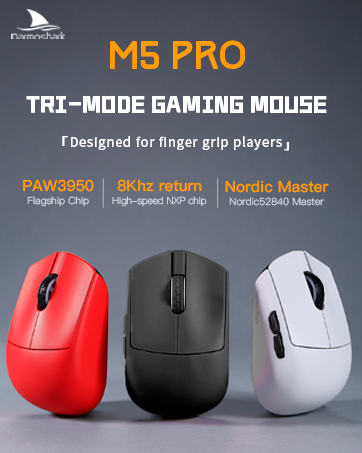
Image: Darmoshark M5PRO mouse charging via USB-C cable, highlighting its built-in lithium battery.
6. Sagteware-aanpassing
To unlock the full potential of your Darmoshark M5PRO mouse, download and install the official Darmoshark driver software from the manufacturer's webwebwerf. Die sagteware laat jou toe om:
- Customize DPI settings and create multiple profiles.
- Program button functions and macros.
- Adjust polling rate.
- Manage power settings and battery life.
- Dateer firmware op.

Image: Darmoshark proprietary driver software interface for mouse customization.
7. Spesifikasies
| Model | M5PRO |
| Sensor | PAW3950 Optiese Sensor |
| DPI | Tot 30000 DPI |
| Spoedspoed | 750 IPS |
| Versnelling | 50G |
| Stemmingskoers | 8KHz (2.4G Wireless), 1KHz (Wired/Bluetooth) |
| Konnektiwiteit | 2.4G Draadloos, Bluetooth 5.0, USB-C Bedraad |
| Knoppies | 5 Programmeerbare knoppies |
| Gewig | Ongeveer. 38g |
| Afmetings (L x B x H) | 91.7 mm x 57.4 mm x 35.7 mm |
| Battery | Ingeboude litiumbattery (300mAh) |
| Verenigbaarheid | Windows, Apple Mac |
Image: Product parameter diagram with mouse dimensions.
8. Onderhoud
- Skoonmaak: Gebruik 'n sagte, droë lap om die muis skoon te maak. Vermy die gebruik van harde chemikalieë of skuurmiddels.
- Berging: Bêre die muis op 'n koel, droë plek weg van direkte sonlig en uiterste temperature.
- Batterysorg: Om die batterylewe te verleng, vermy om die muis gereeld heeltemal te ontlaai. Laai dit wanneer die lae battery-aanwyser verskyn.
9. Probleemoplossing
9.1. Muis reageer nie
- Bedrade modus: Maak seker dat die USB-kabel stewig aan beide die muis en die rekenaar gekoppel is. Probeer 'n ander USB-poort.
- 2.4G draadlose modus: Ensure the 2.4G receiver is plugged in and the mouse is switched to 2.4G mode. Try re-pairing the mouse with the receiver. Ensure the mouse battery is charged.
- Bluetooth-modus: Ensure Bluetooth is enabled on your device and the mouse is in Bluetooth pairing mode. Try re-pairing the mouse in your device's Bluetooth settings. Ensure the mouse battery is charged.
9.2. Cursor Movement is Erratic or Inaccurate
- Maak die optiese sensor aan die onderkant van die muis skoon met 'n sagte, droë lap.
- Maak seker dat jy die muis op 'n geskikte oppervlak gebruik (bv. 'n muismat). Vermy hoogs weerkaatsende of deursigtige oppervlaktes.
- Adjust the DPI settings using the DPI Adjustment Key or the software.
- Check for any software conflicts or outdated drivers. Update mouse drivers if necessary.
9.3. Probleme met draadlose verbinding
- Reduce the distance between the mouse and the receiver/device.
- Avoid placing the receiver near other wireless devices or sources of interference (e.g., Wi-Fi routers, cordless phones).
- Maak seker dat die muis volledig gelaai is.
10. Amptelike Produkvideo
Watch the official product video for a visual guide on the Darmoshark M5PRO Mini Wireless Gaming Mouse.
Video: 'n Oorview of the Darmoshark M5PRO Wireless Gaming Mouse, showcasing its design and features in various colors.
11. Waarborg en Ondersteuning
For warranty information and technical support, please refer to the warranty card included with your product or visit the official Darmoshark webwebwerf.
Vervaardiger: Darmoshark
Webwebwerf: Darmoshark Official Store