
1. Inleiding
This manual provides essential information for the proper setup, operation, and maintenance of your Veout 15.6-inch Portable Monitor. Please read these instructions thoroughly before using the product to ensure optimal performance and longevity.
2. Pakketinhoud
Verifieer dat al die items wat hieronder gelys word, in u produkverpakking teenwoordig is:
- 1 x draagbare monitor
- 1 x USB-A na USB-C kabel
- 1 x USB-C na USB-C kabel
- 1 x Mini HDMI na HDMI-kabel
- 1 x Gebruikershandleiding

Figure 2.1: Included accessories with the portable monitor.
3. Produk verbyview
The Veout portable monitor features a 15.6-inch IPS display with a slim profile and integrated kickstand for versatile use.
3.1. Fisiese kenmerke

Figuur 3.1: Voorkant view of the Veout 15.6-inch Portable Monitor.

Figuur 3.2: Agter view highlighting connectivity ports.

Figuur 3.3: Syprofile demonstrating the monitor's thin design.
3.2. Poorts en Beheer
- Full-Function USB-C Ports: For video, audio, data, and power delivery with a single cable.
- Mini-HDMI-poort: For video and audio input. Requires external power via USB-C when used.
- 3.5 mm oudio-aansluiting: Vir die koppeling van eksterne oorfone of luidsprekers.
- Control Wheel/Buttons: Used for adjusting volume, brightness, and navigating the On-Screen Display (OSD) menu.
3.3. Geïntegreerde skopstaander
The monitor features a foldable kickstand for stable positioning at various viewhoeke.
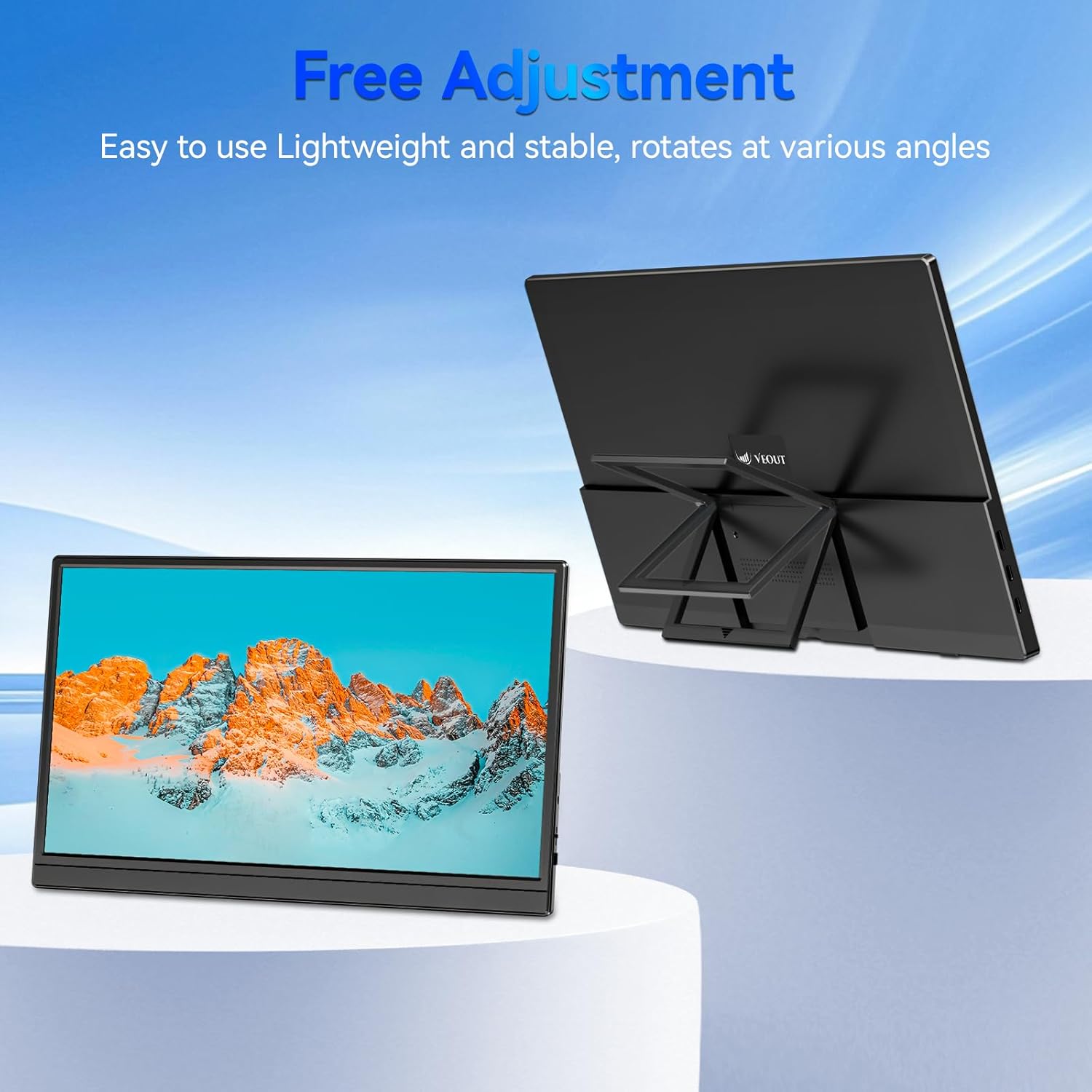
Figure 3.4: Monitor with kickstand for adjustable viewing.
4. Opstelling
The Veout portable monitor supports plug-and-play functionality, requiring no driver installation for most devices.
4.1. Verbinding met 'n toestel
- USB-C Connection (Single Cable):
- Connect one end of the USB-C to USB-C cable to a full-function USB-C port on your laptop, smartphone, or other compatible device.
- Connect the other end of the USB-C to USB-C cable to one of the full-function USB-C ports on the portable monitor.
- This connection provides video, audio, and power to the monitor.
- HDMI Connection (Requires Additional Power):
- Connect one end of the Mini-HDMI to HDMI cable to the Mini-HDMI port on the monitor.
- Connect the other end of the Mini-HDMI to HDMI cable to the HDMI port on your device.
- For power, connect the USB-A to USB-C cable or a USB-C to USB-C cable from your device's USB port or a power adapter (not included) to one of the monitor's USB-C ports.
4.2. Positioning the Monitor
Deploy the integrated kickstand to position the monitor on a flat surface. Adjust the angle for optimal viewing. The monitor can be used in both landscape and portrait orientations.

Figure 4.1: Monitor used in portrait mode for document viewing.
5. Bedryfsinstruksies
5.1. Vertoonmodusse
When connected to a computer, you can configure the display mode through your operating system's display settings:
- Copy Mode (Mirror Display): Duplicates your primary screen's content onto the portable monitor. Useful for presentations or sharing content.
- Uitgebreide modus: Extends your desktop across both screens, providing additional workspace for multitasking.
- Second Screen Only Mode: Displays content only on the portable monitor, with the primary device's screen turned off.
5.2. Pas instellings aan
The monitor features an intuitive control mechanism for quick adjustments:
- Helderheid aanpassing: Scroll the control wheel up or down to instantly adjust screen brightness.
- Volume aanpassing: Scroll the control wheel up or down to instantly adjust speaker volume.
- OSD-kieslys: Press the control wheel or designated button to access the On-Screen Display menu for advanced settings like color, contrast, and input source selection.
5.3. Oogsorgtegnologie
The monitor incorporates advanced eye-care technology designed to reduce blue light emission and screen flicker, promoting comfortable viewtydens langdurige gebruik.
6. Onderhoud
To maintain your monitor's performance and appearance, follow these guidelines:
- Skoonmaak van die skerm: Vee die skerm liggies af met 'n sagte, pluisvrye lap. Vir hardnekkige merke, vee liggiesampMaak die lap skoon met water of 'n skermskoonmaakoplossing. Vermy harde chemikalieë of skuurmiddels.
- Maak die C skoonasing: Gebruik 'n sagte, droë lap om die monitor se ... skoon te maak.asing.
- Berging: Wanneer dit nie gebruik word nie, bêre die monitor op 'n koel, droë plek, verkieslik in sy oorspronklike verpakking of 'n beskermende omslag.
- Vermy vloeistowwe: Do not expose the monitor to excessive moisture or spill liquids directly onto it.
7. Probleemoplossing
As jy probleme met jou monitor ondervind, raadpleeg die volgende algemene probleme en oplossings:
| Probleem | Moontlike oorsaak | Oplossing |
|---|---|---|
| Geen vertoon/"Geen sein"-boodskap | Incorrect cable connection, insufficient power, incorrect input source. | Ensure cables are securely connected. If using HDMI, ensure a separate power source is connected to the monitor's USB-C port. Check your device's display settings to ensure the monitor is detected and enabled. Select the correct input source via the OSD menu. |
| Flikkerende skerm | Loose cable connection, incompatible resolution/refresh rate, power fluctuations. | Reconnect cables. Adjust display resolution or refresh rate on your connected device. Ensure stable power supply. |
| Geen klank van monitorluidsprekers nie | Monitor volume too low, incorrect audio output selected on device. | Increase monitor volume using the control wheel. On your connected device, ensure the portable monitor is selected as the audio output device. |
| Monitor word nie aangeskakel nie | No power supply, faulty cable. | Ensure the monitor is receiving power via a USB-C connection from a compatible device or power adapter. Try a different USB-C cable. |
8. Spesifikasies
| Kenmerk | Detail |
|---|---|
| Produkmodelnommer | Veout-15.6 |
| Skerm grootte | 15.6 duim |
| Resolusie | 1920 x 1080 piksels (FHD 1080p) |
| Aspekverhouding | 16:9 |
| Paneel tipe | IPS |
| Skermoppervlak | Mat |
| Produk afmetings | 1.97 x 13.78 x 11.02 duim |
| Item gewig | 3.08 pond |
| Invoer Voltage | 5V |
| Gegradeerde huidige | 3A |
| Uitset krag | 5.5 W |
| Vervaardiger | Guangdong Zhanwei electronic Technology Co., LTD |

Figure 8.1: Product information and certification details.
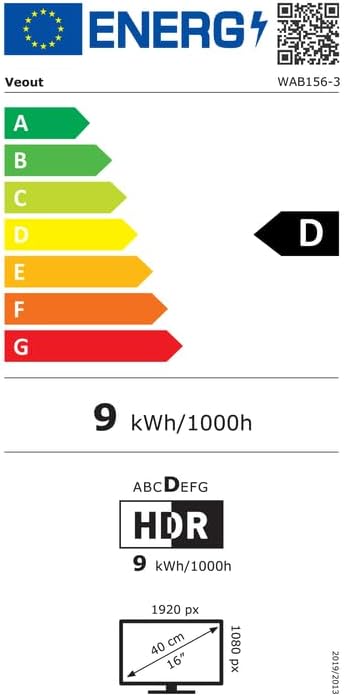
Figure 8.2: EU Energy Label for model WAB156-3. For more details, visit eprel.ec.europa.eu/qr/2209122.
9. Waarborg en Ondersteuning
Your Veout Portable Monitor is backed by a 12-month warranty from the date of purchase. We are committed to providing customer service and support.
- Waarborgtydperk: 12 Maande
- Retourbeleid: 30-dae geld-terugwaarborg
- Kliëntediens: Available 24 hours

Figure 9.1: Warranty and support information.
For technical assistance or warranty claims, please contact Veout customer support at ondersteuning@veout.com.