
1. Inleiding
This manual provides essential information for the safe and efficient installation, operation, and maintenance of the HLTNC HS320 Variable Frequency Drive (VFD) Inverter. The HS320 is designed to control the speed of three-phase AC motors, commonly used in applications such as spindle speed control. Please read this manual thoroughly before using the product to ensure proper functionality and safety.
2. Veiligheidsinligting
WARNING: Improper installation or operation can lead to serious injury or equipment damage. Always follow safety guidelines.
- Elektriese gevaar: Ensure all power is disconnected from the supply before performing any installation, wiring, or maintenance. Wait at least 10 minutes after disconnecting power for capacitors to discharge before touching internal components.
- Aarding: Always ensure the VFD is properly grounded according to local electrical codes.
- Gekwalifiseerde personeel: Installation and maintenance should only be performed by qualified electrical personnel.
- Omgewing: Do not operate the VFD in environments with excessive dust, moisture, corrosive gases, or direct sunlight. Mount the inverter on a non-combustible surface.
- Oorladingsbeskerming: Do not bypass any safety or overload protection features.
Refer to the warning labels on the device for additional safety instructions.

3. Produk verbyview
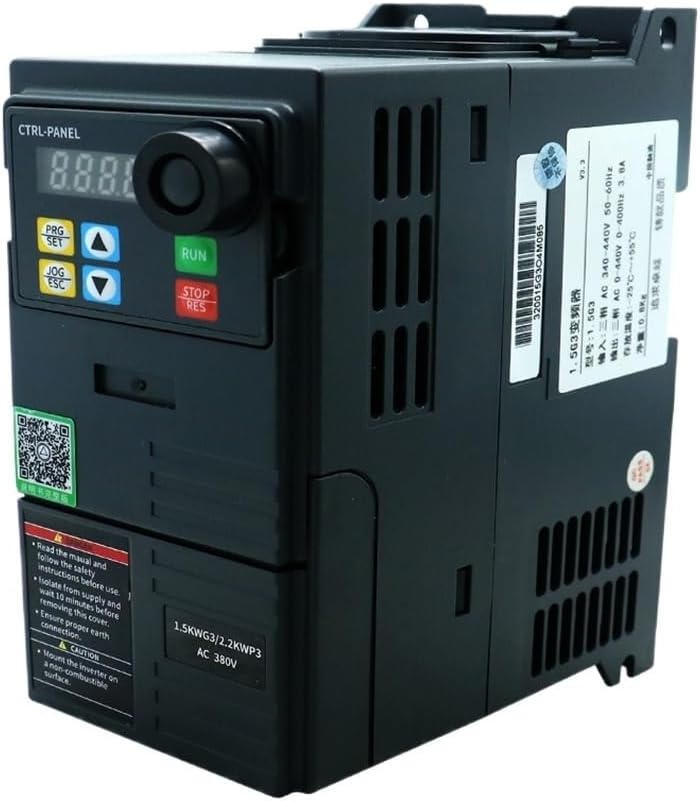
The HLTNC HS320 is a compact Variable Frequency Drive designed for precise motor speed control. It features a digital display, control buttons, and a rotary encoder for parameter adjustment. The unit is equipped with various input/output terminals for external control and monitoring.


4. Spesifikasies
The following table outlines the key technical specifications for the HLTNC HS320 VFD (0.75KW, 380V, 0-400Hz variant).
| Kenmerk | Spesifikasie |
|---|---|
| Modelnommer | HS320 |
| Invoer Voltage | 380V AC |
| Uitset krag | 0.75KW |
| Uitsetfase | 3-Fase |
| Uitsetfrekwensie Range | 0-400Hz |
| Tik | GS/WS-omskakelaar |
| Beheer metode | Vector Control / V/F Control (refer to detailed parameter settings) |
| Verkoelingsmetode | Waaier afgekoel |
| Bedryfstemperatuur | Typically -10°C to 40°C (14°F to 104°F) |
| Humiditeit | Minder as 90% RH, nie-kondenserend |
| Hoogte | Below 1000m (3300ft) |
| Beskermingsvlak | IP20 (typical for enclosed VFDs) |
| Fisiese afmetings en gewig | Refer to product packaging or official documentation for accurate physical dimensions and weight. |
5. Installasie
5.1 Montering
- Mount the VFD vertically on a sturdy, non-combustible surface.
- Ensure adequate ventilation space around the unit (typically 10cm above and below, 5cm on sides) for proper heat dissipation.
- Avoid mounting in direct sunlight, near heat sources, or in areas subject to vibration.
- Use appropriate screws and mounting hardware to secure the VFD firmly.
5.2 Bedrading
All wiring must comply with local and national electrical codes. Use appropriate wire gauges for the VFD's power rating.
5.2.1 Power Input (R, S, T)
- Connect the 380V AC three-phase power supply to the R, S, and T terminals.
- Install an appropriate circuit breaker or fuse upstream for protection.
5.2.2 Motor Output (U, V, W)
- Connect the three-phase motor to the U, V, and W output terminals.
- Ensure the motor's rated voltage and current are compatible with the VFD.
5.2.3 Grounding (PE)
- Connect the VFD's grounding terminal (PE) to a reliable earth ground. This is critical for safety and EMI reduction.
5.2.4 Beheerterminale
The VFD provides various control terminals for external start/stop, speed reference (analog input), multi-function inputs, and relay outputs. Refer to the detailed wiring diagram in the full product manual for specific terminal assignments and functions. Common connections include:
- Analoog invoer: For external speed control via potentiometer or 0-10V/4-20mA signal.
- Digitale insette: For external start, stop, forward/reverse, multi-step speed commands.
- Aflos uitsette: For fault indication or run status.
6. Operasie
6.1 Beheerpaneelfunksies
The integrated control panel allows for direct operation and parameter setting.
- Digitale skerm: Shows frequency, output current, voltage, and parameter codes.
- RUN-knoppie: Begin die motor.
- STOP/RES Button: Stops the motor or resets a fault.
- PRG/SET Button: Enters/exits parameter setting mode, confirms parameter changes.
- JOG/ESC Button: Initiates JOG operation (momentary run) or exits a menu without saving.
- Op/af pyle: Navigate through parameters or adjust values.
6.2 Basiese Bedieningsstappe
- Krag aan: Apply power to the VFD. The display will light up.
- Stel frekwensie: Use the Up/Down arrows to set the desired output frequency.
- Begin Motor: Druk die HARDLOOP knoppie. Die motor sal versnel tot die ingestelde frekwensie.
- Stop Motor: Druk die STOP/RES knoppie. Die motor sal vertraag en stop.
7. Parameterinstellings
The HLTNC HS320 VFD has a comprehensive set of parameters to customize its operation. Accessing and modifying these parameters allows fine-tuning for specific applications.
7.1 Entering Parameter Mode
- Druk die PRG/SET button to enter parameter setting mode. The display will show a parameter group code (e.g., P00).
- Use the Up/Down arrows to navigate through parameter groups (e.g., P00, P01, P02, etc.).
- Druk PRG/SET again to enter a specific parameter within a group (e.g., P00.01).
7.2 Modifying Parameters
- Once a specific parameter is selected, use the Up/Down arrows to change its value.
- Druk PRG/SET to save the new value. The display may flash to confirm.
- Druk JOG/ESC to exit the current parameter or group without saving changes.
7.3 Important Parameters (Examphulle)
- P00.01 (Max Output Frequency): Sets the maximum frequency the VFD can output.
- P00.03 (Acceleration Time): Defines the time it takes for the motor to accelerate from 0Hz to the maximum frequency.
- P00.04 (Deceleration Time): Defines the time it takes for the motor to decelerate from the maximum frequency to 0Hz.
- P00.05 (Rated Motor Frequency): Set to the motor's nominal frequency.
- P00.06 (Rated Motor Voltage): Set to the motor's nominal voltage.
- P00.07 (Rated Motor Current): Set to the motor's nominal current.
For a complete list of parameters and their detailed descriptions, refer to the comprehensive parameter manual provided with your HLTNC HS320 VFD.
8. Onderhoud
Gereelde onderhoud verseker die lang lewensduur en betroubare werking van u VFD.
- Skoonmaak: Periodically clean the VFD's exterior and cooling fins to prevent dust accumulation, which can hinder heat dissipation. Use a soft, dry cloth. Do not use liquids or solvents.
- Fan inspeksie: Check the cooling fan for proper operation and ensure it is free from obstructions. Replace if noisy or not functioning.
- Terminale digtheid: Periodically check all wiring terminals for tightness. Loose connections can cause overheating and intermittent operation.
- Omgewingskontrole: Verseker dat die bedryfsomgewing binne die gespesifiseerde temperatuur- en humiditeitsreekse bly.
9. Probleemoplossing
Hierdie afdeling bied oplossings vir algemene probleme. Vir komplekse probleme, kontak tegniese ondersteuning.
| Probleem-/foutkode | Moontlike oorsaak | Oplossing |
|---|---|---|
| No Display/Power | No input power; Blown fuse; Internal fault. | Check power supply and fuses. If power is present, contact support. |
| Motor loop nie | VFD not in RUN mode; Incorrect frequency setting; Motor wiring issue; Fault condition. | Press RUN. Check frequency setting. Verify motor wiring. Check for fault codes. |
| Overcurrent Fault (OC) | Motor overload; Short circuit in motor wiring; Rapid acceleration/deceleration. | Reduce load. Check motor wiring. Increase acceleration/deceleration times (P00.03/P00.04). |
| Oorvoltage Fault (OV) | Regenerative braking from motor; High input voltage. | Increase deceleration time. Check input voltage. Consider braking resistor if needed. |
| Ondervoltage Fault (UV) | Lae inset voltage; Power sag. | Kontroleer die invoerkragtoevoervolumetage. |
| Overheat Fault (OH) | Insufficient ventilation; High ambient temperature; Clogged fan. | Ensure proper ventilation. Clean cooling fins and fan. Reduce ambient temperature. |
Druk altyd die STOP/RES button to clear a fault after addressing the cause.
10. Waarborg en Ondersteuning
For warranty information, technical support, or service inquiries, please refer to the documentation provided with your purchase or contact your vendor. Ensure you have your product model number (HS320) and purchase details available when seeking support.