
Inleiding
Thank you for choosing the LUMINTOP F01 Pro EDC Flashlight. This compact and versatile flashlight is designed for everyday carry, offering multiple lighting modes, convenient Type-C charging, and a magnetic base for hands-free use. Please read this manual carefully to ensure proper operation and maintenance of your device.
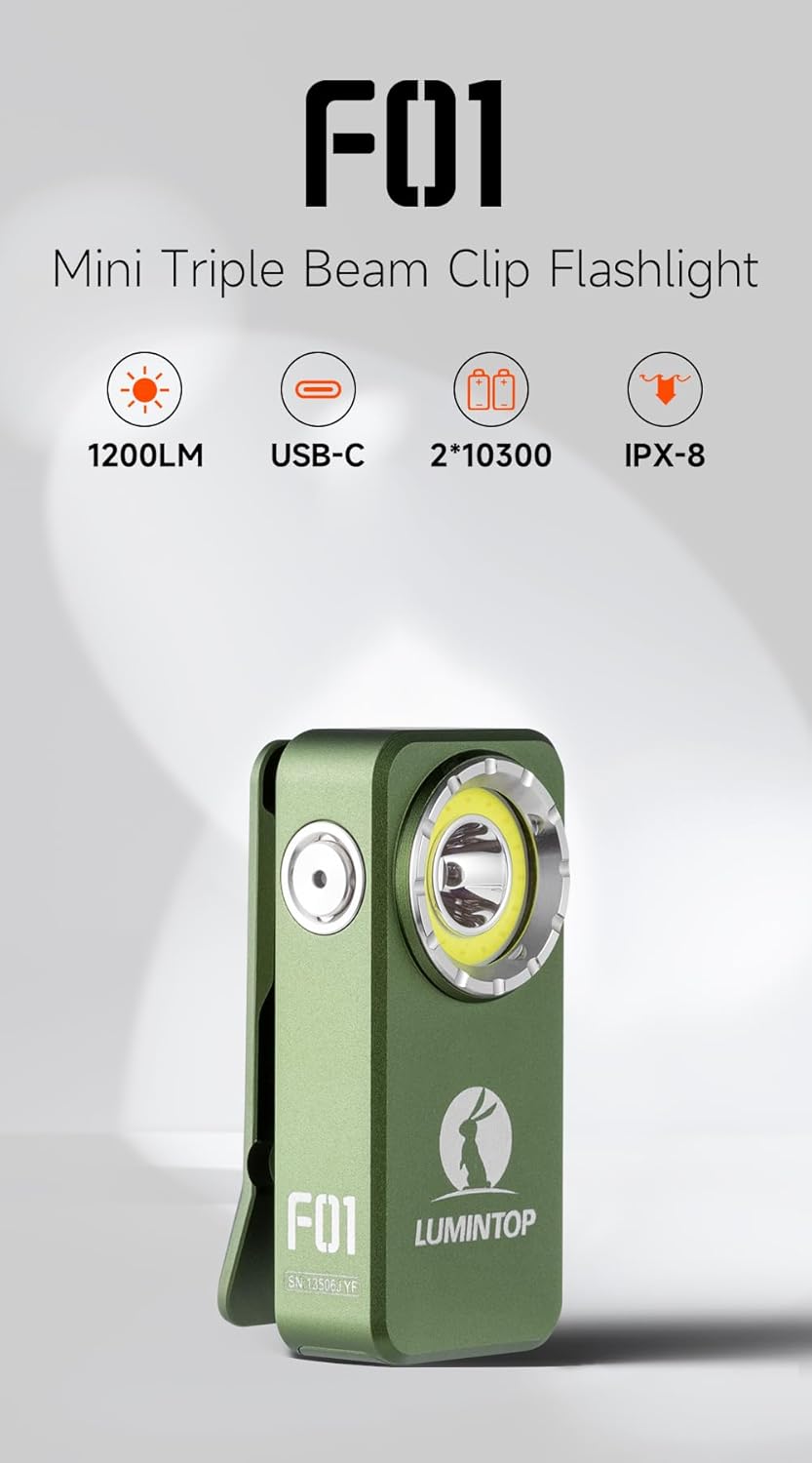
Image: LUMINTOP F01 Pro EDC Flashlight, highlighting its compact form factor.
Pakketinhoud
- LUMINTOP F01 Pro EDC Flashlight
- Ingeboude litiumioonbattery
- USB Type-C laaikabel
- Gebruikershandleiding (hierdie dokument)
Opstelling
1. Initial Use & Unlocking
For first-time use, the flashlight is in a locked state to prevent accidental activation during shipping. To unlock the device, press the side button 5 XNUMX XNUMX keer rapidly. The indicator light will confirm the unlock status.
2. Laai die battery
The F01 Pro features a built-in rechargeable Lithium Ion battery and supports Type-C charging.
- Locate the USB Type-C charging port on the side of the flashlight.
- Maak die beskermende deksel van die laaipoort oop.
- Connect the provided USB Type-C cable to the flashlight and a compatible USB power source (e.g., wall adapter, computer USB port).
- Die aanwyserliggie sal die laaistatus wys (bv. rooi vir laai, groen vir volledig gelaai).
- Once charging is complete, disconnect the cable and securely close the protective cover to maintain water resistance.

Beeld: Sykant view of the flashlight, illustrating the side button and USB-C charging port.
Bedryfsinstruksies
The LUMINTOP F01 Pro utilizes a single side-mounted stainless steel switch for all operations.
Basiese bewerkings:
- 1x Click (from OFF): Turns the flashlight ON.
- 1x Click (from ON): Turns the flashlight OFF.
- Press & Hold (from ON): Cycles through Flood modes (Eco, Low, High) or switches between Flood and Red light modes. The flashlight has mode memory for the last used Flood mode.
Gevorderde modusse:
- 2x Click (from ON): Toggles between Spot Light and Flood Light modes.
- 3x Click (from ON/OFF): Aktiveer Strobe-modus.
- 4x Click (from ON/OFF): Activates Combo Light mode (Flood and Spot simultaneously).
- 5x Click (from ON/OFF): Locks or Unlocks the flashlight. (As mentioned in Setup, 5 clicks unlocks for first use).
- 7x Click (from ON/OFF): Toggles the Indicator Light ON/OFF.
Beeld: Gedetailleerd view of the side button, illustrating its functions.
Kenmerke
- Triple Beam System: Offers a 500lm floodlight, a 120-meter spotlight, and dual-mode red light (40/6lm) for various applications.
- Durable Pocket Clip: Allows secure attachment to pockets, straps, or other gear for flexible everyday carry. Features anti-slip texture and an integrated lanyard hole.
- Magnetiese basis: Provides hands-free lighting by attaching to metallic surfaces.
- USB Tipe-C herlaaibaar: Gerieflike en vinnige laai.
- Waterdig (IPX8): Designed to withstand immersion in water up to 2 meters.
- Robuuste konstruksie: Machined from high-strength aluminum alloy for durability.

Image: Floodlight beam for wide-angle illumination.

Image: Pocket clip and lanyard hole for secure carrying.
Onderhoud
- Skoonmaak: Maak die flitsliggaam gereeld skoon met 'n sagte, damp cloth. Keep the lens free of dust and debris for optimal light output.
- Laaipoort: Ensure the Type-C charging port is clean and dry before charging. Always close the protective cover after charging to prevent water and dust ingress.
- Battery: The F01 Pro uses a built-in Lithium Ion battery. While accessible for replacement if needed, it is generally not user-serviceable. If battery issues arise, contact customer support.
- Berging: Store the flashlight in a cool, dry place when not in use for extended periods. Charge the battery every 3-6 months to maintain its lifespan.
Probleemoplossing
- Flashlight not turning ON:
- Ensure the flashlight is unlocked (press 5 times rapidly).
- Check battery charge level. Recharge if necessary.
- Liguitset is dof:
- Battery may be low. Recharge the flashlight.
- Lens may be dirty. Clean the lens carefully.
- Laai kwessies:
- Maak seker dat die USB Type-C-kabel behoorlik gekoppel is.
- Probeer 'n ander USB-kragbron of -kabel.
- Check if the charging port is clean and free of obstructions.
- Flashlight gets warm during use:
- This is normal, especially on higher brightness modes, due to thermal regulation. The flashlight may automatically reduce brightness to prevent overheating.
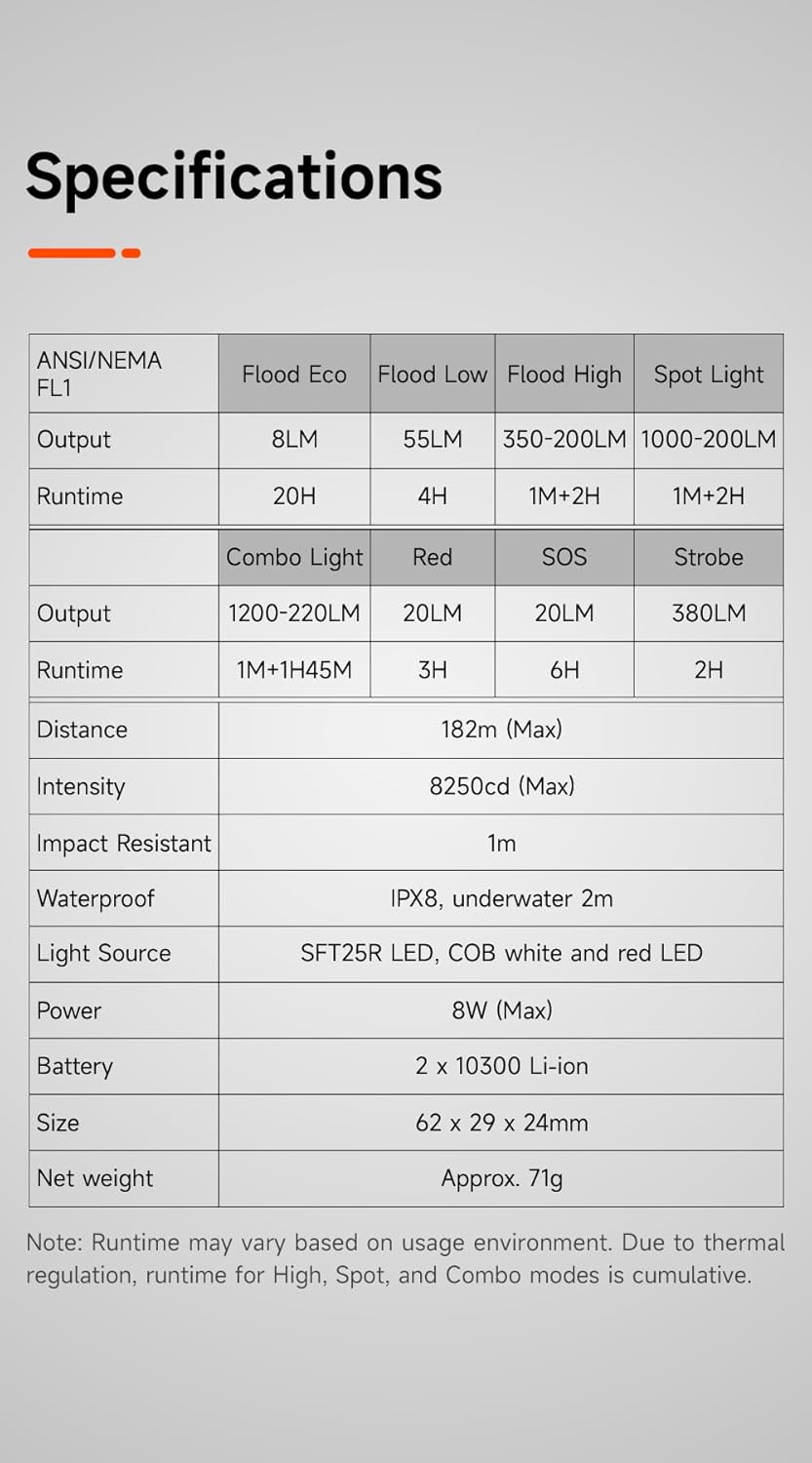
Spesifikasies
| Kenmerk | Detail |
|---|---|
| Model | F01 Pro (G1) |
| Handelsmerk | LUMINTOP |
| Ligbron | SFT25R LED, COB white and red LED |
| Flood Light Output | Eco: 8LM, Low: 55LM, High: 350-200LM |
| Spot Light Output | 1000-200LM |
| Combo Light Output | 1200-220LM |
| Red Light Output | 20LM (High), 6LM (Low) |
| Strobe Output | 380 LM |
| SOS Output | 20 LM |
| Maksimum straalafstand | 182m |
| Kragbron | Built-in 2 x 10300 Lithium Ion Battery |
| Laai | USB Tipe-C |
| Materiaal | Aluminum Alloy (Anodized Finish) |
| Afmetings | 62 x 29 x 24 mm (2.44"D x 1.14"W x 0.94"H) |
| Gewig | Ongeveer 71 g (0.32 onse) |
| Waterweerstand | IPX8 (Underwater 2m) |
| Impak weerstand | 1m |
| Ingesluit komponente | Battery |
Image: Detailed specifications table for the F01 Pro flashlight.
Waarborg en Ondersteuning
For warranty information, technical support, or service inquiries, please refer to the warranty card included with your product or visit the official LUMINTOP webwebwerf. Bewaar u aankoopbewys as bewys van aankoop.
Vervaardiger: LUMINTOP