
1. Inleiding
Thank you for choosing the Aiandcc M8 MP3 Player. This device is designed for portable audio playback, featuring Bluetooth 5.3 connectivity, a 1.77-inch screen, and expandable storage. This manual provides detailed instructions for setup, operation, and maintenance to ensure optimal performance and longevity of your device.
2. Produk verbyview
2.1 Pakketinhoud
- Aiandcc M8 MP3 Player
- USB Type-C laaikabel
- Bedrade oorfone
- Armband
- Gebruikershandleiding
2.2 Toesteluitleg en -kontroles
Familiarize yourself with the buttons and ports on your Aiandcc M8 MP3 Player.

Prent: Voor- en sykant view of the Aiandcc M8 MP3 Player, highlighting the 1.77" TFT screen, Previous Track Button, Play/Pause/Confirm Button, Next Track Button, Submenu Button, USB C charging Port, Headphone Jack, Power on/off, TF Card Slot, Volume -, Volume +, and Fast Forward/Retreat controls.
- 1.77" TFT Screen: Displays menus, track information, and settings.
- Vorige snitknoppie: Single click to go to the previous track.
- Play / Pause / Confirm Button: Single click to play/pause, long press to confirm selection.
- Volgende snitknoppie: Single click to go to the next track.
- Submenu Button: Kry toegang tot kontekssensitiewe spyskaarte.
- USB C-laaipoort: Vir die laai van die toestel en die koppeling aan 'n rekenaar.
- Koptelefoonaansluiting: 3.5mm port for wired headphones.
- Krag aan/af: Long press to power the device on or off.
- TF-kaartgleuf: Insert a MicroSD card for expanded storage.
- Volume - / Volume +: Pas die terugspeelvolume aan.
- Retreat / Fast Forward: Long press during playback to rewind or fast forward.
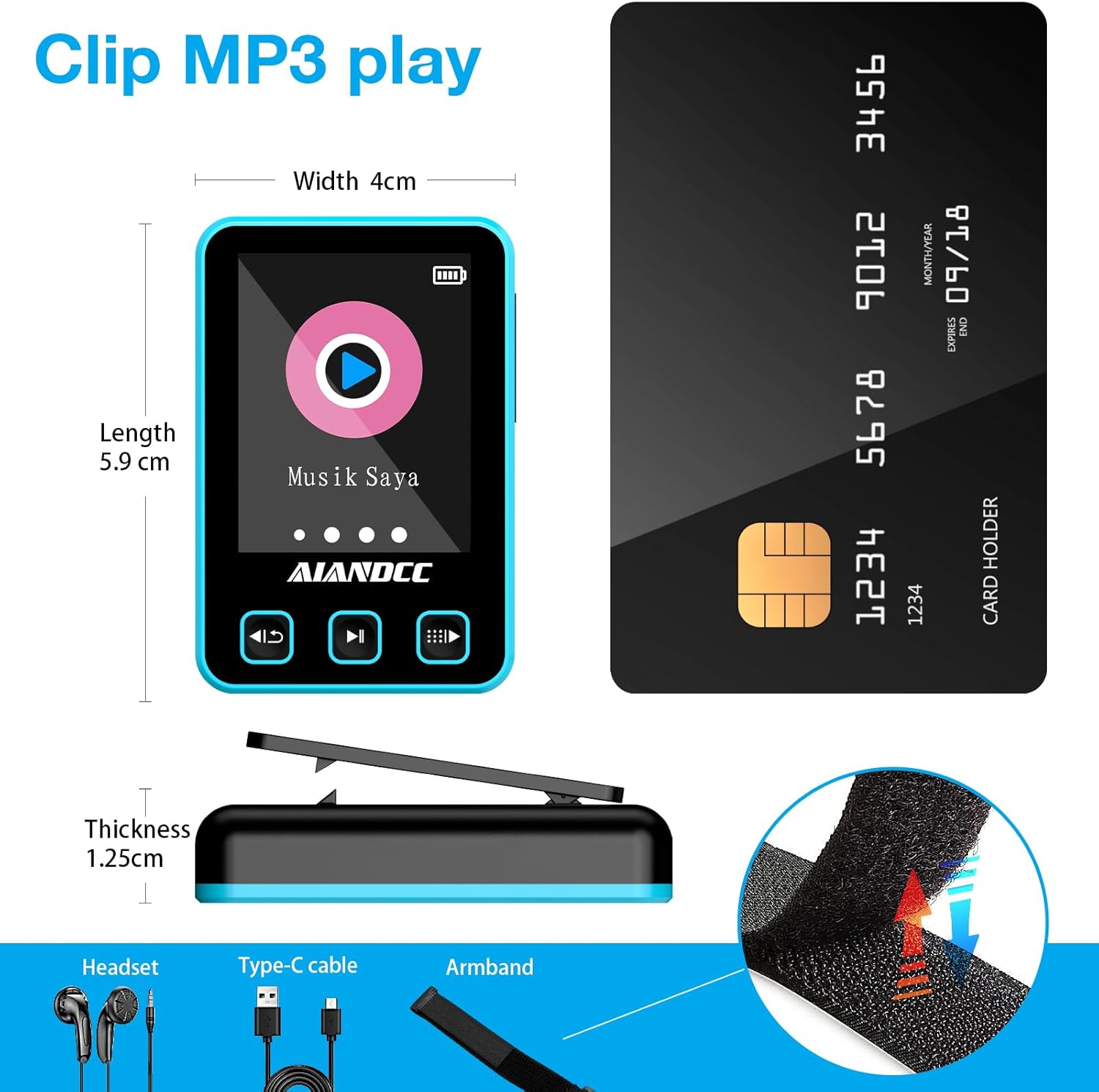
Prent: Diagram showing the dimensions of the Aiandcc M8 MP3 Player (Length 5.9cm, Width 4cm, Thickness 1.25cm) and included accessories: Headset, Type-C cable, and Armband with a clip mechanism.
2.3 Dra van die armband
The included armband allows for convenient, hands-free use during activities like sports or running.
- Attach the MP3 player to the clip on the armband.
- Secure the armband around your arm, ensuring a comfortable fit that is not too tight.
- Adjust the position for easy access to controls.

Prent: A person wearing the Aiandcc M8 MP3 Player on an armband during a workout, demonstrating its portability and suitability for active lifestyles with Bluetooth connectivity.
3. Opstelling
3.1 Laai die toestel
Before first use, fully charge the MP3 player. A full charge takes approximately 2.5 hours.
- Koppel die meegeleverde USB Tipe-C-kabel aan die laaipoort op die toestel.
- Koppel die ander kant van die kabel aan 'n USB-kragadapter (nie ingesluit nie) of 'n rekenaar se USB-poort.
- Die battery-ikoon op die skerm sal laaistatus aandui.
- Sodra dit ten volle gelaai is, ontkoppel die kabel.

Prent: Illustration of the Aiandcc M8 MP3 Player connected to a Type-C charging cable, showing the charging port and estimated playback times (31 hours with wired headphones, 11 hours with Bluetooth).
3.2 Aan-/afskakel
- Om aan te skakel: Long press the Power On/Off button located on the side of the device until the screen lights up.
- Om af te skakel: Long press the Power On/Off button until the screen turns off.
3.3 Invoeging van 'n TF-kaart (MicroSD-kaart)
The device has 32GB of internal storage and supports external TF cards up to 128GB for additional music storage.
- Locate the TF Card Slot on the side of the device.
- Steek die TF-kaart versigtig in die gleuf totdat dit in plek klik. Maak seker dat die kaart korrek georiënteer is.
- Om te verwyder, druk die kaart weer liggies in totdat dit uitspring.

Prent: The Aiandcc M8 MP3 Player showing the TF card slot and indicating support for up to 128GB via TF card, along with support for 28 languages.
4. Basiese werking
4.1 Navigering van spyskaarte
- Use the Previous Track and Next Track buttons to scroll through menu options.
- Press the Play/Pause/Confirm button to select an option.
- Press the Submenu button to go back to the previous menu or exit a function.
4.2 Musiek speel
- From the main menu, navigate to "Music" and press the Play/Pause/Confirm button.
- Browse your music library by Artist, Album, Songs, or Playlists.
- Select a song and press Play/Pause/Confirm to start playback.
- Tydens afspeel:
- Press Play/Pause/Confirm to pause or resume.
- Press Previous Track or Next Track to skip songs.
- Long press Previous Track or Next Track to fast forward or rewind within a song.
- Use Volume - and Volume + buttons to adjust the volume.
The Aiandcc M8 supports various audio formats including MP3, APE, FLAC, ACELP, WMA, and WAV.

Prent: The Aiandcc M8 MP3 Player screen showing supported audio formats (MP3, APE, FLAC, ACELP, WMA, WAV) and equalizer presets (Auto, Normal, Rock, Classic, Jazz, Pop).
5. Bluetooth-verbinding
The Aiandcc M8 features Bluetooth 5.3 for wireless audio streaming to compatible headphones, speakers, or car audio systems. It offers a stable transmission range of up to 10 meters.
- From the main menu, navigate to "Bluetooth" and press the Play/Pause/Confirm button.
- Ensure Bluetooth is enabled on your external device (headphones, speaker, etc.) and it is in pairing mode.
- On the MP3 player, select "Search Device" to scan for available Bluetooth devices.
- Once your device appears in the list, select it and press Play/Pause/Confirm to pair.
- After successful pairing, the Bluetooth icon on the MP3 player's screen will indicate a connected status.

Prent: The Aiandcc M8 MP3 Player screen showing the Bluetooth connection interface, surrounded by various Bluetooth headphones and speakers, illustrating its compatibility and stable connection features.
6. File Bestuur
Om musiek oor te dra files to your Aiandcc M8 MP3 Player:
- Connect the MP3 player to your computer using the provided USB Type-C cable.
- The device will appear as a removable disk drive on your computer.
- Open the device's storage folder.
- Sleep en los jou musiek files (MP3, FLAC, etc.) into the appropriate folders on the MP3 player (e.g., "Music" folder).
- Een keer files are transferred, safely eject the device from your computer before disconnecting the cable.
7. Spesifikasies
| Kenmerk | Spesifikasie |
|---|---|
| Handelsmerk | Aiandcc |
| Modelnommer | M8 |
| Interne bergingskapasiteit | 32 GB |
| Uitbreidbare berging | Up to 128 GB via TF Card (MicroSD) |
| Skerm grootte | 1.77 duim |
| Bluetooth weergawe | 5.3 |
| Ondersteunde oudioformate | MP3, APE, FLAC, ACELP, WMA, WAV |
| Item gewig | 31 gram |
| Vervaardiger | shenzhen ChenFec technology co., LTD |
8. Probleemoplossing
8.1 Toestel sal nie aanskakel nie
- Ensure the device is fully charged. Connect it to a power source and try again after a few minutes.
- Long press the Power On/Off button for at least 10 seconds to perform a hard reset.
8.2 Geen klank nie
- Check the volume level and increase it if necessary.
- If using wired headphones, ensure they are fully plugged into the 3.5mm jack. Test with another pair of headphones.
- If using Bluetooth, ensure the device is correctly paired and connected to your audio output. Check the volume on both the MP3 player and the Bluetooth device.
- Verseker die klank files are not corrupted and are in a supported format.
8.3 Kan nie oordra nie Files
- Ensure the USB cable is securely connected to both the MP3 player and the computer.
- Probeer 'n ander USB-poort op jou rekenaar of 'n ander USB-kabel.
- Restart both the MP3 player and your computer.
- Check if the device appears in "My Computer" or "This PC" as a removable drive.
8.4 Bluetooth-verbindingsprobleme
- Ensure both devices are within 10 meters of each other.
- Make sure the external Bluetooth device is in pairing mode.
- Delete previous pairings on both the MP3 player and the external device, then attempt to pair again.
- Herbegin albei toestelle.
9. Veiligheidsinligting
- Moenie die toestel blootstel aan uiterste temperature, direkte sonlig of hoë humiditeit nie.
- Vermy om die toestel te laat val of aan sterk impakte te onderwerp.
- Moenie probeer om die toestel self uitmekaar te haal of te herstel nie. Dit kan die waarborg ongeldig maak en skade veroorsaak.
- Hou die toestel weg van water en ander vloeistowwe.
- Gebruik slegs die voorsiene of aanbevole laaikabels en -bykomstighede.
- Gooi die toestel en sy battery verantwoordelik weg volgens plaaslike regulasies.
10. Waarborg en Ondersteuning
The Aiandcc M8 MP3 Player comes with a standard manufacturer's warranty. For specific warranty details, please refer to the warranty card included in your package or contact Aiandcc customer support.
For technical support, troubleshooting assistance, or general inquiries, please visit the official Aiandcc webwebwerf of kontak hul kliëntediensafdeling. Kontakbesonderhede kan tipies op die produkverpakking of die handelsmerk se amptelike aanlyn teenwoordigheid gevind word.