
Skyworth H30P
Skyworth H30P Smart 360° Pan & Tilt Indoor Wi-Fi Security Camera User Manual
Model: H30P
1. Inleiding
Thank you for choosing the Skyworth H30P Smart 360° Pan & Tilt Indoor Wi-Fi Security Camera. This camera is designed to provide comprehensive surveillance for your indoor spaces, offering advanced features like 360° pan and tilt, two-way audio, and remote viewing via a mobile app. Please read this manual carefully before use to ensure proper installation and operation.
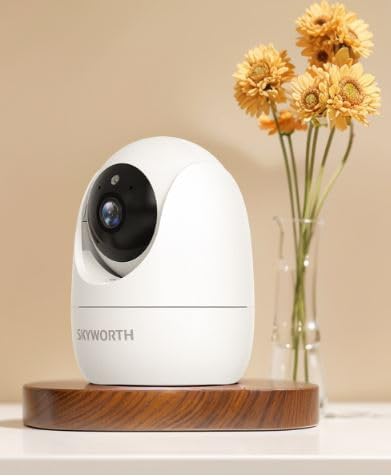
Figure 1: Skyworth H30P Smart Wi-Fi Camera
2. Veiligheidsinligting
- Ensure the camera is used indoors only. It is not water-resistant (IP20 rating).
- Gebruik slegs die kragadapter wat by die toestel voorsien is.
- Keep the camera away from direct sunlight, heat sources, and moisture.
- Moenie probeer om die kamera uitmekaar te haal of te wysig nie. Dit sal die waarborg ongeldig maak.
- Hou buite bereik van kinders en troeteldiere.
- Ensure stable Wi-Fi connectivity for optimal performance.
3. Pakketinhoud
Kontroleer asseblief die inhoud van die pakket na opening. Indien enige items ontbreek of beskadig is, kontak kliëntediens.
- Skyworth H30P Smart Wi-Fi Camera (1 unit)
- Kragadapter (1 eenheid)
- Monteringsbykomstighede (skroewe, muurproppe)
- Gebruikershandleiding (hierdie dokument)
4. Produk verbyview
The Skyworth H30P camera features a compact dome shape with pan and tilt functionality, allowing for a 360-degree viewing angle. It includes a high-quality CMOS image sensor, infrared LEDs for night vision, and a built-in microphone and speaker for two-way audio communication.
Sleutel kenmerke:
- 360° Pan & Kantel: Full room coverage with no blind spots.
- 2K-resolusie: Verskaf duidelike en gedetailleerde video footage.
- Wi-Fi konneksie: Easy remote access and control via smartphone app.
- Volkleur Nagvisie: Enhanced visibility in low-light conditions up to 10 meters.
- Tweerigting-klank: Communicate with people or pets through the camera.
- Bewegingsopsporing: Receive alerts for detected movement.
- Mikro SD kaart ondersteuning: Up to 128GB for local storage (Micro SD card not included).
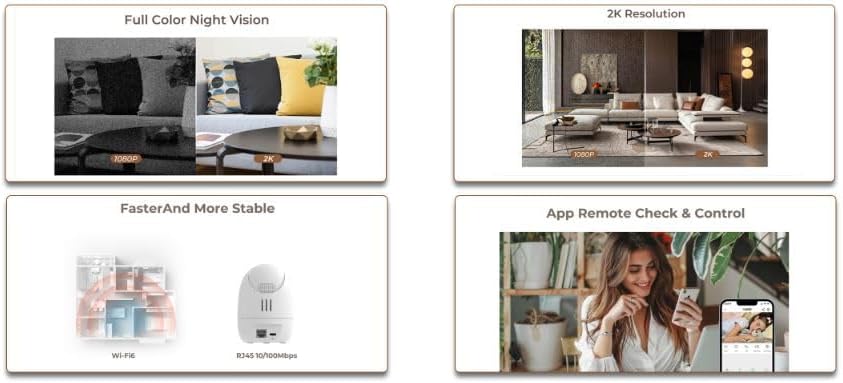
Figure 2: Demonstrates 2K resolution and full color night vision capabilities.
This image illustrates the camera's ability to capture clear images with 2K resolution and its full color night vision feature, which provides visibility even in dark environments.
5. Opstelling
5.1 Aanskakel
- Koppel die kragadapter aan die kamera se kragtoevoerpoort.
- Plug the power adapter into a standard AC power outlet.
- The camera will power on, and its indicator light will begin to flash, indicating it is ready for setup.
5.2 App-installasie en rekeningskepping
- Download the dedicated mobile application from your smartphone's app store (e.g., App Store for iOS, Google Play Store for Android). Soek vir "Skyworth Smart Home" or refer to the QR code on the packaging.
- Maak die toepassing oop en volg die instruksies op die skerm om 'n nuwe rekening te skep of aan te meld as jy reeds een het.
5.3 Koppel aan Wi-Fi
- Tik in die toepassing op "Voeg toestel by" of die "+"-ikoon.
- Select "Security Camera" or the specific model (H30P) from the list of devices.
- Follow the in-app prompts to connect the camera to your 2.4GHz Wi-Fi network. Ensure your Wi-Fi password is correct.
- The app may ask you to scan a QR code displayed on your phone screen with the camera lens, or to listen for an audible pairing tone.
- Once connected, the camera's indicator light will turn solid, and you will receive a confirmation in the app.

Figure 3: Illustrates Wi-Fi connectivity and remote control via mobile app.
This image shows the camera's wireless connectivity and how it can be controlled and monitored remotely using a smartphone application.
5.4 Montering van die kamera
The H30P camera can be placed on a flat surface like a shelf or table, or mounted on a wall.
Tabletop/Shelf Placement:
- Place the camera on a stable, flat surface within Wi-Fi range.
- Maak seker dat die kamera 'n duidelike siglyn het na die area wat jy wil monitor.
Muurmontering:
- Choose a suitable location on the wall, ensuring it is within Wi-Fi range and has a power outlet nearby.
- Use the provided mounting template (if available) or mark the screw positions on the wall.
- Boor vlieëniergate en plaas muurproppe indien nodig.
- Secure the mounting bracket (if included) to the wall using the screws.
- Heg die kamera aan die monteerbeugel vas.
6. Bedien die kamera
6.1 Lewendig View
- Open the mobile app and select your H30P camera from the device list.
- You will see the live video feed from the camera.
6.2 Pan- en Kantelbeheer
- Op die lewendige view screen in the app, use the directional controls (usually a joystick or arrows) to remotely adjust the camera's viewing hoek.
- The camera supports 360° horizontal rotation and vertical tilt.
6.3 Tweerigting-klank
- To speak through the camera, tap the microphone icon in the app and hold it while speaking. Release to listen.
- To listen to audio from the camera's environment, ensure the speaker icon in the app is enabled.
6.4 Bewegingsopsporing en waarskuwings
- Access the camera settings in the app to configure motion detection sensitivity and alert preferences.
- You can set up push notifications to your smartphone when motion is detected.
6.5 Opname en berging
- The camera supports continuous recording or event-triggered recording (e.g., motion detection).
- Insert a Micro SD card (up to 128GB, not included) into the camera's Micro SD card slot for local storage.
- Opgeneem footage kan verkry word en herwin wordviewed through the mobile app.
7. Onderhoud
- Skoonmaak: Gently wipe the camera lens and body with a soft, dry cloth. Do not use liquid cleaners or abrasive materials.
- Firmware -opdaterings: Regularly check the mobile app for available firmware updates to ensure optimal performance and security.
- Bergingbestuur: If using a Micro SD card, periodically review en verwyder ou footage to free up space, or enable loop recording if supported.
8. Probleemoplossing
| Probleem | Moontlike oorsaak | Oplossing |
|---|---|---|
| Kamera skakel nie aan nie | Kragadapter nie gekoppel of foutief nie; probleem met kragaansluiting. | Check power connections. Try a different power outlet. Ensure the power adapter is working. |
| Kan nie aan Wi-Fi koppel nie | Incorrect Wi-Fi password; camera too far from router; 5GHz Wi-Fi network used. | Verify Wi-Fi password. Move camera closer to router. Ensure you are connecting to a 2.4GHz Wi-Fi network. Reset camera and try again. |
| Geen regstreekse videostroom nie | Poor Wi-Fi signal; camera offline; app issue. | Check Wi-Fi signal strength. Restart the camera and router. Close and reopen the app. |
| Tweerigting-oudio werk nie | Microphone/speaker muted in app; volume too low; network latency. | Check app settings for audio controls. Adjust volume. Ensure stable network connection. |
| Bewegingswaarskuwings nie ontvang nie | Motion detection disabled; incorrect sensitivity settings; app notifications blocked. | Enable motion detection in app settings. Adjust sensitivity. Check phone notification settings for the app. |
9. Spesifikasies
| Kenmerk | Detail |
|---|---|
| Modelnommer | H30P |
| Afmetings | 8.5 x 8.5 x 12 cm |
| Gewig | 164 gram |
| Kleur | Wit |
| Konnektiwiteit | Wi-Fi (2.4GHz) |
| Resolusie | 2 Megapixels (2K effective video resolution) |
| Raamtempo | 30 fps |
| Viewing Hoek | 360 degrees (Pan & Tilt) |
| Nagsigreeks | Up to 10 meters (Full Color Night Vision with Infrared LEDs) |
| Berging | Micro SD card (up to 128GB, not included) |
| Kragbron | AC (5 Watts) |
| Spesiale kenmerke | Pan/Tilt, Full Color Night Vision, Two-Way Audio, Remote View, Bewegingsensor |
| Binne/buiteluggebruik | Indoor only (IP20) |
| Versoenbare toestelle | Smartphone, Tablet, Smart Displays |
10. Waarborg en Ondersteuning
For warranty information and customer support, please refer to the warranty card included in your product packaging or visit the official Skyworth website. You can also contact your retailer for assistance.
Vervaardiger: Skyworth
Land van oorsprong: China