
1. Inleiding
Thank you for choosing Bluedee BD-SK900 Computer Speakers. This manual provides essential information for the proper setup, operation, and maintenance of your new speakers. Please read this guide thoroughly before use to ensure optimal performance and longevity of your device. These speakers are designed to deliver high-fidelity audio with versatile connectivity and dynamic RGB lighting for an enhanced audio-visual experience.
2. Pakketinhoud
Verifieer asseblief dat al die items wat hieronder gelys word, in u pakket ingesluit is:
- 1x Bluedee Computer Speaker (Pair)
- 1x USB/USB-C Cable
- 1x vinnige begingids
3. Produkkenmerke
The Bluedee BD-SK900 speakers are equipped with advanced features for a superior audio experience:
- High-Fidelity Stereo Klank: Features 2 tweeters, 2 full-range drivers, and 2 passive radiators for clear highs, rich mids, and powerful bass with a 20W output.
- All-in-One Control Knob: A single, intuitive knob allows for play/pause, volume adjustment, lighting control, and switching between connection modes.
- Bluetooth 5.4-verbinding: Ensures a stable, low-latency wireless connection for seamless audio streaming. (Note: Requires USB power supply for operation).
- Plug & Play-ontwerp: Connects easily via the included USB/USB-C cable for both audio and power, requiring no additional drivers or software.
- Dinamiese RGB-beligting: Offers 5 distinct RGB lighting modes, including dynamic color-shifting and static single-color glows, controllable via the knob.
- Unique Egg-shaped Acoustic Design: A minimalist and space-saving design (5.1"D x 5"W x 7.2"H) that enhances sound projection.
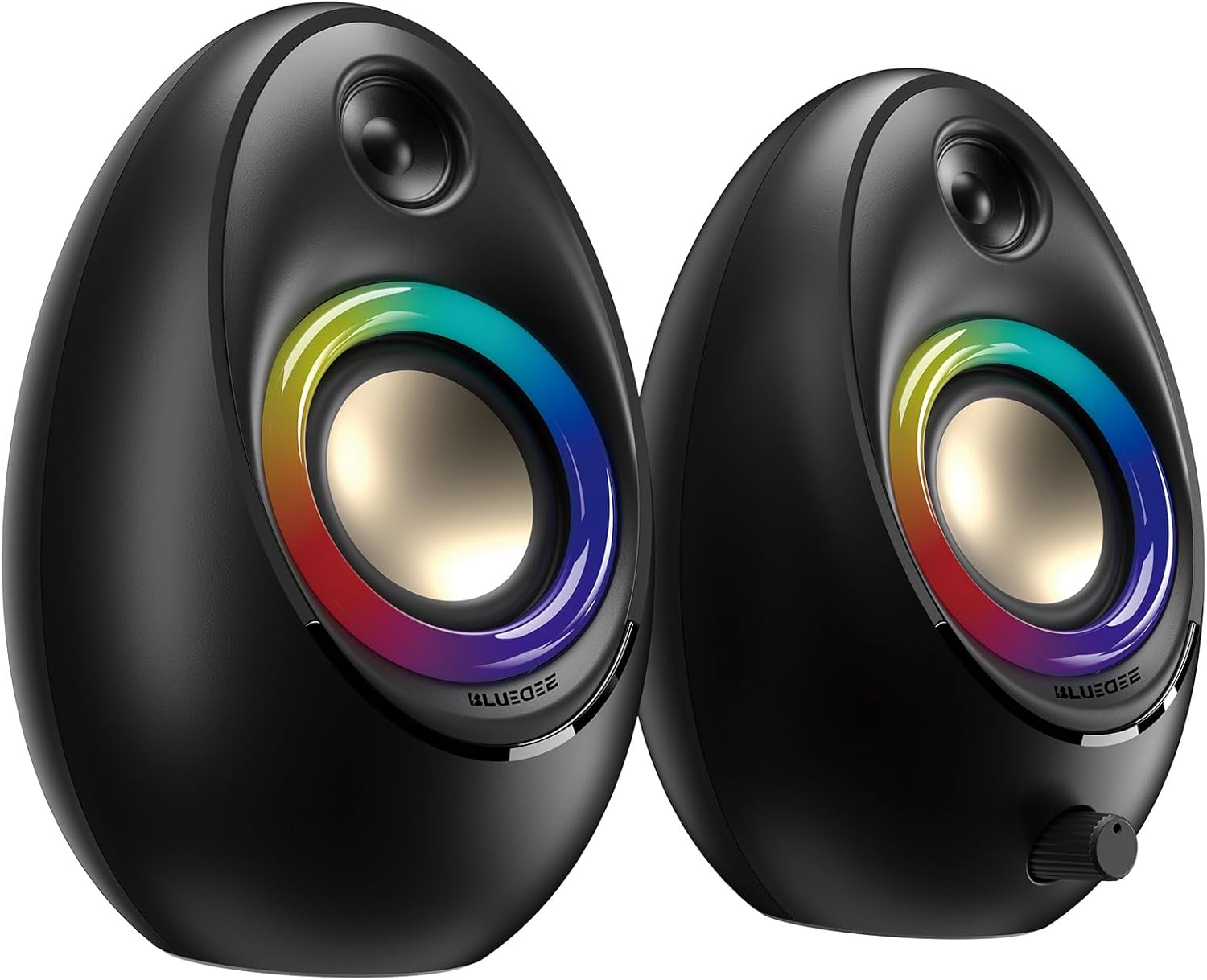
Figure 3.1: Bluedee BD-SK900 Computer Speakers, showcasing their design and RGB lighting.

Figure 3.2: Internal acoustic architecture of the Bluedee BD-SK900 speakers.

Figure 3.3: The multi-functional control knob for easy operation.
4. Opstelinstruksies
Follow these steps to set up your Bluedee BD-SK900 speakers:
- Plasing: Position the two speakers on your desktop or desired surface, ensuring they are spaced appropriately for optimal stereo sound.
- Connect Power and Audio: Use the provided all-in-one USB/USB-C cable. Connect the USB-A or USB-C end to an available port on your computer (desktop, laptop) or a compatible USB power adapter (not included). The speakers will power on automatically.
- Aanvanklike verbinding: Upon connecting, the speakers will typically default to USB audio mode. If your computer recognizes the speakers, audio will play directly through them.
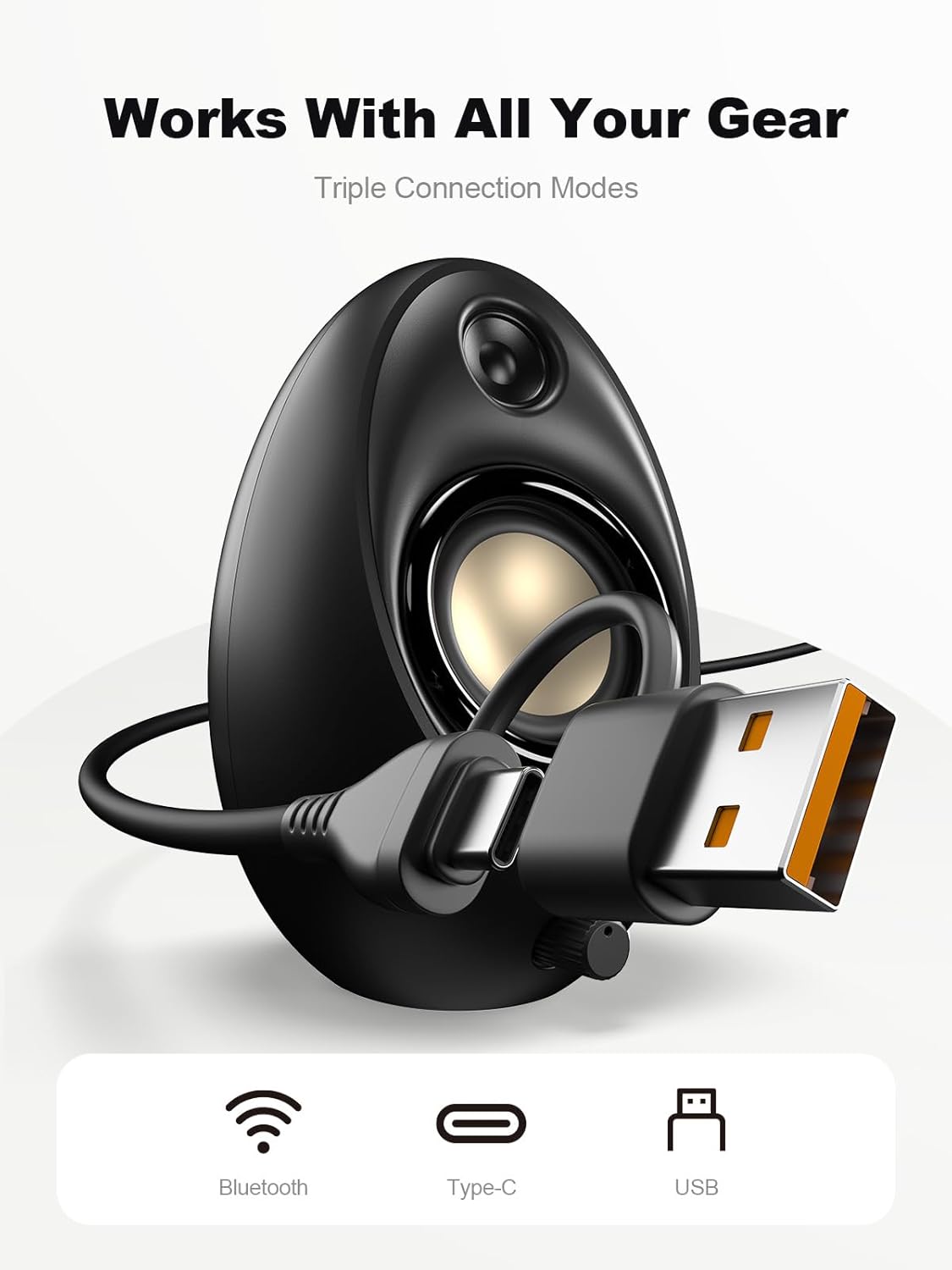
Figure 4.1: Connecting the speakers via USB/USB-C cable.
5. Bedryfsinstruksies
5.1 Krag aan/af
The speakers power on automatically when connected to a USB power source. To power off, disconnect the USB cable.
5.2 Volumebeheer
Rotate the multi-functional knob clockwise to increase volume and counter-clockwise to decrease volume.
5.3 Bluetooth -koppeling
- Switch to Bluetooth Mode: Press and hold the multi-functional knob for approximately 2-3 seconds until the speaker indicates Bluetooth mode (e.g., a specific light pattern or audio prompt).
- Aktiveer Bluetooth op toestel: Aktiveer Bluetooth op jou slimfoon, tablet of skootrekenaar en soek vir beskikbare toestelle.
- Paar: Select "Bluedee BD-SK900" from the list of devices. Once paired, the speakers will confirm the connection.
5.4 USB/Type-C Connection
When connected via the USB/USB-C cable, the speakers will automatically function as an audio output device for your computer. To switch back to USB mode from Bluetooth, press and hold the multi-functional knob again.
5.5 RGB-beligtingsbeheer
The speakers feature 5 dynamic RGB lighting effects. Briefly press the multi-functional knob to cycle through the available lighting modes. This allows you to customize the ambiance to your preference.

Figure 5.1: Dynamic RGB lighting effects.
6. Probleemoplossing
If you encounter issues with your Bluedee BD-SK900 speakers, please refer to the following common solutions:
- Geen klank:
- Ensure the USB/USB-C cable is securely connected to both the speakers and your device/power source.
- Check the volume level on both the speakers (using the knob) and your connected device.
- Verifieer dat die korrekte oudio-uitvoertoestel in jou rekenaar se klankinstellings gekies is.
- If using Bluetooth, ensure the speakers are in Bluetooth mode and successfully paired.
- Bluetooth-ontkoppelings-/paringsprobleme:
- Ensure the speakers are within the 10-meter Bluetooth range of your device.
- Skakel Bluetooth op jou toestel af en aan, en probeer dan weer om te koppel.
- Forget the device from your Bluetooth list and re-pair.
- Ensure the speakers are not connected to another device.
- RGB-ligte werk nie:
- Maak seker dat die luidsprekers aangeskakel is.
- Briefly press the multi-functional knob to cycle through lighting modes; the lights might be off or in a static mode.
- Verwronge oudio:
- Reduce the volume on both the speakers and your connected device.
- Maak seker dat die klankbron van goeie gehalte is.
- Check for any interference if using Bluetooth.
7. Spesifikasies
| Model Naam | BD-SK900 |
| Tipe luidspreker | Rekenaarspreker |
| Verbindingstegnologie | Bluetooth, USB |
| Bluetooth weergawe | 5.4 |
| Bluetooth-reeks | 10 meter |
| Kraguitset | 20 W |
| Sein-tot-geraas verhouding | 70 dB |
| Frekwensierespons | 20 KHz (Upper limit, typical for full-range) |
| RGB-beligtingsmodusse | 5 |
| Versoenbare toestelle | Rekenaar, Skootrekenaar, Slimfoon, Tablet |
| Produk Afmetings (elke luidspreker) | 5.1" D x 5" B x 7.2" H |
| Item gewig | 2.88 pond |
| Kragbron | Corded Electric (USB/Type-C) |

Figure 7.1: Speaker dimensions and design.
8. Onderhoud
Om die lang lewensduur en optimale werkverrigting van u luidsprekers te verseker, volg hierdie onderhoudsriglyne:
- Skoonmaak: Use a soft, dry cloth to clean the speaker surfaces. Avoid using abrasive cleaners, solvents, or strong chemicals, as they may damage the finish.
- Berging: Wanneer dit nie vir lang tye gebruik word nie, bêre die luidsprekers op 'n koel, droë plek weg van direkte sonlig en uiterste temperature.
- Hantering: Hanteer die luidsprekers versigtig. Vermy om hulle te laat val of aan harde impakte bloot te stel.
- Ventilasie: Ensure proper ventilation around the speakers to prevent overheating. Do not block any vents.
9. Veiligheidsinligting
Neem asseblief die volgende veiligheidsmaatreëls in ag:
- Moenie die luidsprekers aan water, vog of uiterste temperature blootstel nie.
- Do not attempt to disassemble or modify the speakers. This will void the warranty and may cause damage or injury.
- Keep the speakers away from heat sources, open flames, and direct sunlight.
- Use only the provided USB/USB-C cable for connection.
- Vermy luister teen uitermatig hoë volumes vir lang tye om gehoorskade te voorkom.
10. Waarborg en Ondersteuning
Bluedee provides comprehensive support for your BD-SK900 Computer Speakers:
- Kwaliteit waarborg: Your speakers are covered by a 540-day quality warranty from the date of purchase.
- Lewenslange ondersteuning: Bluedee offers lifetime customer support for this product.
- Kontak: For any questions, technical assistance, or warranty claims, please contact us via Amazon Messages or refer to the contact details provided in your Quick Start Guide.