
1. Inleiding
Thank you for choosing the Nocpix Vista H35R LRF 35-640 Thermal Monocular. This device is engineered to provide superior thermal imaging performance for various applications, including observation, hunting, and surveillance. Featuring an advanced thermal sensor, integrated laser rangefinder, and a high-resolution AMOLED display, the Vista H35R delivers exceptional clarity and detail. This manual provides essential information for the proper setup, operation, and maintenance of your device.
2. Produk verbyview
The Nocpix Vista H35R LRF 35-640 is a high-performance handheld thermal monocular designed for detailed observation in challenging conditions. Key features include:
- Gevorderde Optika: Equipped with an f/0.9 germanium objective lens for unmatched clarity.
- Hoë-resolusie sensor: Features a 640x512 thermal sensor with 15 mK NETD sensitivity for detailed images.
- Integrated Laser Rangefinder: Accurately detects distances up to 1,200 yards with 1-yard precision.
- Lewendige skerm: 1.03-inch 2560x2560 round AMOLED display for a smooth, sharp picture.
- Elektroniese Beeldstabilisering: Ensures stable viewing even during movement.
- Removable Battery Pack: Utilizes the Nocpix IBP-7 Removable Battery Pack with direct USB-C charging.
- Opname vermoëns: Built-in photo, video, and audio recording.
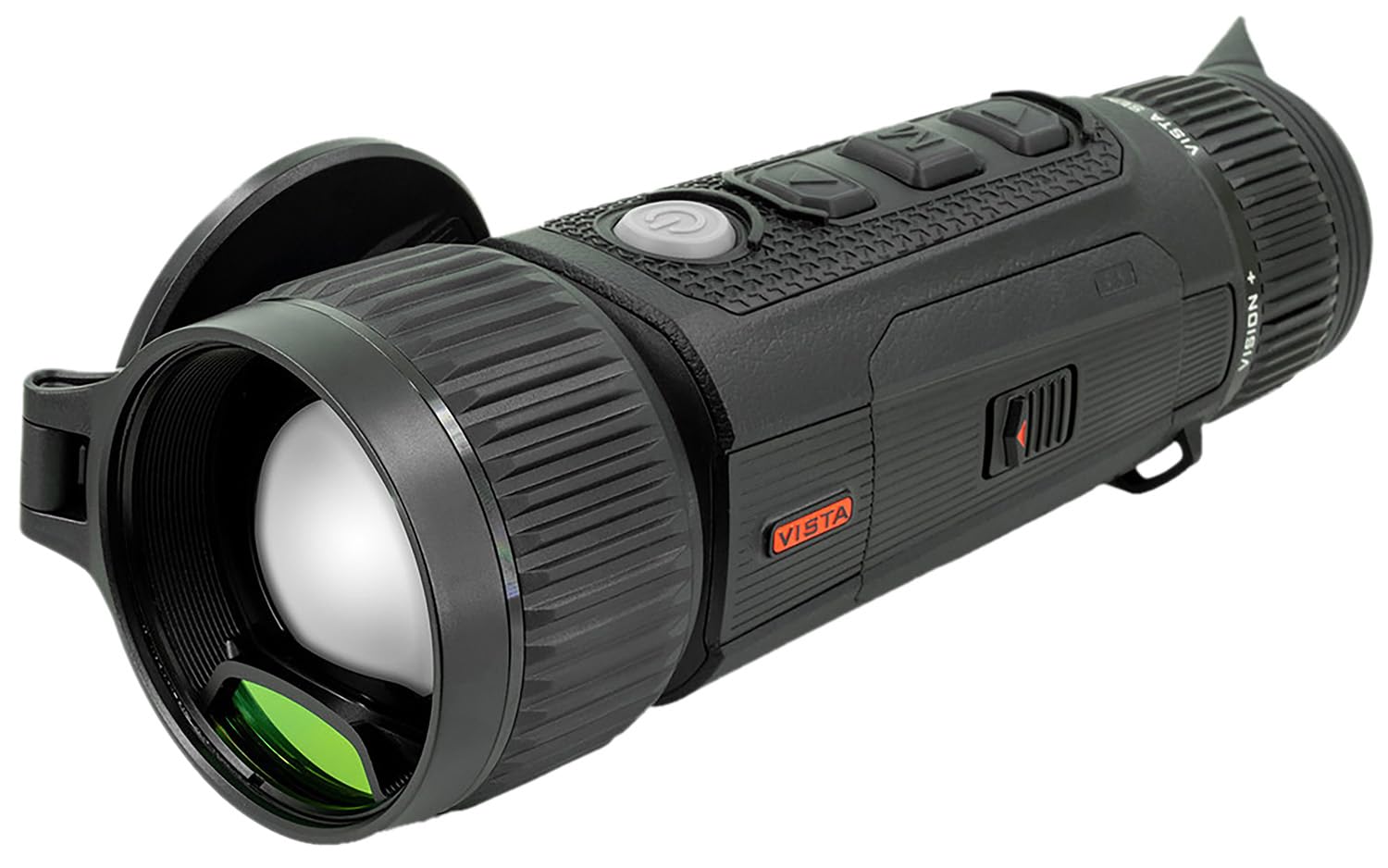
Figure 2.1: The Nocpix Vista H35R LRF 35-640 Thermal Monocular. This image shows the device from a side angle, highlighting its ergonomic design and objective lens.
3. Opstelling
3.1. Battery Installasie
- Vind die batterykompartement op die toestel.
- Maak die batteryvakdeksel oop.
- Insert the Nocpix IBP-7 Removable Battery Pack, ensuring correct polarity.
- Maak die batterykompartement se deksel stewig toe.
3.2. Laai die battery
The Nocpix IBP-7 battery can be charged directly via the USB-C port on the device.
- Connect the provided USB-C cable to the device's USB-C port.
- Koppel die ander kant van die USB-C-kabel aan 'n versoenbare USB-kragadapter (nie ingesluit nie) of 'n rekenaar se USB-poort.
- The charging indicator will illuminate, typically red during charging and green when fully charged.
3.3. Aanvanklike Aanskakeling
After installing a charged battery, press and hold the power button (refer to the device diagram for location) for approximately 3 seconds until the display illuminates.
4. Bedryfsinstruksies
4.1. Skakel aan/af
- Krag aan: Druk en hou die kragknoppie vir 3 sekondes.
- Skakel af: Press and hold the power button for 3 seconds until the shutdown prompt appears, then confirm.
4.2. Fokusaanpassing
Use the ergonomic objective focus dial located on the device to achieve a clear image. Rotate the dial clockwise or counter-clockwise until the image on the AMOLED display is sharp.
4.3. Gebruik van die laserafstandsmeter (LRF)
The integrated laser rangefinder can be activated for single measurements or continuous scanning.
- Enkele meting: Briefly press the LRF button (refer to device diagram) to measure the distance to the target. The distance will be displayed on the screen.
- Deurlopende skandering: Press and hold the LRF button to activate continuous scanning. The distance will update as you move the device across different targets. Release the button to stop scanning.
4.4. Photo, Video, and Audio Recording
The Vista H35R allows for capturing images, videos, and audio.
- Foto: Press the photo capture button (refer to device diagram) to take a still image.
- Video: Press the video recording button to start recording. Press it again to stop.
- Oudio: Audio recording is integrated with video recording. Ensure the microphone is not obstructed.
4.5. Kieslysnavigasie en -instellings
The device features an intuitive interface for accessing various settings. Use the navigation buttons (up, down, select) to browse through menus and adjust parameters such as color palettes, brightness, contrast, and electronic image stabilization.
5. Onderhoud
5.1. Maak die toestel skoon
- Lens: Use a soft, lint-free cloth specifically designed for optical lenses. Gently wipe the lens surface. Avoid abrasive materials or excessive pressure.
- Liggaam: Vee die toestel se liggaam af met 'n sagte, damp lap. Moenie harde chemikalieë of oplosmiddels gebruik nie.
5.2. Batteryversorging
- Berg batterye op 'n koel, droë plek wanneer dit nie gebruik word nie.
- Vermy die volle ontlading van die battery vir lang tye.
- Charge the battery regularly, even if not in frequent use, to maintain its lifespan.
5.3. Berging
When storing the device for extended periods, ensure it is clean, dry, and the battery is partially charged. Store it in its protective case in a stable environment, away from extreme temperatures and humidity.
6. Probleemoplossing
If you encounter issues with your Nocpix Vista H35R, please refer to the following common solutions:
- Toestel skakel nie aan nie: Ensure the battery is correctly installed and fully charged. Try charging the device for at least 30 minutes.
- Image Unclear/Blurred: Adjust the objective focus dial until the image is sharp. Ensure the lens is clean and free from smudges or debris.
- Laser Rangefinder Not Working: Ensure there are no obstructions between the device and the target. Check if the LRF function is enabled in the settings menu.
- Kort batterylewe: Ensure the battery is fully charged before use. Reduce screen brightness or disable unnecessary features to conserve power.
- Toestel reageer nie: Perform a soft reset by holding the power button for 10-15 seconds until the device restarts. If the issue persists, contact customer support.
7. Spesifikasies
| Kenmerk | Spesifikasie |
|---|---|
| Modelnommer | VISTA-H35R |
| Termiese sensorresolusie | 640x512 |
| NETD Sensitivity | <15 mK |
| Objektiewe lens | 35mm, f/0.9 Germanium |
| Tipe vertoon | AMOLED |
| Vertoon resolusie | 2560x2560 |
| Laser Rangefinder Range | Up to 1,200 yards (1-yard accuracy) |
| Battery Tipe | Nocpix IBP-7 Removable Battery Pack |
| Laai-koppelvlak | USB-C |
8. Waarborg en Ondersteuning
Nocpix products are manufactured to high-quality standards. For information regarding warranty coverage, please refer to the warranty card included with your product or visit the official Nocpix website. For technical support, service, or inquiries, please contact Nocpix customer service through their official channels. Please have your model number (VISTA-H35R) and purchase information ready when contacting support.