
Comfort Direct CD7030T4DS-2
Merwry DL-4112T-02 Fan Remote Control Replacement
Gebruikershandleiding
Inleiding
This manual provides detailed instructions for the setup, operation, and maintenance of your new Merwry DL-4112T-02 Fan Remote Control Replacement. This remote is designed to be a direct replacement for Home Decorators Ceiling Fans, offering enhanced functionality and ease of use.
It features an all-in-one control design, allowing you to manage fan speeds, light functions, and reverse mode directly from the front of the remote, eliminating the need to access internal switches for reverse function.

Image: Comparison of the original remote (left) and the Merwry DL-4112T-02 replacement remote (right).
Opstelling
1. Battery Installasie
The remote control requires one 9V battery (not included). To install the battery:
- Vind die batteryklepdeksel aan die agterkant van die afstandbeheerder.
- Skuif die deksel afwaarts om oop te maak.
- Plaas 'n nuwe 9V-battery in en maak seker dat die polariteit (+/-) ooreenstem met die diagram binne-in die kompartement.
- Skuif die deksel terug in plek totdat dit stewig klik.
2. Muurmontering
The remote comes with a convenient wall mount and screws for secure storage.
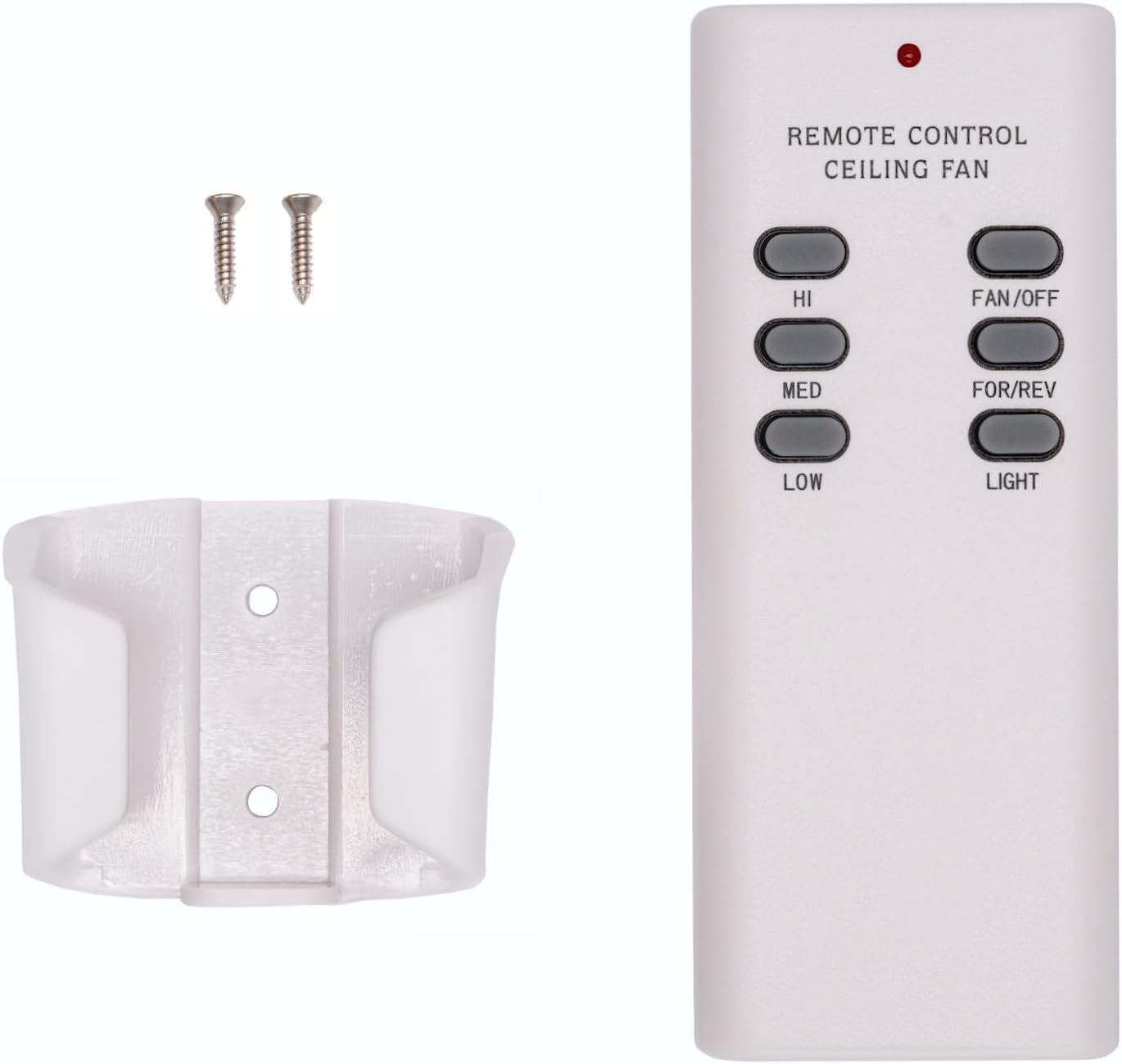
Image: The Merwry DL-4112T-02 remote control, its wall mount cradle, and two mounting screws.
Om die muurhouer te installeer:
- Choose a suitable location on a wall, away from direct heat or moisture.
- Gebruik die muurbevestiging as 'n sjabloon om die posisies vir die twee skroewe te merk.
- Boor loodsgate indien nodig.
- Bevestig die muurbevestiging aan die muur met die meegeleverde skroewe.
- Place the remote control into the mounted cradle for easy access.
3. Pairing Process (Syncing the Remote)
Follow these steps to pair your new remote control with your ceiling fan:
- Turn off power to the fan: Locate the circuit breaker or wall switch that controls power to your ceiling fan and turn it OFF. Ensure the fan is completely powered down.

Image: A hand turning off a wall light switch, illustrating the first step of power cycling.
- Herstel krag: After a few seconds, turn the power back ON at the circuit breaker or wall switch.
- Press and hold the "FAN/OFF" button: Within 30 seconds of restoring power, press and hold the "FAN/OFF" button on your remote control for 10 seconds. The fan light (if applicable) should blink, indicating successful pairing.

Beeld: 'n Nabyskoot view of the Merwry DL-4112T-02 remote control, with the 'FAN/OFF' button highlighted by a green rectangle.
If pairing is unsuccessful, repeat the steps. Ensure the remote is within range of the fan's receiver during the pairing process.
Bedryfsinstruksies
The Merwry DL-4112T-02 remote control provides comprehensive control over your ceiling fan's functions. Familiarize yourself with the buttons:

Beeld: Voorkant view of the Merwry DL-4112T-02 replacement remote control, showing all control buttons.
- HI: Stel die waaierspoed op Hoog.
- met: Stel die waaierspoed op Medium.
- LAAG: Stel die waaierspoed op Laag.
- WAAIER/AF: Turns the fan off. Also used for pairing (see Setup section).
- FOR/REV: Toggles the fan's direction between forward (downward airflow for cooling) and reverse (upward airflow for heat distribution). This button is conveniently located on the front, unlike some original remotes.
- LIG: Toggles the fan light On or Off.
Onderhoud
Battery vervanging
Replace the 9V battery when the remote's indicator light dims or if the remote becomes unresponsive. Refer to the "Battery Installation" section under Setup for instructions.
Skoonmaak
To clean the remote control, wipe it gently with a soft, dry cloth. Do not use abrasive cleaners, solvents, or expose the remote to excessive moisture, as this can damage the electronics.
Probleemoplossing
| Probleem | Moontlike oorsaak | Oplossing |
|---|---|---|
| Afstandbeheerder reageer nie. | Lae of dooie battery. | Vervang die 9V-battery. |
| Afstandbeheerder reageer nie. | Remote is not paired with the fan. | Perform the pairing process again (see Setup section). |
| Fan or light not responding after pairing. | Power interruption to the fan. | Ensure the fan's power supply (wall switch/breaker) is ON. |
| Die waaier werk, maar die lig nie. | Light bulb issue. | Check if the light bulb is properly installed and not burnt out. |
| Fan direction (FOR/REV) does not change. | Fan motor issue or internal switch. | Ensure the fan is running at a low speed before attempting to change direction. If issues persist, consult your fan's manual or a qualified electrician. |
Spesifikasies
- Modelnommer: CD7030T4DS-2 (DL-4112T-02 Replacement)
- Handelsmerk: Comfort Direct
- Versoenbare toestelle: Home Decorators Ceiling Fans (Merwry series, 2A767-DL-4112T-01, 28865-DL4112T)
- Kragbron: 1 x 9V-battery (nie ingesluit nie)
- Spesiale kenmerk: Radiofrequency (RF) control, All-in-One Control (Fan Speed, Light, Reverse)
- Kleur: Wit
- Produk afmetings: 2.76 x 1.8 x 4.57 duim
- Item gewig: 4 onse
- Land van oorsprong: Taiwan
Waarborg inligting
This Merwry DL-4112T-02 Fan Remote Control Replacement is backed by a 1-jaar vervaardigerwaarborgHierdie waarborg dek defekte in materiaal en vakmanskap onder normale gebruik. Bewaar asseblief u bewys van aankoop vir waarborgeise.
For specific warranty terms and conditions, or to initiate a warranty claim, please contact the manufacturer directly.
Kliënte ondersteuning
If you encounter any issues not covered in this manual or require further assistance, please contact Comfort Direct customer support. Refer to the product packaging or the retailer's webwebwerf vir kontakinligting.
When contacting support, please have your product model number (CD7030T4DS-2) and purchase details ready.
Verwante Dokumente - CD7030T4DS-2
 |
Summer Wind International Ltd DL-4112T-01 RF Remote Control User Manual User manual for the Summer Wind International Ltd DL-4112T-01 RF remote control, detailing fan speed control, fan direction, and light operation. |
 |
AutomationDirect DirectNet-drywerhulp - Tegniese dokumentasie Omvattende gids tot die AutomationDirect DirectNet-drywer, wat toestelopstelling dek, tag databasisgenerering, datatipes, adresseringskemas vir verskeie PLC-modelle (DL-05 tot DL-450), en foutoplossing. |
 |
LG Droër Eienaar se Handleiding: Veiligheid, Installasie en Bedieningsgids Verken die LG Droër Eienaar se Handleiding vir noodsaaklike veiligheidsmaatreëls, gedetailleerde installasiestappe, gebruiksinstruksies, onderhoudswenke en probleemoplossingsriglyne vir LG droërmodelle DL*X370**, DL*X390**, DL*X400**, DL*X408**, DL*X420**, DL*X450**, DL*350**, DL*346**, DL*360**, en DL*342**. |
 |
LG Droër Eienaar se Handleiding: Veiligheid, Installasie en Bedieningsgids This comprehensive owner's manual from LG Electronics provides essential information on safety, installation, operation, maintenance, and troubleshooting for LG Dryer models DL*X370**, DL*X390**, DL*X400**, DL*X408**, DL*X420**, DL*X450**, DL*350**, DL*346**, DL*360**, and DL*340**. |
 |
Manual del Propietario LG Secadora: Guía de Seguridad e Instalación Lea el manual del propietario de la secadora LG para obtener instrucciones esenciales de seguridad, instalación y funcionamiento. Incluye información sobre modelos DL*X370**, DL*X390**, DL*X400**, DL*X408**, DL*X420**, DL*X450**, DL*350**, DL*346**, DL*360**, DL*342**. |
 |
LG Droër Eienaar se Handleiding: Installasie-, Bediening- en Veiligheidsgids This comprehensive owner's manual provides essential safety instructions, detailed installation guides, operational procedures, maintenance tips, and troubleshooting advice for LG dryers. Ensure safe and efficient use of your appliance with this official LG documentation. |
Ask a question about this manual
Ask about setup, troubleshooting, compatibility, parts, safety, or missing instructions. Manuals+ will review the question and use this page’s manual context to help answer it.