
1. Inleiding
This manual provides detailed instructions for the Loutoc SRC4526 Universal Remote Control, designed for seamless compatibility with Philips Ambilight Smart TVs. Please read this guide thoroughly to ensure optimal use and longevity of your remote control.
1.1 Produk verbyview
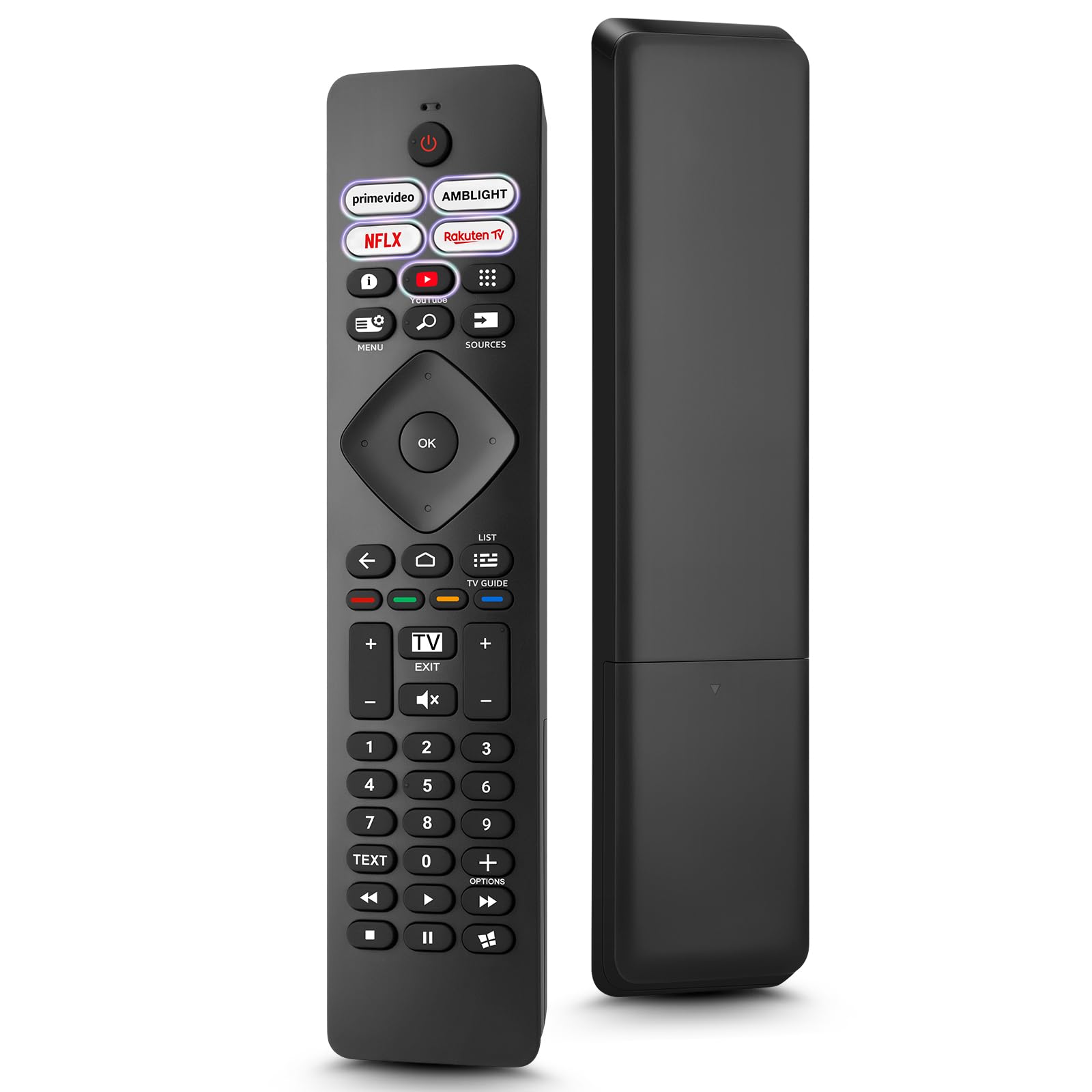
Image: The Loutoc SRC4526 Universal Remote Control, showcasing sy ergonomiese ontwerp en knoppie-uitleg.
1.2 Sleutelkenmerke
- Convenient Plug-and-Play: No complex setup or programming required. Simply insert batteries and the remote is ready for use.
- Wide TV Compatibility: Fully compatible with Philips Ambilight TVs, including 4K Ambilight LED, OLED, FHD, and Full Ultra HD models.
- Dedicated Shortcut Buttons: Features 5 direct access buttons for popular streaming platforms: Ambilight, Video, NFLX (Netflix), Rakuten TV, and YouTube.
- Betroubare prestasie: Offers an effective operating range of 8 meters (26 feet) and an ultra-fast response time of 0.2 seconds.
2. Opstelling
2.1 Battery installasie
The Loutoc SRC4526 remote control requires two AAA batteries (not included) for operation.
- Vind die batterykompartement aan die agterkant van die afstandbeheer.
- Skuif die deksel van die batterykompartement oop.
- Plaas twee AAA-batterye in en maak seker dat die positiewe (+) en negatiewe (-) terminale korrek met die aanwysers binne die kompartement in lyn is.
- Maak die batterykompartement se deksel stewig toe.
2.2 Aanvanklike gebruik
This remote control is designed for immediate use with compatible Philips Ambilight TVs. No programming or pairing is required. Once batteries are installed, point the remote at your TV and begin operation.
3. Bedryfsinstruksies
3.1 Knoppiefunksies oorview
Refer to the image below for a visual guide to the remote control's buttons and their corresponding functions.

Image: Detailed diagram of the Loutoc SRC4526 remote control, illustrating each button and its primary function.
| Knoppie | Funksie |
|---|---|
| Krag | Switches the TV on or off (Standby mode). |
| Prime Video, Ambilight, Netflix, Rakuten TV | Quickly launches the corresponding application. |
| Spyskaart | Opens the Quick Menu with typical TV functions. Hold to show Gaming control bar. |
| Soek | Opens the Search tab on the Home screen. |
| Bronne | Opens or closes the TV's input sources menu. |
| OK | Confirms a selection or setting. |
| Arrow/Navigation Keys | Navigates up, down, left, or right through menus and options. |
| Terug | Keer terug na die vorige skerm of kanaal. |
| Tuis | Opens the TV's Home menu. |
| TV Gids | Opens or closes the TV Guide. Long press to open the channel list. |
| Color Keys (Red, Green, Yellow, Blue) | Provides direct selection of on-screen options. The blue key typically opens Help. |
| Volume (+/-) | Verstel die TV se volumevlak. |
| Channel (+/-) | Switches to the next or previous channel. |
| Verlaat | Exits current menu/application or returns to live TV. From standby, goes to last viewed source. |
| Demp | Demp of ontdemp die TV-klank. |
| Getalsleutels (0-9) | Kies direk TV-kanale. |
| TEKS | Opens or closes Text/Teletext. |
| Afspeelkontroles | Controls media playback: Play, Pause, Stop, Rewind, Fast Forward. |
| Toepassings | Opens the Apps tab on the Home screen. |
3.2 Ambilight Functionality
For Philips TVs equipped with Ambilight functionality, the dedicated Ambilight button on your remote allows you to control the lighting effects.
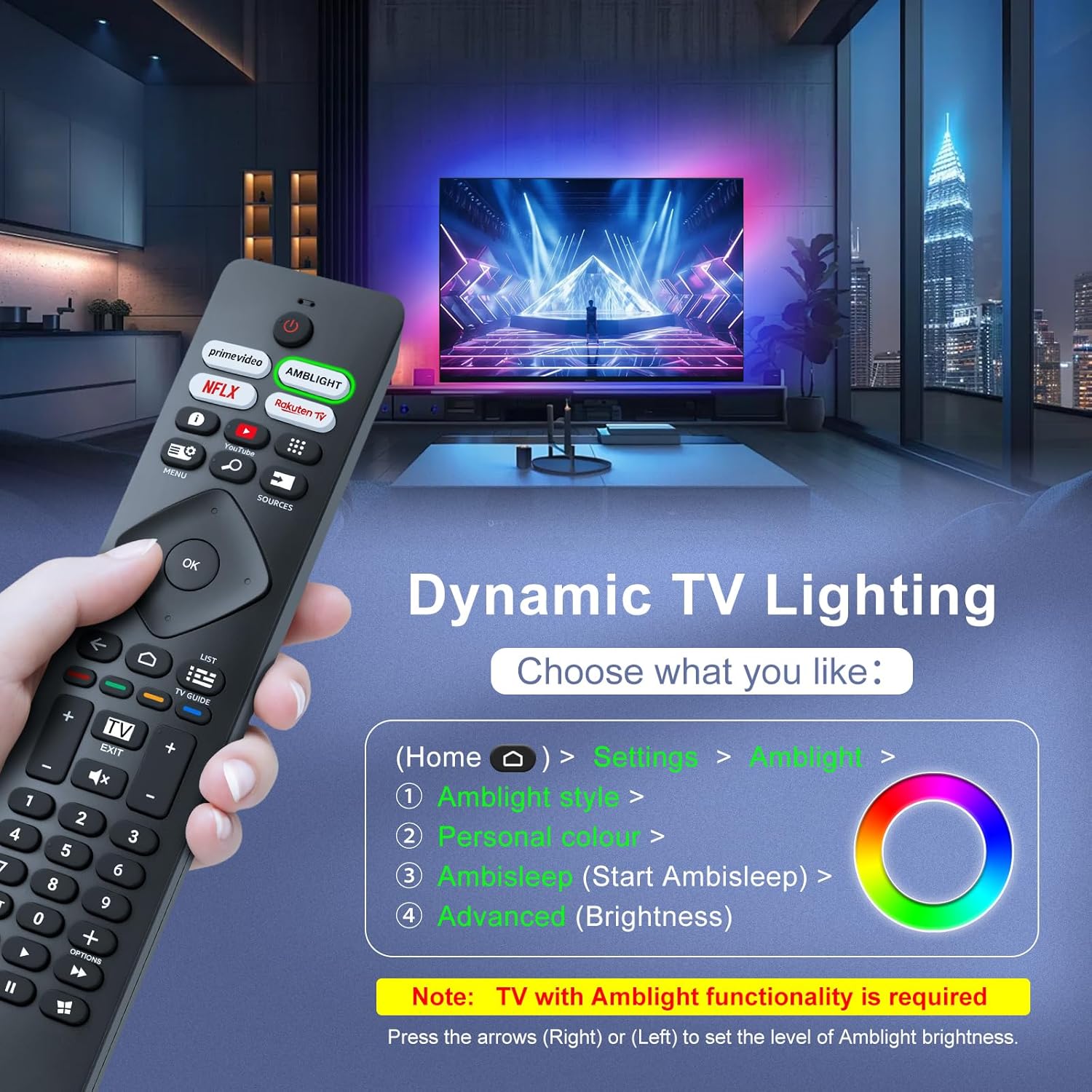
Image: A hand holding the remote control, with an overlay showing Ambilight settings on a TV screen.
After pressing the Ambilight button, you can navigate through the TV's menu to:
- Select different Ambilight display styles.
- Adjust personal color preferences.
- Initiate AmbiSleep mode.
- Adjust Ambilight brightness levels (using the right or left arrow keys).
Note: This feature requires a Philips TV with built-in Ambilight functionality.
4. Onderhoud
4.1 Skoonmaak
To clean your remote control, gently wipe it with a soft, dry cloth. Avoid using liquid cleaners, aerosols, or harsh chemicals, as these can damage the remote's surface or internal components.
4.2 Berging
Bêre die afstandbeheerder op 'n koel, droë plek weg van direkte sonlig en uiterste temperature. Indien die afstandbeheerder nie vir 'n lang tydperk gebruik gaan word nie, word dit aanbeveel om die batterye te verwyder om lekkasie te voorkom.
4.3 Batterysorg
- Vervang alle batterye gelyktydig; moenie ou en nuwe batterye meng nie.
- Moenie verskillende soorte batterye meng nie (bv. alkaliese en herlaaibare).
- Gooi gebruikte batterye verantwoordelik volgens plaaslike regulasies weg.
5. Probleemoplossing
5.1 Algemene kwessies en oplossings
- Afstandsbediening reageer nie:
- Kontroleer of die batterye korrek met die korrekte polariteit geplaas is.
- Vervang die batterye met nuwe AAA-batterye.
- Maak seker dat daar geen obstruksies tussen die afstandbeheerder en die TV se infrarooi-ontvanger is nie.
- Maak seker dat jy binne die effektiewe bedryfsbereik is (tot 8 meter).
- Spesifieke knoppies werk nie:
- Clean the remote control, especially around the non-functioning buttons, to remove any dirt or debris.
- If only Ambilight functions are not working, ensure your Philips TV model supports Ambilight.
5.2 Kontak Ondersteuning
If you encounter persistent issues that cannot be resolved with the troubleshooting steps above, please contact Loutoc customer support directly. We aim to respond to all inquiries within 12 working hours.
6. Spesifikasies
| Kenmerk | Detail |
|---|---|
| Handelsmerk | Loutoc |
| Model Naam | SRC4526-FBA |
| Item Modelnommer | SRC4526 |
| Kleur | Swart |
| Verbindingstegnologie | Infrarooi |
| Spesiale kenmerke | No programming required, Ergonomic, Lightweight |
| Versoenbare toestelle | Television (Philips Ambilight TVs) |
| Maximum Number of Supported Devices | 1 |
| Tipe beheerder | Knoppie beheer |
| Maksimum reeks | 8 meter (26 voet) |
| Battery Beskrywing | AAA (2 required, not included) |
| Vervaardiger | Loutoc |
| Land van oorsprong | China |
| Datum eerste beskikbaar op Amazon.com.be | 31 Augustus 2025 |
7. Waarborg en Ondersteuning
7.1 Waarborginligting
This Loutoc remote control comes with a manufacturer's warranty of 30 days from the date of purchase. Please retain your proof of purchase for any warranty claims.
7.2 Kliëntediens
For any questions, technical assistance, or warranty inquiries, please contact Loutoc customer support. We are committed to providing timely assistance and will respond to your queries within 12 working hours.