
1. Welkom
Thank you for choosing the AWEI T1 Pro Wireless Bluetooth Headphones. This manual provides detailed instructions for setting up, operating, and maintaining your new earbuds. Please read this manual carefully before use to ensure optimal performance and longevity of your device.
2. Produk verbyview
2.1. Pakketinhoud
- Draadlose oordopjes (links en regs)
- Laaikas
- USB-laaikabel
- Oordoppe (verskillende groottes)
- Gebruikershandleiding
2.2. Earbud and Charging Case Components
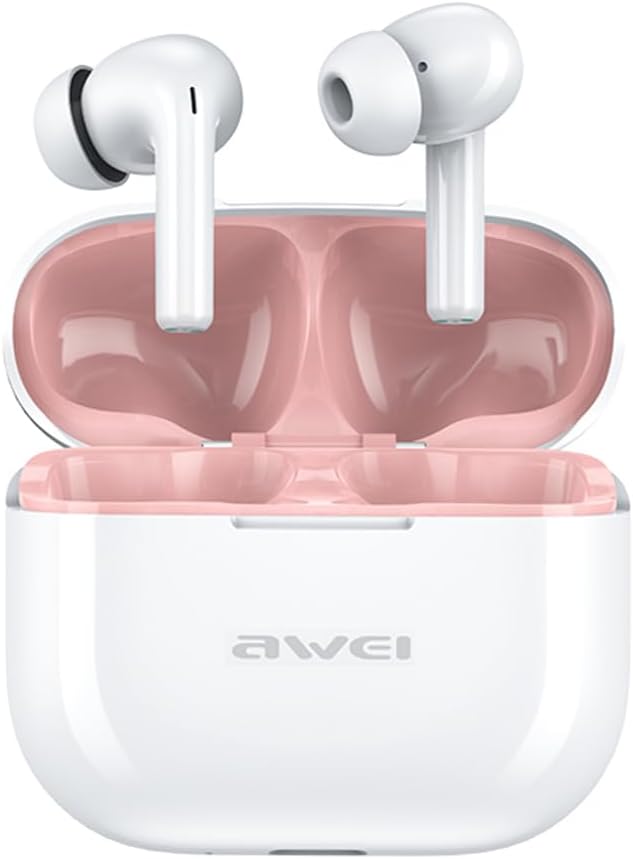
Image: The AWEI T1 Pro wireless earbuds are shown in their open charging case. The earbuds are white with a stem design, and the interior of the charging case is a light pink color. The AWEI logo is visible on the front of the white charging case.
The AWEI T1 Pro earbuds feature an ergonomic in-ear design for a comfortable and secure fit. The compact charging case not only protects the earbuds but also provides multiple charges on the go.
2.3. Sleutel kenmerke
- Hi-Fi klankgehalte: Equipped with 13mm speakers for an immersive audio experience and clear call performance.
- Bluetooth 5.4 Tegnologie: Ensures a faster, more stable signal transmission with low latency and a wireless range of up to 10 meters. (Note: Some packaging may indicate Bluetooth 5.3, but the device supports 5.4 for enhanced performance).
- Slim raakbeheer: Intuitive touch sensors on each earbud allow for easy control of music playback, calls, and voice assistant activation.
- Lang batterylewe: Enjoy up to 7 hours of continuous playback per charge. The 300mAh charging case extends total playtime to 36 hours in dual-ear mode or up to 60 hours in single-ear mode. The case fully charges in approximately 1 hour via Type-C.
- IPX6 waterdigte ontwerp: Resistant to sweat and rain, making them suitable for sports and outdoor activities.

Image: A detailed diagram illustrating the internal components of an earbud speaker, labeled as 'Drive Units HiFi Stereo', highlighting the layered structure of the audio driver for high-fidelity sound.

Image: A stylized depiction of a microchip labeled '5.3 Bluetooth', surrounded by circuit board elements, emphasizing lower latency and increased stability in wireless communication.

Image: A black earbud is shown next to a smartphone displaying a music player interface. Text indicates 'Touch Control Wake up Voice Assistant', illustrating how touch gestures on the earbud can control phone functions like answering calls or activating a voice assistant.

Image: A smartphone displaying a music player is shown alongside a transparent block, symbolizing extended power. Text highlights 'Full of Energy Long Battery Life', indicating the 300mAh charging case provides 7 hours of continuous use per charge.

Image: Two black earbuds are depicted, one dry and the other surrounded by water droplets, illustrating the 'No Fear of Sweat & Rain IPX6 Waterproof Rate' feature, which prevents water penetration during sports.
3. Opstelling
3.1. Aanvanklike laai
- Plaas albei oordopjes in die laaikas voor die eerste gebruik.
- Connect the provided USB Type-C charging cable to the charging port on the case and a power source (e.g., USB wall adapter, computer USB port).
- The indicator lights on the charging case will show charging status. A full charge for the case takes approximately 1 hour.
- Ensure the earbuds are fully charged before initial pairing.
3.2. Koppel met 'n Toestel
- Maak die laaikas oop. Die oorfone sal outomaties aanskakel en in paringsmodus gaan.
- Aktiveer Bluetooth op jou toestel (slimfoon, tablet, skootrekenaar).
- Soek vir beskikbare Bluetooth-toestelle.
- Select "AWEI T1 Pro" from the list of devices.
- Sodra dit gekoppel is, sal jy 'n bevestigingstoon hoor, en die oorfone sal gereed wees vir gebruik.
- Die oorfone sal outomaties weer aan die laaste gekoppelde toestel koppel wanneer dit uit die houer gehaal word, indien Bluetooth op die toestel geaktiveer is.
4. Bedryfsinstruksies
4.1. Skakel aan/af
- Krag aan: Maak die laaikas oop, of druk die aanraakarea op beide oordopjes vir 3 sekondes lank.
- Skakel af: Plaas die oordopjes terug in die laaikas en maak die deksel toe, of druk die aanraakarea op beide oordopjes vir 5 sekondes lank.
4.2. Raak Kontroles
| Funksie | Aksie |
|---|---|
| Speel/Pause Musiek | Enkele tik op enige van die oordopjes |
| Volgende Liedjie | Dubbeltik op die regter oordopje |
| Vorige Liedjie | Dubbeltik op die linker oordopje |
| Volume op | Tik drie keer op die regteroorknoppie |
| Volume af | Tik drie keer op die linkeroorknoppie |
| Beantwoord/beëindig oproep | Enkele tik op enige van die oordopjes |
| Verwerp oproep | Druk lank vir 2 sekondes op enige oordopjes |
| Aktiveer stemassistent | Long press on either earbud for 2 seconds (when not on a call) |
4.3. Maak en Ontvang Oproepe
When a call comes in, you can answer or reject it using the touch controls as described above. During a call, a single tap will end the conversation.
4.4. Musiekweergawe
Control your music directly from the earbuds. Use single, double, or triple taps to play, pause, skip tracks, or adjust volume.
5. Onderhoud
5.1. Skoonmaak
- Maak die oordopjes en laaikas gereeld skoon met 'n sagte, droë, pluisvrye lap.
- Moenie skuurmiddels, alkohol of chemiese oplosmiddels gebruik nie.
- Verwyder enige oorsmeer of puin versigtig van die oordopjesmaas en laaikontakte met 'n droë wattestokkie of 'n klein, sagte borseltjie.
5.2. Berging
- Wanneer dit nie gebruik word nie, bêre die oordopjes altyd in hul laaikassie om hulle teen stof en skade te beskerm.
- Bêre die toestel op 'n koel, droë plek, weg van uiterste temperature en direkte sonlig.
5.3. Waterweerstand
The AWEI T1 Pro earbuds are rated IPX6 waterproof, meaning they are protected against high-pressure water jets from any direction. This makes them suitable for workouts and light rain. However, they are not designed for swimming or submersion in water. Ensure the earbuds are dry before placing them back into the charging case to prevent damage.
6. Probleemoplossing
6.1. Algemene probleme en oplossings
- Oorfone koppel nie met toestel nie:
Ensure both earbuds are charged. Turn off and on your device's Bluetooth. Forget "AWEI T1 Pro" from your device's Bluetooth list and try pairing again. - Slegs een oordoppie werk:
Place both earbuds back into the charging case, close the lid, wait a few seconds, then open the lid and take them out. This should reset their connection. If the issue persists, try resetting the earbuds (refer to manufacturer's webwebwerf vir spesifieke herstelinstruksies indien nodig). - Geen geluid of lae volume:
Check the volume level on both your device and the earbuds. Ensure the earbuds are properly seated in your ears. Try cleaning the earbud mesh for any obstructions. - Laaikas laai nie:
Ensure the USB cable is securely connected to both the case and the power source. Try a different charging cable or power adapter. - Oorfone laai nie in geval:
Ensure the charging contacts on both the earbuds and the case are clean and free of debris. Make sure the earbuds are correctly seated in the case.
7. Spesifikasies

Image: A graphic displaying the technical specifications of the AWEI T1 Pro, including basic information, horn details, Bluetooth version, and battery capacities.
| Algemene inligting | |
|---|---|
| Model Naam | T1 Pro |
| Produk Tipe | Stereo TWS oordopjes |
| Netto gewig | 36g |
| Afmetings (kas) | 58*50*24 mm |
| Oorplasing | In Oor |
| Tipe beheer | Raak Beheer |
| Waterweerstandvlak | IPX6 waterdig |
| Geraasbeheer | Aanpasbare geraaskansellasie |
| Oudio spesifikasies | |
| Luidspreker deursnee | 13 mm |
| Sensitiwiteit | 100±3dB |
| Frekwensieresponsreeks | 20Hz~20,000Hz |
| Impedansie | 32 ohm |
| Konnektiwiteit | |
| Bluetooth weergawe | 5.4 (Image shows 5.3) |
| Wireless Range | Tot 10 meter |
| Ondersteunde protokolle | HSP, HFP, A2DP, AVRCP |
| Versoenbare toestelle | Laptops, Tablets, Mobile Phones |
| Battery & Laai | |
| Laaikas battery | 300mAh / 3.7V |
| Oordopjes se batterykapasiteit | 45 mAh * 2 |
| Musiek Speel Tyd | Tot 7 uur (per lading) |
| Praat Tyd | Tot 8 uur |
| Bystandtyd | Tot 300 uur |
| Laaityd (kas) | Ongeveer 1 uur |
| Laaipoort | USB Tipe-C |
8. Waarborg en Ondersteuning
AWEI products are designed and manufactured to the highest quality standards. For information regarding warranty coverage, please refer to the warranty card included in your product packaging or visit the official AWEI website. If you encounter any issues or require technical assistance, please contact AWEI customer support through the contact information provided on the official webwebwerf of jou aankoopplatform.