
1. Inleiding
Thank you for choosing the Ekrist HX100A5 Magnetic Portable Charger. This device is designed to provide convenient and versatile charging for your mobile devices, including iPhones with MagSafe, Apple Watches, and other USB-C and Lightning compatible devices. Please read this manual thoroughly before use to ensure proper operation and to maximize the product's lifespan.

Beeld 1: verbyview of the Ekrist HX100A5 Magnetic Portable Charger's charging capacity for various devices.
2. Pakketinhoud
Maak seker dat alle items in jou pakket teenwoordig is:
- Ekrist HX100A5 Magnetic Portable Charger
- USB-C-laaikabel
- Gebruikershandleiding (hierdie dokument)
3. Kenmerke
- Dual Magnetic Wireless Charging: Compatible with MagSafe for iPhone 12-17 series and dedicated charging for Apple Watch (Series 1-10/Ultra).
- Ingeboude kabels: Integrated Lightning and USB-C cables for direct wired charging.
- Veelvuldige uitsetpoorte: Additional USB-A and USB-C ports for versatile wired charging.
- Hoë kapasiteit: 10800mAh battery provides extended power for multiple charges.
- 25W PD+QC4.0 Fast Charging: Supports rapid charging for compatible devices, reaching 50% iPhone charge in approximately 30 minutes.
- LCD digitale skerm: Clear screen shows real-time battery percentage.
- Kompakte en draagbare ontwerp: Ideal for travel and daily use.
- Veelvuldige veiligheidsbeskerming: Built-in safeguards against overheating, overcharging, overdischarge, short circuit, overvoltage, overcurrent, and overload.

Image 2: Diagram illustrating the multiple security protections integrated into the power bank.
4. Opstelling
4.1 Aanvanklike laai van die kragbank
- Koppel die meegeleverde USB-C-laaikabel aan die USB-C-invoerpoort op die kragbank.
- Plug the other end of the USB-C cable into a compatible USB wall adapter (not included).
- The LCD digital display will show the charging status and battery percentage. Allow the power bank to fully charge before first use. Full recharge typically takes 3-5 hours.
4.2 Verstaan die LCD-skerm
The LCD display shows the current battery percentage of the power bank. When charging devices or being recharged, the display will illuminate to show the status. Press the power button briefly to check the battery level.
5. Bedryfsinstruksies
5.1 Charging iPhone via MagSafe (Wireless)
- Maak seker dat jou iPhone MagSafe-versoenbaar is (iPhone 12-reeks of nuwer).
- Align the back of your iPhone with the magnetic charging pad on the power bank. The magnets will snap into place, and charging will begin automatically.
- For optimal magnetic connection and charging efficiency, use an iPhone without a case or with a MagSafe-compatible case.
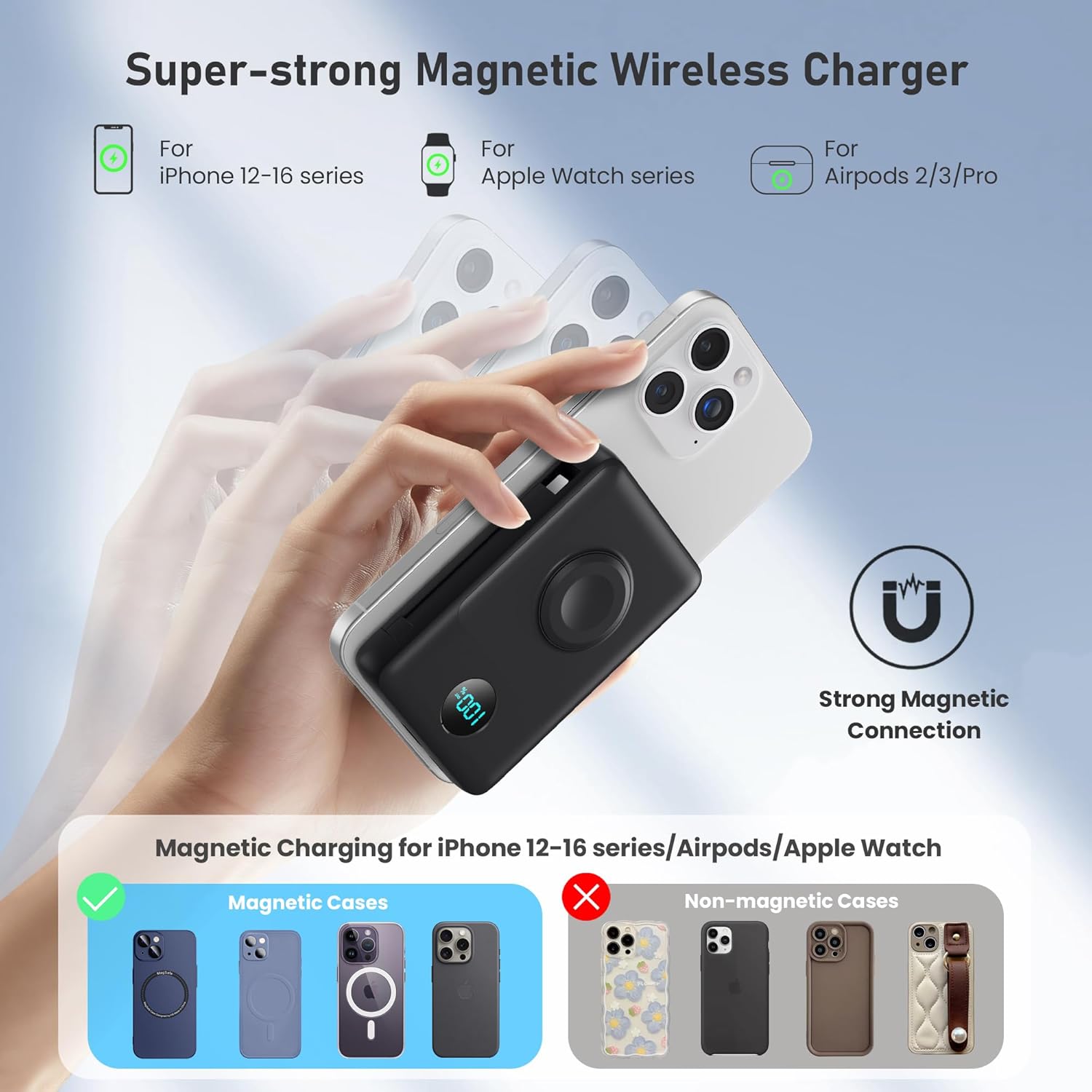
Image 3: Illustration of the strong magnetic connection for wireless charging with an iPhone, showing compatibility with MagSafe cases.
5.2 Charging Apple Watch (Wireless)
- Place your Apple Watch onto the dedicated Apple Watch charging module on the power bank.
- Ensure the watch is properly aligned for charging to begin.
5.3 Charging via Built-in Cables
- Pull out the integrated Lightning cable or USB-C cable from its storage slot.
- Connect the appropriate cable to your device's charging port. Charging will start automatically.

Image 4: The power bank demonstrating simultaneous charging of multiple devices using its built-in cables and wireless pads.
5.4 Charging via USB-A/USB-C Ports
- Use your own USB-A or USB-C charging cable.
- Plug one end into the USB-A or USB-C output port on the power bank.
- Koppel die ander kant aan jou toestel.

Image 5: The power bank illustrating 25W PD + QC4.0 fast charging capabilities for wired connections.
6. Onderhoud
- Hou die kragbank weg van water, vuur en uiterste temperature.
- Vermy om die toestel te laat val of aan sterk impakte te onderwerp.
- Maak die oppervlak skoon met 'n sagte, droë lap. Moenie harde chemikalieë of skuurmiddels gebruik nie.
- Berg in 'n koel, droë plek wanneer dit nie gebruik word nie.
7. Probleemoplossing
7.1 Toestel laai nie
- Ensure the power bank is sufficiently charged. Check the LCD display.
- Verify that the charging cable (built-in or external) is securely connected to both the power bank and your device.
- For wireless charging, ensure proper alignment of your device on the charging pad. Remove any non-MagSafe cases that may interfere.
- Try using a different cable or port to rule out a faulty connection.
7.2 Stadige Laai
- Ensure your device supports fast charging and that you are using a compatible cable and port (e.g., USB-C PD).
- Wireless charging is generally slower than wired fast charging.
- High ambient temperatures can affect charging speed.
7.3 LCD Display Not Working
- Press the power button briefly to activate the display.
- If the issue persists, try fully recharging the power bank.
8. Spesifikasies
| Modelnommer | HX100A5 |
| Battery kapasiteit | 10800 mAh |
| Produk afmetings | 4.37 x 2.8 x 1.02 duim |
| Item gewig | 10.5 onse |
| Connector Tipe | 2*Wireless Charging + Built-in 2 Cables (Lightning, USB-C) + USB-C Port |
| Spesiale kenmerke | Dual magnetic portable charger, Built-in Cables, iWatch charger, 25W Power Delivery Fast Charging for iPhone/Apple Watch, LCD Digital Display, Wireless Charger |
| Vervaardiger | Dongguan Yuanhaoxun Technology Co., Ltd. |
| Datum Eerste Beskikbaar | 20 Junie 2025 |
9. Waarborg en Ondersteuning
The Ekrist HX100A5 Magnetic Portable Charger comes with a standard manufacturer's warranty. For detailed warranty information, product support, or technical assistance, please refer to the contact information provided on the product packaging or visit the official Ekrist webwebwerf. Bewaar asseblief u bewys van aankoop vir waarborgeise.