
1. Inleiding
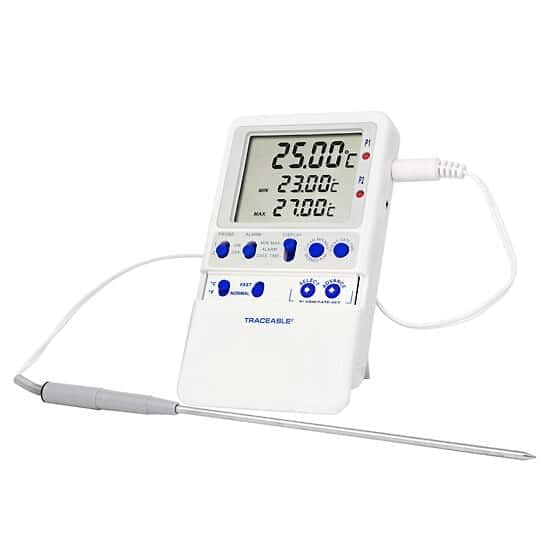
This manual provides instructions for the proper setup, operation, and maintenance of your Traceable High-Accuracy Refrigerator/Freezer Thermometer. This device is designed to monitor temperatures in various environments such as liquids, baths, air/gas, incubators, refrigerators, and freezers. It features a triple display for current, minimum, and maximum temperatures, along with programmable alarms and a stainless steel probe.
2. Produk verbyview
2.1 Kenmerke
- Driedubbele skerm: Toon gelyktydig huidige, minimum en maksimum temperature.
- Ingeboude geheue: Stores minimum and maximum temperatures until manually cleared.
- Precise Temperature Alarms: Allows setting of high and low alarms in 1° increments. An audible alarm activates when temperatures exceed or fall below set points.
- Versatile Probe: Includes a 10-ft (3-m) submersible stainless steel micro-cable probe.
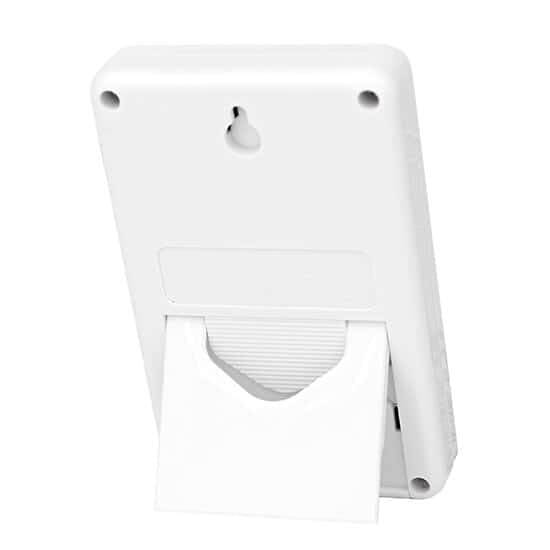
- Veelvuldige montage-opsies: Can be mounted using included hook-and-loop strips, wall-mount slots, or the integrated flip-open stand.
- NIST-Traceable Calibration: Supplied with a NIST-traceable calibration certificate.
2.2 Wat is in die boks
- Traceable High-Accuracy Refrigerator/Freezer Thermometer unit
- 1 Stainless Steel Probe
- NIST-traceable calibration certificate with data
- Plastiek staander
- Double-back tape and hook-and-loop fastener for mounting
- Twee AA-batterye
3. Opstelling
3.1 Battery installasie
- Vind die batterykompartement aan die agterkant van die termometer-eenheid.
- Maak die kompartement se deksel oop.
- Plaas die twee AA-batterye in en maak seker dat die polariteit (+/-) korrek is.
- Maak die batterykompartement se deksel stewig toe.
3.2 Sondeverbinding en -plasing
- Connect the stainless steel probe cable to the designated port on the thermometer unit.
- Place the probe in the desired monitoring location (e.g., inside a refrigerator or freezer). The micro-cable design allows doors to close over it without damage.
3.3 Monteer die eenheid
The thermometer unit offers several mounting options:
- Benchtop: Use the integrated flip-open stand on the back of the unit to place it on a flat surface.
- Muur berg: Utilize the wall-mount slots on the back of the unit with appropriate screws (not included).
- Oppervlakmontering: Apply the provided double-back tape or hook-and-loop fastener to attach the unit to any clean, flat surface.
4. Bedryfsinstruksies
4.1 Krag aan/af
The thermometer typically powers on automatically once batteries are installed. Refer to the unit's buttons for a dedicated power button if available, or it may operate continuously.
4.2 Temperature lesing
The display simultaneously shows three temperature readings:
- Huidige temperatuur: The real-time temperature at the probe's location.
- Minimum Temperature (MIN): The lowest temperature recorded since the last reset.
- Maximum Temperature (MAX): The highest temperature recorded since the last reset.
4.3 Clearing Memory (MIN/MAX)
To clear the stored minimum and maximum temperature readings, press the designated "CLEAR" or "RESET" button on the unit. This will reset the MIN/MAX values to the current temperature, allowing for a new monitoring period.
4.4 Alarms instel
The thermometer allows you to set high and low temperature alarms:
- Press the "ALARM SET" button (or similar) to enter alarm setting mode.
- Use the "UP" and "DOWN" arrows (or similar buttons) to adjust the desired high temperature limit.
- Press "ALARM SET" again to confirm the high limit and proceed to set the low temperature limit.
- Adjust the low temperature limit using the "UP" and "DOWN" arrows.
- Press "ALARM SET" one more time to save the settings and exit alarm mode.
- When the temperature goes above the high limit or below the low limit, an audible alarm will sound. The alarm will continue until acknowledged or the temperature returns to the non-alarm range.
4.5 Temperatuureenheidkeuse (°C/°F)
To switch between Celsius (°C) and Fahrenheit (°F), locate and press the "°C/°F" button on the unit. The display will update to show temperatures in the selected unit.
5. Onderhoud
5.1 Skoonmaak
To clean the thermometer unit and probe, wipe them with a soft, damp cloth. Do not immerse the main unit in water. The stainless steel probe is submersible and can be cleaned with mild soap and water. Avoid using abrasive cleaners or solvents.
5.2 Batteryvervanging
When the display becomes dim or the unit stops functioning, it is time to replace the batteries. Follow the battery installation steps in Section 3.1.
5.3 Kalibrasie
The thermometer comes with a NIST-traceable calibration certificate. Regular calibration checks are recommended to ensure continued accuracy, especially in critical applications. Refer to the calibration certificate for details on traceability and recommended recalibration intervals. For recalibration services, contact Traceable customer support.
6. Probleemoplossing
- No Display/Unit Not Turning On: Kontroleer batteryinstallasie en maak seker dat batterye vars is. Vervang indien nodig.
- Onakkurate lesings: Ensure the probe is correctly positioned and fully immersed in the substance being measured (if applicable). Verify the probe cable is securely connected. Consider recalibration if accuracy issues persist.
- Alarm klink nie: Check alarm settings to ensure they are correctly configured. Verify the alarm volume is not muted or set too low (if applicable).
- Wisselvallige lesings: This may indicate a loose probe connection or a damaged probe. Reconnect the probe or contact support for a replacement.
7. Spesifikasies
| Spesifikasie | Detail |
|---|---|
| Modelnommer | AO-94460-parent |
| Handelsmerk | Naspoorbaar |
| Spesiale kenmerk | Hoë akkuraatheid |
| Tipe vertoon | Digitaal |
| Buite materiaal | Vlekvrye Staal (Sond) |
| Kragbron | Battery-aangedrewe (2 AA-batterye ingesluit) |
| Produkversorgingsinstruksies | Vrieskas veilig, vee skoon |
| Spesifikasie Met | NIST |
| Sonde Kabel Lengte | 10-ft (3-m) |
| Pakket afmetings | 10.3 x 3.7 x 3.7 duim |
| Item gewig | 7.83 onse |
8. Waarborg en Ondersteuning
8.1 Waarborginligting
Specific warranty details for this product are typically provided at the time of purchase or can be obtained directly from the manufacturer, TRACEABLE (an Antylia Scientific company). Please retain your proof of purchase for warranty claims.
8.2 Kliëntediens
For technical assistance, troubleshooting beyond this manual, or inquiries regarding calibration services and replacement parts, please contact TRACEABLE customer support. Contact information can usually be found on the manufacturer's webwebwerf of op die produkverpakking.