
1. Inleiding
Thank you for choosing the Xiaomi Smart Temperature and Humidity Monitor 3 Mini. This device is designed to provide accurate, real-time measurements of indoor temperature and humidity, helping you maintain a comfortable and healthy environment. Its compact design and smart features make it a valuable addition to any home.
2. Produk verbyview en kenmerke
The Xiaomi Smart Temperature and Humidity Monitor 3 Mini combines precision with convenience. Key features include:
- Kompakte ontwerp: Small footprint for versatile placement.
- Hoë-presisie sensor: Accurate detection of temperature and humidity changes.
- Duidelike LCD-skerm: Shows temperature and humidity simultaneously.
- Ideal Range Indicator: Visual cues for optimal environmental conditions.
- Ultra-lae kragverbruik: Extended battery life.
- Buigsame plasing: Suitable for tabletop or wall mounting.
- Slimhuisversoenbaarheid: Bluetooth connectivity for integration with smart home systems.

The monitor features a compact design with a 42.8 x 35.1 mm LCD screen, making it easy to read and place. Device dimensions are approximately 62.6 x 53.2 mm.
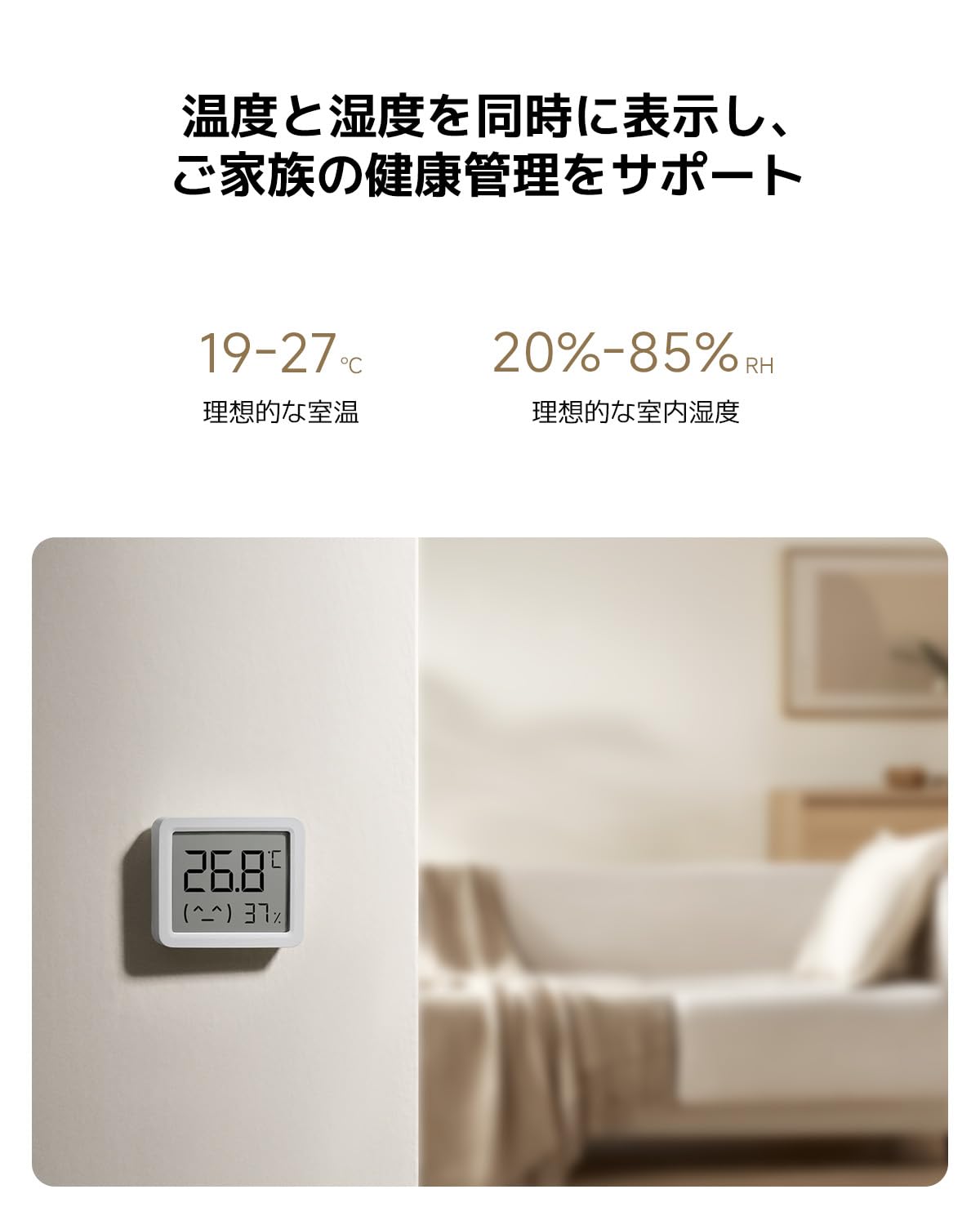
Equipped with a high-precision sensor, the monitor accurately detects changes in temperature (0.1°C resolution) and humidity (1% RH resolution).

The display simultaneously shows current temperature and humidity. Ideal indoor conditions are indicated as 19-27°C for temperature and 20-85% RH for humidity.
3. Opstelling
3.1 Uitpak en Aanvanklike Inspeksie
Carefully remove the monitor from its packaging. Inspect the device for any signs of damage. The package should include the Xiaomi Smart Temperature and Humidity Monitor 3 Mini and this user manual.
3.2 Battery installasie
- Vind die batteryklepdeksel aan die agterkant van die toestel.
- Maak die deksel versigtig oop.
- Insert one CR2450 button cell battery, ensuring the positive (+) side faces upwards as indicated inside the compartment.
- Close the battery compartment cover securely. The display should activate automatically.

The monitor uses a CR2450 button cell battery, offering ultra-low power consumption for up to 2 years in standard mode and 3 years in battery-saving mode.
3.3 Plasing
The monitor can be placed on a flat surface using its integrated stand or mounted on a wall. For accurate readings, place the device away from direct sunlight, heat sources, and strong drafts.

Its versatile design allows for flexible placement, either on a tabletop using its integrated stand or mounted on a wall.
3.4 Smart Home Pairing (Optional)
To connect the monitor to your smart home system via Bluetooth, follow these general steps:
- Download the official Xiaomi Home app (or compatible smart home app) on your smartphone.
- Maak seker dat Bluetooth op jou slimfoon geaktiveer is.
- Open the app and follow the on-screen instructions to add a new device. The monitor should appear as an available device for pairing.
- Confirm the pairing within the app.
4. Bedryfsinstruksies
4.1 Lees van die skerm
The LCD screen continuously displays the current temperature in Celsius (°C) and relative humidity (RH%). The display is designed for clear visibility from a distance.
4.2 Understanding Ideal Ranges
The monitor may provide visual indicators or a simple emoji to represent comfort levels. Generally, ideal indoor conditions are:
- Temperatuur: 19°C tot 27°C
- Humiditeit: 20% RH tot 85% RH
Adjust your environment (e.g., heating, cooling, humidifiers, dehumidifiers) as needed to stay within these ranges for optimal comfort and health.
5. Onderhoud
5.1 Skoonmaak
Wipe the device gently with a soft, dry cloth. Do not use liquid cleaners, abrasive materials, or immerse the device in water.
5.2 Batteryvervanging
When the battery is low, a low battery indicator may appear on the display. Replace the CR2450 battery by following the installation steps in Section 3.2. Dispose of used batteries responsibly according to local regulations.
5.3 Berging
Indien die toestel vir 'n lang tydperk gestoor word, verwyder die battery om lekkasie te voorkom. Bêre op 'n koel, droë plek.
6. Probleemoplossing
- Geen skerm: Kontroleer of die battery korrek geïnstalleer is en voldoende lading het. Vervang die battery indien nodig.
- Onakkurate lesings: Ensure the device is placed in an appropriate location, away from direct heat, cold, or drafts. Allow some time for the sensor to stabilize after placement or battery change.
- Bluetooth-verbindingskwessies: Ensure Bluetooth is enabled on your smartphone and the device is within range. Try restarting both the monitor (by reinserting the battery) and your smartphone.
- Display Not Changing: If readings appear stuck, try replacing the battery. If the issue persists, contact customer support.
7. Spesifikasies
| Modelnommer | QBH4312GL |
| Afmetings (Toestel) | Ongeveer. 62.6 x 53.2 x 12.7 mm |
| Gewig | 50 g |
| Temperatuurmetingsreeks | 0°C tot 50°C (32°F tot 122°F) |
| Temperatuur Akkuraatheid | ±0.5°C |
| Humiditeitsmetingsreeks | 0% RH tot 99% RH |
| Humiditeit Akkuraatheid | ±1% RH |
| Battery Tipe | CR2450 Knoppie Sel |
| Batterylewe | Up to 2-3 years (depending on usage mode) |
| Konnektiwiteit | Bluetooth |
| Monteer Opsies | Tabletop, Wall-mounted |
8. Waarborg en Ondersteuning
8.1 Waarborginligting
The Xiaomi Smart Temperature and Humidity Monitor 3 Mini comes with a standard manufacturer's warranty. Please refer to your purchase documentation or the official Xiaomi webwebwerf vir gedetailleerde waarborgbepalings en -voorwaardes spesifiek vir u streek.
8.2 Kliëntediens
Vir tegniese ondersteuning, hulp met probleme of waarborgeise, besoek asseblief die amptelike Xiaomi-ondersteuning website or contact their customer service department. Contact details can typically be found on the Xiaomi official webwebwerf of in jou produkverpakking.
Aanlyn ondersteuning: www.mi.com/global/support