
Inleiding
This manual provides comprehensive instructions for the Comfort Direct UC7229T Ceiling Fan Remote Control. It covers setup, operation, maintenance, and troubleshooting to ensure optimal performance and longevity of your remote. This remote is designed to replace original UC7229T, CHQ7229T, 2968A-7229T, and TR240A models, offering control over fan speed, light, breeze mode, and timer functions.
Opstelling
1. Battery Installasie
Die afstandbeheerder benodig twee (2) AAA-batterye (nie ingesluit nie). Volg hierdie stappe om hulle te installeer:
- Vind die battery kompartement deksel op die agterkant van die afstandbeheer.
- Skuif die deksel afwaarts om die kompartement oop te maak.
- Plaas twee AAA-batterye in en maak seker dat die positiewe (+) en negatiewe (-) terminale korrek in lyn is met die merke binne-in die kompartement.
- Skuif die batteryklepdeksel terug in plek totdat dit stewig klik.
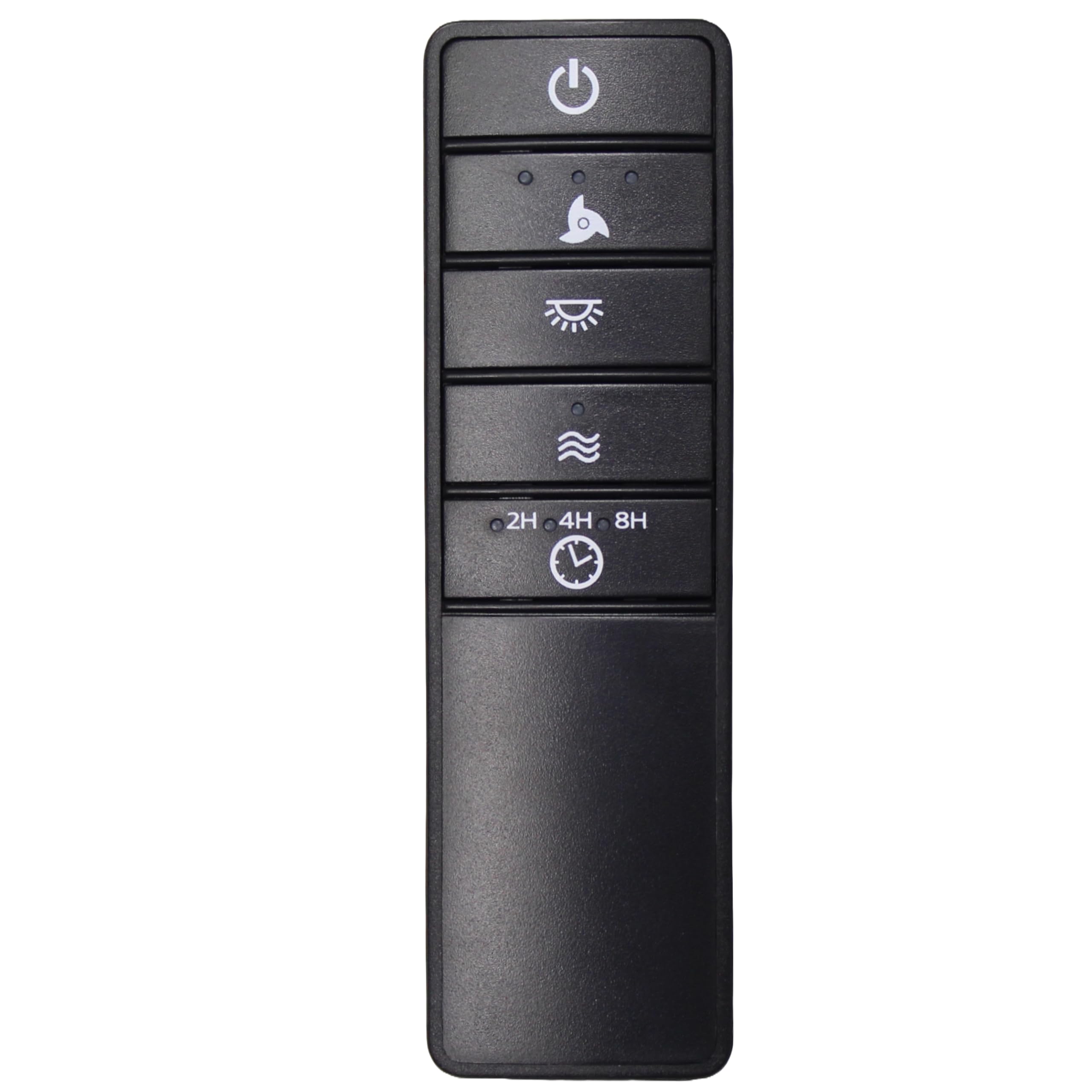
Image: Back of the remote control with the battery compartment open, showing slots for two AAA batteries and the DIP switches. The battery cover is shown detached.
2. Stel die DIP-skakelaars
For the remote control to communicate with your ceiling fan's receiver, the DIP switch settings on the remote must match those on the receiver. The DIP switches are small numbered switches located inside the battery compartment.
- Before installing batteries, observe the position of the four DIP switches (numbered 1, 2, 3, 4) on your existing fan receiver. Each switch can be in an 'ON' or 'OFF' position.
- Carefully adjust the DIP switches on your new UC7229T remote control to exactly match the pattern of your fan's receiver. Use a small, non-metallic tool if necessary.
- Once the DIP switches are matched, install the batteries and replace the cover as described in the "Battery Installation" section.
- Test the remote control to ensure proper function. If the fan or light does not respond, re-check the DIP switch settings on both the remote and the receiver.
Bedryfsinstruksies
The UC7229T remote control provides intuitive control over your ceiling fan's functions. Familiarize yourself with the buttons:
- Aan/af-knoppie (⏻): Druk om die waaier en lig AAN of AF te skakel.
- Fan Speed Button (Fan Icon): Cycles through fan speeds (Low, Medium, High, Off). Press repeatedly to adjust the fan speed.
- Ligknoppie (💡): Turns the light ON or OFF. If your fan supports dimming, press and hold to adjust light brightness.
- Breeze Mode Button (Wave Icon): Activates a natural breeze effect, varying fan speed to simulate outdoor breezes. Press again to deactivate.
- Timer Buttons (2H, 4H, 8H): Sets the fan to turn off automatically after 2, 4, or 8 hours, respectively. Press the desired time button to activate.
Onderhoud
Battery vervanging
When the remote control's range decreases or the fan/light response becomes inconsistent, it is likely time to replace the batteries. Follow the "Battery Installation" steps to replace the two AAA batteries. Always use fresh batteries and dispose of old batteries responsibly.
Probleemoplossing
- Afstandsbediening reageer nie:
- Kontroleer of die batterye korrek geïnstalleer is en nie leeg is nie. Vervang indien nodig.
- Ensure the DIP switch settings on the remote match those on the fan receiver.
- Verify that the fan's power supply is ON at the wall switch or circuit breaker.
- Fan or light operates intermittently:
- Vervang die batterye met nuwes.
- Check for any obstructions between the remote and the fan receiver.
- Ensure you are within the maximum operating range (approximately 30 feet).
- Fan runs but light does not, or vice-versa:
- Check the light bulb in the fan for proper installation or if it needs replacement.
- Confirm the correct button is being pressed for the desired function.
Spesifikasies
| Model Naam: | UC7229T (also compatible with CHQ7229T, 2968A-7229T, TR240A) |
| Handelsmerk: | Comfort Direct |
| Kleur: | Swart |
| Verbindingstegnologie: | Radiofrekwensie (RF) |
| Versoenbare toestelle: | Plafonwaaiers |
| Number of Supported Devices: | 1 |
| Kontroleurstipe: | Knoppie beheer |
| Button Quantity: | 4 (Power, Fan Speed, Light, Breeze Mode, Timer functions integrated) |
| Maksimum reeks: | 30 Voet |
| Batterye benodig: | 2 x AAA (Alkaline recommended, not included) |
| Itemafmetings (L x B x H): | 1.8 cm L x 4.57 cm B x 2.76 cm H |
| FCC ID: | CHQ7229T |
| IC: | 2968A-7229T |
Waarborg en Ondersteuning
This Comfort Direct UC7229T remote control comes with a 1-jaar vervaardigerwaarborg. For warranty claims or technical support, please refer to the contact information provided with your purchase or visit the Comfort Direct official webwebwerf.