
1. Inleiding
This manual provides detailed instructions for the setup, operation, maintenance, and troubleshooting of your AOOSTAR WTR PRO Intel N150 NAS Mini PC. Please read this manual carefully before using the device to ensure optimal performance and longevity.
2. Produk verbyview
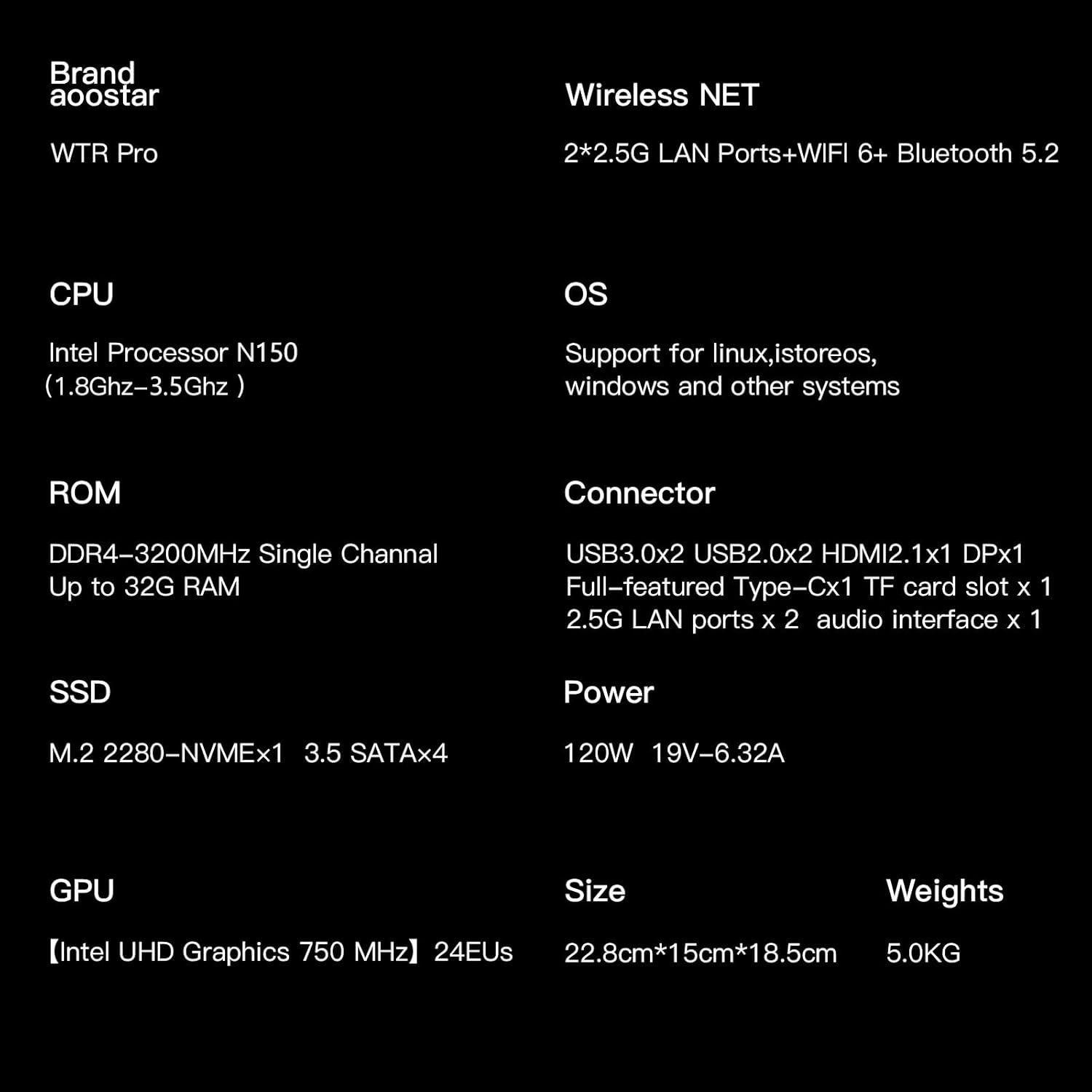
The AOOSTAR WTR PRO is a versatile NAS Mini PC featuring the 12th generation Intel Alder Lake-N150 processor. It is designed for various applications including network-attached storage, soft routing, and general computing tasks, offering robust performance and expandability.
Sleutel kenmerke:
- Verwerker: Intel Alder Lake-N150 (4C/4T, up to 3.6 GHz)
- Geheue: Dual-channel 3200MHz DDR4 RAM, 2 slots, supporting up to 64GB (32GB*2)
- Berging: 4 bays for 3.5-inch SATA hard drives (up to 4x 22TB), 2 M.2 2280-NVMe slots (up to 2TB)
- Grafika: Intel UHD Graphics, supporting up to three 4K-resolution displays via DP1.4 (144Hz), HDMI 2.1, and Type-C.
- Netwerk: 2 x 2.5G LAN ports
- Verkoeling: Through-the-wall construction with a 12CM ultra-quiet fan and intelligent fan control.
Poorte en verbindings:
The device offers a comprehensive set of ports for connectivity and expansion.

Beeld: Agter view of the AOOSTAR WTR PRO N150 Mini PC, highlighting the various input/output ports.
- 2 x USB 3.0-poorte
- 2 x USB 2.0-poorte
- 1 x DP 1.4 port (4K@144Hz)
- 1 x HDMI 2.1-poort
- 1 x Tipe-C-poort
- 2 x LAN ports (2.5G)
- 1 x 3.5 mm oudio-aansluiting
- 1 x Micro SD Card Port
- 1 x DC Power Input
3. Opstelling
3.1 Hardeware installasie
Before powering on your device, you may need to install 3.5-inch SATA hard drives and M.2 NVMe SSDs for storage.
Installing 3.5-inch SATA Hard Drives:
- Gently open the front panel of the NAS Mini PC to reveal the drive bays.
- Slide each 3.5-inch SATA hard drive into an available bay until it clicks securely into place. No tools are required for this step.
- Maak die voorpaneel toe.

Image: Step-by-step installation of a 3.5-inch SATA hard drive into the AOOSTAR WTR PRO N150's drive bay.
Installing M.2 NVMe SSDs:
- Locate the M.2 NVMe slots, typically found on the underside or inside the chassis. Refer to the product diagram for exact location.
- Plaas die M.2 NVMe SSD teen 'n hoek in die gleuf.
- Gently push down the SSD and secure it with the provided screw or retention clip.
Beeld: Intern view of the AOOSTAR WTR PRO N150, illustrating the installation of M.2 NVMe SSDs.
3.2 Aanvanklike aanskakeling
- Connect the power adapter to the DC input port on the device and then to a power outlet.
- Connect a monitor to the HDMI, DP, or Type-C port.
- Koppel 'n sleutelbord en muis aan die USB-poorte.
- Druk die kragknoppie om die toestel aan te skakel.
- Follow the on-screen instructions for initial operating system setup.
4. Bedryfsinstruksies
4.1 Bedryfstelsel
The AOOSTAR WTR PRO N150 supports various operating systems, including Linux, Windows, and other compatible systems, allowing for flexible deployment based on your needs.
4.2 Netwerkkonfigurasie
Utilize the dual 2.5G LAN ports for high-speed network connectivity. Connect the device to your router or network switch using Ethernet cables. Network settings can be configured within your chosen operating system.
4.3 Bergingbestuur
With 4 bays for 3.5-inch SATA HDDs and 2 M.2 NVMe slots, the WTR PRO offers extensive storage options. You can configure RAID arrays (e.g., RAID 0, 1, 5, 10) for data redundancy and performance, depending on your operating system and software. The device supports up to 4x 22TB 3.5-inch HDDs and up to 2TB M.2 NVMe SSDs.
4.4 4K Video Output and Multi-Screen Setup
The Mini PC supports simultaneous connection to up to three 4K-resolution displays via its DP1.4, HDMI 2.1, and Type-C ports. This enables efficient multitasking and an enhanced visual experience for office work, media consumption, or video editing.

Beeld: Oorview of the AOOSTAR WTR PRO N150 Mini PC's core features, including its Intel N150 CPU, 4-bay design, memory, storage, and triple 4K display support.
5. Onderhoud
5.1 Verkoelingstelsel
The WTR PRO Mini PC features a through-the-wall construction and a 12CM fan for efficient heat dissipation. The intelligent fan control adjusts fan speed according to the system load, ensuring optimal cooling while maintaining quiet operation. The dustproof design helps prevent dust accumulation, contributing to stable long-term performance.

Image: Internal structure of the AOOSTAR WTR PRO N150, illustrating the cooling fan and airflow path for effective heat management.
5.2 Sagteware-opdaterings
Regularly update your operating system and installed software to ensure security and access to the latest features and performance improvements.
6. Probleemoplossing
If you encounter any issues with your AOOSTAR WTR PRO N150, please refer to the following general troubleshooting steps:
- Geen krag: Maak seker dat die kragadapter stewig aan beide die toestel en 'n werkende kragpunt gekoppel is.
- Geen skerm: Verify that the monitor cable is correctly connected to the device and the monitor. Try different display ports or cables.
- Netwerkkwessies: Check Ethernet cable connections. Verify network settings in your operating system.
- Berging nie opgespoor nie: Ensure hard drives and SSDs are properly seated in their bays/slots. Check drive health in your operating system's disk management tools.
For persistent issues or advanced support, please contact AOOSTAR customer service.
7. Spesifikasies
| Kenmerk | Spesifikasie |
|---|---|
| Handelsmerk | AOOSTAR |
| Item Modelnommer | WTR PRO N150 |
| Verwerker | Intel Alder Lake-N150 (3.6 GHz) |
| Grafiese medeverwerker | Intel UHD-grafika |
| Geheue spoed | 3200 MHz DDR4 SDRAM |
| Flash geheue grootte | 16 GB (RAM) |
| Geheue berging kapasiteit | 512 GB (SSD) |
| Hardeskyfondersteuning | 4x 22TB HDD (Serial ATA) |
| Maksimum skermresolusie | 3840x2160 (4K) |
| Verbindingstegnologie | DP1.4, HDMI, LAN, USB |
| Totale USB-poorte | 4 (2x USB 3.0, 2x USB 2.0) |
| Produkafmetings (LxBxH) | 8.6 x 5.9 x 7 duim |
| Item gewig | 11 pond |
8. Waarborg en Ondersteuning
AOOSTAR provides 12 months of after-sales service from the date of order. If you have any questions or require support for your product, please use the following methods:
- Amazon Inquiry: Log in to your Amazon account, check your order, and click "Get Help" to request support.
- E-pos ondersteuning: Stuur jou vrae aan aoostar-shop@outlook.com.
9. Produkvideo
Kyk na hierdie amptelike produkvideo vir 'n visuele oorsigview of the AOOSTAR WTR PRO Intel N150 Mini PC.
Video: Amptelike produkvideovertoningasing the AOOSTAR WTR PRO Intel N150 Mini PC.