
Inleiding
Thank you for choosing the GNCC 1080P Indoor Security Camera. This manual provides detailed instructions for setting up, operating, and maintaining your camera to ensure optimal performance and security for your home. This camera offers high-definition video, advanced detection features, and two-way audio communication.
Wat is in die boks
Kontroleer asseblief die inhoud van u pakket. Indien enige items ontbreek of beskadig is, kontak kliëntediens.
- Binne-kamera
- Kragadapter
- Instruksie Handleiding
- Monteer skroef
- 2m kragkabel
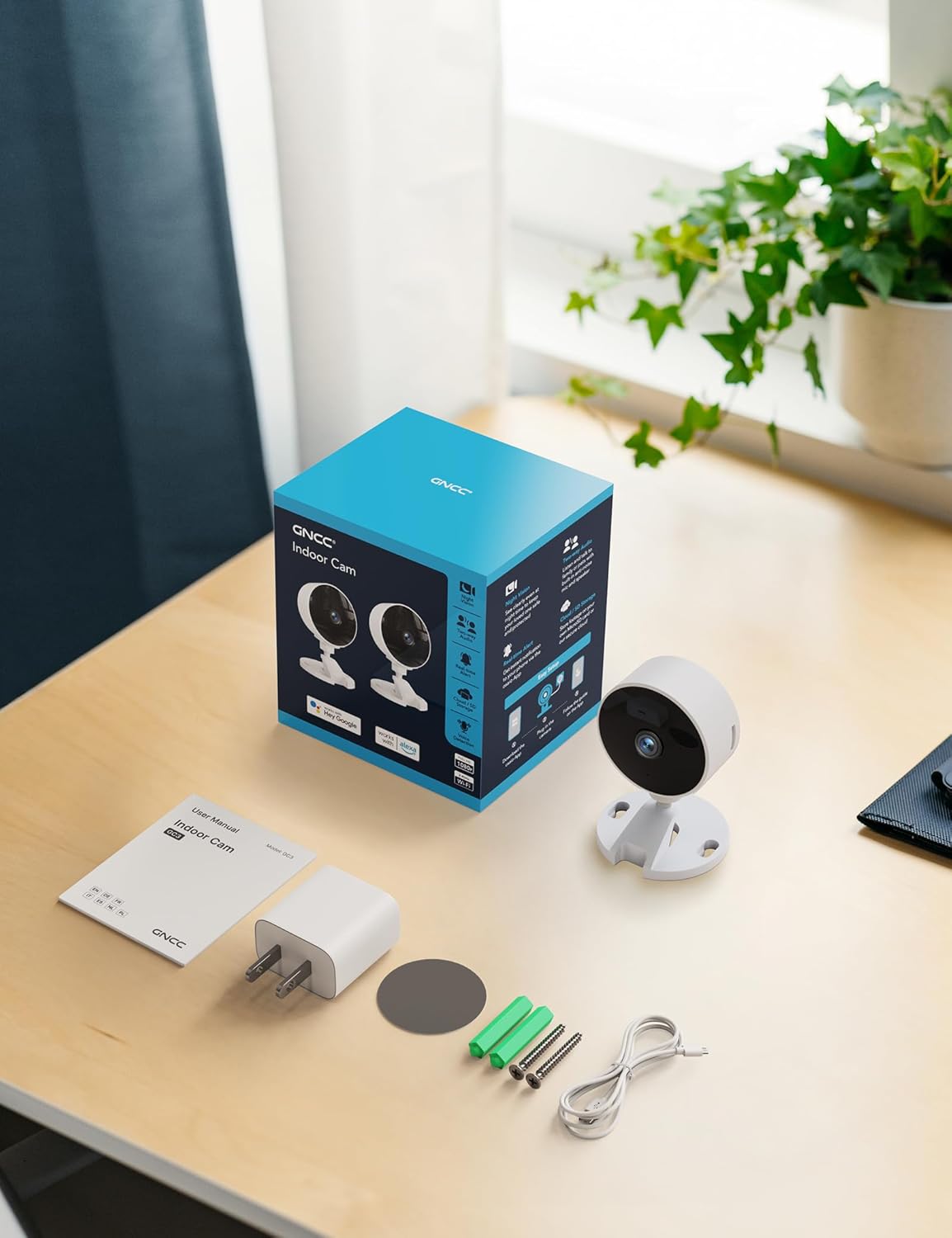
Image: All components included in the GNCC Indoor Camera package, neatly laid out on a wooden surface.
Produk Kenmerke
The GNCC Indoor Security Camera is equipped with several features designed to enhance your home security and monitoring experience:
- 1080P Full HD-resolusie: Provides clear and detailed video monitoring.
- 15m Nagvisie: Built-in infrared LEDs enable clear vision up to 15 meters in low-light conditions.
- Smarter AI Detection: Advanced AI (subscription required) for identifying people, pets, vehicles, and packages, reducing false alerts.
- Buigsame bergingsopsies: Supports local recording with a 128GB Micro SD card (not included) and offers a 14-day free cloud storage trial.
- Maklike opstelling: Can be installed quickly using 3M tape or included screws for wall mounting.
- Privaatheidmodus: One-tap privacy mode to disable the lens and LED for enhanced privacy.
- Tweerigting-klank: Ingeboude mikrofoon en luidspreker vir kommunikasie intyds.
- Slim integrasie: Compatible with Alexa and Google Home for voice control.
- Gesinsdeling: Allows sharing access with up to 3 users.

Image: Visual representation of the camera's core functionalities, including HD resolution, night vision, and two-way audio.
Opstelling
1. Aanskakel
- Connect the provided power adapter to the camera's power input port.
- Steek die kragadapter in 'n standaard elektriese aansluiting.
- The camera will power on, and an indicator light will show its status.
2. App-installasie en rekeningskepping
- Download the official GNCC app from your smartphone's app store (iOS App Store or Google Play Store).
- Maak die toepassing oop en volg die instruksies op die skerm om 'n nuwe rekening te skep of aan te meld as jy reeds een het.
3. Voeg die kamera by die toepassing
- In the GNCC app, tap the "+" icon to add a new device.
- Select "Security Camera" or the specific model if prompted.
- Volg die app se instruksies om die kamera aan jou 2.4GHz Wi-Fi-netwerk te koppel. Note: This camera is not compatible with 5GHz Wi-Fi networks.
- You may be required to scan a QR code displayed on your phone with the camera lens or enter a code manually.
- Once connected, name your camera and assign it to a specific room or location.

Image: The GNCC camera alongside a smartphone showing the camera's live feed and app interface, demonstrating connectivity.
4. Monteer Opsies
Die kamera bied buigsame monteringsopsies:
- Tafelbladplasing: Simply place the camera on a flat surface like a shelf, table, or desk.
- Muurmontering: Use the included 3M adhesive tape for a drill-free installation, or use the provided screws for a more permanent fixture. Ensure the mounting surface is clean and dry before applying adhesive.
Bedryfsinstruksies
Leef View en afstandmonitering
Once connected, you can access the live video feed from your camera anytime, anywhere, through the GNCC app.

Image: A smartphone screen showing the live feed from the GNCC camera, illustrating remote monitoring capabilities.
Tweerigting-klank
The camera features a built-in microphone and speaker, allowing for two-way communication. Tap the microphone icon in the app to speak, and release to listen. This is ideal for communicating with family members or pets.

Image: A visual representation of the two-way audio feature, showing a child and a pet, with text bubbles indicating conversation.
Nagvisie
The camera automatically switches to night vision mode in low-light conditions, providing clear black and white images up to 15 meters. This ensures continuous monitoring even in complete darkness.

Image: A baby sleeping in a crib, demonstrating the camera's clear night vision capabilities in a dark environment.
Beweging- en klankopsporing
The camera can detect motion and sound, sending instant alerts to your smartphone. With an optional AI subscription, the camera can differentiate between people, pets, vehicles, and packages, reducing false alarms. You can customize motion detection zones within the app.

Image: Children and a dog triggering motion and sound detection, with example alert notifications shown.
Bergingsopsies
Your GNCC camera supports two primary storage methods for recorded footage:
- Mikro-SD-kaart: Insert a Micro SD card (up to 128GB, not included) into the camera's slot for continuous local recording.
- Wolkberging: A 14-day free trial of cloud storage is included. Cloud storage provides secure, off-site backup of your recordings, accessible from anywhere.

Image: The camera with visual cues for both SD card and cloud storage, highlighting flexible recording options.
Privaatheidmodus
To ensure privacy, the GNCC camera features a one-tap privacy mode within the app. Activating this mode will fully disable the camera lens and LED indicator, preventing any recording or live viewing.
Onderhoud
- Skoonmaak: Gebruik 'n sagte, droë lap om die kameralens en -behuizing skoon te maak. Vermy die gebruik van vloeibare skoonmaakmiddels of skuurmiddels.
- Firmware -opdaterings: Regularly check the GNCC app for firmware updates. Keeping your camera's firmware up-to-date ensures optimal performance, security, and access to new features.
- Plasing: Ensure the camera is placed in a stable location, away from direct sunlight, heat sources, and excessive moisture.
Probleemoplossing
| Probleem | Moontlike oorsaak/oplossing |
|---|---|
| Kamera koppel nie aan Wi-Fi nie |
|
| No video feed / Offline status |
|
| Swak video kwaliteit |
|
| Motion/Sound alerts not received |
|
| Tweerigting-oudio werk nie |
|
Spesifikasies
| Kenmerk | Detail |
|---|---|
| Model Naam | GC3B-1P |
| Binne/buiteluggebruik | Binneshuise |
| Video-opname-resolusie | 1080p Full HD |
| Nagsigreeks | 15 meter |
| Verbindingstegnologie | Draadloos (Wi-Fi) |
| Wi-Fi frekwensie | 2.4GHz (Nie versoenbaar met 5GHz nie) |
| Kragbron | Elektries met koord |
| Tipe beheerder | Amazon Alexa, Google Home |
| Montage tipe | Tafelbladmontering, Muurmontering |
| Bergingsopsies | Mikro SD-kaart (tot 128 GB, nie ingesluit nie), Wolkberging |
| Tweerigting-klank | Ja |
| KI-opsporing | Motion, Sound (AI features require subscription) |
| Produk afmetings | 2.56 x 2.76 x 3.54 duim |
| Item gewig | 2.24 onse |
| Kleur | Wit |
| Ingesluit komponente | Indoor camera, Power Adapter, Instruction Manual, Mounting Screw, 2m power cord |
Waarborg en Ondersteuning
GNCC products are designed for reliability and performance. For specific warranty details, please refer to the warranty card included with your product or visit the official GNCC webwebwerf.
If you encounter any issues or have questions regarding your GNCC 1080P Indoor Security Camera, please contact GNCC Customer Support through the following channels:
- Official GNCC Webwebwerf: Look for the "Support" or "Contact Us" section.
- E-pos ondersteuning: Refer to the contact information provided in the GNCC app or on the product packaging.
- In-app ondersteuning: Some issues can be resolved directly through the help section within the GNCC application.
Please have your product model (GC3B-1P) and purchase information ready when contacting support.