
1. Inleiding
This manual provides essential information for the safe and efficient operation of your FASTWD Android 15 Tablet 11-inch. Please read this manual thoroughly before using the device and retain it for future reference. This tablet features an 11-inch 2K display, Android 15 operating system, Octa-Core processor, 36GB RAM, 256GB ROM (expandable up to 1TB), 4G LTE, and 5G WiFi connectivity.
2. Veiligheidsinligting
- Moenie die tablet blootstel aan uiterste temperature, direkte sonlig of hoë humiditeit nie.
- Vermy om die tablet te laat val of aan harde impakte bloot te stel.
- Gebruik slegs goedgekeurde laaiers en bykomstighede om skade te voorkom en veiligheid te verseker.
- Hou die tablet weg van water en ander vloeistowwe.
- Do not attempt to disassemble or repair the tablet yourself. Contact customer support for assistance.
- Gooi die battery en toestel weg volgens plaaslike regulasies.
3. Pakketinhoud
Upon opening your FASTWD Android 15 Tablet package, please verify that all the following items are included:
- FASTWD Tablet
- Bluetooth-sleutelbord
- Muis
- Beskermende saak
- Stylus Pen
- Tipe C-kabel
- Lader
- Gebruikershandleiding

Image: The FASTWD Android 15 Tablet displayed with its full set of accessories, including the keyboard, mouse, protective case, stylus, and charging components.
4. Toestel oorview
The FASTWD Android 15 Tablet features a sleek metal body with an 11-inch 2K INCell display. It is designed for both productivity and entertainment.
4.1 Fisiese kenmerke
- Vertoon: 11-inch 2K UHD INCell display with 120Hz refresh rate.
- Kameras: 8MP front camera, 13MP rear camera with LED flash.
- Poorte: USB Tipe-C-poort vir laai en data-oordrag.
- Kaartgleuf: Dual SIM card slot, also supports MicroSD card expansion up to 1TB.
- Luidsprekers: Vier amplitude speakers for enhanced audio.

Image: A visual representation of the FASTWD tablet's slim design, 11-inch screen, and Type-C charging port.
5. Opstelling
5.1 Aanvanklike aanskakeling
- Press and hold the Power button located on the side of the tablet until the FASTWD logo appears.
- Volg die aanwysings op die skerm om jou taal en streek te kies en aan 'n Wi-Fi-netwerk te koppel.
- Meld aan met jou Google-rekening of skep 'n nuwe een om toegang tot die Google Play Winkel en ander dienste te verkry.
5.2 SIM-kaart en MicroSD-kaartinstallasie
Your tablet supports dual SIM cards for 4G LTE connectivity and a MicroSD card for expanded storage.
- Vind die SIM-/MicroSD-kaartlaai aan die kant van die tablet.
- Gebruik die meegeleverde SIM-uitwerpgereedskap om versigtig in die klein gaatjie langs die skinkbord te druk totdat dit uitspring.
- Place your Nano-SIM card(s) and/or MicroSD card into the designated slots on the tray. Ensure they are correctly oriented.
- Plaas die skinkbord versigtig terug in die tablet totdat dit vasklik.

Beeld: 'n Gedetailleerde view of the tablet's SIM card tray, showing slots for two SIM cards and one MicroSD card.
6. Bedryfsinstruksies
The FASTWD tablet runs on Android 15, offering an intuitive and customizable user experience.
6.1 Basiese navigasie
- Swiep op: Kry toegang tot die toepassingslaai.
- Swiep af: Open the notification panel and quick settings.
- Tik: Kies items of maak toepassings oop.
- Lang pers: Kry toegang tot kontekstuele spyskaarte of skuif ikone.
- Knyp-om-te-Zoem: Adjust zoom level in apps like browser or gallery.
6.2 Android 15-kenmerke
Android 15 introduces several enhancements for privacy, security, and user experience:
- Improved Privacy Controls: Granular permissions for apps, allowing you to authorize access more precisely.
- KI-optimalisering: Intelligent AI features for improved performance and battery life.
- Gebaarnavigasie: New touch control gestures for a more fluid interaction.
- Global Dark Mode: System-wide dark theme for reduced eye strain and power consumption.
- Face Recognition Unlock: Securely unlock your tablet using facial recognition.
- Ouerkontroles: Manage screen time and app access for children.
- Verdeel skerm: Use two applications simultaneously side-by-side.
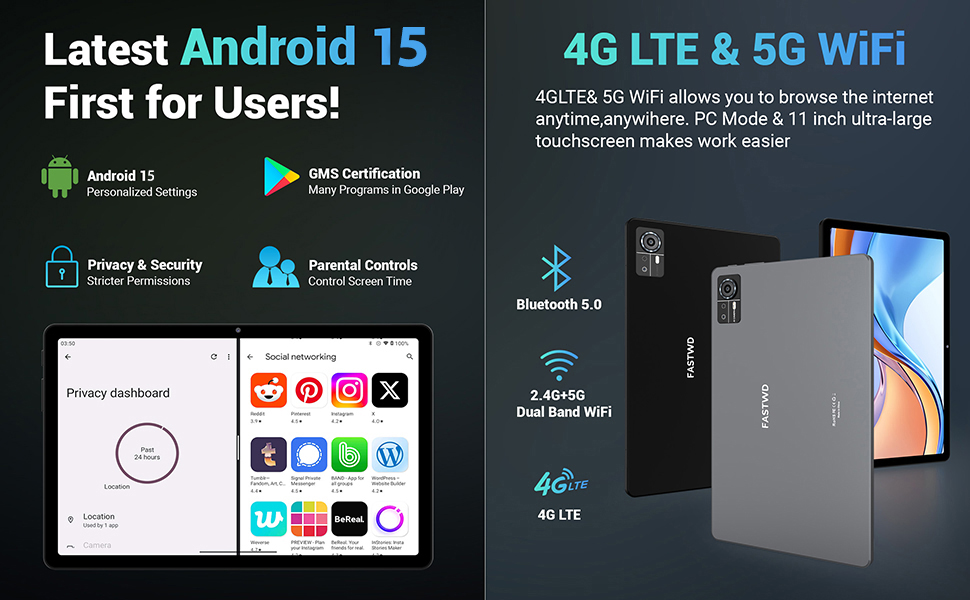
Image: A visual guide to key Android 15 features such as easy app pairing, storage management, quick Bluetooth connection, face recognition unlock, double-tap to wake, and parental control settings.
7. Konnektiwiteit
Your FASTWD tablet offers versatile connectivity options for internet access and peripheral devices.
7.1 Wi-Fi-verbinding
- Gaan na Instellings > Netwerk en internet > Wi-Fi.
- Wi-Fi wissel On.
- Kies die verlangde netwerk uit die lys en voer die wagwoord in indien gevra.
- The tablet supports dual-band 2.4G/5G Wi-Fi for stable and fast connections.
7.2 4G LTE Mobile Data
With a compatible SIM card installed, you can access 4G LTE mobile data.
- Ensure your SIM card is correctly installed (refer to Section 5.2).
- Gaan na Instellings > Netwerk en internet > Mobiele netwerk.
- Aktiveer Mobiele data and configure APN settings if required by your carrier.
7.3 Bluetooth -koppeling
Connect Bluetooth accessories like the included keyboard and mouse.
- Gaan na Instellings > Gekoppelde toestelle > Bluetooth.
- Wissel Bluetooth On.
- Plaas jou Bluetooth-bykomstigheid in paringsmodus.
- Select the accessory from the list of available devices and follow any on-screen prompts to complete pairing.
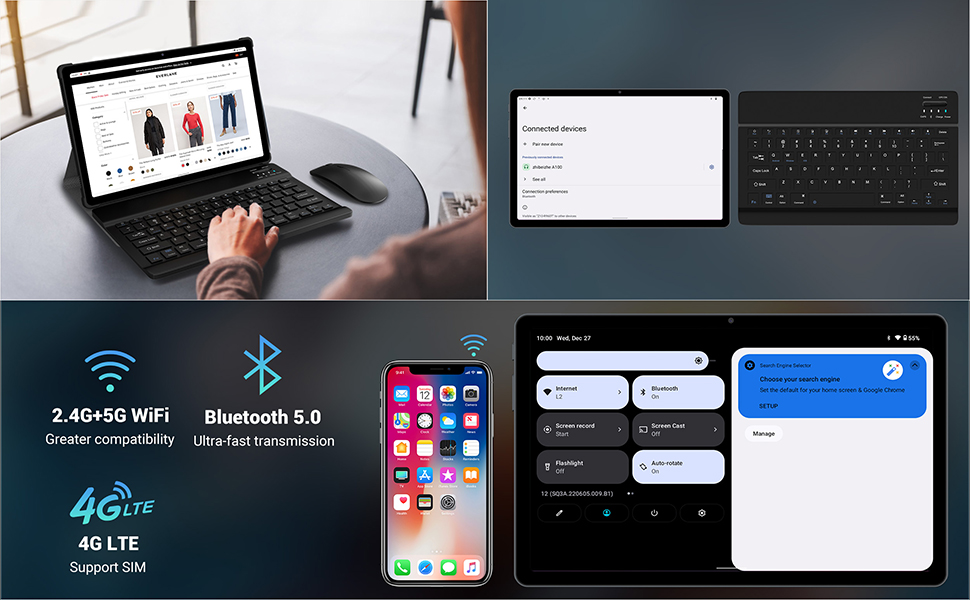
Image: The FASTWD tablet connected to its keyboard and mouse, illustrating its 2.4G+5G WiFi, Bluetooth 5.0, and 4G LTE SIM support for comprehensive connectivity.
8. Kamera
The tablet is equipped with an 8MP front camera and a 13MP rear camera for photos and video calls.
- Maak die oop Kamera aansoek.
- Tik die sluiterknoppie om 'n foto te neem.
- Wissel tussen voor- en agterkameras deur die kamera-skakelikoon te gebruik.
- AI post-processing technology enhances photo quality, making images more realistic.

Beeld: 'n Gedetailleerde view of the tablet's rear camera, highlighting its 13MP sensor and AI Camera branding.
9. Batterybestuur
The tablet features a 9580mAh battery for extended usage and supports 12W fast charging.
9.1 Laai die tablet
- Connect the Type-C cable to the tablet's charging port.
- Plug the other end of the cable into the provided charger, and then into a power outlet.
- Die battery-ikoon op die skerm sal laaistatus aandui.
9.2 Battery-optimalisering
- Pas die skermhelderheid aan tot 'n gemaklike vlak.
- Maak ongebruikte toepassings wat in die agtergrond loop toe.
- Aktiveer batteryspaarmodus in Instellings > Battery.
- Deaktiveer Wi-Fi, Bluetooth of GPS wanneer dit nie gebruik word nie.

Image: The FASTWD tablet connected to a Type-C charger, illustrating its 9580 mAh battery and 12W fast charging capability.
10. Berging
The tablet comes with 256GB of internal storage (ROM) and supports expansion up to 1TB via a MicroSD card.
10.1 Bergingbestuur
- Om stoorplekgebruik na te gaan, gaan na Instellings > Berging.
- You can free up space by uninstalling unused apps, deleting old files, or moving media to a MicroSD card.
10.2 RAM Management
The tablet features 36GB RAM (12GB LPDDR4 + 24GB expandable virtual memory) for smooth multitasking.
- The system automatically manages RAM for optimal performance.
- You can activate additional virtual RAM in the settings if needed for demanding applications.
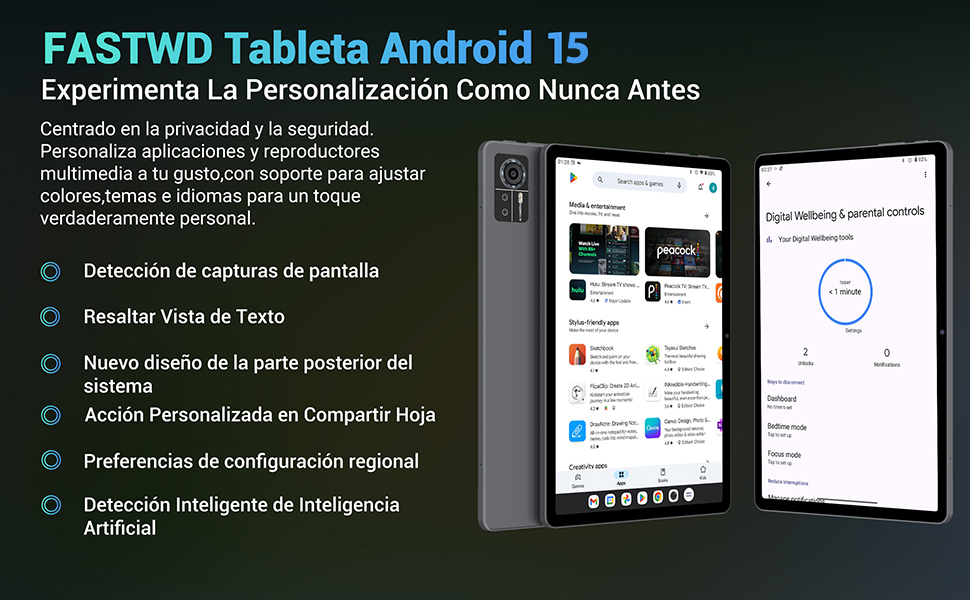
Image: An illustration highlighting the tablet's 36GB RAM (12+24GB), 256GB ROM, and 1TB MicroSD expansion capabilities, alongside its Octa-core processor.
11. Onderhoud
11.1 Skoonmaak
- Gebruik 'n sagte, pluisvrye lap om die skerm en liggaam van die tablet skoon te maak.
- Moenie harde chemikalieë of skuurmateriaal gebruik nie.
11.2 Sagteware-opdaterings
- Kontroleer gereeld vir stelselopdaterings in Instellings > Stelsel > Stelselopdatering om optimale werkverrigting en sekuriteit te verseker.
12. Probleemoplossing
As jy probleme met jou tablet ondervind, raadpleeg die volgende algemene oplossings:
| Probleem | Oplossing |
|---|---|
| Tablet skakel nie aan nie | Maak seker dat die battery gelaai is. Koppel die laaier aan en wag 'n paar minute voordat jy weer probeer aanskakel. Indien nie reageer nie, voer 'n geforseerde herbegin uit deur die aan/af-knoppie vir 10-15 sekondes in te hou. |
| Applications crash or freeze | Close background applications. Clear the cache of the problematic app (Settings > Apps > [App Name] > Storage & cache > Clear cache). Restart the tablet. |
| Swak Wi-Fi-verbinding | Ensure you are within range of the Wi-Fi router. Restart your router and the tablet. Forget the network and reconnect. |
| SIM-kaart nie bespeur nie | Ensure the SIM card is correctly inserted into the tray. Restart the tablet. Verify the SIM card is active with your mobile carrier. |
| Battery raak vinnig leeg | Reduce screen brightness. Disable unused connectivity features (Wi-Fi, Bluetooth, GPS). Close background apps. Check for apps consuming excessive battery in Settings > Battery. |
13. Spesifikasies
Detailed technical specifications for the FASTWD Android 15 Tablet 11-inch (Model M986):
| Kenmerk | Spesifikasie |
|---|---|
| Handelsmerk | FASTWD |
| Model Naam | FASTWD Android 15 Tablet 11 Pulgadas |
| Bedryfstelsel | Android 15 |
| Verwerker spoed | 2 GHz Agtkern |
| RAM | 36 GB (12GB LPDDR4 + 24GB expandable) |
| Interne berging (ROM) | 256 GB |
| Uitbreidbare berging | Tot 1 TB via MicroSD-kaart |
| Skerm grootte | 11 Pulgadas (Inches) |
| Skermresolusie | 2560 x 1440 pixels (2K UHD INCell) |
| Herlaaitempo | 120 Hz |
| Agterste kamera | 13 MP |
| Voorste kamera | 8 MP |
| Battery kapasiteit | 9580 mAh |
| Battery Life (average) | 8 Hours (video playback) |
| Laai | 12W Fast Charging, Type-C Interface |
| Konnektiwiteit | 4G LTE (Cellular), 5G Wi-Fi (802.11ac), Bluetooth 5.0 |
| Afmetings | 29.7 x 19.6 x 4 cm |
| Gewig | 1.36 kg |
| Spesiale kenmerke | Gaming Tablet, Face Recognition, Parental Control, GPS (Beidou, Galileo, Glonass, GPS) |
14. Waarborg en Ondersteuning
FASTWD offers two years of premium after-sales service and long-term technical support for your tablet.
- Waarborgtydperk: 2 jaar vanaf die datum van aankoop.
- Tegniese ondersteuning: For any issues or inquiries, please contact the FASTWD after-sales team through your Amazon purchase platform.
- Our support team aims to respond within 24 hours.