
1. Inleiding
This manual provides instructions for the setup, operation, and maintenance of your Retroid Pocket Classic handheld gaming console. The Retroid Pocket Classic is a portable Android-based gaming device featuring a 3.92-inch OLED touchscreen, designed for a versatile gaming experience.

Image 1.1: Retroid Pocket Classic consoles in white and yellow.
2. Wat is in die boks
Verifieer dat alle items in die pakket teenwoordig is:
- Retroid Pocket Classic Gaming Console
- Laaikabel (USB-C)
- Gebruikershandleiding (hierdie dokument)
3. Toestel oorview
Familiarize yourself with the physical components and controls of your Retroid Pocket Classic.
3.1 Voorkant View

Beeld 3.1: Voorkant view of the Retroid Pocket Classic.
- 3.92-inch OLED Touchscreen: The primary display for all operations and gaming.
- D-pad: Directional input for navigation and gameplay.
- Aksieknoppies: (A, B, X, Y or similar layout) for in-game actions.
- Begin/Kies Knoppies: For game and system functions.
- Luidsprekerroosters: Oudio-uitvoer.
3.2 Top and Back View

Beeld 3.2: Bo view showing shoulder buttons and ports.
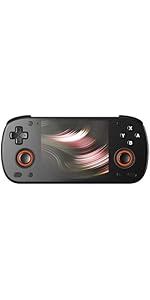
Image 3.3: Curved back design and trigger buttons.
- Skouerknope (L1, R1): Located on the top edge.
- Snellerknoppies (L2, R2): Located on the back, below the shoulder buttons.
- USB-C-poort: Vir laai en data-oordrag.
- 3.5 mm oudio-aansluiting: Vir die koppeling van koptelefoon.
- Micro SD -kaartgleuf: Vir die uitbreiding van berging.
- Kragknoppie: Om die toestel aan/af te skakel of dit in slaapmodus te plaas.
- Volume knoppies: To adjust audio output.
3.3 Internal Components (Cooling)

Image 3.4: Integrated active cooling system.
The Retroid Pocket Classic features an integrated active cooling system designed to maintain optimal performance and manage heat during extended use.
4. Opstelling
4.1 Aanvanklike laai
Before first use, fully charge the device. Connect the provided USB-C charging cable to the console's USB-C port and the other end to a compatible USB power adapter (not included). The device has a 5000mAh battery.
4.2 Aan-/afskakel
- Om aan te skakel: Druk en hou die aan/af-knoppie in totdat die skerm verlig.
- Om af te skakel: Press and hold the Power button, then select "Power Off" from the on-screen options.
- Om te slaap/wakker te word: Druk kortliks die Power-knoppie.
4.3 Wi-Fi-verbinding
To access online features and download applications, connect to a Wi-Fi network:
- Gaan na Instellings.
- Kies Netwerk en internet.
- Tik Wi-Fi en skakel dit aan.
- Kies die verlangde netwerk uit die lys en voer die wagwoord in indien gevra.
4.4 Google-rekeningopstelling
The Retroid Pocket Classic runs Android 14 and supports the Google Play Store. To download apps and games, you will need to sign in with a Google account during the initial setup process or later via the Settings menu.
4.5 Mikro SD-kaartinstallasie
To expand the device's storage (128GB internal), insert a Micro SD card into the designated slot. Ensure the card is inserted correctly until it clicks into place. The device supports various Micro SD card capacities.
5. Bedryfsinstruksies
5.1 Navigasie deur die Android-koppelvlak
The device operates on Android 14. Use the touchscreen for navigation, tapping icons to open applications, swiping to scroll, and using gestures for system controls. The D-pad and action buttons can also be used for navigation within compatible applications and games.
5.2 Downloading and Installing Applications
Applications and games can be downloaded from the Google Play Store. Open the Play Store app, search for your desired content, and follow the on-screen prompts to download and install.
Note: The Retroid Pocket Classic does not come with preloaded games. Users are responsible for acquiring and installing their own game content.
5.3 Bergingbestuur
Om view and manage internal and external storage, go to Instellings > Berging. Here you can see storage usage and manage files. For optimal performance, ensure sufficient free space is available.
5.4 Bluetooth-konnektiwiteit
The device supports Bluetooth 5.1 for connecting wireless accessories such as headphones or external controllers.
- Gaan na Instellings.
- Kies Gekoppelde toestelle.
- Tik Koppel nuwe toestel en kies jou bykomstigheid uit die lys.
6. Onderhoud
6.1 Die skoonmaak van die toestel
Use a soft, dry, lint-free cloth to clean the device's exterior. For the screen, a screen cleaner specifically designed for electronics can be used. Avoid using harsh chemicals or abrasive materials.
6.2 Batterysorg
Om die batterylewe te verleng:
- Vermy uiterste temperature.
- Moenie die battery gereeld heeltemal ontlaai nie.
- Berg die toestel met 'n gedeeltelike lading op indien dit nie vir lang tye gebruik word nie.
6.3 Sagteware-opdaterings
Kontroleer gereeld vir stelselopdaterings en installeer dit om optimale werkverrigting en sekuriteit te verseker. Gaan na Instellings > Stelsel > Stelselopdatering om te kyk vir beskikbare opdaterings.
7. Probleemoplossing
7.1 Toestel skakel nie aan nie
- Ensure the device is sufficiently charged. Connect it to a power source for at least 30 minutes.
- Try holding the Power button for 10-15 seconds to force a restart.
7.2 Wi-Fi-verbindingsprobleme
- Verifieer dat Wi-Fi in Instellings geaktiveer is.
- Herbegin jou Wi-Fi-router.
- Forget the network and reconnect, ensuring the password is correct.
7.3 Toepassings wat vasval of vries
- Maak die toepassing toe en heropen dit.
- Vee die toepassing se kasgeheue en data uit via Instellings > Programme > [Programnaam] > Berging en kasgeheue.
- Maak seker dat die toepassing na sy nuutste weergawe opgedateer is.
- Herbegin die toestel.
7.4 Skerm reageer nie
- Herbegin die toestel deur die aan/uit-knoppie in te hou.
- Maak seker dat die skerm skoon en vry van puin is.
8. Spesifikasies

Image 8.1: Retroid Pocket Classic detailed specifications.
| Kenmerk | Detail |
|---|---|
| Model Naam | RP CLASSIC |
| Verwerker | G1 Gen2 (8-Core Kryo CPU, 2 Performance Cores, 6 Efficiency Cores) |
| GPU | Adreno A12 |
| RAM | 6GB LPDDR4x @2133M |
| Berging | 128GB EMMC 5.1 (expandable via Micro SD card) |
| Skerm | 3.92-inch AMOLED, 1240x1080 @60fps |
| Bedryfstelsel | Android 14 |
| Wi-Fi | Wi-Fi 5 |
| Bluetooth | Bluetooth 5.1 |
| Koppelvlak | USB-C / 3.5mm Audio Jack / TF Card Slot |
| Video-uitset | NVT |
| Battery | 5000mAh |
| Laai spoed | 27 watt |
| Afmetings | 138 x 89.8 x 26 mm (5.43 x 3.53 x 1 duim) |
| Gewig | 223 g (7.9 onse) |
9. Waarborg en Ondersteuning
For warranty information and technical support, please refer to the official Retroid Pocket webwebwerf of kontak hul kliëntediens. Bewaar u bewys van aankoop vir waarborgeise.
Online resources and community forums may also provide helpful information and troubleshooting tips.