
1. Inleiding
This manual provides essential instructions for setting up, operating, maintaining, and troubleshooting your HONOR 400 5G smartphone. Please read this guide thoroughly to ensure proper use and to maximize the performance of your device.
The HONOR 400 is a powerful 5G smartphone featuring a 6.55-inch AMOLED display, a Qualcomm Snapdragon 7 Gen 3 processor, 12GB of RAM, and 512GB of internal storage. It operates on Android 15 and is equipped with a 5300mAh battery, a 200MP main camera, and dual-SIM capabilities.
2. Wat is in die boks
Upon unboxing your HONOR 400 smartphone, verify that all items are present:
- HONOR 400 5G-slimfoon
- USB kabel
- (Other accessories such as a charger, SIM ejector tool, or protective case may vary by region and package contents.)
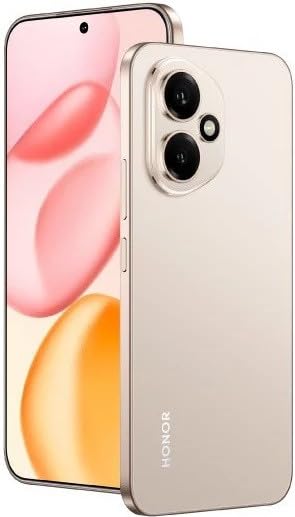
Figuur 2.1: The HONOR 400 5G Smartphone. This image displays the device's sleek design and the main screen.
3. Toestel oorview
Familiarize yourself with the physical components of your HONOR 400 smartphone.
3.1 Voorkant View
- Vertoon: 6.55-inch AMOLED screen with 1264 x 2736 pixels resolution.
- Voorste kamera: 50 MP, f/2.0 (wide) for selfies and video calls.
- gehoorstuk: Located at the top edge of the display.
An illustration of the front view would typically show the display, front camera, and earpiece.
3.2 Agter View
- Main Camera System:
- 200 MP, f/1.9 (wide), 1/1.4", PDAF, OIS
- 12 MP, f/2.2, 112° (ultrawide), AF
- Flits: LED flash for low-light photography.
- HONOR Logo: Handelsmerkidentifikasie.
An illustration of the rear view would typically highlight the camera module and brand logo.
3.3 Kant Views en hawens
- Kragknoppie: Typically on the right side, used to power on/off and wake/sleep the device.
- Volume knoppies: Typically on the right side, above the power button, for adjusting volume.
- USB Tipe C-poort: Geleë aan die onderkant, gebruik vir laai en data-oordrag.
- SIM kaart skinkbord: Location varies, typically on the side or bottom, for inserting Nano-SIM cards.
- Microphones & Speakers: Strategically placed for calls and audio output.
Illustrations of the device's sides would show the placement of buttons, ports, and the SIM tray.
4. Opstelling
4.1 SIM-kaarte insit
- Vind die SIM-kaartlaai op jou toestel.
- Plaas die SIM-uitwerpgereedskap (indien voorsien) in die klein gaatjie langs die laai en druk liggies totdat die laai uitspring.
- Place your Nano-SIM card(s) into the designated slots on the tray. The HONOR 400 supports Dual-SIM (Nano-SIM + ESIM OR Nano-SIM + Nano-SIM). Ensure the gold contacts face downwards.
- Plaas die laai versigtig terug in die foon.
An image demonstrating SIM card insertion would be helpful here.
Belangrik: Voor aankoopasing, verify network compatibility with your service provider. This device supports GSM networks (2G, 3G, 4G LTE, and 5G SA/NSA) but does not support CDMA networks.
4.2 Aanvanklike Aanskakeling en Opstellingsassistent
- Press and hold the Power button until the HONOR logo appears.
- Volg die instruksies op die skerm om die aanvanklike opstelling te voltooi, wat insluit die keuse van jou taal, die verbinding met Wi-Fi, die opstel van jou Google-rekening en die konfigurasie van sekuriteitskenmerke.
5. Bedien jou toestel
5.1 Android 15-bedryfstelsel
Your HONOR 400 runs on Android 15, offering a user-friendly interface and access to a vast ecosystem of applications via the Google Play Store. Navigate using gestures or on-screen buttons, customize your home screen, and manage notifications.
5.2 Basiese Funksies
- Maak oproepe: Tik die Foon-ikoon, voer die nommer in en tik die oproepknoppie.
- Stuur boodskappe: Use the Messaging app to send SMS/MMS.
- Internet blaai: Maak oop a web browser (e.g., Chrome) to access the internet via Wi-Fi or mobile data.
- Programbestuur: Download, install, and uninstall apps from the Google Play Store.
5.3 Kameragebruik
The HONOR 400 features a versatile camera system:
- Agterste kamera: Utilize the 200 MP main sensor for high-resolution photos and the 12 MP ultrawide lens for expansive shots. Features include PDAF and Optical Image Stabilization (OIS).
- Voorste kamera: The 50 MP wide-angle front camera is ideal for selfies and video conferencing.
- Video-opname: Capture videos in up to 4K resolution at various frame rates (30, 60, 120 fps).
A diagram of the camera interface or tips for photography modes could be included here.
5.4 Konnektiwiteit
Jou toestel ondersteun verskeie konnektiwiteitsopsies:
- 5G/4G LTE: High-speed mobile data connectivity.
- Wi-Fi: Koppel aan draadlose netwerke vir internettoegang.
- Bluetooth: Koppel met draadlose oorfone, luidsprekers en ander toestelle.
- USB Tipe C: Vir laai en verbinding met 'n rekenaar vir data-oordrag.
6. Onderhoud
6.1 Batterysorg
- The HONOR 400 is equipped with a 5300mAh non-removable battery.
- Om die batterylewe te verleng, vermy uiterste temperature en ontlaai die battery gereeld.
- Use the provided USB cable and a compatible charger for optimal charging.
6.2 Sagteware-opdaterings
Regularly check for and install software updates to ensure your device has the latest features, security patches, and performance improvements. You can usually find this option in your phone's Settings menu under "System & updates" or "About phone."
6.3 Skoonmaak van jou toestel
Gebruik 'n sagte, pluisvrye lap om die skerm en liggaam van jou foon skoon te maak. Vermy die gebruik van harde chemikalieë of skuurmiddels.
7. Probleemoplossing
This section addresses common issues you might encounter with your HONOR 400 smartphone.
7.1 Toestel skakel nie aan nie
- Ensure the battery is charged. Connect the phone to a charger for at least 15 minutes before attempting to power it on again.
- Try a forced restart by holding the Power button for an extended period (e.g., 10-15 seconds).
7.2 Netwerkverbindingsprobleme
- Kontroleer of jou SIM-kaart behoorlik ingesit is.
- Verify that mobile data is enabled in your phone's settings.
- Herbegin jou toestel.
- Confirm with your service provider that your plan is active and there are no network outages in jou area.
- Ensure your device is compatible with your network's frequencies (GSM only, no CDMA).
7.3 Programme wat vasval of vries
- Maak die toepassing toe en heropen.
- Maak die program se kasgeheue en data skoon in Instellings > Programme.
- Maak seker dat die toepassing na sy nuutste weergawe opgedateer is.
- Herbegin jou foon.
7.4 Stadige Werkverrigting
- Maak onnodige agtergrondprogramme toe.
- Maak kas skoon en tydelik files.
- Ensure you have sufficient free storage space (512GB internal storage).
- Herbegin jou toestel gereeld.
8. Spesifikasies
| Kenmerk | Detail |
|---|---|
| Model Naam | Eer 400 |
| Bedryfstelsel | Android 15.0 |
| Verwerker | Qualcomm SM7550-AB Snapdragon 7 Gen 3 (4 nm), Agtkern (1x2.63 GHz Cortex-A715 & 3x2.4 GHz Cortex-A715 & 4x1.8 GHz Cortex-A510) |
| RAM | 12 GB |
| Interne berging | 512 GB (nie-uitbreidbaar) |
| Vertoon | 6.55 Inches AMOLED, 1B colors, 1264 x 2736 pixels |
| Agterste kamera | 200 MP (wide, OIS) + 12 MP (ultrawide) |
| Voorste kamera | 50 MP (wyd) |
| Video-opname-resolusie | 4K (30, 60, 120 fps) |
| Battery kapasiteit | 5300 miljoenamp Hours (non-removable) |
| SIM-kaart | Dual-SIM (Nano-SIM + ESIM OR Nano-SIM + Nano-SIM) |
| Konnektiwiteit | 5G, GSM, LTE, Wi-Fi, Bluetooth, USB Type-C |
| Afmetings | 156.5 x 74.6 x 7.3 mm (6.16 x 2.94 x 0.29 duim) |
| Gewig | 202 gram (6.49 ons) |
| Kleur | Desert Gold (as per product listing, actual color may vary by variant) |
9. Waarborg en Ondersteuning
9.1 Vervaardiger se waarborg
The HONOR 400 smartphone comes with a 1 Jaar VervaardigerswaarborgHierdie waarborg dek defekte in materiaal en vakmanskap onder normale gebruik. Bewaar asseblief u bewys van aankoop vir waarborgeise.
For specific terms and conditions of the warranty, please refer to the warranty card included with your product or visit the official HONOR support webwebwerf.
9.2 Kliëntediens
For further assistance, technical support, or service inquiries, please contact HONOR customer support through their official webwebwerf of die kontakinligting wat in u produkverpakking verskaf word.
You can typically find support resources, FAQs, and contact details on the official HONOR webwebwerf: www.hihonor.com