
Inleiding
This manual provides detailed instructions for the HAARAY Solar Lights Outdoor, Model CCP0110. These versatile lights offer both solar and USB-C charging, multiple installation options, and intelligent motion sensing capabilities. Please read this manual thoroughly before installation and use to ensure proper function and longevity of your product.
Wat is in die boks
Maak asseblief seker dat alle komponente teenwoordig is tydens uitpak:
- HAARAY Solar Light Unit(s)
- Monteringshardeware (skroewe, ankers)
- USB-C-laaikabel
- Instructiehandleiding (hierdie dokument)
Produk Kenmerke
- Verskeie installasie-opsies: Can be clipped onto fences, decks, or wall-mounted. The unit can also be disassembled for separate use, functioning as a portable light or desk lamp.
- Bewegingsopsporing: Features a detection angle of up to 120° and a detection distance of approximately 16 feet, providing illumination when movement is detected.
- 360° Rotatable Angle: The light head can be rotated 360° horizontally and adjusted 45° vertically, allowing precise direction of light.
- Dubbele laaimetodes: Equipped with monocrystalline silicon solar panels for efficient solar charging (6-8 hours for full charge) and a USB-C port for indoor or faster charging (3-4 hours for full charge).
- Drie beligtingsinstellings: Offers one 'Stay On' mode and two 'Motion Sensor' modes to suit various lighting needs.
- IP65 Waterdig: Designed to withstand outdoor weather conditions, ensuring durability.
Opstelling en installasie
The HAARAY Solar Light offers flexible installation options:
1. Clip-On Installation
Attach the light unit to fences, decks, or gutters using the integrated clip. Ensure the clip is securely fastened to a stable surface. The clip mechanism allows for easy relocation.
2. Wall-Mount Installation
For a permanent fixture, use the provided mounting hardware to attach the light to a wall. Mark the desired position, drill pilot holes, insert anchors, and secure the bracket with screws.

Image: The solar light can be installed using either the clip-on method on a window frame or wall-mounted under a roof eave for outdoor illumination.
3. Hoekverstelling
The light features a 360° rotatable joint and a 45° vertical adjustment. This allows you to direct the light precisely where needed. You can also choose between vertical or horizontal clip orientation based on your mounting surface.

Image: The light head can be rotated 360 degrees and tilted 45 degrees. The clip can be configured for both vertical and horizontal mounting.
Laai instruksies
Your HAARAY Solar Light can be charged using two methods:
1. Sonkraglaai
Position the solar panel in direct sunlight for 6-8 hours to achieve a full charge. The monocrystalline silicon panel is designed for efficient energy absorption.
2. USB-C Laai
For faster charging or when solar exposure is limited, use the provided USB-C cable to connect the light to a power source. A full charge typically takes 3-4 hours via USB-C.
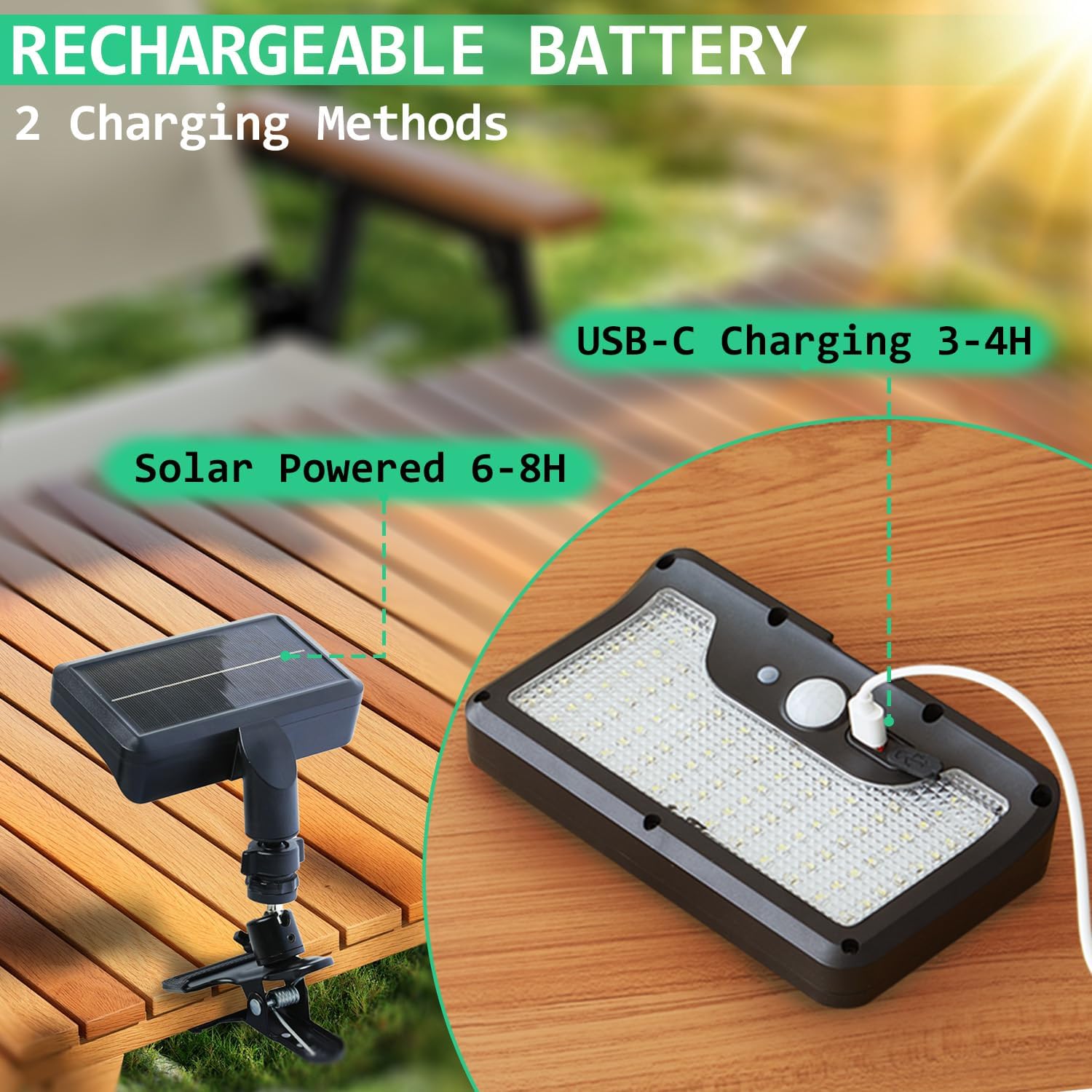
Image: The solar light can be charged via its integrated solar panel or through the USB-C port for quicker charging.
Bedryfsmodusse
The HAARAY Solar Light features three distinct operating modes, selectable via a push button:
- Setting 1 (Dim + Motion Sensor): The light remains dim at night and switches to bright light when motion is detected. After approximately 15 seconds of no motion, it returns to dim mode.
- Setting 2 (Off + Motion Sensor): The light remains off at night and switches to bright light when motion is detected. After approximately 15 seconds of no motion, it turns off.
- Setting 3 (Stay On): The light stays on at a consistent dim level throughout the night. This mode provides over 10 hours of continuous illumination on a full charge.

Image: Visual representation of the three operating modes, demonstrating how the light behaves with and without motion detection.
Bewegingsensorfunksionaliteit
The integrated motion sensor detects movement within a 120° angle and up to 16 feet. This feature is active in Setting 1 and Setting 2, providing security and energy efficiency.

Image: The motion sensor provides a 120-degree detection angle and a 16-foot detection distance, illuminating a wide area.
Onderhoud
To ensure optimal performance and longevity of your HAARAY Solar Light, follow these maintenance guidelines:
- Skoonmaak: Periodically wipe the solar panel and light surface with a soft, damp lap om stof, vuiligheid of puin te verwyder. 'n Skoon sonpaneel verseker doeltreffende laai.
- Waterbeskerming: While the light is IP65 waterproof, for outdoor use, always ensure the USB-C charging port is securely covered with its silicone cap to prevent water ingress.
- Batterysorg: Allow the light to fully charge in direct sunlight before first use. If storing the light for an extended period, ensure it is fully charged and recharge it every few months to maintain battery health.

Image: The light is IP65 waterproof, suitable for outdoor use. Always cover the USB-C port with its silicone plug to prevent water ingress.
Probleemoplossing
If you encounter issues with your HAARAY Solar Light, please refer to the following common problems and solutions:
| Probleem | Moontlike oorsaak | Oplossing |
|---|---|---|
| Lig gaan nie snags aan nie. | Onvoldoende sonlading. | Ensure the solar panel is exposed to direct sunlight for 6-8 hours. Charge via USB-C if sunlight is consistently low. |
| Die lig is dof of die batterylewe is kort. | Partial charge, dirty solar panel, or cold weather. | Clean the solar panel. Ensure full solar exposure or charge via USB-C. Battery performance may decrease in extreme cold. |
| Bewegingsensor bespeur nie. | Obstruction, incorrect mode, or sensor malfunction. | Ensure the sensor is clear of obstructions. Verify the light is in Setting 1 or 2. Test in different locations. |
| Water inside the unit. | USB-C port cap not sealed. | Always ensure the silicone cap on the USB-C port is tightly closed when used outdoors. |
Indien hierdie stappe nie die probleem oplos nie, kontak asseblief kliëntediens.
Spesifikasies
| Kenmerk | Detail |
|---|---|
| Handelsmerk | HAARAY |
| Modelnommer | CCP0110 |
| Kleur | Swart |
| Materiaal | Akriel-nitril-butadiëne-stireen |
| Liggaamvorm | Spreilig |
| Produk afmetings | 3.5 cm L x 6 cm B x 11 cm H |
| Binne/buiteluggebruik | Binne, Buitelug |
| Kragbron | Sonkrag aangedryf |
| Installasie tipe | Wall Mount, Clip On |
| Spesiale kenmerke | Adjustable Height, Cordless, Lightweight, Motion Sensor, Portable |
| Beheer metode | Drukknop |
| Ligbrontipe | LED |
| Aantal ligbronne | 92 |
| Ligte Kleur | Wit |
| Ingesluit komponente | Instruction Manual, Mounting Hardware, USB-C Cable |
| Aantal items | 2 |
| Waterweerstandvlak | Waterdig (IP65) |
| Vergadering benodig | Ja |
| Kleur temperatuur | 7000 Kelvin |
| Item gewig | 2.01 pond |
| Batterye | 1 D battery benodig (ingesluit) |
Waarborg inligting
The HAARAY Solar Lights Outdoor come with an extended warranty. For specific details regarding the warranty period and coverage, please refer to the warranty card included in your product packaging or contact HAARAY customer support.
Kliënte ondersteuning
If you have any questions, require technical assistance, or need to report a problem that cannot be resolved using the troubleshooting guide, please contact HAARAY customer support. Contact information can typically be found on the product packaging, the official HAARAY webwebwerf, of deur jou aankoopplatform.