
1. Inleiding
This manual provides essential instructions for setting up, operating, maintaining, and troubleshooting your FUNYET 2-in-1 Laptop, Model FUN01-05. This device features a 14.1-inch Full HD touchscreen, an Intel Core i7-1265U processor, 16GB RAM, and a 512GB SSD, running Windows 11 Pro. Its 360-degree reversible screen allows for versatile usage modes.
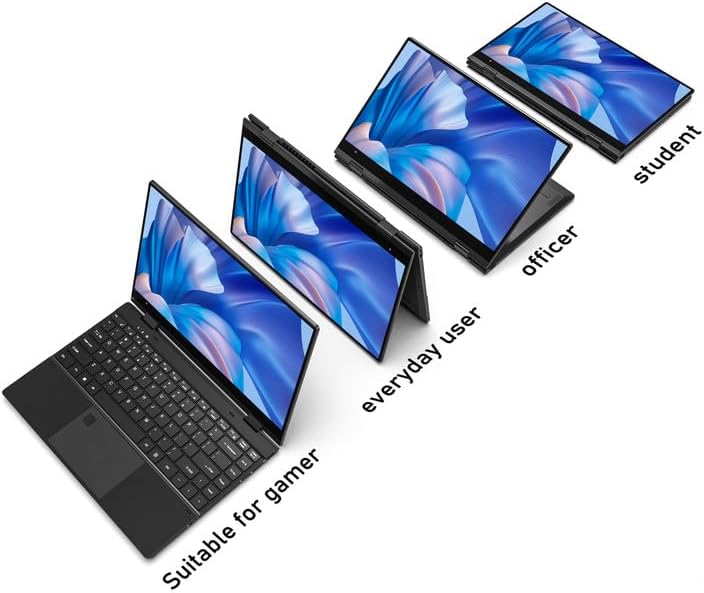
Figure 1: FUNYET 2-in-1 Laptop showcasing its versatile modes.
2. Pakketinhoud
Verifieer dat alle items in die pakket teenwoordig is:
- FUNYET 2-in-1 Touch Screen Laptop
- AC Adapter
- Waarborgkaart
- Instructions (this manual)
3. Opstelling
3.1 Aanvanklike laai en aanskakeling
- Connect the AC adapter to the DC-IN port on the laptop and plug it into a power outlet.
- Laat die skootrekenaar vir ten minste 30 minute laai voor die eerste gebruik.
- Press and hold the Power Button (located on the side) until the screen illuminates.
3.2 Windows 11 Pro-opstelling
Follow the on-screen prompts to complete the Windows 11 Pro initial setup. This includes selecting your region, language, connecting to a Wi-Fi network, and creating a user account.
3.3 Opstelling van vingerafdrukleser
For enhanced security and quick access, set up the fingerprint reader:
- Navigeer na Windows-instellings > Rekeninge > Aanmeldopsies.
- Under "Windows Hello Fingerprint," click "Set up" and follow the instructions to register your fingerprint.

Figure 2: Backlit keyboard and integrated fingerprint reader.
4. Bedryfsinstruksies
4.1 Kragbestuur
- Krag aan: Druk die Power-knoppie.
- Slaap stelling: Briefly press the Power Button or close the lid.
- Sluit af: Gaan na die Begin-kieslys > Aan/uit > Skakel af.
- Herbegin: Gaan na die Begin-kieslys > Aan/uit > Herbegin.
4.2 2-in-1 Modusse
The laptop's 360-degree hinge allows for four primary modes:
- Notebook Mode: Standaard skootrekenaarkonfigurasie vir tik en produktiwiteit.
- Staanmodus: Fold the keyboard back to prop up the screen for viewinhoud.
- Tentmodus: Position the laptop in an inverted 'V' shape, ideal for touch interaction or presentations in confined spaces.
- Tabletmodus: Fold the screen completely back against the base for a tablet experience.

Figure 3: Different operational modes of the 2-in-1 laptop.
4.3 Touchscreen and Keyboard
- Raakskerm: Use gestures similar to a smartphone or tablet for navigation and interaction.
- Verligte sleutelbord: The keyboard features a backlight for use in low-light conditions. The backlight can typically be toggled or adjusted using function keys (e.g., Fn + F5).
4.4 Konnektiwiteit
Your laptop supports various connectivity options:
- Wi-Fi 6: For high-speed wireless internet access. Connect via Windows Settings > Network & Internet > Wi-Fi.
- Bluetooth 5.2: For connecting wireless peripherals like headphones, mice, or keyboards. Pair devices via Windows Settings > Bluetooth & devices.
- Poorte: The laptop includes various ports for external devices.

Figure 4: Laptop ports and their functions.
Beskikbare hawens:
- DC-IN (kraginvoer)
- USB 3.1 Type-C (Video Output, Data Transfer, Charging)
- Audio Port (Headphones/Microphone)
- Kragknoppie
- TF Card Slot (for storage expansion up to 1TB)
- USB 3.1 Tipe-A
5. Onderhoud
5.1 Skoonmaak
- Gebruik 'n sagte, pluisvrye lap om die skerm en die buitekant skoon te maak.
- Vir hardnekkige vlekke, dampen the cloth slightly with water or a screen-safe cleaner.
- Avoid harsh chemicals, abrasives, or excessive moisture.
5.2 Batterysorg
- Om die battery se lewensduur te maksimeer, vermy om die battery gereeld volledig te ontlaai.
- Bêre die skootrekenaar op 'n koel, droë plek wanneer dit nie vir lang tye gebruik word nie.
- The laptop features a 38 Watt-hour Lithium-Ion battery, providing up to 8 hours of usage.
5.3 Termiese Bestuur
The laptop is designed with an improved thermal system to maintain optimal operating temperatures. Ensure proper airflow by not blocking the ventilation openings, especially during intensive tasks.

Figure 5: Laptop thermal design for efficient cooling.
6. Probleemoplossing
Indien u probleme ondervind, probeer die volgende basiese probleemoplossingstappe:
- Geen krag: Maak seker dat die WS-adapter stewig aan beide die skootrekenaar en 'n werkende kragaansluiting gekoppel is. Probeer 'n ander aansluiting.
- Skerm vertoon nie: Connect an external monitor to check if the issue is with the laptop's display. Restart the laptop.
- Stadige prestasie: Close unnecessary applications. Check for Windows updates. Ensure sufficient free storage space.
- Wi-Fi/Bluetooth-probleme: Toggle Wi-Fi/Bluetooth off and on in Windows Settings. Restart the laptop. Check router/device connections.
- Vertoonfoute: Ensure your Windows operating system and graphics drivers are up to date. This can often resolve display anomalies.
- Raakskerm wat nie reageer nie: Restart the laptop. Ensure the screen is clean and free of debris.
For persistent issues, refer to the support section or contact customer service.
7. Spesifikasies
| Kenmerk | Detail |
|---|---|
| Handelsmerk | FUNYET |
| Model Naam | Magbook |
| Modelnommer | FUN01-05 |
| Skerm grootte | 14.1 duim |
| Vertoon resolusie | 1920 x 1080 piksels (FHD) |
| Tipe vertoon | LCD, Touchscreen, Glossy Finish |
| Verwerker | Intel Core i7-1265U (up to 4.8 GHz, 8 Cores, 12 Threads) |
| RAM | 16 GB DDR4 (3733 MHz) |
| Berging | 512 GB SSD (PCIE x 4), expandable up to 1TB with TF card |
| Bedryfstelsel | Windows 11 Pro |
| Grafika | Geïntegreerde Intel Iris Xe-grafika |
| Draadlose konneksie | Wi-Fi 6, Bluetooth 5.2 |
| Hawens | USB 3.1 Type-A, USB 3.1 Type-C, DC-IN, Audio Jack, TF Card Slot |
| Kamera | Front 2 MP |
| Sekuriteit | Vingerafdrukherkenning |
| Battery | 38 Watt Hours Lithium Ion (up to 8 hours) |
| Gewig | 3 pond |
| Afmetings (L x B x D) | 12.7" x 8.6" x 0.6" |
8. Waarborg en Ondersteuning
8.1 Waarborginligting
Your FUNYET 2-in-1 Laptop comes with a 2-jaar beperkte waarborgHierdie waarborg dek vervaardigingsdefekte en hardeware-wanfunksies onder normale gebruik. Bewaar asseblief u bewys van aankoop vir waarborgeise.
Daarbenewens, a 180-dae gratis terugkeerbeleid is offered from the date of purchase.
8.2 Kliëntediens
For technical assistance, warranty claims, or any product-related inquiries, please contact FUNYET customer support:
- Telefoonondersteuning: +1 800-986-9631 (English phone support available)
- Aanlyn ondersteuning: 24/7 instant online support is available. Please visit the official FUNYET webwebwerf vir kontakbesonderhede.