
1. Inleiding
This manual provides detailed instructions for the installation, operation, and maintenance of your PHORUS 48-inch Tropical Palm Leaf Ceiling Fan. Please read this manual thoroughly before installation and retain it for future reference. This ceiling fan is designed for both indoor and outdoor covered areas, offering a unique tropical aesthetic with modern functionality.
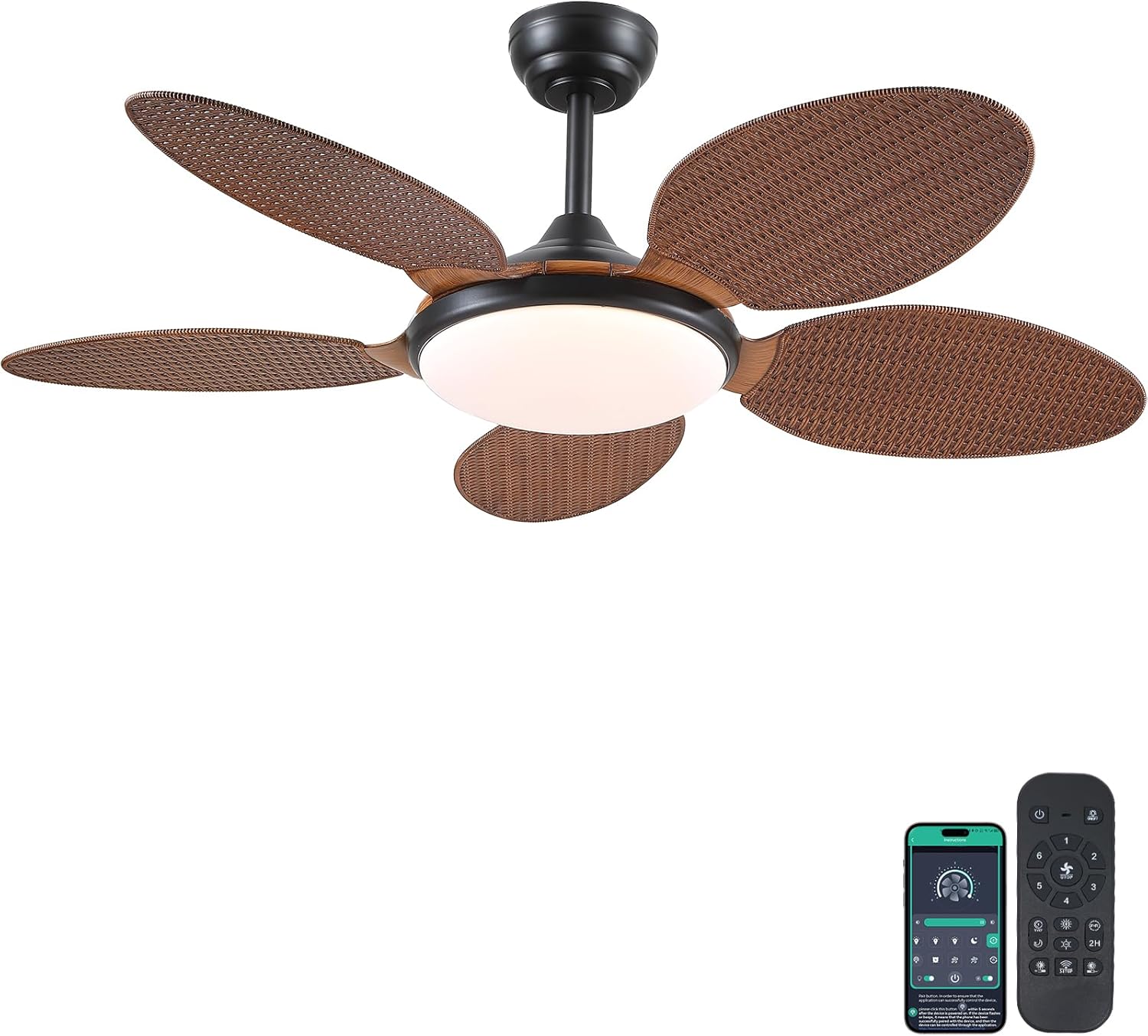
Image 1.1: PHORUS 48-inch Tropical Palm Leaf Ceiling Fan.
2. Veiligheidsinligting
- Ensure the main power supply is disconnected before installation, maintenance, or cleaning.
- All electrical connections must comply with local codes and ordinances, as well as national electrical codes. If you are unfamiliar with electrical wiring, consult a qualified electrician.
- The mounting structure must be capable of supporting the weight of the fan (approximately 12.58 pounds) plus the dynamic load during operation.
- Moenie die lemhouers buig tydens installasie of skoonmaak nie.
- Ensure there is adequate clearance between the fan blades and any obstacles.
- This fan is suitable for use in damp plekke, maar moet nie direk aan water blootgestel word nie.
3. Pakketinhoud
Verifieer dat al die komponente wat hieronder gelys word, in u pakket ingesluit is. Kontak asseblief kliëntediens indien enige onderdele ontbreek of beskadig is.

Beeld 3.1: verbyview of included components and fan dimensions.
- Waaierliggaamsamestelling
- 5 Palm Leaf Blades
- Afdak
- Afwaartse stange (4-duim en 8-duim opsies)
- Lamp Skaduwee
- Afstandbeheer
- Afstandontvanger
- Montagebeugel
- Hardewarepak (skroewe, draadmoere, ens.)
- Instruksie Handleiding
4. Opstelling en installering
Follow these steps carefully for proper installation. For a visual guide, please refer to the installation video provided below.
4.1. Installasievideogids
Video 4.1: Detailed installation guide for the PHORUS 48-inch Palm Leaf Ceiling Fan with lights.
4.2. Stap-vir-stap installasie
- Prepare the Fan Body: Attach the LED light board to the fan body assembly using the provided screws.
- Heg waaierblaaie aan: Secure each of the five palm leaf blades to the fan body. Ensure the correct side of the blade is facing upwards as indicated in the video.
- Monteer die onderstang: Insert the downrod through the canopy and secure it to the fan body. Feed the electrical wires through the downrod.
- Installeer montagebeugel: Secure the mounting bracket to your ceiling junction box. Ensure it is firmly attached and can support the fan's weight.
- Bedrading verbindings: Connect the fan's electrical wires to your household wiring. Typically, this involves connecting the black live wire, white neutral wire, and yellow ground wire. Refer to the wiring diagram in the installation video for precise connections.
- Hang die waaier: Carefully lift the fan assembly and hang it onto the mounting bracket.
- Installeer afstandontvanger: Place the remote receiver within the canopy, ensuring wires are not pinched. Connect the receiver to the fan and household wiring as per the diagram.
- Veilige afdak: Slide the canopy up to the ceiling and secure it to the mounting bracket with screws.
- Installeer L.amp Skakering: Heg die lamp shade to the bottom of the fan body.
The fan is equipped with 4-inch and 8-inch downrods to accommodate various ceiling heights. It can also be used with sloped ceilings up to 15 degrees.
5. Bedryfsinstruksies
Your PHORUS ceiling fan can be controlled via the included remote control or a smart application on your mobile device.
5.1. Afstandsbediening

Image 5.1: Remote control layout with function descriptions.
The remote control allows you to adjust the following settings:
- Krag aan/af: Skakel die waaier en lig aan of af.
- Fan Spoed: Kies uit 6 windsnelhede (1-6).
- Lig aan/af: Control the integrated LED light independently.
- Kleur temperatuur: Adjust between 3 light colors: 3000K (Warm Light), 4500K (Natural Light), and 6000K (White Light).
- Helderheid aanpassing: Verminder of verhelder die lig van 10% tot 100%.
- Omgekeerde funksie: Change the direction of the fan blades for summer (downdraft) or winter (updraft) modes. Press the F\R key and wait 5-8 seconds for the fan to stop completely and then automatically reverse.
- Afteller: Set a 2-hour timer for automatic shutdown.
Remote Code Pairing:
If your remote control is not responding, you may need to pair it with the fan. Follow these steps:
- Turn off the main power supply to the fan for one minute.
- Turn on the main power supply and simultaneously long-press the code key on the remote control for 3-5 seconds.
- The fan light will blink 2-3 times to indicate successful code matching.
Video 5.2: Instructions for remote code pairing.
5.2. Slim-appbeheer
The fan supports control via a smart application. Scan the QR code in Image 5.1 or visit https://www.jasonghost.com/fanlamppro/ om die "Fan L" af te laaiamp Pro"-app.
Video 5.3: Guide for setting up and using the smart app control.
The app provides comprehensive control over fan speeds, light settings (color temperature and brightness), and the reverse function, similar to the remote control. All settings will be remembered after power cycling.

Image 5.4: Customizable light effects and dimming range.

Image 5.5: Fan airflow modes (summer/winter) and 6-speed settings.
6. Onderhoud
Gereelde onderhoud verseker optimale werkverrigting en lang lewensduur van jou plafonwaaier.
- Skoonmaak: Periodically clean the fan blades and light cover with a soft, damp cloth. Do not use abrasive cleaners or solvents that could damage the finish.
- Draai bevestigingsmiddels vas: Check all screws and fasteners on the fan body and mounting bracket annually. Tighten any loose connections to prevent wobbling or noise.
- Afstof: Dust the fan motor housing and canopy regularly to prevent dust buildup, which can affect performance.
7. Probleemoplossing
As jy probleme met jou waaier ondervind, raadpleeg die volgende algemene probleme en oplossings:
| Probleem | Moontlike oorsaak | Oplossing |
|---|---|---|
| Waaier begin nie | No power supply; Loose wire connections; Remote not paired. | Check circuit breaker/wall switch; Verify all wire connections are secure; Perform remote code pairing (refer to Section 5.1). |
| Lig werk nie | Los draadverbinding; LED-drywerprobleem. | Check light wiring connections; Contact customer support if LED driver is suspected. |
| Fan wiebel | Los lemme of monteerhardeware; Ongebalanseerde lemme. | Ensure all blade screws and mounting bracket screws are tight; Use a balancing kit (not included) if necessary. |
| Afstandbeheer reageer nie | Low battery; Remote not paired. | Replace AAA batteries (2 required, included); Perform remote code pairing (refer to Section 5.1). |
| Oormatige geraas | Loose screws; Motor issue. | Check and tighten all screws; Ensure blades are securely attached. If noise persists, contact customer support. |
8. Spesifikasies
- Handelsmerk: FOROUS
- Model: B0FC1SY1B2
- Kleur: 48" Dark Brown
- Materiaal: Akriel, Plastiek
- Styl: Tropies
- Kamer tipe: Bedroom, Dining Room, Garage, Kids Room, Kitchen
- Binne/buiteluggebruik: Binnenshuis (geskik vir damp liggings)
- Kragbron: DC
- Spesiale kenmerke: App-bedienbaar, LED-lig, stil werking, afstandbeheer, timer
- Beheer metode: Toepassing, afstandbeheer
- Aantal ligbronne: 1
- Ingesluit komponente: Light Kit, Remote Control
- Item gewig: 12.58 pond
- Aantal items: 1
- Wattage: 60 watt
- Kontroleurstipe: App-beheer, afstandbeheer
- Eenheidtelling: 1.0 Tel
- Montage tipe: Plafon Mount
- Vergadering benodig: Ja
- Grootte: Medium (48 inches)
- Aanbevole gebruike vir produk: Lug sirkulasie
- Produk afmetings: 48 x 48 x 15.15 duim
- Batterye: 2 AAA-batterye benodig (ingesluit)
9. Waarborg en Ondersteuning
PHORUS provides a one-year quality warranty for this product. We also offer free replacement service for any damage and quality problems encountered during the warranty period. If you have any questions or require assistance, please contact PHORUS customer support for a satisfactory answer within 24 hours.