
Ledwood PLAYKARAOKE
Ledwood PLAYKARAOKE Portable Karaoke Speaker
Instruksie Handleiding
Inleiding
Dankie vir die aankoopasing the Ledwood PLAYKARAOKE Portable Karaoke Speaker. This manual provides essential information for the safe and efficient operation of your device. Please read it thoroughly before use and retain it for future reference.
Belangrike veiligheidsinligting
- Moenie die toestel aan water of oormatige vog blootstel nie.
- Vermy uiterste temperature.
- Moenie probeer om die toestel self uitmekaar te haal of te herstel nie. Verwys alle diens na gekwalifiseerde personeel.
- Hou buite bereik van kinders.
- Gebruik slegs die meegeleverde laaikabel en adapter.
- Verseker behoorlike ventilasie tydens gebruik en laai.
Pakketinhoud
Kontroleer asseblief dat alle items teenwoordig is:
- Ledwood PLAYKARAOKE Portable Karaoke Speaker
- 2 Draadlose mikrofone
- Laaikabel (USB-C)
- Gebruikershandleiding
- 32GB USB Key
Produk verbyview
The Ledwood PLAYKARAOKE is a compact and powerful portable karaoke speaker designed for entertainment. It features a 120W output, dynamic RGB LED lighting, and multiple connectivity options.
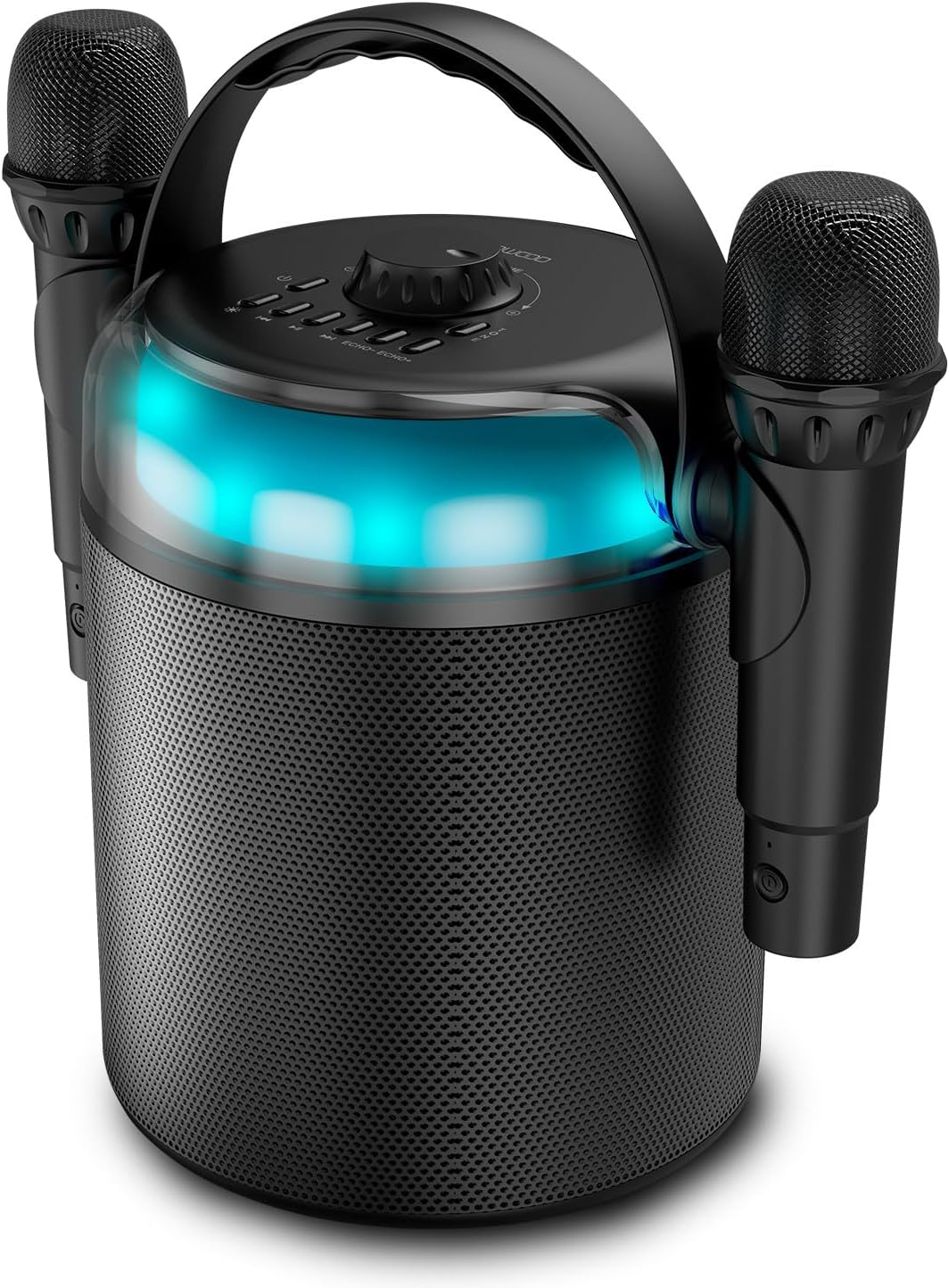
Figure 1: Ledwood PLAYKARAOKE Speaker with Microphones
This image shows the main unit of the Ledwood PLAYKARAOKE speaker, a cylindrical black device with a handle on top. Two wireless microphones are securely attached to the sides of the speaker. A blue LED light band is visible around the top section of the speaker.
Beheerpaneel

Figuur 2: Bo-kontrolepaneel
Hierdie beeld bied 'n bo-na-onder view of the speaker's control panel. It features a large central volume knob, a power button, buttons for LED light control, playback controls (play/pause, skip), and echo adjustment for the microphones.
Familiarize yourself with the buttons and ports on the device:
- Volumeknop: Pas die algehele klankuitset aan.
- Kragknoppie: Skakel die luidspreker aan of af.
- LED -ligknoppie: Cycles through LED light effects or turns them off.
- Terugspeelkontroles: Speel/Pouseer, Vorige snit, Volgende snit.
- Echo Controls (Echo-, Echo+): Adjusts the echo effect on the microphones.
- Modusknoppie: Switches between input sources (Bluetooth, USB, MicroSD, AUX, COAX).
- Vocal Effects Button: Cycles through different vocal effects (Man, Woman, Monster, Child, Reverb).
- USB-poort: Vir USB-skyf-terugspeel.
- MicroSD -kaartgleuf: For microSD card playback.
- AUX-invoer: 3.5 mm-klankinvoer vir eksterne toestelle.
- COAX Input: Coaxial audio input.
- Laaipoort: USB-C-poort vir die laai van die luidspreker.
Opstelling
1. Laai die luidspreker op
- Connect the provided USB-C charging cable to the charging port on the speaker.
- Koppel die ander kant van die kabel aan 'n geskikte USB-kragadapter (nie ingesluit nie) of 'n aangedrewe USB-poort.
- Die laai-aanwyserliggie sal brand. 'n Volle lading neem ongeveer 4 uur.
- Sodra dit ten volle gelaai is, ontkoppel die laaikabel.
2. Skakel aan/af
- Om aan te skakel, hou die Kragknoppie until the LED lights illuminate and you hear an audible prompt.
- Druk en hou die. In om uit te skakel Kragknoppie again until the LED lights turn off.
3. Pairing Wireless Microphones
The two wireless microphones are typically pre-paired with the speaker. If they do not connect automatically:
- Maak seker dat die luidspreker aangeskakel is.
- Insert batteries into the microphones (if not already installed).
- Power on each microphone. They should automatically connect to the speaker.
- If connection issues persist, refer to the Troubleshooting section.
Bedryfsinstruksies
1. Bluetooth-verbinding
- Power on the speaker. It will automatically enter Bluetooth pairing mode (indicated by a flashing LED).
- Aktiveer Bluetooth op jou slimfoon, tablet of ander Bluetooth-geaktiveerde toestel en soek vir beskikbare toestelle.
- Select "Ledwood PLAYKARAOKE" from the list.
- Once connected, the speaker will emit an audible confirmation, and the LED will stop flashing.
- Jy kan nou klank vanaf jou gekoppelde toestel deur die luidspreker speel.
2. USB/MicroSD Playback
- Insert a USB drive or microSD card (with audio files) into the corresponding port/slot on the speaker.
- The speaker should automatically switch to USB/MicroSD mode and begin playing audio. If not, press the Mode-knoppie om die korrekte invoer te kies.
- Gebruik die Afspeelkontroles (Play/Pause, Previous Track, Next Track) to manage your music.
3. AUX/COAX Input
- Connect an external audio device (e.g., TV, PC) to the speaker using a 3.5mm AUX cable or a coaxial cable (not included).
- Druk die Mode-knoppie repeatedly until the speaker switches to AUX or COAX input mode.
- Play audio from your external device. The speaker will output the sound.
4. Aanpassing van volume
Draai die groot Volumeknop on the top panel clockwise to increase volume and counter-clockwise to decrease volume.
5. Using Vocal Effects
While using the microphones:
- Druk die Vocal Effects Button to cycle through the available vocal effects: Man, Woman, Monster, Child, and Reverb.
- Gebruik die eggo- en Echo+ buttons to adjust the intensity of the echo effect on your voice.
6. LED-ligeffekte
Druk die LED lig knoppie to cycle through different dynamic RGB LED light patterns or to turn the lights off.
Onderhoud
- Skoonmaak: Vee die luidspreker af met 'n sagte, droë lap. Moenie skuurmiddels of oplosmiddels gebruik nie.
- Berging: Bêre die toestel op 'n koel, droë plek weg van direkte sonlig en uiterste temperature.
- Batterysorg: For optimal battery life, charge the speaker fully before long periods of storage and recharge it every few months.
Probleemoplossing
| Probleem | Moontlike Oplossing |
|---|---|
| Luidspreker skakel nie aan nie. | Maak seker dat die battery gelaai is. Koppel die laaikabel aan en probeer weer. |
| Geen geluid van die luidspreker nie. |
|
| Mikrofone werk nie. |
|
| Bluetooth-verbinding onstabiel. |
|
Spesifikasies
- Model: Ledwood PLAYKARAOKE
- Uitset krag: 120 W
- Sprekerbestuurders: 4" (10 cm) Woofer, 1.25" Tweeter
- Bluetooth weergawe: 5.1
- Batterylewe: Tot 3 uur (teen 70% volume)
- Laai tyd: Ongeveer 4 uur
- Invoerpoorte: USB, MicroSD, AUX (3.5mm), COAX
- Mikrofone: 2 Draadlose mikrofone
- Vokale effekte: Man, Woman, Monster, Child, Reverb (5 effects)
- LED ligte: Dinamiese RGB
- Luidsprekerafmetings (H x B x D): 215 x 168 x 168 mm
- Microphone Dimensions (H x Dia): 175 x 50 mm
- Ingesluit bykomstighede: 32GB USB Key
Waarborg en Ondersteuning
For warranty information and technical support, please refer to the warranty card included with your product or visit the official Ledwood webwebwerf. Bewaar u bewys van aankoop vir enige waarborgeise.
Ask a question about this manual
Ask about setup, troubleshooting, compatibility, parts, safety, or missing instructions. Manuals+ will review the question and use this page’s manual context to help answer it.