
1. Inleiding
Dankie vir die aankoopasing the AIKELA ZJ-027 5-in-1 Induction Bluetooth Speaker. This versatile device combines a wireless induction speaker, Bluetooth speaker, power bank, phone stand, and LED light, designed to enhance your audio and mobile experience. Please read this manual carefully to ensure proper use and optimal performance.
2. Veiligheidsinligting
- Hou die toestel weg van water, vog en uiterste temperature.
- Moenie probeer om die toestel self uitmekaar te haal of te herstel nie. Kontak kliëntediens vir bystand.
- Gebruik slegs die meegeleverde laaikabel of 'n gesertifiseerde ekwivalent.
- Vermy om swaar voorwerpe op die toestel te plaas.
- Hou buite bereik van kinders.
3. Pakketinhoud
Verifieer dat alle items in jou pakket teenwoordig is:
- AIKELA 5-in-1 Induction Speaker (Model: ZJ-027) x 1
- Tipe C-laaikabel x 1
- Gebruikershandleiding x 1
- Vinnige aanvangsgids x 1

Image: What you will receive with your AIKELA ZJ-027 speaker.
4. Produk verbyview
The AIKELA ZJ-027 is a multifunctional device designed for convenience and enhanced audio. It features:
- Induction Speaker: Play audio by simply placing your phone on the stand, no Bluetooth pairing needed.
- Bluetooth-luidspreker: Connect wirelessly via Bluetooth 5.3 for stable, high-quality audio.
- Telefoonstaander: Adjustable 360° vertical rotation for optimal viewhoeke.
- Krag bank: Built-in 3500mAh battery for emergency phone charging.
- LED lig: Colorful ambient lighting with multiple modes.

Image: The AIKELA ZJ-027 5-in-1 Induction Speaker in use, highlighting its multiple functions.

Beeld: Gedetailleerd view of the speaker driver, illustrating its capability for massive, booming sound with crystal-clear quality.
5. Opstelling
5.1 Laai die luidspreker
Before first use, fully charge the speaker. Connect the provided Type-C cable to the charging port on the speaker and the other end to a USB power adapter (not included). A full charge takes approximately 2 hours and provides 5-8 hours of playtime, depending on volume levels.

Image: Battery life and charging time information.
5.2 Adjusting the Phone Stand
The integrated phone stand can be rotated 360° vertically to achieve your desired viewing angle. Ensure the non-slip silicone on the base, back, and slot keeps your phone secure.
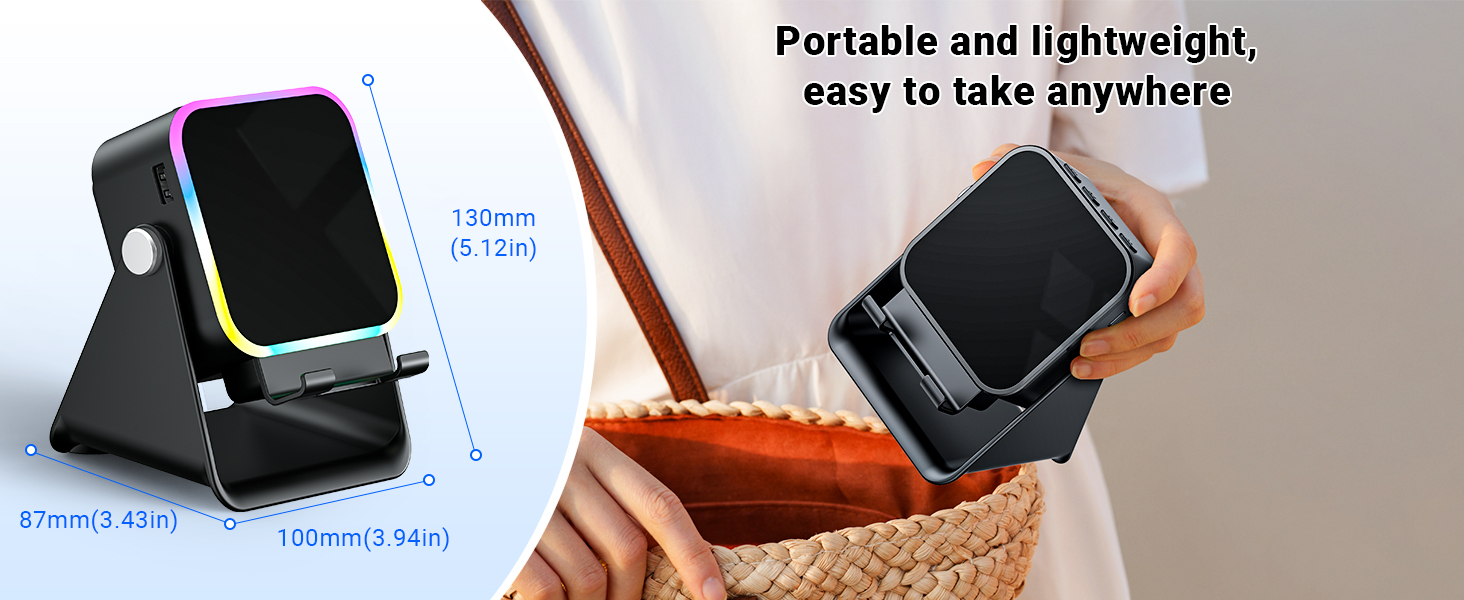
Image: Adjustable stand with 360° rotation and non-slip base for stability.
6. Operasie
6.1 Krag aan/af
Druk lank die kragknoppie (⏻) om die toestel aan of af te skakel.
6.2 Switching Modes (Induction / Bluetooth)
After powering on, the device will typically start in Induction Mode. To switch between Induction Mode and Bluetooth Mode, short press the 'M' button.
Video: Demonstrates how to use both Induction and Bluetooth modes, including switching between them and proper phone placement.
6.3 Induksiemodus
In Induction Mode, no Bluetooth connection is required. Simply place your smartphone correctly on the stand. The speaker's inductive chip will capture and amplify audio directly from your phone.
- Foonplasing: Ensure your phone is placed correctly on the stand, typically in portrait orientation, for optimal sound transfer.
- Volume aanpassing: Adjust your phone's volume to 50% or higher for the best playback experience. You can also use the volume buttons on the speaker.
- Verenigbaarheid: Induction mode is primarily compatible with smartphones. It does not support iPads or tablets.
- Outo-af: The speaker will automatically turn off after 10 minutes of standby in Induction Mode.

Image: Guide on how to correctly place your phone and adjust volume for Induction Mode.
6.4 Bluetooth-modus
For wireless audio streaming, switch to Bluetooth Mode:
- Druk lank op die kragknoppie om die luidspreker aan te skakel.
- Short press the 'M' button to switch to Bluetooth Mode (you will hear an audible prompt).
- On your phone or tablet, go to Bluetooth settings and search for "ZJ-027".
- Select "ZJ-027" to pair. For Android devices, enable "Sync volume with phone" in Bluetooth settings after pairing for optimal control.
- Once connected, you can play audio from your device through the speaker.
In Bluetooth mode, you can place your phone horizontally or vertically on the stand. The Bluetooth range is approximately 10 meters.

Image: Visual representation of Induction Mode (no Bluetooth) and Bluetooth Mode (10m range).
6.5 LED-ligfunksies
The speaker features colorful LED lights:
- Skakel Beligtingsmodusse: Single-click the 'M' button to cycle through different light colors and patterns.
- Skakel ligte aan/af: Long-press the 'M' button to turn the LED lights on or off.

Image: Multiple light strip patterns to choose from.
6.6 Power Bank Function (Emergency Charge)
The speaker can act as an emergency power bank for your phone. Connect your phone's charging cable (not included) to the USB-A output port on the speaker and to your phone. This is a wired charging function, not wireless charging.
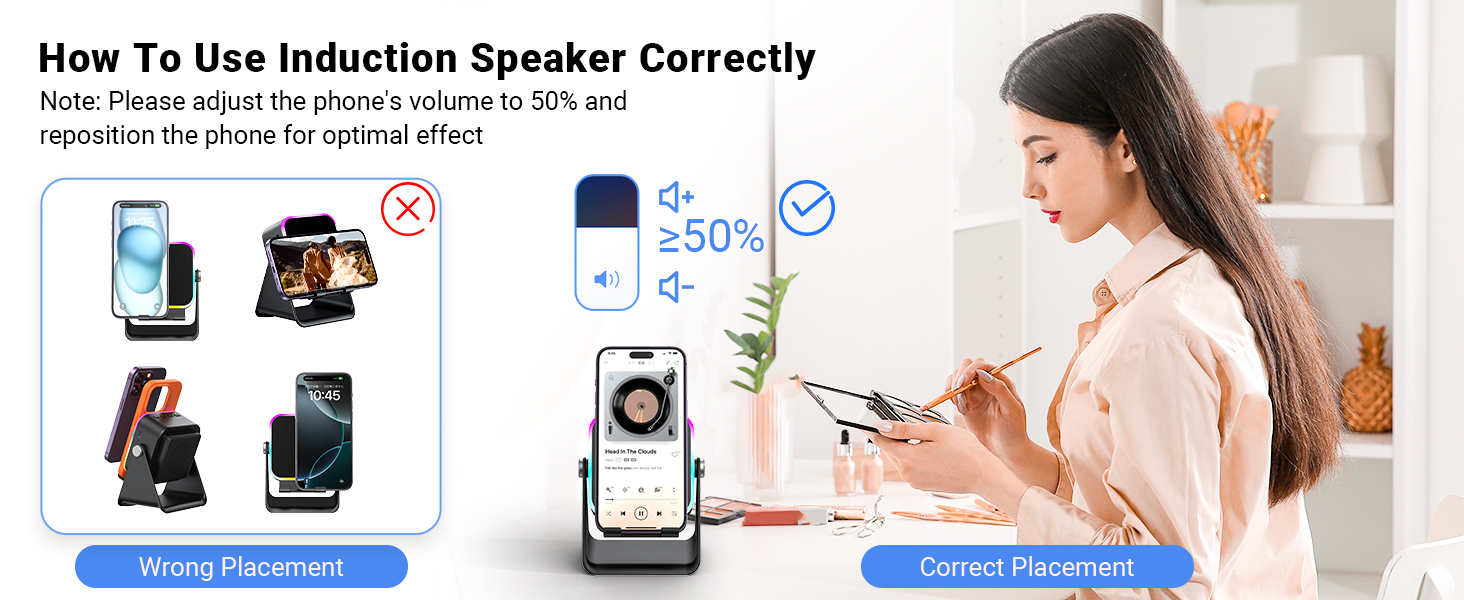
Image: The speaker's 3500mAh power bank function for emergency charging.
7. Onderhoud
- Maak die toestel skoon met 'n sagte, droë lap. Moenie skuurmiddels of oplosmiddels gebruik nie.
- Vermy om die toestel vir lang tydperke aan direkte sonlig bloot te stel.
- Berg die toestel op 'n koel, droë plek wanneer dit nie gebruik word nie.
8. Probleemoplossing
Q1: What should I do if the volume is too low?
- If in Induction mode, place the phone correctly on the holder, and then adjust the phone's volume to 50% or higher.
- If you are using an Android device and using Bluetooth mode, first pair the Bluetooth device. Then enable "Sync volume with phone" in your phone's Bluetooth settings.
Q2: What should I do if the sound cuts in and out in Induction mode?
- Ensure the phone is correctly placed on the holder.
- The working principle of Induction mode is that the speaker's inductive chip captures audio from the phone and amplifies it through the speaker. The louder the phone's volume, the louder the speaker's output. Therefore, we recommend setting the phone's volume to 50% or higher to ensure uninterrupted playback.
9. Spesifikasies
| Kenmerk | Detail |
|---|---|
| Model Naam | ZJ-027 |
| Tipe luidspreker | Draagbare luidspreker |
| Spesiale kenmerke | Bluetooth Speaker, Built-In Powerbank, Induction Speaker, LED Light, Phone Stand |
| Versoenbare toestelle | Android Phone, iPad, iPhone |
| Kleur | Swart |
| Produk afmetings | 5" D x 2" B x 3" H |
| Item gewig | 0.34 kilogram (12 onse) |
| Maksimum Bluetooth-reeks | 10 meter |
| Battery | 1 A-battery benodig (ingesluit) |
| Vervaardiger | AIKELA |
| Luidspreker Maksimum uitsetkrag | 1 Watt |
| Verbindingstegnologie | Bluetooth, Induction |
| Materiaal | Akrielnitril Butadieen Styreen (ABS) |
10. Waarborg en ondersteuning
AIKELA provides 12 months of support for your Phone Amplifier Speaker. If you encounter any issues or have questions, please contact customer service. You can typically find contact information by navigating to 'Find Order' on the platform where you purchased the product.