
1. Produk verbyview
The MOVE SPEED 3-in-1 Portable Charger Power Bank (Model: MSP14) is a versatile charging solution designed for convenience and efficiency. It integrates a 20,000mAh power bank, a built-in retractable USB-C cable, and a foldable AC wall plug, allowing for charging on the go or directly from a wall outlet. This device supports 65W GaN fast charging and features a smart digital display to monitor battery status and power output.

Image: The MOVE SPEED 3-in-1 Portable Charger Power Bank, showcasing its compact design, integrated retractable USB-C cable, and foldable AC wall plug. The digital display shows 100% charge.
Sleutel kenmerke:
- 3-in-1-funksionaliteit: Combines a 20,000mAh power bank, a built-in 70cm (27.6in) retractable USB-C cable, and a foldable AC wall plug for comprehensive charging.
- 65W GaN Fast Charging: Provides high-speed charging for compatible devices, including laptops like MacBook Air, and ensures efficient power delivery.
- 20 000 mAh hoë kapasiteit: Offers multiple charges for smartphones (e.g., iPhone 16 up to 4.5 times) and other portable electronics.
- Slim digitale skerm: Real-time display shows exact battery percentage (0-100%) and current input/output power status.
- Multi-toestel laai: Equipped with a built-in USB-C cable, an additional USB-C port, and a USB-A port, allowing simultaneous charging of up to three devices.
- Deurlaai laai: The power bank can be recharged while simultaneously charging connected devices.
- Reisvriendelike ontwerp: Compact, lightweight (1.08 pounds), and airline-approved (77Wh), making it suitable for travel.
2. Pakketinhoud
Kontroleer asseblief die pakket vir die volgende items:
- MOVE SPEED 3-in-1 Portable Charger Power Bank (MSP14)
- Gebruikershandleiding (hierdie dokument)
Note: Charging cables for external devices are not included unless specified. The device features a built-in USB-C cable.
3. Opstelling en aanvanklike gebruik
3.1 Aanvanklike heffing
Before first use, it is recommended to fully charge the power bank. Connect the foldable AC plug directly into a wall outlet (AC 100-240V~50/60Hz). The digital display will show the charging progress, indicating 100% when fully charged.

Image: The power bank plugged into a wall outlet, demonstrating its ability to recharge itself and simultaneously charge a smartphone and a smartwatch via its ports and built-in cable.
3.2 Retractable USB-C Cable Operation
To extend the built-in USB-C cable, gently pull both ends of the cable simultaneously until it reaches the desired length (up to 27.6 inches / 70 cm). To retract, pull both ends slightly further, then release, and the cable will automatically retract into the unit. Avoid pulling only one side to prevent tangling or damage to the retraction mechanism.
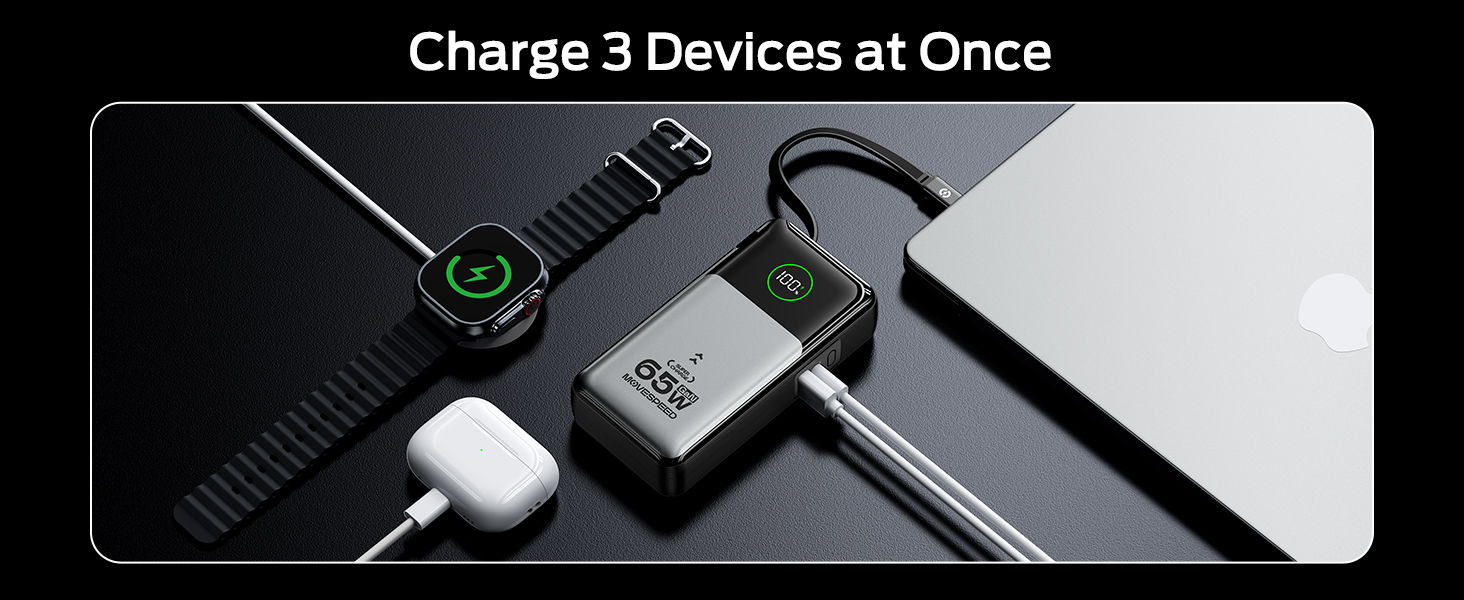
Image: A person demonstrating the extension of the 27.6-inch retractable USB-C cable from the power bank, highlighting its flexible and convenient design.
4. Bedryfsinstruksies
4.1 Charging Devices (Portable Charger Mode)
To charge your devices using the power bank function:
- Connect your device to the power bank using the built-in retractable USB-C cable, or an external USB-C to USB-C cable, or a USB-A to compatible cable.
- The power bank will automatically begin charging your device. The digital display will show the current battery percentage en uitsetkrag.
- You can charge up to three devices simultaneously using the built-in USB-C cable, the USB-C port, and the USB-A port.

Image: A woman charging her phone from the power bank, which is stored in her bag, illustrating the convenience of the retractable cable for on-the-go charging without cable stress.
4.2 Charging Devices (Wall Charger Mode)
To use the device as a wall charger:
- Fold out the AC plug and insert the power bank directly into a wall outlet.
- Connect your device(s) to the power bank using the built-in retractable USB-C cable, or an external USB-C to USB-C cable, or a USB-A to compatible cable.
- The power bank will charge your device(s) and simultaneously recharge itself (pass-through charging).

Image: The power bank plugged into a wall outlet, charging a smartphone. This demonstrates its function as a direct wall charger, eliminating the need for a separate adapter.
4.3 Digital Display Information
Die geïntegreerde digitale skerm verskaf intydse inligting:
- Battery opgeteltage: Shows the remaining charge of the power bank from 0-100%.
- Input/Output Power Status: Indicates the current power being drawn by the power bank (input) or delivered to connected devices (output).
5. Onderhoud en versorging
- Hou die kragbank weg van uiterste temperature, direkte sonlig en vogtige omgewings.
- Moenie die toestel aan water of ander vloeistowwe blootstel nie.
- Maak die oppervlak skoon met 'n sagte, droë lap. Moenie skuurmiddels of oplosmiddels gebruik nie.
- Store the power bank in a cool, dry place when not in use. For long-term storage, it is recommended to charge the power bank to approximately 50-70% every three months to maintain battery health.
- Vermy om die toestel te laat val of aan sterk impakte te onderwerp.
- Ensure the retractable cable is fully retracted when not in use to protect it from damage.
6. Probleemoplossing
| Probleem | Moontlike oorsaak | Oplossing |
|---|---|---|
| Kragbank laai nie toestelle nie. | Low battery on power bank; incorrect cable connection; device not compatible. | Herlaai die kragbank; maak seker dat kabels stewig gekoppel is; verifieer toestelversoenbaarheid. |
| Kragbank herlaai nie. | AC plug not fully inserted; wall outlet issue; damaged power bank. | Ensure AC plug is fully inserted into a working wall outlet; try a different outlet; contact support if issue persists. |
| Digitale skerm werk nie. | Power bank is off or completely drained; internal malfunction. | Charge the power bank; if still unresponsive, contact customer support. |
| Retractable cable not extending/retracting smoothly. | Improper pulling technique; internal mechanism issue. | Ensure you pull both ends simultaneously; avoid forcing the cable; if damaged, use external cables. |
7. Spesifikasies
| Kenmerk | Detail |
|---|---|
| Modelnommer | MSP14 |
| Battery kapasiteit | 20,000mAh (77Wh) |
| Produk afmetings | 8.19 x 4.49 x 1.56 duim |
| Item gewig | 1.08 pond |
| Kleur | Silwer |
| Connector Tipe | USB Tipe-C, USB Tipe-A |
| Ingeboude kabellengte | 70 cm (27.6 duim) |
| Muurlaaier-invoer | AC 100-240V~50/60Hz 1A |
| Portable Charger Input (USB-C / Retractable Cable) | 65W Maks |
| Single Port Output (Portable Charger Mode) | USB-C: 65W, USB-A: 22.5W, Retractable USB-C Cable: 65W |
| Dual/Triple Port Output (Portable Charger Mode) | Combined output up to 15W per port (e.g., Type-C + Retractable Cable: 15W, Type-C + USB-A: 15W, Type-C + Retractable Cable + USB-A: 15W) |
| Single Port Output (Wall Charger Mode) | USB-C: 30W, USB-A: 22.5W, Retractable USB-C Cable: 30W |
| Dual/Triple Port Output (Wall Charger Mode) | Combined output up to 15W per port (e.g., Type-C + Retractable Cable: 15W, Type-C + USB-A: 15W, Type-C + Retractable Cable + USB-A: 15W) |
| Spesiale kenmerke | GaN Technology, Smart Digital Display, Flight-approved |
Note: Output power may vary based on the number of devices connected and their power requirements.
8. Veiligheidsinligting
- Moenie die toestel self uitmekaar haal, wysig of herstel nie.
- Avoid using the device in environments with high humidity or extreme temperatures.
- Hou buite bereik van kinders.
- Gooi die produk verantwoordelik weg volgens plaaslike regulasies vir elektroniese afval.
- Gebruik slegs versoenbare laaikabels en adapters.
9. Waarborg en Ondersteuning
MOVE SPEED products are manufactured with high-quality standards. For information regarding warranty coverage, technical support, or customer service, please refer to the warranty card included with your product or visit the official MOVE SPEED webwebwerf.
You may also contact the seller directly through the platform where the purchase was made for assistance.
Manufacturer: Shenzhen Speedmobile Technology Co.,Ltd.