
Belangrike veiligheidsinstruksies
Lees en verstaan asseblief alle veiligheidsinstruksies voordat u hierdie produk gebruik. Bewaar hierdie handleiding vir toekomstige verwysing.
- Ventilasie: Verseker voldoende ventilasie. Moenie enige ventilasie-openinge blokkeer nie.
- Water en vog: Moenie hierdie toestel aan reën of vog blootstel nie. Moenie voorwerpe gevul met vloeistowwe, soos vase, op die apparaat plaas nie.
- Hittebronne: Moenie naby enige hittebronne soos verkoelers, hitteregisters, stowe of ander toerusting (insluitend ampversterkers) wat hitte produseer.
- Kragbronne: Use only power supplies specified by the manufacturer. Ensure the power cord is protected from being walked on or pinched.
- Skoonmaak: Maak slegs skoon met 'n droë lap.
- Diens: Moenie probeer om hierdie produk self te onderhou nie. Verwys alle diens na gekwalifiseerde dienspersoneel.
Pakketinhoud
Verifieer dat al die items wat hieronder gelys word, in jou pakket ingesluit is:
- Kuephom CD-X2A Boombox
- AC kragkabel
- Gebruikershandleiding (hierdie dokument)
- Afstandbeheer
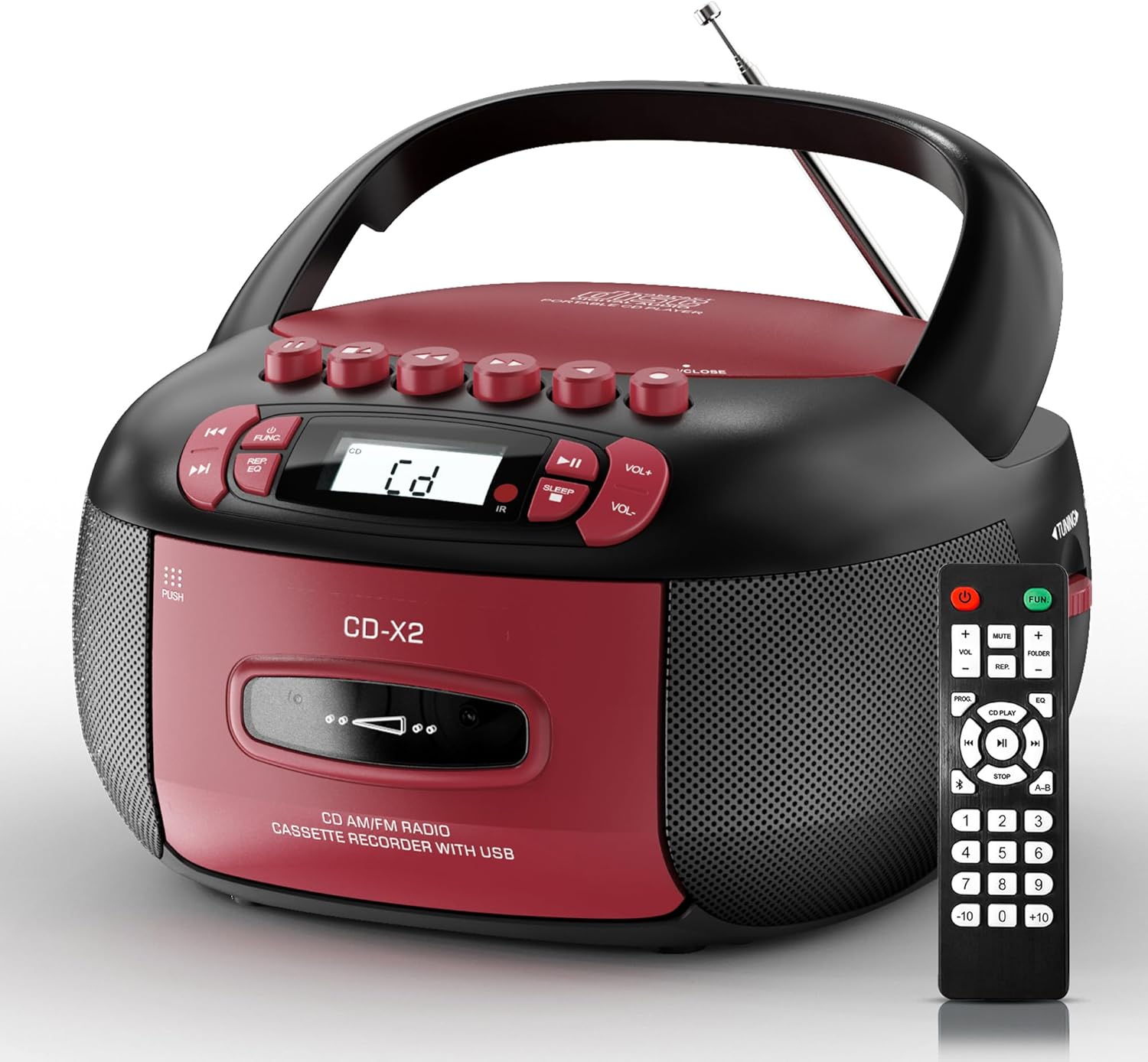
Image: The Kuephom CD-X2A Boombox with its included remote control, showcasing its compact design and red/black color scheme.
Produk verbyview
Familiarize yourself with the various components and controls of your Kuephom CD-X2A Boombox.
Voorpaneelkontroles
- Krag/funksie-knoppie: Press and hold to power on/off. Press to cycle through modes (CD, USB, Bluetooth, Radio, AUX, Tape).
- Volume +/- knoppies: Pas die terugspeelvolume aan.
- Speel/Pause-knoppie: Start or pause playback for CD, USB, Bluetooth, or Tape.
- Stopknoppie: Stop die afspeel.
- Skip/Search Buttons: Navigate between tracks on CD/USB or fast forward/rewind on tape.
- EQ-knoppie: Kies gelykmaker-voorinstellings.
- Slaap Timer-knoppie: Stel die slaap timer.
Beheer van sypanele
- Stemknop: Manually tune AM/FM radio stations.
- Koptelefoonaansluiting: Koppel koptelefoon vir privaat luister.
- AUX-in-poort: Koppel eksterne oudiotoestelle.
- USB-poort: Insert USB drives for MP3/WMA playback.
Top paneel funksies
- CD-kompartement: Top-loading compartment for CDs.
- Kassetkompartement: Front-loading compartment for cassette tapes.
- Teleskopiese antenna: Extend for improved radio reception.

Image: The boombox highlighting its multiple functions including CD/MP3, Bluetooth, Type I/II tape, USB, FM/AM Radios, Sleep timer, Remote, Phone jack, AUX, and Tape recording.

Beeld: Nabyskoot views of the boombox's phone jack, top-loading CD player, telescopic antenna, and tape play/record buttons.
Opstelling
Aandryf die Boombox
AC krag
- Connect the supplied AC power cord to the AC IN jack on the back of the boombox.
- Plug the other end of the power cord into a standard AC wall outlet (120V~60Hz).
Batterykrag
- Open the battery compartment cover located on the bottom of the boombox.
- Insert 6 x 'C' size batteries (not included), ensuring correct polarity (+/-).
- Maak die batterykompartement se deksel stewig toe.
- When operating on battery power, disconnect the AC power cord.

Image: The boombox demonstrating both AC power connection and the use of 6 C-size batteries for portable operation.
Afstandbeheer
- Insert 2 x 'AAA' batteries (not included) into the remote control, observing polarity.
- Point the remote control towards the boombox's IR sensor for optimal operation.

Image: An individual comfortably operating the boombox using the remote control from a distance.
Bedryfsinstruksies
Algemene werking
- Krag aan/af: Press and hold the Power/Function button to turn the unit on or off.
- Funksie keuse: Press the Power/Function button repeatedly to switch between CD, USB, Bluetooth, Radio (AM/FM), AUX, and Tape modes.
CD speel
- Maak die deksel van die CD-kompartement oop.
- Place a CD (CD, CD-R, MP3, WMA compatible) onto the spindle with the label side facing up.
- Maak die deksel van die CD-kompartement toe.
- Press the Power/Function button to select 'CD' mode.
- Druk die Speel/Pause-knoppie om afspeel te begin.
- Use the Skip/Search buttons to navigate tracks.
- Press the Repeat button to repeat a single track, folder, or all tracks.
- Press the Program button to program a custom playback sequence.

Image: The boombox's display showing 'CD' mode, with icons indicating compatibility with CD, CD-R, CD-RW, WMA, and MP3 formats, along with single cycle, repeat folder, repeat all, random play, and play in order options.
Cassette Playback and Recording
- Press the 'OPEN/CLOSE' button on the cassette compartment to open it.
- Plaas 'n kassetband in.
- Maak die kassetkompartement toe.
- Press the Power/Function button to select 'TAPE' mode.
- Druk die Speel-knoppie om afspeel te begin.
- Use the Fast Forward/Rewind buttons to navigate the tape.
- Opname: In TAPE mode, select the desired source (CD, Bluetooth, USB, or AM/FM radio). Press the Record button to begin recording onto the cassette. The unit features an auto-stop function when the tape reaches its end.

Image: A hand inserting a cassette tape into the boombox's front-loading compartment, with controls for tape operation visible.
AM/FM-radio
- Press the Power/Function button to select 'RADIO' mode. Press again to switch between AM and FM bands.
- Extend the telescopic antenna for better FM reception. For AM, rotate the unit for best reception.
- Use the Tuning knob on the side to manually tune to your desired station. The frequency will be displayed on the screen.

Image: A man relaxing on a couch with the boombox, which displays various FM/AM radio frequencies, indicating good reception.
Bluetooth-verbinding
- Press the Power/Function button to select 'BT' (Bluetooth) mode. The display will show 'BT' and flash, indicating it's in pairing mode.
- On your mobile device, enable Bluetooth and search for 'CD-X2A'.
- Select 'CD-X2A' to pair. Once paired, the 'BT' indicator will stop flashing.
- You can now stream audio wirelessly from your device to the boombox.

Image: A woman in a living room wirelessly streaming audio from her smartphone to the boombox via Bluetooth 5.1, indicating a stable connection.
USB-weergawe
- Insert a USB flash drive into the USB port on the side of the boombox.
- Press the Power/Function button to select 'USB' mode.
- The boombox will automatically detect and play compatible MP3/WMA files.
- Use the Play/Pause, Stop, and Skip/Search buttons to control playback.
AUX-invoer
- Connect an external audio device (e.g., smartphone, MP3 player) to the AUX-in port using a 3.5mm audio cable (not included).
- Press the Power/Function button to select 'AUX' mode.
- Beheer terugspeel direk vanaf jou gekoppelde eksterne toestel.
Slaap Timer
- While the unit is playing, press the Sleep Timer button.
- Repeatedly press the button to cycle through available sleep timer durations (e.g., 15, 30, 60, 90 minutes).
- The unit will automatically power off after the selected time.

Image: A man sleeping in bed with the boombox on his nightstand, illustrating the sleep timer feature which allows the device to turn off automatically.
Onderhoud
- Skoonmaak: Use a soft, dry cloth to clean the exterior of the boombox. Do not use abrasive cleaners or solvents.
- CD sorg: Hanteer CD's aan hul kante. Maak vuil CD's skoon met 'n sagte, pluisvrye lap en vee van die middel na buite af.
- Cassette Care: Keep cassette tapes away from direct sunlight and heat. Periodically clean the tape heads with a specialized cassette head cleaner.
- Berging: Wanneer dit nie vir lang tye gebruik word nie, ontkoppel die kragkabel en verwyder die batterye. Bêre die eenheid op 'n koel, droë plek.
Probleemoplossing
Indien u probleme ondervind, raadpleeg die tabel hieronder vir algemene probleme en oplossings.
| Probleem | Moontlike oorsaak | Oplossing |
|---|---|---|
| Geen krag nie | Netsnoer nie gekoppel nie; Batterye leeg of verkeerd geplaas. | Check AC connection; Replace or correctly insert batteries. |
| Geen klank nie | Volume too low; Incorrect function mode selected; Headphones connected. | Verhoog volume; Kies korrekte modus; Ontkoppel oorfone. |
| CD spring oor of speel nie | CD dirty or scratched; CD inserted incorrectly; Incompatible CD format. | Clean or replace CD; Insert CD correctly; Ensure CD is compatible (CD, CD-R, MP3, WMA). |
| Radiostaties/swak ontvangs | Antenna nie uitgebrei/geposisioneer nie; Swak sein. | Extend and adjust telescopic antenna; Try repositioning the unit. |
| Bluetooth saambind nie | Boombox not in pairing mode; Device Bluetooth off; Device too far. | Ensure boombox is in 'BT' mode and flashing; Enable Bluetooth on device; Move device closer. |
| Kasset speel/neem nie op nie | Tape inserted incorrectly; Tape heads dirty; Auto-stop engaged. | Insert tape correctly; Clean tape heads; Check tape end. |
Spesifikasies
| Kenmerk | Detail |
|---|---|
| Modelnommer | CD-X2A |
| Produkafmetings (L x B x H) | 8.39 x 4.8 x 8.54 duim |
| Item gewig | 3.45 pond |
| Kragbron | AC 120V~60Hz or 6 x 'C' size batteries |
| Verbindingstegnologie | Hulp, Bluetooth, USB |
| Tipe luidspreker | Stereo (2W+2W output) |
| Ondersteunde skyfformate | CD, CD-R, MP3, WMA |
| Supported Tape Types | Type I/II Cassette |
| Radio Bands | AM/FM |
| Spesiale kenmerke | Tape Recording, Sleep Timer, Earphone Jack, Remote Control |
Waarborg en Ondersteuning
Kuephom products are designed for reliability and performance. This product comes with a standard manufacturer's warranty against defects in materials and workmanship under normal use.
For warranty claims, technical assistance, or any questions regarding your Kuephom CD-X2A Boombox, please contact Kuephom customer support. Refer to the contact information provided with your purchase documentation or visit the official Kuephom webwebwerf vir ondersteuningsbesonderhede.
We are committed to providing lifetime service support and 7/24 customer assistance for our products.