
1. Inleiding
Thank you for choosing the SnapFresh 4V Cordless Electric Scissors. This tool is designed for efficient cutting of various materials such as cardboard, fabric, carpet, and leather. Please read this manual thoroughly before operation to ensure safe and effective use. Keep this manual for future reference.
2. Veiligheidsinstruksies
Always prioritize safety when operating any power tool. Failure to follow these instructions may result in electric shock, fire, and/or serious injury.
2.1 Algemene Veiligheid
- Hou die werkarea skoon en goed belig. Deurmekaar of donker areas nooi ongelukke uit.
- Moenie elektriese gereedskap in plofbare atmosfeer gebruik nie, soos in die teenwoordigheid van vlambare vloeistowwe, gasse of stof. Elektriese gereedskap skep vonke wat die stof of dampe kan aansteek.
- Hou kinders en omstanders weg terwyl 'n elektriese gereedskap gebruik word. Afleidings kan veroorsaak dat jy beheer verloor.
- Always wear appropriate personal protective equipment, including safety glasses, gloves, and hearing protection if necessary.
2.2 Elektriese veiligheid
- Vermy liggaamskontak met geaarde of geaarde oppervlaktes soos pype, verkoelers, reekse en yskaste. Daar is 'n verhoogde risiko van elektriese skok as jou liggaam geaard of geaard is.
- Moenie elektriese gereedskap aan reën of nat toestande blootstel nie. Water wat 'n elektriese gereedskap binnedring, sal die risiko van elektriese skok verhoog.
- Moenie die koord misbruik nie. Moet nooit die koord gebruik om die kraggereedskap te dra, te trek of te ontkoppel nie. Hou koord weg van hitte, olie, skerp kante of bewegende dele. Beskadigde of verstrengelde toue verhoog die risiko van elektriese skok.
2.3 Blade Safety
- Ensure the safety lock is engaged when the tool is not in use or when changing blades.
- Always use sharp, undamaged blades. Dull blades can bind and cause kickback.
- Keep hands and fingers away from the rotating blade during operation.
- Do not attempt to cut materials thicker than 1/4 inch (6.35 mm).
3. Pakketinhoud
Verifieer dat alle items teenwoordig en in 'n goeie toestand is wanneer u dit uitpak.
- 1 x Cordless Electric Scissors (SP5091)
- 1 x Extra SKS7 Alloy Blade
- 1 x USB Tipe-C-laaikabel
- 1 x Gebruikershandleiding
- 1 x Opbergsak

Image: The complete kit, showing the electric scissors, an extra blade, a USB charging cable, the user manual, and a storage bag.
4. Produk verbyview
Familiarize yourself with the components of your SnapFresh Electric Scissors.

Beeld: 'n Gedetailleerde view of the electric scissors, pointing out the SKS7 alloy blade, safety switch, LED status indicator, Type-C charging port, and built-in LED light.
- SKS7 Alloy Blade: Durable and self-sharpening for precise cuts.
- Veiligheidskakelaar: Voorkom toevallige aktivering.
- LED-statusaanwyser: Toon batterylaaivlak.
- Tipe C-laaipoort: Vir gerieflike herlaai.
- Ingeboude LED-lig: Illuminates the cutting area for improved visibility.
5. Opstelling
5.1 Laai die battery
The tool is powered by a 4V 2.0Ah rechargeable battery. Ensure the battery is fully charged before first use.
- Locate the Type-C charging port on the tool.
- Connect the provided USB Type-C charging cable to the tool and a compatible USB power adapter (not included).
- The LED status indicator will show the charging progress. A full charge is indicated when all LED lights are solid green.
- Ontkoppel die laaier sodra die laai voltooi is.

Image: The electric scissors being charged via its Type-C USB port.
5.2 Installing/Replacing the Blade
Always ensure the tool is turned off and the safety lock is engaged before handling the blade.
- Press the safety lock to prevent accidental activation.
- Using a screwdriver, unscrew the screw holding the blade in place.
- Carefully remove the old blade, holding it with pliers if necessary.
- Place the new SKS7 alloy blade onto the spindle, ensuring it aligns correctly.
- Draai die skroef stewig vas.

Image: Visual instructions for replacing the cutting blade, detailing how to hold the blade, unscrew, remove, prepare, install, and tighten the new blade.
6. Bedryfsinstruksies
6.1 Aan-/afskakel
- To turn on: Press and hold the safety lock button, then pull the trigger. The blade will begin rotating.
- To turn off: Release the trigger. The blade will stop rotating.
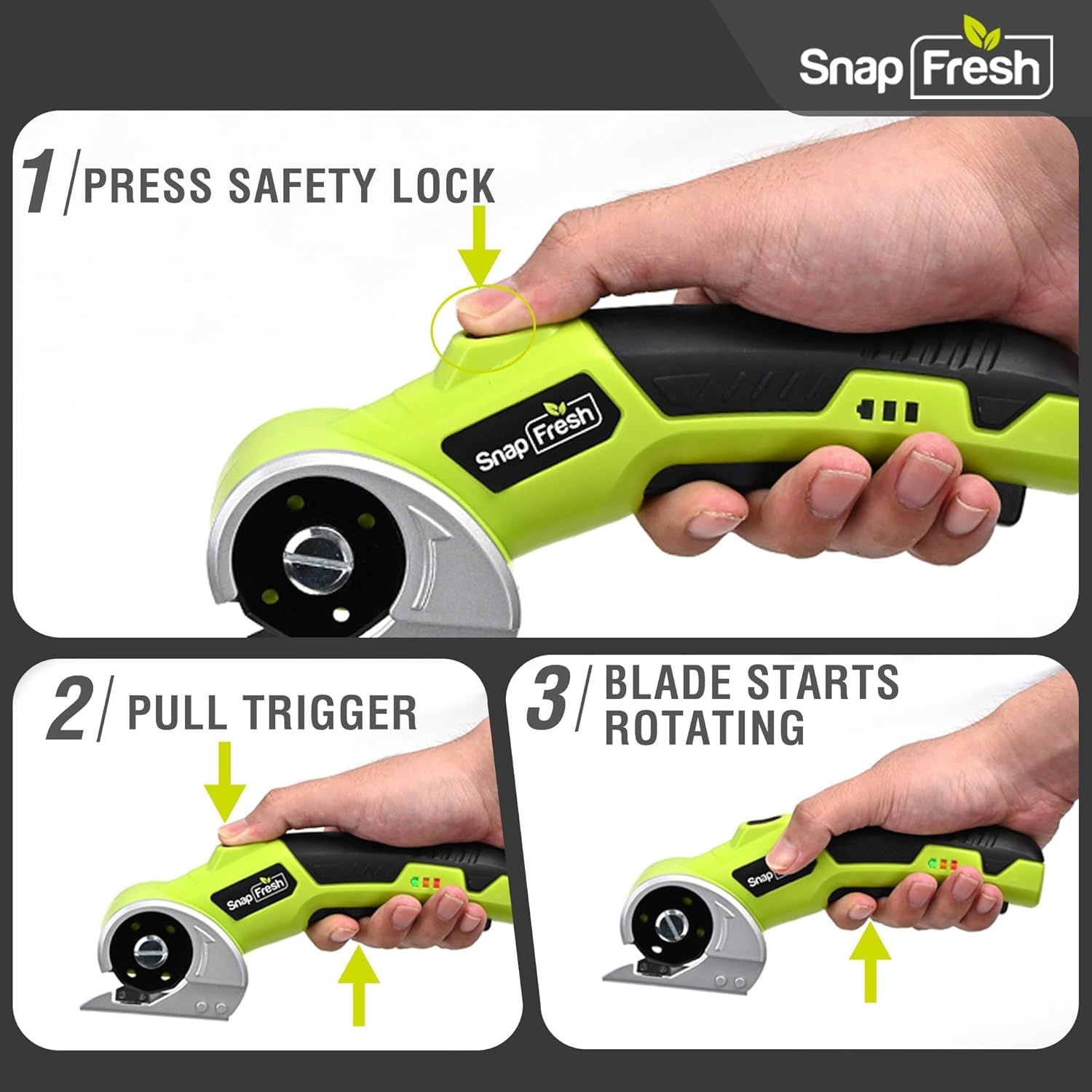
Image: A three-step visual guide demonstrating how to activate the electric scissors by pressing the safety lock and pulling the trigger.
6.2 Sny van Verskeie Materiale
The SnapFresh Electric Scissors are suitable for cutting materials up to 1/4 inch thick, including:
- Karton
- Stof
- Tapyt
- Leer
- Papier
- Lint
- Kunsmatige gras
For best results, ensure the material is laid flat and stable. Guide the tool smoothly along the desired cutting line. The built-in LED light will illuminate your path.
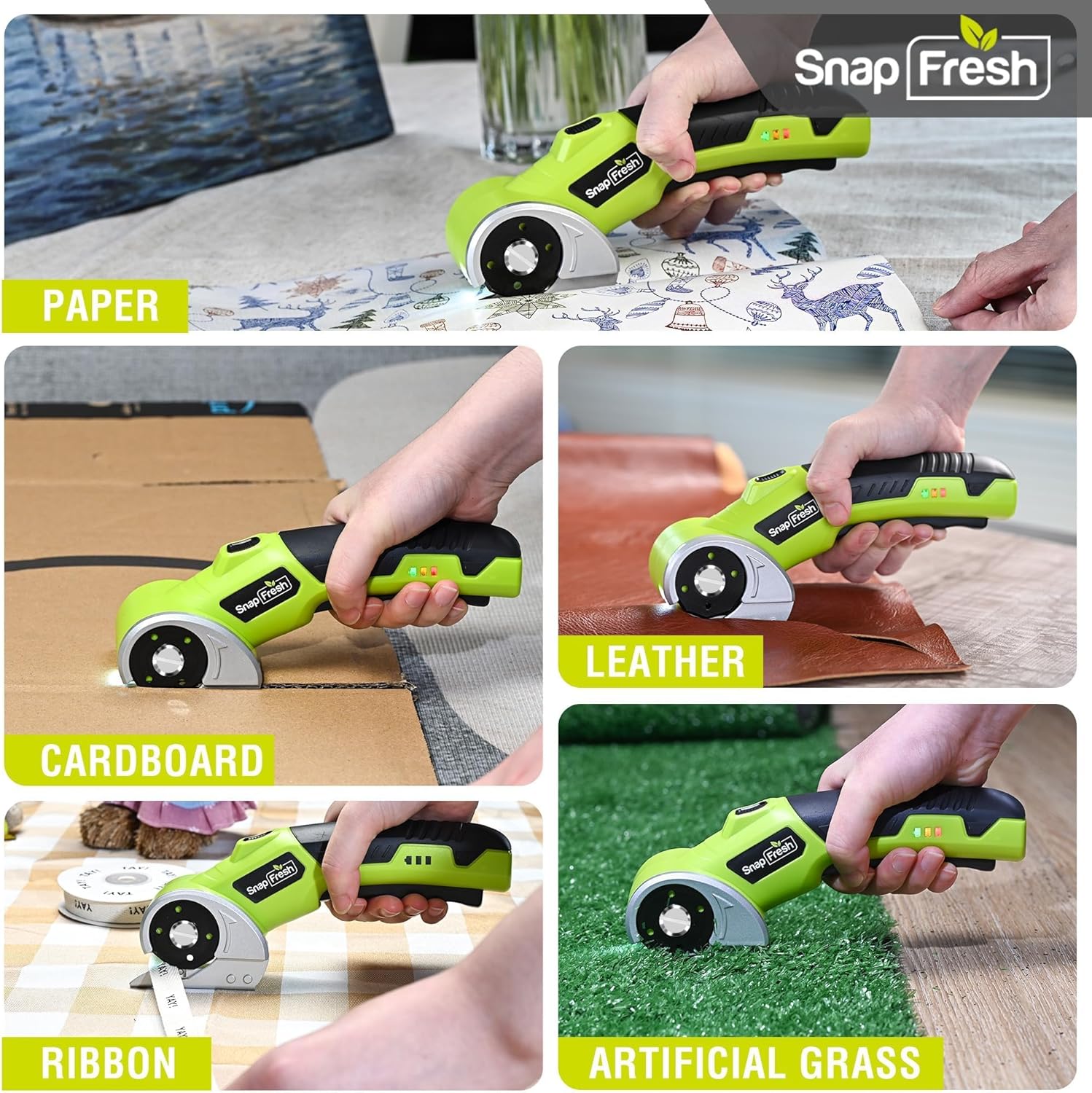
Image: The electric scissors demonstrating its capability to cut through various materials like paper, leather, cardboard, ribbon, and artificial grass.

Image: The electric scissors making both straight and curved cuts on a piece of leather, highlighting its precision.
Video: An official product video demonstrating the SnapFresh Electric Scissors cutting various materials like burlap, kraft paper, ribbon, and newspaper, showcasing its versatility for crafting and DIY projects.
7. Onderhoud
7.1 Skoonmaak
- After each use, ensure the tool is off and the safety lock is engaged.
- Use a dry cloth to wipe away any dust or debris from the blade and tool body.
- Moenie harde chemikalieë of skuurmiddels gebruik nie.
7.2 Batterysorg
- Store the tool with a partially charged battery (around 50%) if not used for extended periods.
- Vermy om die battery gereeld heeltemal te ontlaai, aangesien dit die lewensduur daarvan kan verkort.
- Moenie die battery aan uiterste temperature blootstel nie.
7.3 Berging
Store the electric scissors and its accessories in the provided storage bag in a dry, secure place, out of reach of children.
8. Probleemoplossing
| Probleem | Moontlike oorsaak | Oplossing |
|---|---|---|
| Gereedskap skakel nie aan nie | Battery is laag of leeg Safety lock not disengaged | Laai die battery ten volle Ensure both safety lock and trigger are pressed simultaneously |
| Lem sny nie effektief nie | Blade is dull or damaged Materiaal is te dik | Vervang die lem Do not attempt to cut materials thicker than 1/4 inch |
| Gereedskap stop tydens werking | Die battery is leeg Oorladingsbeskerming geaktiveer | Herlaai die battery Reduce pressure or cut thinner material |
9. Spesifikasies
| Kenmerk | Spesifikasie |
|---|---|
| Modelnommer | SP5091 |
| Voltage | 4V |
| Battery kapasiteit | 2.0Ah Litiumioon |
| Geen laai spoed | 285 RPM |
| Max snydikte | 1 mm (4/6.35 duim) |
| Bladmateriaal | SKS7 Alloy Steel |
| Laaipoort | USB Tipe-C |
| Item gewig | 0.81 lbs (370 gram) |
| Produk afmetings | 7.9 x 2 x 3 duim |
10. Waarborg en Ondersteuning
SnapFresh products are designed and manufactured to high-quality standards. This product comes with a standard manufacturer's warranty against defects in materials and workmanship. Please refer to the warranty card included in your package for specific terms and conditions.
For technical support, troubleshooting assistance, or to inquire about replacement parts, please contact SnapFresh customer service through the official webwebwerf of die kontakinligting wat op u waarborgkaart verskaf word.
Webwebwerf: Visit the SnapFresh Store