
1. Inleiding
This manual provides essential information for the safe installation, operation, and maintenance of your TOMZN TOB9-VAP 63A 1P+N WiFi Smart Switch Energy Meter. This device is a miniature circuit breaker (MCB) with integrated energy metering (Kwh, Voltage, Amperage, Wattage), monitoring, and timer relay functions, compatible with TUYA Smartlife applications. It is designed to protect electrical circuits from overloads and short circuits while offering smart control and energy consumption insights.
2. Veiligheidsinligting
WAARSKUWING: Risiko van elektriese skok.
- Installasie en onderhoud moet slegs deur gekwalifiseerde personeel uitgevoer word.
- Always disconnect power at the main circuit breaker before installing or servicing the device.
- Maak seker dat alle bedradingsverbindings veilig is en aan plaaslike elektriese kodes voldoen.
- Moenie die toestel gebruik as dit beskadig lyk nie.
- This device is designed for indoor use in dry environments unless otherwise specified for specific outdoor enclosures.
- The device is rated for 1P+N (Single Phase + Neutral) systems. Ensure correct polarity during installation.
3. Produk verbyview
The TOMZN TOB9-VAP is a versatile smart circuit breaker offering protection and advanced monitoring capabilities.
3.1. Sleutel kenmerke
- Overload and Short Circuit Protection: Prevents damage caused by excessive current.
- Energy Metering (Kwh, V, A, W): Monitors real-time and historical energy consumption.
- WiFi-verbinding: Remote control and monitoring via smartphone app.
- Timer Relay Function: Schedule on/off times for connected loads.
- VA Protection: Verstelbare Voltage en Amperage protection settings.
- TUYA Smartlife Compatible: Integrates with popular smart home platforms.
- Duursame konstruksie: Made with high-quality insulating, flame-retardant, and UV-resistant materials.
- Veilige verbindings: Screw-type terminals for stable electrical connections.
3.2. Komponente en Aanwysers

Figure 1: TOMZN TOB9-VAP WiFi Smart Switch Energy Meter (Metering VA Protection, 1-63A Adjustable). This image shows the device with its input (Power) and output (Load) terminals, WiFi indicator, CE mark, signal light, and the main power button. The display indicates 'Metering VA protection In: 1-63A'.

Figure 2: TOMZN TOB9-63M WiFi Smart Switch Energy Meter (Metering). This variant includes energy metering capabilities (kW·h, W, V, A) but may not have the adjustable VA protection of the TOB9-VAP.
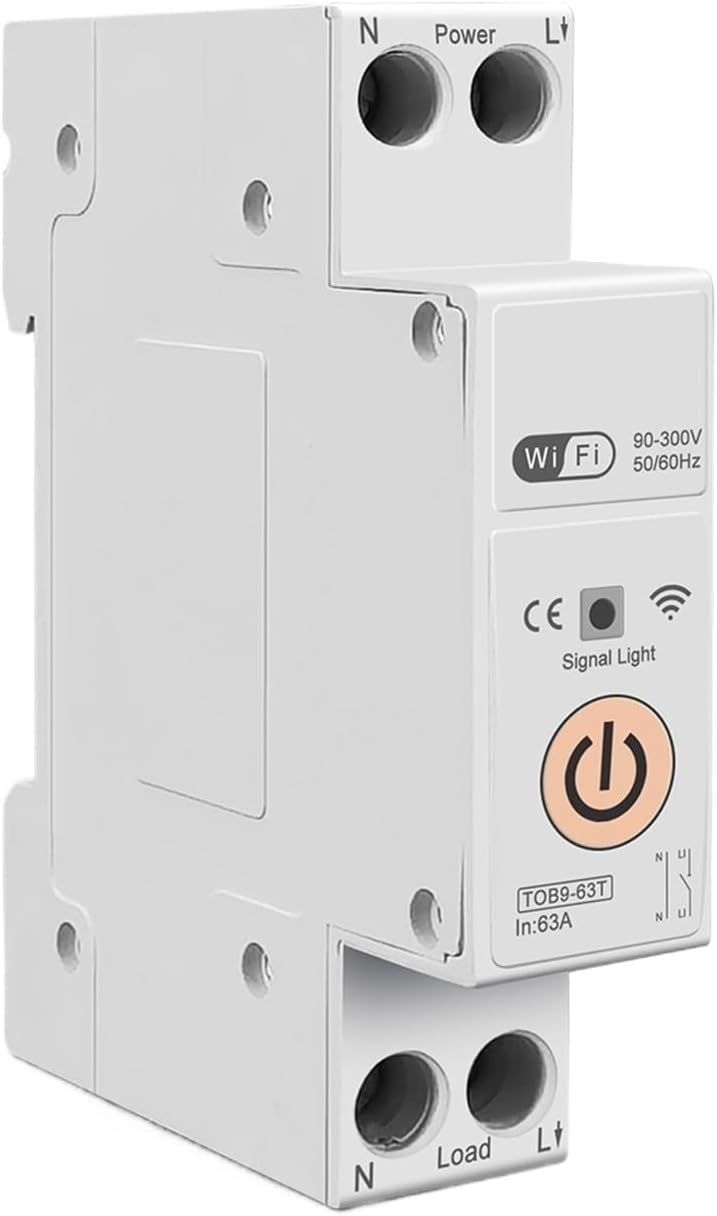
Figure 3: TOMZN TOB9-63T WiFi Smart Switch (No Metering). This basic variant provides WiFi control and circuit protection without energy metering functions.
- Power Terminals (N, L): Input connections for neutral and live wires.
- Load Terminals (N, L): Output connections for neutral and live wires to the load.
- WiFi-aanwyser: Shows the status of the WiFi connection.
- Seinlig: Dui toestelstatus aan.
- Hoofkrag-knoppie: Manual ON/OFF control for the circuit breaker.
- Display (TOB9-VAP/TOB9-63M): Shows real-time energy data (Kwh, W, V, A) and protection settings.
4. Opstelling
4.1. Installasie en bedrading
- Kragontkoppeling: Before starting, ensure the main power supply to the installation area is completely disconnected.
- Montering: Mount the TOB9-VAP on a standard DIN rail within an appropriate electrical enclosure.
- Invoerbedrading: Connect the incoming neutral wire to the 'N' terminal under 'Power' and the incoming live wire to the 'L' terminal under 'Power'. Ensure secure screw-type connections.
- Uitset bedrading: Connect the neutral wire to your load to the 'N' terminal under 'Load' and the live wire to your load to the 'L' terminal under 'Load'.
- Verifikasie: Dubbelkontroleer alle verbindings vir styfheid en korrekte polariteit.
- Herstel krag: Once installation is complete and verified, restore power to the main circuit.
4.2. App Pairing (TUYA Smartlife)
- Laai die app af: Download the 'TUYA Smart' or 'Smart Life' app from your smartphone's app store.
- Registreer/Teken aan: Skep 'n rekening of meld aan by jou bestaande rekening.
- Voeg toestel by: In the app, tap '+' to add a new device. Select 'Electrical' > 'Circuit Breaker (Wi-Fi)'.
- Paringsmodus: Ensure the TOB9-VAP's WiFi indicator is blinking rapidly. If not, press and hold the main power button for 5-10 seconds until it blinks rapidly to enter pairing mode.
- Koppel aan WiFi: Follow the in-app instructions to connect the device to your 2.4GHz WiFi network. (5GHz networks are not supported).
- Toestelhernoeming: Once paired, you can rename the device for easy identification in the app.
5. Bedryfsinstruksies
5.1. Handmatige werking
- Skakel AAN/UIT: Press the main power button on the device to manually switch the circuit breaker ON or OFF.
5.2. App Control and Monitoring
- Afstandsbediening AAN/UIT: Use the TUYA Smartlife app to remotely switch the circuit breaker ON or OFF.
- Energiemonitering: View real-time and historical data for Kwh consumption, current (A), voltage (V), and power (W) directly in the app.
- Timer/Schedule: Set up schedules or countdown timers for automatic ON/OFF operations.
- VA Protection Settings: Adjust the over-voltage, onder-voltage, over-current, and over-power protection thresholds within the app. The device will automatically trip if these thresholds are exceeded.
- Toneel-outomatisering: Integrate the device into smart scenes with other TUYA-compatible devices.
6. Onderhoud
- Gereelde inspeksie: Periodically inspect the device and its wiring for any signs of damage, loose connections, or overheating.
- Skoonmaak: Clean the exterior of the device with a dry, soft cloth. Do not use liquid cleaners or solvents.
- Firmware -opdaterings: Check the TUYA Smartlife app for any available firmware updates to ensure optimal performance and security.
- Professionele tjek: For any internal issues or complex repairs, consult a qualified electrician.
7. Probleemoplossing
| Probleem | Moontlike oorsaak | Oplossing |
|---|---|---|
| Toestel skakel nie aan nie. | No power supply; loose wiring; internal fault. | Check main power supply. Verify all wiring connections. If problem persists, contact support. |
| WiFi indicator not blinking/connecting. | Incorrect pairing mode; weak WiFi signal; 5GHz network. | Ensure device is in rapid blinking pairing mode. Move device closer to router. Ensure router is 2.4GHz. |
| Toestel skakel gereeld af. | Overload/short circuit; incorrect VA protection settings. | Reduce load on the circuit. Check for short circuits. Adjust VA protection thresholds in the app if necessary. |
| Inaccurate energy readings. | Incorrect wiring; device malfunction. | Verify wiring connections. If problem persists, contact support. |
8. Spesifikasies
| Kenmerk | Detail |
|---|---|
| Model | TOB9-VAP |
| Gegradeerde huidige | 1-63A (Verstelbaar) |
| Gegradeerde Voltage | 90-300V AC |
| Frekwensie | 50/60Hz |
| Pole | 1P+N |
| Konnektiwiteit | WiFi (2.4GHz only) |
| Programversoenbaarheid | TUYA Smart / Smart Life |
| Beskermingskenmerke | Overload, Short Circuit, Over-Voltage, Onder-Voltage, Over-Current, Over-Power |
| Pakket afmetings | 0.39 x 0.39 x 0.39 duim |
| Item gewig | 3.53 onse |
| Vervaardiger | Generic (TOMZN) |
| Item Modelnommer | JCZWUUZZB-DFE767306BB9FC909ED20C115B9 |
9. Waarborg en Ondersteuning
For warranty information, technical support, or service inquiries, please refer to the documentation provided with your purchase or contact the seller directly. Keep your purchase receipt as proof of purchase.