
Imada DST-44
Imada Digital Force Gauge User Manual
Model: DST-44 (44 lbf / 20 kg Capacity)
Inleiding
This manual provides instructions for the safe and effective operation of the Imada DST Digital Force Gauge, specifically the 44 lbf (20 kg) capacity model. The DST series is designed for precise force measurement in various industrial and scientific applications, featuring a large LCD display, simple controls, and data output capabilities.
Please read this manual thoroughly before using the device to ensure proper functionality and to prevent damage or injury.
Produk verbyview
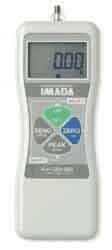
Figure 1: Imada DST Digital Force Gauge. This image shows the front view of the force gauge, highlighting its digital display, control buttons (ZERO, PEAK, UNIT, etc.), and the Imada branding.
The Imada DST Digital Force Gauge is a robust instrument featuring:
- Ergonomic, heavy-duty metal construction for durability.
- Easy-to-read, large backlit LCD for clear data display.
- Selectable units: lbf (pounds-force), kgf (kilogram-force), and Newtons.
- USB and RS-232C outputs for data collection.
- High/low setpoints with LCD indicators for Go/No Go testing.
- Overload capacity of 200% F.S. (Full Scale) for enhanced safety.
- Simultaneous display of peak and real-time values.
- Reversible display for convenient viewvanuit enige hoek.
- Powered by rechargeable Ni-MH batteries or AC adapter/charger.
Opstelling
1. Uitpak en inspeksie
Carefully remove the force gauge and all accessories from the packaging. Inspect for any signs of damage during transit. Report any damage to your supplier immediately.
2. Laai die battery
Before first use, fully charge the internal Ni-MH battery. Connect the supplied AC adapter/charger to the gauge's power input and plug it into a standard electrical outlet. The charging indicator will illuminate. A full charge typically takes several hours. The gauge can be operated while charging.
3. Attaching Fixtures (Optional)
The force gauge comes with a threaded shaft for attaching various fixtures (e.g., hooks, flat heads, chisel points) depending on the application. Ensure fixtures are securely tightened to prevent slippage during testing.
Bedryfsinstruksies
1. Skakel aan/af
Druk en hou die KRAG button to turn the gauge ON or OFF.
2. Zeroing the Display
Before taking a measurement, ensure the gauge is unloaded. Press the NUL button to set the display to 0.00. This compensates for any tare weight or residual force.
3. Kies Eenhede
Druk die EENHEID button to cycle through the available measurement units: lbf, kgf, and Newtons. Select the desired unit for your application.
4. Neem 'n meting
Apply force to the sensor. The real-time force value will be displayed on the main LCD. The gauge has a 30,000/sec ultra-high sampling rate for accurate readings.
5. Peak Hold Function
Druk die PUIK button to activate the peak hold function. The display will show the maximum force detected during the measurement cycle. Press PUIK again to return to real-time display.
6. Setting High/Low Limits (Go/No Go Testing)
The DST gauge allows setting programmable high and low force limits. Refer to the detailed programming section in the full user manual (not included here) for instructions on how to set these limits. When a measurement falls within or outside these limits, the LCD indicators will provide visual feedback (Go/No Go).
7. Data-uitvoer
The gauge supports data collection via USB or RS-232C connections. Connect the appropriate cable to the gauge's output port and to your computer. Optional software like Force Logger or SW-1X (sold separately) is required to acquire and analyze data.
Onderhoud
1. Skoonmaak
Wipe the gauge with a soft, dry cloth. For stubborn dirt, a cloth lightly dampened with water or a mild, non-abrasive cleaner can be used. Do not use strong solvents or immerse the gauge in liquid.
2. Batteryversorging
To prolong battery life, avoid fully discharging the battery frequently. Recharge the battery when the low battery indicator appears. If storing the gauge for an extended period, charge the battery periodically (e.g., every 3-6 months) to prevent deep discharge.
3. Berging
Store the force gauge in a clean, dry environment, away from extreme temperatures, humidity, and direct sunlight. Keep it in its protective case when not in use.
4. Kalibrasie
Regular calibration is essential to maintain the accuracy of the force gauge. Imada recommends periodic calibration by an authorized service center. Refer to your local Imada distributor for calibration services.
Probleemoplossing
- Meter skakel nie aan nie:
Ensure the battery is charged. Connect the AC adapter and try again. If the issue persists, the battery may need replacement or there could be an internal fault.
- Onakkurate lesings:
Ensure the gauge is properly zeroed before measurement. Check for any external forces or vibrations affecting the sensor. The gauge may require calibration if readings are consistently off.
- Display shows "OVER" or "UNDER":
This indicates an overload or underload condition. Remove the force immediately to prevent damage. The gauge has a 200% F.S. overload capacity, but continuous or severe overloading can cause permanent damage.
- Cannot connect to computer for data output:
Verify the correct cable is used and securely connected to both the gauge and the computer. Ensure the necessary drivers and data acquisition software (e.g., Force Logger, SW-1X) are installed and running correctly on your computer.
Spesifikasies
| Parameter | Waarde |
|---|---|
| Model | DST-44 (44 lbf / 20 kg Capacity) |
| Akkuraatheid | 0.2% F.S. ±1 LSD |
| Vertoon | 4.5-syfer LCD |
| Sampling Koers | 30,000/sek |
| Capacity (lbf) | 44 lbf |
| Capacity (kgf) | 20 kgf |
| Oorladingskapasiteit | 200% FS |
| Bedryfstemperatuur | 32°F tot 104°F (0°C tot 40°C) |
| Kragbron | Rechargeable Ni-MH batteries or AC adapter/charger |
| Uitsette | USB, RS-232C |
Waarborg en Ondersteuning
Imada products are manufactured to high standards of quality and reliability. For specific warranty terms and conditions, please refer to the documentation included with your purchase or contact Imada directly. General return policy information for this product indicates a 30-day refund/replacement period from the seller.
For technical support, calibration services, or inquiries about accessories and software (such as Force Logger or SW-1X), please contact your authorized Imada distributor or visit the official Imada website. When contacting support, please have your model number (DST-44) and serial number ready.
Manufacturer: COLE-PARMER
Ask a question about this manual
Ask about setup, troubleshooting, compatibility, parts, safety, or missing instructions. Manuals+ will review the question and use this page’s manual context to help answer it.