
Inleiding
Welcome to your Angrox Universal Replacement Remote Control. This manual provides detailed instructions for setting up and operating your new remote, designed for seamless compatibility with various Philips Smart 4K UHD Android TVs. Please read this manual thoroughly to ensure optimal performance and longevity of your remote control.
1. Opstelling
1.1 Battery installasie
Die afstandbeheerder benodig twee AAA alkaliese batterye (nie ingesluit nie).
- Vind die battery kompartement deksel op die agterkant van die afstandbeheer.
- Druk die oortjie af en skuif die deksel afwaarts om oop te maak.
- Plaas twee AAA-batterye in en maak seker dat die positiewe (+) en negatiewe (-) terminale korrek in lyn is met die merke binne-in die kompartement.
- Skuif die batterydeksel terug in plek totdat dit stewig klik.
1.2 Aanvanklike verbinding
This Angrox replacement remote control is designed for immediate use with compatible Philips Smart TVs. No programming or pairing is required. Simply insert the batteries, and the remote is ready to operate your television.
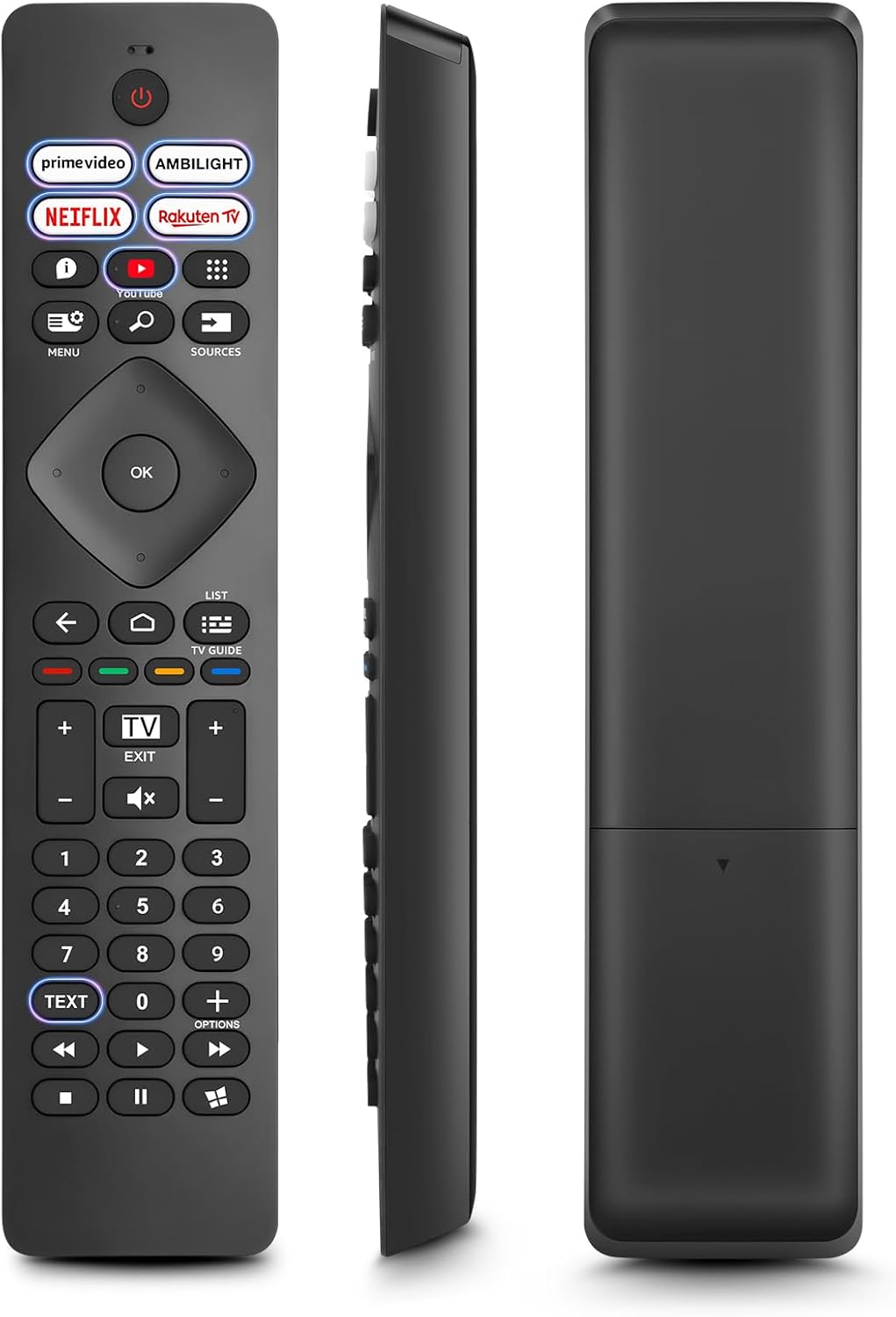
Beeld: Voorkant, sykant en agterkant views of the Angrox Universal Replacement Remote Control. This image illustrates the physical design and battery compartment location.
2. Bedryfsinstruksies
2.1 Knoppiefunksies oorview
Familiarize yourself with the remote control's buttons and their primary functions.
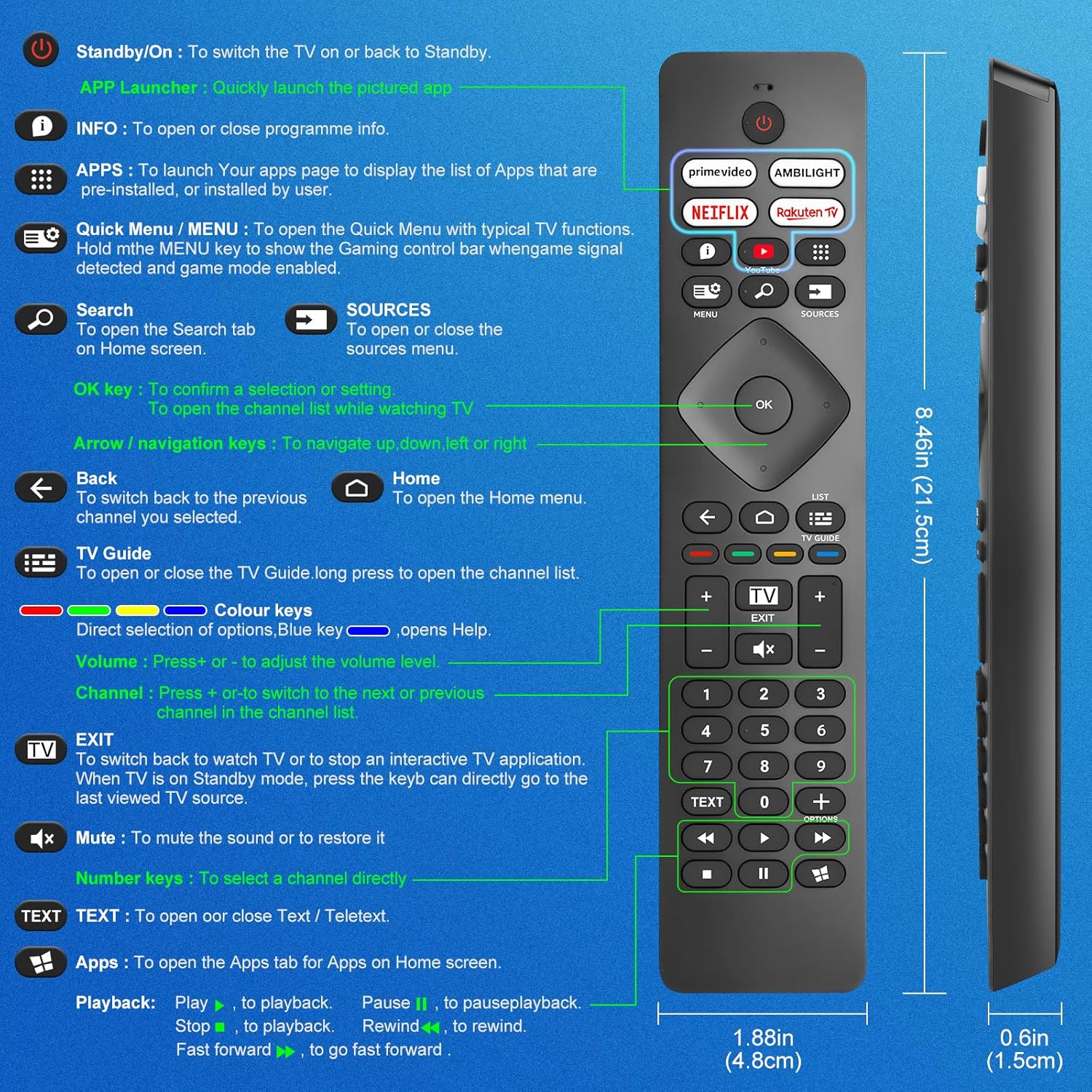
Image: A detailed diagram illustrating each button on the Angrox remote control and its corresponding function.
Detailed Button Descriptions:
- Standby/On (Power Button): Om die TV aan of terug na Standby aan te skakel.
- APP Launcher: Quickly launch the pictured app.
- INLIGTING: To open or close programme info.
- APPS: To launch your apps page to display the list of apps that are pre-installed or installed by the user.
- Quick Menu / MENU: To open the Quick Menu with typical TV functions. Hold the MENU key to show the Gaming control bar when game signal detected and game mode enabled.
- Soek: To open the Search tab on Home screen.
- BRONNE: To open or close the sources menu.
- OK sleutel: To confirm a selection or setting. To open the channel list while watching TV.
- Arrow/Navigation keys: Om op, af, links of regs te navigeer.
- Agter: Om terug te skakel na die vorige kanaal wat jy gekies het.
- Tuis: To open the Home menu.
- Televisie gids: To open or close the TV Guide. Long press to open the channel list.
- Colour keys (Red, Green, Yellow, Blue): Direct selection of options. Blue key opens Help.
- Volume +/-: Om die volumevlak aan te pas.
- Kanaal +/-: Om oor te skakel na die volgende of vorige kanaal in die kanaallys.
- UITGANG: To switch back to watch TV or to stop an interactive TV application. When TV is on Standby mode, press the key to directly go to the last viewed TV source.
- Demp: Om die klank te demp of om dit te herstel.
- Getalsleutels (0-9): Om 'n kanaal direk te kies.
- TEKS: To open or close Text / Teletext.
- Apps (Netflix, Prime Video, Rakuten TV, YouTube): Quick access to dedicated streaming applications.
- Terugspeelkontroles (Speel, Pouseer, Stop, Terugspoel, Vinnig Vorentoe): Vir mediaterugspeel.
2.2 Kortpadknoppies
The remote features dedicated shortcut buttons for popular streaming services and Ambilight control.

Image: The Angrox remote control with highlighted shortcut buttons for Prime Video, Ambilight, Netflix, Rakuten TV, and YouTube.
- Prime Video: Direct access to Amazon Prime Video.
- Ambilight: Control Philips Ambilight features.
- Netflix: Direct access to Netflix.
- Rakuten TV: Direct access to Rakuten TV.
- YouTube: Direct access to YouTube.
3. Verenigbaarheid
This Angrox replacement remote control is universally compatible with a wide range of Philips Smart TVs, including:

Image: Visual representation of the Angrox remote's compatibility with Philips 4K Ambilight TV, 4K Ultra HD TV, LED 4K TV, and OLED 4K TV.
- 4K Ambilight TV
- 4K Ultra HD TV
- LED 4K TV
- OLED 4K TV
It is designed to function with all Philips Smart TV models that utilize an infrared remote control.
4. Prestasiekenmerke

Image: Graphics indicating a 0.2-second fast response and a 10-meter transmitting distance for the remote control.
- Vinnige reaksie: Enjoy a quick response time of approximately 0.2 seconds for button presses.
- Versendingsafstand: Effective operating range up to 10 meters (approximately 33 feet).
5. Onderhoud
- Skoonmaak: Gebruik 'n sagte, droë lap om die afstandbeheerder skoon te maak. Vermy die gebruik van vloeibare skoonmaakmiddels of skuurmiddels.
- Batterysorg: If the remote will not be used for an extended period, remove the batteries to prevent leakage and potential damage. Replace batteries when the remote's response becomes sluggish or inconsistent.
- Berging: Bêre die afstandbeheerder op 'n koel, droë plek weg van direkte sonlig en uiterste temperature.
6. Probleemoplossing
6.1 Afstandbeheerder reageer nie
- Gaan batterye na: Ensure batteries are inserted correctly with the correct polarity (+/-). Replace old or depleted batteries with new AAA alkaline batteries.
- Lyn van sig: Make sure there is a clear line of sight between the remote control and the TV's infrared sensor. Obstructions can block the signal.
- Afstandsensor: Ensure the TV's infrared sensor is not blocked or dirty.
6.2 Beperkte funksionaliteit
- While this remote is broadly compatible, some specific advanced functions unique to certain original Philips remote models might not be replicated. Verify the button functions against the provided diagram.
6.3 Ambilight Functionality
Sommige gebruikers herviews indicate that Ambilight functionality might vary. If your Ambilight button does not work as expected, ensure your TV's Ambilight feature is enabled and configured correctly in your TV settings.
7. Spesifikasies
| Kenmerk | Detail |
|---|---|
| Handelsmerk | Angrox |
| Model | pour Philips TV |
| Versoenbare toestelle | Philips Smart TV (4K Ambilight, 4K UHD, LED 4K, OLED 4K) |
| Spesiale kenmerk | Universeel |
| Connector Tipe | Infrarooi |
| Battery Tipe | 2 x AAA Alkaliese batterye (nie ingesluit nie) |
| Item afmetings | 22.7 x 6.2 x 2.4 cm |
| Item gewig | 60 g |
| Kleur | Swart |
Let wel: Spesifikasies is onderhewig aan verandering sonder vooraf kennisgewing.
8. Waarborg en Ondersteuning
For product support or warranty inquiries, please contact your retailer or the manufacturer, Angrox, directly. Please refer to your purchase documentation for specific warranty terms and contact information.
Vervaardiger: Angrox
ASIN: B0F83X2FQG